DOS Screen Display

asallwey

New member
Local time
8:47 AM
Messages
28
Location
N. VA
I have a simple batch file to run dos programs that help with my machining hobby. But I need to retain the screen display when a program completes because it contains input data and results.

I put a Pause code line following the program which keeps everything on the screen. However, it puts the "Press any key to continue." at the end of the last line displayed, rather than below it. I've tried several versions of echo to no avail.

How can I get the Pause ... below the last line?

Thanks!
 

My Computer

Computer type
Laptop
OS
XP - 32bit
Did you try this?
Code:
echo.
pause
 

My Computer

Computer type
PC/Desktop
Computer Manufacturer/Model Number
Dell Optiplex 7050
OS
Windows 7/8.1/10 multiboot
CPU
Intel Core i7-7700
Motherboard
Dell, Intel Q270 chipset
Memory
48GB (2x16GB Crucial DDR4-3200 + 2x8GB Hynix DDR4-2400)
Graphics Card(s)
Intel HD630 + AMD Radeon R7 450 PCIe
Monitor(s) Displays
Asus VC279 (27")
Screen Resolution
1920x1080
Hard Drives
Toshiba M.2 NVMe (256GB),
Samsung 960 Evo (500GB),
WD Red Plus 80EFBX (8TB)
Yes I did, along with echo echo+ echo= echo; and echo/ which I found on some site.

Another site had the following and I tried it without success.
set NLM=^
set NL=^^^%NLM%%NLM%^%NLM%%NLM%
echo %NLM%%NLM%^%NLM%%NLM%

It's all a matter of looks, I'd like to have it on another line rather following with no space.

Instead of this:
Last line of results with results= 0.059 inPress any key to continue.

This:
Last line of results with results= 0.059 in
Press any key to continue.
 

My Computer

Computer type
Laptop
OS
XP - 32bit
Instead of this:
Last line of results with results= 0.059 inPress any key to continue.
What's generating the "Last line of results with results= 0.059 in"? Is it a DOS or CMD function? Or is it a separate program? If the latter, you may need to experiment with some variation of the "start" command (such as perhaps "start /w {other-program}").
 

My Computer

Computer type
PC/Desktop
Computer Manufacturer/Model Number
Dell Optiplex 7050
OS
Windows 7/8.1/10 multiboot
CPU
Intel Core i7-7700
Motherboard
Dell, Intel Q270 chipset
Memory
48GB (2x16GB Crucial DDR4-3200 + 2x8GB Hynix DDR4-2400)
Graphics Card(s)
Intel HD630 + AMD Radeon R7 450 PCIe
Monitor(s) Displays
Asus VC279 (27")
Screen Resolution
1920x1080
Hard Drives
Toshiba M.2 NVMe (256GB),
Samsung 960 Evo (500GB),
WD Red Plus 80EFBX (8TB)
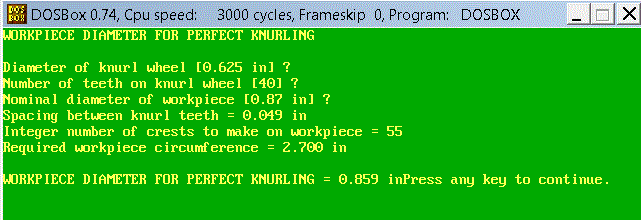
It is a 40kb compiled program that someone made. Here is what the program produces. You can see how it would be nice if I could just insert a blank line after the program ends and before the pause.
 

Attachments

  • Pause.gif
    Pause.gif
    13.3 KB · Views: 30

My Computer

Computer type
Laptop
OS
XP - 32bit
So is it an exe or a .bat file you could pipe the output to a txt file ie dir >test.txt then append dir >> test.txt
 

My Computer

Computer type
PC/Desktop
OS
win 8 32 bit
Ah, so you're running this in DOSBox ... I don't know enough how DOSBox processes commands under the hood, but I think DOSBox may be a limiting factor.

Your symptoms look a lot like what happens running batch files from a Windows Command Prompt window, where launching an exe from the batch file spawns another thread while the first thread continues processing the rest of the batch commands. The Windows command processor has a special batch command, "start /w", for that situation where you want the batch file to pause processing until the exe finishes and before picking up again with the next step. True DOS, of course, can only do one thing at a time, so it doesn't need "start". But when using a multi-tasking environment like Windows the "start" command may be necessary to pause the batch processing until the exe has finished.

I don't know where DOSBox falls between those two extremes (DOSBox is it's own "operating system" environment, neither DOS nor Windows), but it appears DOSBox does not support the "start" command. If it spawns a second thread but doesn't recognize a "start" command, you may be out of luck. That may just be a limitation of DOSBox.

What are those "?" in the knurling display? Are those user input prompts where the program pauses for you to input something, then displays the next line? And I guess you're calling the batch file from a shortcut that launches DOSBox, runs the knurling program, but finishes processing after the third input field and closes the DOSBox window before you have a chance to read the results?

It's too bad that when the program was compiled the programmer didn't simply end the program by displaying a couple gratuitous new-lines, but as is, probably the best you can do is suppress the "press any key" prompt in your batch file's pause command, ala "pause > nul". That should still pause the screen at the end of the knurling display and wait for you to press any key to close the window, but just without the text prompt.

 

My Computer

Computer type
PC/Desktop
Computer Manufacturer/Model Number
Dell Optiplex 7050
OS
Windows 7/8.1/10 multiboot
CPU
Intel Core i7-7700
Motherboard
Dell, Intel Q270 chipset
Memory
48GB (2x16GB Crucial DDR4-3200 + 2x8GB Hynix DDR4-2400)
Graphics Card(s)
Intel HD630 + AMD Radeon R7 450 PCIe
Monitor(s) Displays
Asus VC279 (27")
Screen Resolution
1920x1080
Hard Drives
Toshiba M.2 NVMe (256GB),
Samsung 960 Evo (500GB),
WD Red Plus 80EFBX (8TB)
dg1261,

Excellent!! Excellent! > nul did the trick. It executes the Pause and no prompt.

The ? are for user input. I was running this so much this was easiest.

DOSBox is designed to run old games, not really programs.

Thanks!

Alex
 

My Computer

Computer type
Laptop
OS
XP - 32bit
DOSBox is designed to run old games, not really programs.
Well, old games are also programs, all the same ...

I think the point, though, is that the DOSBox developers had to "reinvent the wheel", so to speak, to develop a platform that could run old programs in Windows, so there may be some behavior that is not completely consistent with neither DOS nor Windows.

Anyway, glad to hear you reached a satisfactory solution.
 

My Computer

Computer type
PC/Desktop
Computer Manufacturer/Model Number
Dell Optiplex 7050
OS
Windows 7/8.1/10 multiboot
CPU
Intel Core i7-7700
Motherboard
Dell, Intel Q270 chipset
Memory
48GB (2x16GB Crucial DDR4-3200 + 2x8GB Hynix DDR4-2400)
Graphics Card(s)
Intel HD630 + AMD Radeon R7 450 PCIe
Monitor(s) Displays
Asus VC279 (27")
Screen Resolution
1920x1080
Hard Drives
Toshiba M.2 NVMe (256GB),
Samsung 960 Evo (500GB),
WD Red Plus 80EFBX (8TB)
Back
Top