Downgrade back to vista?

Himie

New member
Local time
4:54 PM
Messages
10
hello these past few days i've been using windows 7 and its good but still a little buggy and some programs i want to run are not compatible with windows 7 so is there a way i can downgrade back to vista without reformatting?
 

My Computer

OS
Windows 7
so my only option is to reformat.... :(
 

My Computer

OS
Windows 7
Yes it is Himie :(
 

My Computer

Computer Manufacturer/Model Number
HP Compaq Presario/SR5113WM
OS
Windows 7 Ultimate x64/ Windows Vista Ultimate x64
CPU
AMD Athlon 64 X2 3600+ 1.9Ghz
Motherboard
Asus M2N68-LA
Memory
PNY Optima Memory DDR2 2GB 2x1 kit
Graphics Card(s)
PNY Nvidia 8400 GS 256MB
Sound Card
On board RealTek
Monitor(s) Displays
Acer X163W LCD
Screen Resolution
1366x768
Hard Drives
Western Digital 160 GB SATA 3G (3.0Gb/sec)
7200 rpm
Western Digital 160 GB IDE
PSU
Dynex 400w
Case
Nothin Special
Cooling
Stock
Keyboard
Standard 102 key with volume and sleep buttons
Mouse
Wireless Logitech LX7
Internet Speed
Comcrap 10mb cable
Other Info
Insignia 2.1 speakers, wireless Xbox 360 controller w/plug n play charger, Belkin wireless G + mimo usb network adapter.
Did you back up Vista before upgrading?
 

My Computer

Computer Manufacturer/Model Number
Custom Desktop & HP G60-120US
OS
Windows 7 Pro x64 & Win7 Pre x64 / Ubuntu 9.10 Beta
CPU
Q6600 Quad Core 2 - 2.4Ghz
Motherboard
EVGA - 680i SLI
Memory
4GB Kingston DDR2 800
Graphics Card(s)
XFX 8800GT Alpha Dog Ed. X 2 SLI
Sound Card
On Board
Monitor(s) Displays
24"Dell Wide Screen and Gateway 17" Widescreen & HP 15.4"
Screen Resolution
1920 x1200 (Dell) 1440 x 900(Gateway) & 1366x768 (HP Laptop)
Hard Drives
WD 500GB, Seagate 1.5 TB
PSU
Rosewell RX750
Case
Antec 900
Cooling
Zalman 8700
Keyboard
Saitek Cyborg & Logitech wireless
Mouse
Logitech G5 & Logitech wireless
Internet Speed
Cable - 20Mbs/sec DOWN 5Mbs/s UP
Main reason why a clean install on a separate hard drive, or at the very least a different partition is better than upgrading. Just a tip for if you ever decide to install a beta OS again.
 

My Computer

Computer Manufacturer/Model Number
Dell 8400
OS
Windows 7 Beta 1 b7000
CPU
Intel Pentium 4
Memory
4GB
Graphics Card(s)
ATI Radeon HD3450
Sound Card
Creative SoundBlaster Audigy 2
Monitor(s) Displays
Acer AL2016W
Screen Resolution
1680x1050
Hard Drives
1x500GB
1x100GB
Case
Dell 8400
Cooling
Standard
Keyboard
Dell Multimedia Keyboard
Mouse
Logitech MediaPlay
Internet Speed
Comcastic!
For anyone curious about this topic in the future -

***YOU ARE USING A BETA OPS***

Unless you have a *lot* of experience Beta testing Operating Systems, ***don't*** upgrade. Don't put this as your main OS on a production machine. Don't Think that just because it is being released to the public for *testing* that it is 100% stable.

I cannot stress these points enough. If you play with fire, you have to reasonably expect to get burned, no matter how good you are. If you install a Beta OS, you have to ***reasonably*** expect it to crash or muck up at some point.

If it were bug free, it would not be a Beta.

 

My Computers

System One System Two

  • Computer type
    PC/Desktop
    Computer Manufacturer/Model Number
    The Beast Model A (homebrew)
    OS
    Windows 11 21H2 Current build
    CPU
    AMD Ryzen 9 3950X
    Motherboard
    MSI MEG X570 GODLIKE
    Memory
    4 * 32 GB - Corsair Vengeance 3600 MHz
    Graphics Card(s)
    EVGA GeForce RTX 3080 Ti XC3 ULTRA GAMING (12G-P5-3955-KR)
    Sound Card
    Realtek® ALC1220 Codec
    Monitor(s) Displays
    2x Eve Spectrum ES07D03 4K Gaming Monitor (Matte) | Eve Spec
    Screen Resolution
    3x 3840 x 2160
    Hard Drives
    3x Samsung 980 Pro NVMe PCIe 4 M.2 2 TB SSD (MZ-V8P2T0B/AM) } 3x Sabrent Rocket NVMe 4.0 1 TB SSD
    PSU
    PC Power & Cooling’s Silencer Series 1050 Watt, 80 Plus Plat
    Case
    Fractal Design Define 7 XL Dark ATX Full Tower Case
    Cooling
    SteelSeries Apex Pro Wired Gaming Keyboard
    Keyboard
    SteelSeries Apex Pro
    Mouse
    Logitech MX Master 3S | MX Master 3 for business
    Internet Speed
    AT&T LightSpeed Gigabit Duplex Ftth
    Antivirus
    Windows Defender + MB 3
    Browser
    Nightly (default) + Firefox (stable),Chrome, Edge
  • Computer type
    PC/Desktop
    System Manufacturer/Model Number
    Dell Latitude E5470
    OS
    ChromeOS Flex Dev Channel (current)
    CPU
    Intel(R) Core(TM) i5-6300U CPU @ 2.40GHz, 2501 Mhz, 2 Core(s), 4 Logical Processor(s)
    Motherboard
    Dell
    Memory
    16 GB
    Graphics Card(s)
    Intel(R) HD Graphics 520
    Sound Card
    Intel(R) HD Graphics 520 + RealTek Audio
    Monitor(s) Displays
    Dell laptop display 15"
    Screen Resolution
    1920 * 1080
    Hard Drives
    Toshiba 128GB M.2 22300 drive
    INTEL Cherryville 520 Series SSDSC2CW180A 180 GB SATA III SSD
    PSU
    Dell
    Case
    Dell
    Cooling
    Dell
    Keyboard
    Dell
    Mouse
    Logitech MX Master 3S (shared w. Sys 1) | Dell TouchPad
    Internet Speed
    AT&T LightSpeed Gigabit Duplex Ftth
yays for D2D recovery partition ^^

thx guys i wont make the same error again now i will install it on a different partition
 

My Computer

OS
Windows 7
For anyone curious about this topic in the future -

***YOU ARE USING A BETA OPS***


Something like this should be a sticky.
 

My Computer

Computer type
PC/Desktop
Computer Manufacturer/Model Number
Systems by SmartEyeball
OS
8 Pro x64
CPU
i7 3770K 4.6GHz
Motherboard
ASUS P8Z77 WS
Memory
16GB G.Skill Trident X 2666mhz
Graphics Card(s)
x2 EVGA 780 Ti Superclocked SLI
Sound Card
SB X-FI Surround 5.1 PRO USB / ATH-AD900 Headphones
Monitor(s) Displays
x3 Dell U2410 / 58" Samsung
Screen Resolution
5760*1200/ 1920*1200
Hard Drives
2x Intel 520 240GB (RAID 0) * 2x WD Caviar Blacks 2TB (RAID 0) * 2TB WD Caviar Black * Sony Optirac DVD
PSU
Silverstone Strider Evolution 1200W
Case
Thermaltake Level 10 GT Snow Edition
Cooling
Noctua NH-D14
Keyboard
Topre Realforce // Ducky Shine MX Black // Filco Ninja TKL
Mouse
Thermaltake Theron (Highly Recommended) + Razer Imperator
Antivirus
MSE
Browser
IE, FF, WaterFox
Other Info
GT Extreme V2 Sim Racing Cockpit + 40" LCD and K/B Mouse stand ▼
Fanatec CSR Elite Wheel + Clubsport V1 Pedals + CSR shifter/7G-H ▼Saitek X52 Pro ▼ TrackIR 5 Pro
Buttkicker v2 Seat Rumbler with Dedicated 5.1 and Sub Woofer attached to frame ▼
=
Bloody Big Grin
Welcome to the forums, Himie.

Check out the tutorials. Lots of great info there.

Gary
 

My Computer

Computer Manufacturer/Model Number
Dell XPS420
OS
Vista Ult 64 bit Seven Ult RTM x64
CPU
Intel Core2 Quad Q6600 2.40 gigahertz
Memory
Crucial Ballistix 4x2GB PC2 6400
Graphics Card(s)
NVIDIA GeForce 8600 GTS 256 MB
Sound Card
Creative SB X-Fi audio
Monitor(s) Displays
HP w2207 + HPvs15
Screen Resolution
1680x1050 + 1024x768
Hard Drives
2-WD5000AAKS-500 GB
WD5000AAV-500 GB external
Keyboard
Microsoft Comfort Curve
Mouse
MX Revolution
Other Info
Wacom Intuos 2 Graphics Tablet
Experience Index=5.5
Unless you have a *lot* of experience Beta testing Operating Systems, ***don't*** upgrade. Don't put this as your main OS on a production machine. Don't Think that just because it is being released to the public for *testing* that it is 100% stable.

I cannot stress these points enough. If you play with fire, you have to reasonably expect to get burned, no matter how good you are. If you install a Beta OS, you have to ***reasonably*** expect it to crash or muck up at some point.

If it were bug free, it would not be a Beta.


Like JG say never ever use it as a main system always on a different partition.
 

My Computer

Computer Manufacturer/Model Number
Home build.
OS
Vista Ultimate 32 bit, Win 7 Pro 32 bit, Win 7 Pro 64 bit
CPU
Intel i5 CPU 750 @ 2.67 GHZ, OC 3.7 GHZ
Motherboard
Asus P7P55D
Memory
4 Gig
Graphics Card(s)
Nvidia GeForce GTS450
Monitor(s) Displays
Acer 24"
Screen Resolution
1440 x 900
Hard Drives
1000 GIG
1000 GIG
PSU
650
Case
Antec Nine Hundred Two
Internet Speed
14 MB (APPROX)
Well, everyone knew it wouldn't be long before this question started getting asked.

A sticky wouldn't do any good; people never listen to warnings any way. Just like telling them not to mess with "D:/Recovery"; they could care less; "it's my machine, I'll do as I please".


Later :shock: Ted
 

My Computer

Computer Manufacturer/Model Number
* BFK Customs *
OS
W 7 64-bit Ultimate
CPU
Intel Q9550 Yorkfield
Motherboard
ASUS P5Q Pro
Memory
8GB Dominator 8500C5D
Graphics Card(s)
ATI : XFX 5870
Sound Card
Realtek HD Audio 7-1
Monitor(s) Displays
1x 47" LCD HDMI & 3x 26" LCD HDMI
Screen Resolution
1920x1080P & 1920x1200
Hard Drives
1x 80GB Intel X25-M G2 SSD : 1x 500GB & 1x 640GB WD Caviar Black(s)
PSU
Corsair 620HX
Case
Cooler Master RC-690
Cooling
Tuniq Tower 120, 2x 140mm and 3x 120mm case fans
Keyboard
Microsoft 500
Mouse
Razer Diamondback 3G
Internet Speed
14 Mb/s
Other Info
1x Koutech 3Gb/s SATA HDD Hot Swap Rack
Of course, for the hardheaded, there is always experience, the harshest yet best mistress.
 

My Computers

System One System Two

  • Computer type
    PC/Desktop
    Computer Manufacturer/Model Number
    The Beast Model A (homebrew)
    OS
    Windows 11 21H2 Current build
    CPU
    AMD Ryzen 9 3950X
    Motherboard
    MSI MEG X570 GODLIKE
    Memory
    4 * 32 GB - Corsair Vengeance 3600 MHz
    Graphics Card(s)
    EVGA GeForce RTX 3080 Ti XC3 ULTRA GAMING (12G-P5-3955-KR)
    Sound Card
    Realtek® ALC1220 Codec
    Monitor(s) Displays
    2x Eve Spectrum ES07D03 4K Gaming Monitor (Matte) | Eve Spec
    Screen Resolution
    3x 3840 x 2160
    Hard Drives
    3x Samsung 980 Pro NVMe PCIe 4 M.2 2 TB SSD (MZ-V8P2T0B/AM) } 3x Sabrent Rocket NVMe 4.0 1 TB SSD
    PSU
    PC Power & Cooling’s Silencer Series 1050 Watt, 80 Plus Plat
    Case
    Fractal Design Define 7 XL Dark ATX Full Tower Case
    Cooling
    SteelSeries Apex Pro Wired Gaming Keyboard
    Keyboard
    SteelSeries Apex Pro
    Mouse
    Logitech MX Master 3S | MX Master 3 for business
    Internet Speed
    AT&T LightSpeed Gigabit Duplex Ftth
    Antivirus
    Windows Defender + MB 3
    Browser
    Nightly (default) + Firefox (stable),Chrome, Edge
  • Computer type
    PC/Desktop
    System Manufacturer/Model Number
    Dell Latitude E5470
    OS
    ChromeOS Flex Dev Channel (current)
    CPU
    Intel(R) Core(TM) i5-6300U CPU @ 2.40GHz, 2501 Mhz, 2 Core(s), 4 Logical Processor(s)
    Motherboard
    Dell
    Memory
    16 GB
    Graphics Card(s)
    Intel(R) HD Graphics 520
    Sound Card
    Intel(R) HD Graphics 520 + RealTek Audio
    Monitor(s) Displays
    Dell laptop display 15"
    Screen Resolution
    1920 * 1080
    Hard Drives
    Toshiba 128GB M.2 22300 drive
    INTEL Cherryville 520 Series SSDSC2CW180A 180 GB SATA III SSD
    PSU
    Dell
    Case
    Dell
    Cooling
    Dell
    Keyboard
    Dell
    Mouse
    Logitech MX Master 3S (shared w. Sys 1) | Dell TouchPad
    Internet Speed
    AT&T LightSpeed Gigabit Duplex Ftth
Thats why I have a seperate Hard Drive with 7 installed. BTW, to me it has been rock solid. takes a biut to get used to some of the changes,, but this one is way better than vista beta1.
 

My Computer

OS
windows 7
Hello everyone,,

I have a tricky question... I have a HP Pavilion that has 2 hard drives C: and D: .... I downloaded and installed windows 7 on my D drive and want to go back to windows vista which I had installed on my C: drive.... When I go to "computer" it shows that there is a win logo on my C and a win on my D: can any give me help downgrading back to windows vista ulitamate or am I screwed?? Is there any way to do this without loosing everything and having to spend tons of money buying a new OS???

Any help would be appreciated...

Thanks,
Nathan Baker
 

My Computer

OS
windows 7
Hi Nate,

Shouldn't be a problem.

Check in Disk Management that your Vista drive is showing as "System"

If it is , then you can just delete the 7 partition , and remove the 7 boot entry from msconfig.

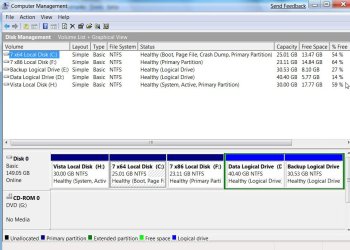
If you are in any doubt, post a screenshot of Disk management, like this:

DISKMANAGEMENT2009-02-04_031947.jpg
 

My Computers

System One System Two

  • Computer type
    PC/Desktop
    OS
    7 X64
    CPU
    i5 8400
    Motherboard
    gigabyte b365m ds3h
    Memory
    2x8gb 3200mhz
    Hard Drives
    various
    PSU
    pure power 11 400w cm
    Case
    Coolermaster
    Cooling
    cryorig m9i
  • Computer type
    PC/Desktop
    OS
    7x64
    CPU
    g5400
    Motherboard
    ga b365m ds3h
    Memory
    8gb ddr4 2400
    PSU
    xfx pro 450w
If you installed Windows 7 on a different drive then you should have dual boot options to use Vista as well, is that not the case?
 

My Computer

Computer Manufacturer/Model Number
Home Brew
OS
Windows 7 Ultimate Vista Ultimate x64
CPU
Core 2 Duo E8500 3.16Ghz @ 3.8Ghz
Motherboard
eVGA 750i FTW
Memory
2x2Gigs Patriot PC2-6400 LL
Graphics Card(s)
Inno3D GeForce GTX260 216 SP
Monitor(s) Displays
ASUS VW222U 22" 2ms Response time
Screen Resolution
1680x1050
Hard Drives
SATA 150GB
SATA II 250GB
USB IDE 750GB Ext.
PSU
HYTEC 600W & Thermaltake 650W Toughpower Power Exp
Case
Thermaltake Armor LCS (Liquid Cooling System)
Cooling
Liquid Cooling System
Keyboard
Logitech G15 Gaming Keyboard
Mouse
Logitech G9 Gaming Mouse
Swi2

Thanks for the advice, I have opened up my disk management and it says my

C: is my OS: system,boot,pagefile,crash,active,crash dump, primary partion.


D: (Where I installed Windows 7 from) says : healthy primary partition...So, do I just frag this drive and Windows Vista will restore? I dont know how to insert a screen capture to show you or else I would..

I appreciate the help very much......

Thanks,
Nate
 

My Computer

OS
windows 7
i think 7201 is a great build to go fully production on a win7 machine. I have only a single program that isen't quite up to par, and that's utorrent. alot other programs can use the compatibily-mode to run XP Emulation. but so far, if it runs on vista, I've seen it run on win7 (few exceptions).

Re-iterating, win7 is good to go as of 7201 to replace a fully functioning production machine via upgrade.

(but do keep a spare DownLevel running somewhere, for compatibity testing)
 

My Computer

Computer Manufacturer/Model Number
Myself
OS
Windows 7 64bit Ultimate Build 7268.0.090701-1900
CPU
Quad CPU Q6600 @ 2.4GHz
Memory
4GB 6400 Dual Channel
Graphics Card(s)
1GB DDR3 x16 + 512mb ddr2 x1
Sound Card
I dunno, but it puts out a good 7.1 sur through the fiber :D
Monitor(s) Displays
Quad-Monitor display (check out the photo)
Screen Resolution
1200x1600
Hard Drives
(2 x 1TB) + (1 x 500Gb)

tip: Always run your OS on a small Disk with away from your large storage files, and make sure theirs plenty of Cache (32mb recommnded).
PSU
1000w
Case
a block of wood
Cooling
Intel Standard. tip: Dont overclock with beta win7...
Internet Speed
15meg
Back
Top