Downgrade Dell Win8 pro to Win7 Pro with Dell DVD

bawldiggle

GrayGhost2 ret.
Pro User
VIP
Local time
6:40 PM
Messages
895
Location
Australia
I want to replace Win8 Pro x64 on Dell laptop with Win7 Pro x64
Win7 DVD is a "Dell" DVD supplied with the Dell laptop.
There is no Win8 DVD

I have been tweaking MS OS since Win95, Win98, WinXP, Win7. Writing AutoCad and Excel addins, scripting ... but never installed an OS
I am the original village idiot. Have never installed an OS in my life. :confused:
So I would appreciate gentle humoring and micro step instructions.

Have started to read An Old School Geek’s approach to Installing & Setting Up a Windows PC ... all beyond me.

I would like to be well prepared before I do anything

Do I need to get any other drivers ?

What do I do and where do I start?

I would appreciate any help, thak you :)
-----
PC Specs
Dell Inspiron 15 3521
Service Tag:=
Express Service Code:=
Screen size:= 15.6 inches
CPU:= Intel Pentium, 2007U @ 1.80GHz
RAM:= 2GB (1.87GB)
Disk drive:= 285 GB HDD -- Hitachi HTS545032A7E380
DVD/CD drive:= Matshita DVD+RW UJ8C2
Current OS:= Win8 Pro x64 -- preloaded on the Dell laptop -- to be replaced with Win 7
Proposed OS:= Win7 Pro x64 -- Dell Reinstallation DVD
Single user, ie, Admin/User only
 

My Computer My Computer

At a glance

XP Pro (x86) | 7 HP (x86) & (x64) | 7 Pro (x64)
Computer type
PC/Desktop
Computer Manufacturer/Model Number
Toshiba, Lenovo (laptops) + 4 rigs
OS
XP Pro (x86) | 7 HP (x86) & (x64) | 7 Pro (x64)

My Computer My Computer

At a glance

Win7 Ultimate X64Intel i5 3570K8GB DDR3 1600Onboard
Computer type
PC/Desktop
Computer Manufacturer/Model Number
Pauly Special
OS
Win7 Ultimate X64
CPU
Intel i5 3570K
Motherboard
Gigabyte Z77X-DS3H
Memory
8GB DDR3 1600
Graphics Card(s)
Onboard
Sound Card
Onboard
Screen Resolution
1280x1024
Hard Drives
Samsung 840 Evo SSD (OS)
1TB Spinner (Data)
PSU
800W Arctic
Case
Cooler Master
Cooling
3x120mm Fans
Keyboard
MS Wireless
Mouse
MS Wireless
Internet Speed
20M
First, Dell says the service tag is "personal" information and should not be shared publicly. I used to do work on the Dell community users forums and the service tag was a "forbidden" item on their forums. I would suggest removing that from your system list.

As this apparently came with Windows 8, the Win 7 DVD I assume came from another Dell. "Legally" the OEM Operating System supplied with a new PC is only licensed for the system it was delivered with.
 

My Computer My Computer

At a glance

Windows 10 64 bitIntel i7 6700K16GB Corsair DominatorIntel CPU Graphics
Computer type
PC/Desktop
Computer Manufacturer/Model Number
My Own Build
OS
Windows 10 64 bit
CPU
Intel i7 6700K
Motherboard
ASUS ROG Maximus VIII Hero
Memory
16GB Corsair Dominator
Graphics Card(s)
Intel CPU Graphics
Sound Card
RealTek
Monitor(s) Displays
27" Dell S2719dgf
Screen Resolution
2560X1440
Hard Drives
1 TB Samsung 850 EVO SSD for Win 10 Pro
500GB Samsung 850 EVO SSD for Win 10 Insider
2 TB drive for backup
PSU
EVGA Supernova 750G2
Case
BeQuiet Silent Base 600
Cooling
Deepcool Captain 120EX
Keyboard
Microsoft Wireless 2000
Mouse
Microsoft wireless
Internet Speed
100 MB/sec (Cable)
Antivirus
Microsoft Defender and Malwarebytes
Browser
Edge/Firefox
Other Info
Cakewalk (Sonar) by BandLab and Studio One 4.1 Pro recording studio software. MOTU 896Mk3 Hybrid recording interface, Frontier Tranzport wireless control unit, Behringer X-Touch Control Surface.
Five USB connected optical drives for CD Audio production using Nero BurningROM
1) Downgrade to Windows 7.
Downgrade Windows 8 to Windows 7
Warning you must have the UEFI/BIOS firmware setting in Step Three set.

Make sure you read the NOTE at Step three.

2) If Using a USB Pen drive on a PC with a UEFI BIOS.
USB Pen drive need to be formatted to FAT32 as in
UEFI Bootable USB Flash Drive - Create in Windows
Take note of Step 11 for Windows 7.
Also you will need to use a USB 2.0 port, as there are no USB 3.0 drivers in Windows 7.
 

My Computer My Computer

At a glance

ME/XP/Vista/Win7
OS
ME/XP/Vista/Win7
I want to replace Win8 Pro x64 on Dell laptop with Win7 Pro x64
Win7 DVD is a "Dell" DVD supplied with the Dell laptop.
There is no Win8 DVD

I have been tweaking MS OS since Win95, Win98, WinXP, Win7. Writing AutoCad and Excel addins, scripting ... but never installed an OS
I am the original village idiot. Have never installed an OS in my life. :confused:
So I would appreciate gentle humoring and micro step instructions.

Have started to read An Old School Geek’s approach to Installing & Setting Up a Windows PC ... all beyond me.

I would like to be well prepared before I do anything

Do I need to get any other drivers ?

What do I do and where do I start?

I would appreciate any help, thak you :)
-----
PC Specs
Dell Inspiron 15 3521
Service Tag:=
Express Service Code:=
Screen size:= 15.6 inches
CPU:= Intel Pentium, 2007U @ 1.80GHz
RAM:= 2GB (1.87GB)
Disk drive:= 285 GB HDD -- Hitachi HTS545032A7E380
DVD/CD drive:= Matshita DVD+RW UJ8C2
Current OS:= Win8 Pro x64 -- preloaded on the Dell laptop -- to be replaced with Win 7
Proposed OS:= Win7 Pro x64 -- Dell Reinstallation DVD
Single user, ie, Admin/User only

Hi GrayGhost2,

I believe most of the information that you would need has been already shared in the post. However, still want to add this article which is specific for dell systems which might be useful for you:

http://dell.to/11wZYxW

Also, please remove the service tag from your post as if it would be required we would ask you the same on a private message only.

If you have any further queries, please feel free to contact us.
 

My Computer My Computer

At a glance

Winndows 7 32 bit
Computer type
PC/Desktop
OS
Winndows 7 32 bit
GrayGhost2 said:
I want to replace Win8 Pro x64 on Dell laptop with Windows 7 Pro x64
Windows 7 DVD is a "Dell" DVD supplied with the Dell laptop.
There is no Win8 DVD


fireberd said:
As this apparently came with Windows 8, the Win 7 DVD I assume came from another Dell. "Legally" the OEM Operating System supplied with a new PC is only licensed for the system it was delivered with.


The Windows 7 install would be Legal ,as the downgrade rights use the OEM factory OEM-SLP activation method Product Key.

MICROSOFT said:
Can I downgrade the software?
Instead of using the Windows 8 Pro software, you may use one of the following earlier versions: Windows 7 Professional or Windows Vista Business.

This agreement applies to your use of the earlier versions. If the earlier version includes different components, any terms for those components in the agreement that come with the earlier version apply to your use of such components. Neither the manufacturer or installer, nor Microsoft, is obligated to supply earlier versions to you. You must obtain the earlier version separately. At any time, you may replace an earlier version with Windows 8 Pro. To enable downgrade on this computer to Windows 7, you must change the settings to boot into legacy BIOS mode. If the BIOS setting is not changed back to native UEFI mode boot prior to installing Windows 8 Pro, Windows 8 Pro will install; however, the following Windows 8 Pro functionalities will not work as they rely on UEFI mode boot:

OEM manufacturer to supply downgrade rights Vista/Win7 Install DVD's.

View attachment Pro Licenses.zip
 

My Computer My Computer

At a glance

ME/XP/Vista/Win7
OS
ME/XP/Vista/Win7
GrayGhost2 said:
I want to replace Win8 Pro x64 on Dell laptop with Windows 7 Pro x64
Windows 7 DVD is a "Dell" DVD supplied with the Dell laptop.
There is no Win8 DVD


gregrocker said:
What Dell Windows 7 disk was provided for that PC? If they provided you one with a Product Key then you have downgrade rights, so go ahead and disable LEgacy BIOS to install Windows 7 in UEFI or Legacy mode, deleting all partitions during the booted install.

No Product Key needed.


The Windows 7 install would be Legal ,as the downgrade rights use the OEM factory OEM-SLP activation method Product Key.

MICROSOFT said:
Can I downgrade the software?
Instead of using the Windows 8 Pro software, you may use one of the following earlier versions: Windows 7 Professional or Windows Vista Business.

This agreement applies to your use of the earlier versions. If the earlier version includes different components, any terms for those components in the agreement that come with the earlier version apply to your use of such components. Neither the manufacturer or installer, nor Microsoft, is obligated to supply earlier versions to you. You must obtain the earlier version separately. At any time, you may replace an earlier version with Windows 8 Pro. To enable downgrade on this computer to Windows 7, you must change the settings to boot into legacy BIOS mode. If the BIOS setting is not changed back to native UEFI mode boot prior to installing Windows 8 Pro, Windows 8 Pro will install; however, the following Windows 8 Pro functionalities will not work as they rely on UEFI mode boot:

OEM manufacturer to supply downgrade rights Vista/Win7 Install DVD's.
 

My Computer My Computer

At a glance

ME/XP/Vista/Win7
OS
ME/XP/Vista/Win7
Nice, Ray. Thanks for the catch.

Too bad it's only for Pro version. They wouldn't be in such a fix if it was for all consumers with desktops or laptops.
 
Thank you "Pauly" for your response. :D

Pauly said:
The critical part is having your networking drivers (LAN/wireless) before you start
Heres the page
http://www.dell.com/support/troubles...spiron-15-3521
The Dell belongs to my 42yr old daughter. Guess that make me a dinosaur.
She thinks I am clever because I keep my 6 work PCs alive.
Little does she know it is all smoke, mirrors, testosterone, one PC with net connection ... and ... sevenforums.com
According to Dell "Drivers and Downloads for Inspiron 15 3521" I am locked into 64 bit Windows.
Would that be correct?
So 32-bit Win7 would be out?
Win7 Home Premium -- OK ?

Edit:- Just realised must use Win x64 if drivers are 64bit
-----
I phoned Dell support today to find out if the Dell "Reinstallation DVD Win7 x64" would successfully slip into place. After 5 frustrating hours, 6 phone calls + 5 emails I was told the motherboard is hard coded with the product code for Win8 and that I might have problems registering Win7.
Dell suggestion was to buy Win7 OEM and install it.
I have lost a day and then some, on extracting blood out of the Dell stone. It is simpler to buy Win7 OEM and get on with it.

Dell tech advised ...

Intel Chipset Driver
Driver Details | Dell US
Intel Management Engine Interface Driver
Driver Details | Dell US
Realtek Card Reader Driver
Driver Details | Dell US
Dell Wireless 1703/1705 WiFi + Bluetooth Driver
- I assume LAN is included with the WiFi driver ... ??
Driver Details | Dell US
Intel Graphics Driver
Driver Details | Dell US
Synaptics Touchpad Driver
Driver Details | Dell US
Dell Quickset Application
Driver Details | Dell US
Realtek Audio High-Definition Driver
Driver Details | Dell US
Intel Turbo Boost Technology Monitor Software
Driver Details | Dell US
Dell Inspiron 3521 System BIOS
Driver Details | Dell US

Is "Dell Quickset Application" really necessary, I am trying to avoid crapware "bloat" ?

Regards :)
 
Last edited:

My Computer My Computer

At a glance

XP Pro (x86) | 7 HP (x86) & (x64) | 7 Pro (x64)
Computer type
PC/Desktop
Computer Manufacturer/Model Number
Toshiba, Lenovo (laptops) + 4 rigs
OS
XP Pro (x86) | 7 HP (x86) & (x64) | 7 Pro (x64)
Thank you "Pauly" for your response. :D

Pauly said:
The critical part is having your networking drivers (LAN/wireless) before you start
Heres the page
http://www.dell.com/support/troubles...spiron-15-3521
The Dell belongs to my 42yr old daughter. Guess that make me a dinosaur.
She thinks I am clever because I keep my 6 work PCs alive.
Little does she know it is all smoke, mirrors, testosterone, one PC with net connection ... and ... sevenforums.com
According to Dell "Drivers and Downloads for Inspiron 15 3521" I am locked into 64 bit Windows.
Would that be correct?
So 32-bit Win7 would be out?
Win7 Home Premium -- OK ?

Edit:- Just realised must use Win x64 if drivers are 64bit
-----
I phoned Dell support today to find out if the Dell "Reinstallation DVD Win7 x64" would successfully slip into place. After 5 frustrating hours, 6 phone calls + 5 emails I was told the motherboard is hard coded with the product code for Win8 and that I might have problems registering Win7.
Dell suggestion was to buy Win7 OEM and install it.
I have lost a day and then some, on extracting blood out of the Dell stone. It is simpler to buy Win7 OEM and get on with it.

Dell tech advised ...

Intel Chipset Driver
Driver Details | Dell US
Intel Management Engine Interface Driver
Driver Details | Dell US
Realtek Card Reader Driver
Driver Details | Dell US
Dell Wireless 1703/1705 WiFi + Bluetooth Driver
- I assume LAN is included with the WiFi driver ... ??
Driver Details | Dell US
Intel Graphics Driver
Driver Details | Dell US
Synaptics Touchpad Driver
Driver Details | Dell US
Dell Quickset Application
Driver Details | Dell US
Realtek Audio High-Definition Driver
Driver Details | Dell US
Intel Turbo Boost Technology Monitor Software
Driver Details | Dell US
Dell Inspiron 3521 System BIOS
Driver Details | Dell US

Is "Dell Quickset Application" really necessary, I am trying to avoid crapware "bloat" ?

Regards :)

Hi GrayGhost2,

Thanks for your reply. I regret for the inconvenience that had been caused to you to downgrade to Windows 7.

You should be able to downgrade to any of the versions whether 32 bit of 64 bit. Please check this link below where you can find the drivers for the same:

3521 drivers

Please let me know what issue you faced while installing Windows 7 on the system. As I have come across alot of customers who not only installed windows 7 but even was able to install XP and drivers on system shipped with Windows 8.

If required I might be able to send out the disk as well for you if you have not yet received the same yet.

If you have already purchased an OEM disc then you can follow then follow the steps in this link below:

http://www.sevenforums.com/tutorials/1649-clean-install-windows-7-a.html

Keep us posted with the results so we can advise you further.
 

My Computer My Computer

At a glance

Winndows 7 32 bit
Computer type
PC/Desktop
OS
Winndows 7 32 bit
Excuse me but why are we still having a discussion about drivers almost five years after the release of the first driver-complete OS?

This discussion became moot after XP because Win7 includes all drivers in the installer and then via all rounds of Important and optional Windows Updates which should be done immediately after install.

There are never more than a few drivers then missing which can easily be found. We can help you if necessary. It rarely takes more than a few minutes.

We have never had a single case I have seen where drivers could not be found for Win7, yet the discussion still often starts with hand-wringing over "Where will I get the drivers?"

This is all explained and a perfect install sequenced in Clean Reinstall OEM which still and all applies here. You only need to disable Secure Boot in BIOS and attempt a UEFI install as shown in UEFI (Unified Extensible Firmware Interface) - Install Windows 8 with. If it causes problems we often see users decide instead to Bypass UEFI to Install WIn7 which always works.

I don't know why Dell would tell you that you can't downgrade to Win7 when you have Windows 8 Professional which features free downgrade if desired. You don't need to purchase anything. Dell will have to get it activated, or else MS Customer Service should be contacted to find out why they are violating the EULA for that version.
 
Excuse me but why are we still having a discussion about drivers almost five years after the release of the first driver-complete OS?

This discussion became moot after XP because Win7 includes all drivers in the installer and then via all rounds of Important and optional Windows Updates which should be done immediately after install.

There are never more than a few drivers then missing which can easily be found. We can help you if necessary. It rarely takes more than a few minutes.

We have never had a single case I have seen where drivers could not be found for Win7, yet the discussion still often starts with hand-wringing over "Where will I get the drivers?"

This is all explained and a perfect install sequenced in Clean Reinstall OEM which still and all applies here. You only need to disable Secure Boot in BIOS and attempt a UEFI install. If it causes problems we often see users decide instead to install in Legacy Mode which always works.

I don't know why Dell would tell you that you can't downgrade to Win7 when you have Windows 8 Professional which features free downgrade if desired. You don't need to purchase anything. Dell will have to get it activated, or else MS Customer Service should be contacted to find out why they are violating the EULA for that version.

Hi Greg,

You are absolutely correct as most of the drivers are inbuilt to the windows and rest you can easily find on the manufacturer's website.

We can also confirm that you can downgrade from Windows 8 Pro to Windows 7 Pro free of charge which is explained here as well:

http://dell.to/17XJ0OW

Also, if customer request we are also sending the disks for Windows 7 Pro as well for downgrade.
 

My Computer My Computer

At a glance

Winndows 7 32 bit
Computer type
PC/Desktop
OS
Winndows 7 32 bit
Thanks, SanDeep, and Kudos to Dell for having you here. Your help is always first rate. I like to think its the Seven Forums in you! ;) You are certainly a key and important member here.
 
@ gregrocker

hand-wringing !!!

SandeepP said:

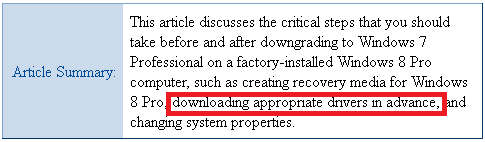
Dell Article.png

So I do need to download some drivers ... or maybe not.
In my academic career I have always questioned ...
... "I think", "I thought", "might", "maybe", "mostly", "sometimes", "standard procedure" and the sweeping statement "appropriate" !

I am attempting to be as well prepared and informed before tackling the Dell laptop.
No point in cocking it up and then coming back to this forum trying to fix a disaster, because of misinformation by others ... or worse ... my own stupidity.

OP (me) post #1 said:
I am the original village idiot. Have never installed an OS in my life.
So I would appreciate gentle humoring and micro step instructions.
 

My Computer My Computer

At a glance

XP Pro (x86) | 7 HP (x86) & (x64) | 7 Pro (x64)
Computer type
PC/Desktop
Computer Manufacturer/Model Number
Toshiba, Lenovo (laptops) + 4 rigs
OS
XP Pro (x86) | 7 HP (x86) & (x64) | 7 Pro (x64)
Hi "SandeepP"
Thank you for your response. :)

I visited your suggested http://dell.to/17XJ0OW but "Dell Inspiron 15 3521" is not listed
No Inspiron-15.png
Also, if customer request we are also sending the disks for Windows 7 Pro as well for downgrade

IF the Inspiron 15 can be downgraded ... do I have the disk. ?
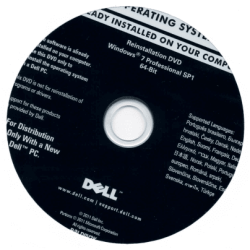
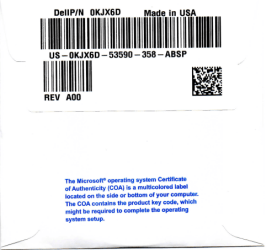
This is the disc that Dell phone support told me would not be recognised (rejected) by Microsoft registration.
Dell are sending a refund for this DVD.
DVD front.png DVD back.png


If this is an "appropriate" downgrade disc ... can I downgrade from Win-8 x64 Pro to Win-7 x32 Pro, using this Dell disc. ?
Daughter installed MS Office 2010 (on the Win8 x64 OS) but it was auto installed as x32 ??
Why when the OS is 64 bit?

Thanks again :)
 

My Computer My Computer

At a glance

XP Pro (x86) | 7 HP (x86) & (x64) | 7 Pro (x64)
Computer type
PC/Desktop
Computer Manufacturer/Model Number
Toshiba, Lenovo (laptops) + 4 rigs
OS
XP Pro (x86) | 7 HP (x86) & (x64) | 7 Pro (x64)
Hi SandeepP

http://dell.to/17XJ0OW

DELL said:
To enable downgrade to Windows 7 on this system the BIOS settings on this system were changed to boot into legacy BIOS mode.
If the BIOS setting is not changed to native UEFI mode boot prior to installing,
Windows 8 Pro will install; however, the following Windows 8 Pro functionalities will not work as they rely on a native UEFI mode boot:

The way I read the above is

Step 1) Set UEFI/BIOS firmware to Legacy mode.

Step 2) Reset UEFI/BIOS firmware to UEFI mode.

Do you Know what settings are in CSM?

Downgrade Windows 8 to Windows 7


theog said:
   Note

You may also need to

Make sure CSM is ENABLED, & set to UEFI boot.

enable Boot Menu.

enable BIOS password.


Technical Note: UEFI BIOS vs. Legacy BIOS, Advantech(EN) - YouTube

On some OEM manufacturer's the CSM setting are
UEFI = Windows 8 only
Legacy = All OS.
UEFI & Legacy = All OS.


Capture CSM.PNG
 

My Computer My Computer

At a glance

ME/XP/Vista/Win7
OS
ME/XP/Vista/Win7
Daughter installed MS Office 2010 (on the Win8 x64 OS) but it was auto installed as x32 ??
Why when the OS is 64 bit?

MS Office installs x32 by default.
 

My Computer My Computer

At a glance

ME/XP/Vista/Win7
OS
ME/XP/Vista/Win7
Dell does the hand-wringing over drivers mainly to scare users away from installing another bit-version which they are entitled to do by MS EULA, if Dell didn't customize drivers for that bit version. But as I said this has still never led to a driver not being found that we have seen here at the top tech site for Win7. If it should become a problem we have in residence the best Dell support you can get.

Again, put your network driver in backup, plug in by ethernet which has a 70% chance of starting up ready to connect. If not install the network driver first, go immediately to enable http://www.sevenforums.com/tutorials/2803-device-installation-settings.html, then run all rounds of Important and Optional Updates while you are setting up your desktop and browser.

This is all sequenced in http://www.sevenforums.com/tutorials/219487-clean-reinstall-factory-oem-windows-7-a.html#post1839164.

after all Updates are completed Let us know any drivers which are missing and not readily found on the Dell Support Downloads webpage for your tag number. Unknown Devices may be card readers, if not traceable using http://www.sevenforums.com/tutorials/73420-hardware-identification.html.
 
Hi "gregrocker" :)
Now that the smoke has cleared there appears to be several suggestions of how to "downgrade" from Win-8 to Win-7.
Tell me if I am wrong.

Post #16 eightforums.com Downgrade Windows 8 to Windows 7. I don't understand most of it.
Post #18 sevenforums.com Clean Reinstall - Factory OEM Windows 7 ... just as daunting.

Problems:-
1. I don't have a disc, other than the confusing Dell Reinstallation disc Win7 Pro SP1 64-Bit
. . . Dell phone support told me MS will not activate Win-7 on an already Win-8 laptop.
. . . "SandeepP" implies the opposite
. . . Dell have already sent a refund for their disc ... their idea not mine.
## Impossible to stay with Dell when so much conflicting advice from big-corp​
2. There are no recovery discs for this Dell OS.
I did not know about recovery discs until about 4 months ago (that is why I am haunting sevenforums.com to learn)
As I understand it recovery discs are best created with a clean installed OS without the scars of use.

With my extremely limited knowledge (I was the inspiration for "Idiots Guide") ...
A new OEM Windows 7 x32 clean installed onto the Dell would be a lot simpler for me. ??
With a new install (first experience) under my belt I would feel more confident to tackle more complex BIOS stuff later on.
I can buy a genuine local OEM Win7 x32 (or x64) ... for peace of mind and I hope a more straight forward OS install.

Concerns:-
Will the Dell accept/work with a new (non-Dell) Win7 x32 OS and drivers ?.
From what you say "Greg (rocker)" IF something does not work this forum can help me out to resolve those "if" issues.
My faith in big corp is rather low having contracted to giant multi-nationals for decades.
To much smoke and mirrors and trusting in the good fairy.
A 2007 Acer Aspire, I own, came with Vista and loaded with Acer bloat-ware. It was so slow even with x2 RAM (maxed out)
An IT tech clean installed WinXP and the Acer took off.
I have 4 custom towers and two laptops, they work extremely well without bloatware.​
I am still inclined to buy a new OEM Windows 7 x32 disc (I have access to a legal disc) and do a clean install.
I can then create a healthy recovery disc and any other maintenance backups very early in the life of the OS.
The cost of a new OEM Win-7 Disc is not an issue

Am I on a safe path?
Will MS register the new OS?
:confused:
.
 
Last edited:

My Computer My Computer

At a glance

XP Pro (x86) | 7 HP (x86) & (x64) | 7 Pro (x64)
Computer type
PC/Desktop
Computer Manufacturer/Model Number
Toshiba, Lenovo (laptops) + 4 rigs
OS
XP Pro (x86) | 7 HP (x86) & (x64) | 7 Pro (x64)
What I would do is ignore Dell's advice for now since they are obligated by the EULA to provide you with downgrade rights to Win7 on a PC sold with Windows 8 Professional, so MS Customer Service will intervene if they don't. By pressing forward you will be helping others assure they get the Downgrade they are entitled to with Professional version under the Windows 8 and Windows 7 EULA. Dell cannot act in violation of these governing rules for the OS version they sold you and which you now own to use as you please under the EULA.

Boot into BIOS setup to disable Secure boot as shown in Downgrade Windows 8 to Windows 7. Once you've done that boot the Win7 DVD which you rightfully already own to install Win7 using the special steps for http://www.sevenforums.com/tutorial...e-firmware-interface-install-windows-7-a.html.

The tutorial for http://www.sevenforums.com/tutorials/219487-clean-reinstall-factory-oem-windows-7-a.html#post1839164 is more a general guide for tips on getting and keeping a perfect install. Much of it compiles everything that may be needed to be backed up first to avoid forgetting something important like email folders, hidden QuickBooks data, or other files. It also can guide you on the best tools and methods which work best with Win7.

After install check Activation and if it does not activate, you can contact Dell right here via our resident Dell technician SanDeep who will advocate that you get what you are owed.

The fallback is that we can at any time file a case with MS CUstomer service which will not allow open violations of the EULA for Downgrade rights and will always protect the customer. This is why they allow http://www.sevenforums.com/tutorials/219487-clean-reinstall-factory-oem-windows-7-a.html#post1839164 to bring customers under MS protection. If there is an issue with auto-activation failing for downgrades then they need to know it and correct it.
 
Back
Top