Help please on downgrading Win8 Pro to Win7 Pro on new VAIO

martin0193

New member
Local time
6:42 PM
Messages
4
Hi all Just bought a new VAIO laptop, with Win8 Pro (as I knew I was going to downgrade to Win7 Pro). So far I have done the following: Found various guides (not on this site!), which seemed to say it was quite straightforward, and that I need a Win7 product key. Sony haven't provided me with one, and have gone silent when I asked them again - they told me it should be with the documents provided with the machine. Downloaded all Win7 drivers available for this model on Sony's support website. Found more detailed guides here on SevenForums, which seem to say that I don't need a Win7 product key, and that the process isn't quite so straightforward. Following the instructions at Downgrade Windows 8 to Windows 7 I have now done: Created a recovery drive on a spare USB external HDD turned secure boot off changed boot mode from UEFI to legacy when I insert the Win7 Pro DVD, it runs as far as the screen in 6A, Where do you want to install Windows. Here is where I get stuck, as I have 6 partitions and I don't know which ones to delete or leave behind. the partitions listed are as follows: Disk 0 Partition 1: SONYSYS 260.0 MB 235.0 MB OEM (Reserved) Disk 0 Partition 2: Windows RE Tools 1.4 GB 615.0 MB OEM (Reserved) Disk 0 Partition 3 260.0 MB 210.0 MB System Disk 0 Partition 4 128.0 MB 128.0 MB MSR (Reserved) Disk 0 Partition 5 431.2 GB 386.5 GB Primary Disk 0 Partition 6 32.5 GB 3.2 GB OEM (Reserved) Whichever of them I select, the 'Next' button is greyed out. On clicking for reasons, they are all because the disk is GPT partition style, and some for additional reasons like being reserved for OEM, or Microsoft Reserved (MSR) or EFI System Partition (ESP). My questions are: Can someone tell me which partitions to delete? I'm a bit nervous about deleting partitions as I have never done it before, and I don't want to screw up my brand new laptop (which is actually a work machine, paid for by my company). Will the Recovery drive put them all back in (if it all goes horribly wrong and I have to revert to the awful Win8)? Thanks awfully - I have been on the verge of sending this laptop back a few times this week, but this looks like it might be salvageable.
 
Last edited:

My Computer My Computer

At a glance

Windows 8 Pro 64 Biti5-33378GBIntel HD Graphics 4000
Computer type
Laptop
Computer Manufacturer/Model Number
Sony Vaio SV-F15A1C5E
OS
Windows 8 Pro 64 Bit
CPU
i5-3337
Memory
8GB
Graphics Card(s)
Intel HD Graphics 4000
Hard Drives
500GB
Antivirus
Not yet
it runs as far as the screen in 6A,

6)
A) Delete all partitions. (in Drive Options)
 

My Computer My Computer

At a glance

ME/XP/Vista/Win7
OS
ME/XP/Vista/Win7
Thanks. Will my Win8 recovery drive work (ie get it back to the state it was shipped in) if I mess this up?
 

My Computer My Computer

At a glance

Windows 8 Pro 64 Biti5-33378GBIntel HD Graphics 4000
Computer type
Laptop
Computer Manufacturer/Model Number
Sony Vaio SV-F15A1C5E
OS
Windows 8 Pro 64 Bit
CPU
i5-3337
Memory
8GB
Graphics Card(s)
Intel HD Graphics 4000
Hard Drives
500GB
Antivirus
Not yet
And one more thing - do I need to get Sony to tell me the product key? Or does Win7 magically pick it up from within the BIOS? EDIT: Just found this page - which answers this question. Downgrade rights details and FAQ
 
Last edited:

My Computer My Computer

At a glance

Windows 8 Pro 64 Biti5-33378GBIntel HD Graphics 4000
Computer type
Laptop
Computer Manufacturer/Model Number
Sony Vaio SV-F15A1C5E
OS
Windows 8 Pro 64 Bit
CPU
i5-3337
Memory
8GB
Graphics Card(s)
Intel HD Graphics 4000
Hard Drives
500GB
Antivirus
Not yet
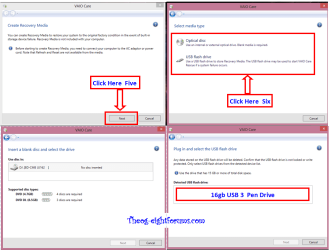
Thanks. Will my Win8 recovery drive work (ie get it back to the state it was shipped in) if I mess this up?

On my Grandkid's the Recovery disks work OK for me.

SONY Recovery Make DVD-USB 003 theog.PNG
 

My Computer My Computer

At a glance

ME/XP/Vista/Win7
OS
ME/XP/Vista/Win7
And one more thing - do I need to get Sony to tell me the product key? Or does Win7 magically pick it up from within the BIOS? EDIT: Just found this page - which answers this question. Downgrade rights details and FAQ

YES, if your SONY came with Windows 8 Pro installed, you have downgrade rights.
But you would need to have the SONY downgrade rights DVD to install Windows 7 Pro, which SONY are REFUSING TO SEND OUT.
 

My Computer My Computer

At a glance

ME/XP/Vista/Win7
OS
ME/XP/Vista/Win7
Just be sure to make the Win8 Recovery Disks, and if possible save a secondary backup image using the latest free version of Paragon Disk Manager which works to restore UEFI HD's.

Then boot into BIOS setup to disable Secure BOot and enable CSM or Legacy Boot.

In some cases you can shrink C to install Win7 in UEFI (Unified Extensible Firmware Interface) - Install Windows 7 with - Windows 7 Forums so you can try Win7 on the drive even though Win8 may not boot if Secure Boot is disabled. It may even configure a Dual Boot.

But in most cases it's required to delete all partitions during a booted Win7 install, either in UEFI or Legacy Mode. If UEFI is a problem then these steps will normally work to Bypass UEFI to Install WIn7
 
Thanks for all your help

Hi, Just wanted to say a big thank you for all your comments. I successfully performed the downgrade on Monday, and even got Win7 licensed, after an hour on the phone and 6 different Microsoft representatives. All drivers installed, Office 2013 downloaded, and ready to import files etc from the old machine. Couldn't have done it without you. Martin
 

My Computer My Computer

At a glance

Windows 8 Pro 64 Biti5-33378GBIntel HD Graphics 4000
Computer type
Laptop
Computer Manufacturer/Model Number
Sony Vaio SV-F15A1C5E
OS
Windows 8 Pro 64 Bit
CPU
i5-3337
Memory
8GB
Graphics Card(s)
Intel HD Graphics 4000
Hard Drives
500GB
Antivirus
Not yet
Back
Top