Downgrading BIOS

coinich

New member
Member
Local time
7:30 PM
Messages
12
I can't find a BIOS forum section, so I thought Drivers might be the most appropriate. If there's another spot for it, could someone move it for me please?

I think the newest BIOS on my computer is blocking my Bluetooth hardware from being seen. When I had a previous version of the BIOS, I had Bluetooth. I tried using the archived BIOSes Fujitsu provided (I'm using a T5010) but the flashing tools that were bundled to it refused to downgrade, and I don't know anywhere enough to begin to try it myself. Can anyone else here show me a way?
 

My Computer

OS
Windows 7
Hi, why don't you try and update the drivers for your bluetooth instead of messing with the Bios of your machine.
 

My Computer

Computer Manufacturer/Model Number
Self Build 64bit
OS
Vista Ult64, Win7600
CPU
Intel Core 2 Quad Q6600 @ 2400 MHz 64bit OS
Motherboard
Asus P5E3 Deluxe WiFi @p 64 bit OS
Memory
4096 MB DDR3-SDRAM
Graphics Card(s)
ATI Radeon HD 3870 Series x2 Crossfired
Sound Card
Realtek on board
Monitor(s) Displays
Samsung SyncMaster - 23 inches
Screen Resolution
1680x1050 pixels at 60 Hz in True Colors
Hard Drives
Hitachi (250 GB)/Samsung 750 GB. /Barracuda 160 GB.
My Book 1 TB external..
PSU
Cooler Master 1000w
Case
Cooler Master Cosmos 1000.
Cooling
Fans and fresh air,
Keyboard
Wireless
Mouse
Wireless
Internet Speed
Never fast enough
Other Info
I use a Magnum.
The Bluetooth drivers won't install if they cannot recognize the bluetooth hardware, which is built in. As far as Tech Support seemed concerned, the BIOS couldn't see the hardware, and this was either a mistake of the BIOS or the chip is bad. I want to test the former with some downgrades, which I know worked at least a few months ago.
 

My Computer

OS
Windows 7
What is with these tech support guys? And why would they have an updated bios that won't reconiize built in computer hardware. I think something else has to be Henkie You should be able to download the older bios and flash it using the same program you used to uppdate it,I would think. I would try jfar's suggestion of updating your chipset drivers. Weird.
 

My Computer

Computer Manufacturer/Model Number
Self Built
OS
Windows 7 ultimate 64 bit / XP Home sp3
CPU
intel Core 2 Duo E8400 3.0ghz
Motherboard
Asus P5ND bios 1401
Memory
8 gigs 1066 OCZ Fata1ty
Graphics Card(s)
EVGA GTX 580 Call of Duty Black Ops Edition
Sound Card
Creative Soundblaster Audigy 2zs
Monitor(s) Displays
Asus 24in LCD's 2MS X2
Screen Resolution
1920x1080p @60Hz
Hard Drives
WD Caviar 500 Black/ WD Caviar 200 Blue
PSU
OCZ 700W GameXtreme
Case
NZXT Apollo
Cooling
Corsair H50 CPU/120mm x3 /60mm x2 /Corsair Dominator Ram
Keyboard
Logitech Bluetooth Wireless MX5000
Mouse
Logitech Bluetooth Wireless MX1000
Internet Speed
Download 19.83 Upload 0.97
Other Info
Logitech Z2300 Speakers/ Bose Noise Cancelling Headphones/Avermedia PCI-e Hybrid TV Bravo/Epson NX415 all in one/ 4 Port Powered USB Hub/ LG 10x Bluray Burner /TSST Corp DVDRW External

My Computer

Computer Manufacturer/Model Number
Self Build 64bit
OS
Vista Ult64, Win7600
CPU
Intel Core 2 Quad Q6600 @ 2400 MHz 64bit OS
Motherboard
Asus P5E3 Deluxe WiFi @p 64 bit OS
Memory
4096 MB DDR3-SDRAM
Graphics Card(s)
ATI Radeon HD 3870 Series x2 Crossfired
Sound Card
Realtek on board
Monitor(s) Displays
Samsung SyncMaster - 23 inches
Screen Resolution
1680x1050 pixels at 60 Hz in True Colors
Hard Drives
Hitachi (250 GB)/Samsung 750 GB. /Barracuda 160 GB.
My Book 1 TB external..
PSU
Cooler Master 1000w
Case
Cooler Master Cosmos 1000.
Cooling
Fans and fresh air,
Keyboard
Wireless
Mouse
Wireless
Internet Speed
Never fast enough
Other Info
I use a Magnum.
To be honest, maybe the chip is burnt out, but I can't find out I think unless the other options are exhausted. As I said, I can't upgrade the drivers for the chip, or even install any at all. I think something may have happened when I upgraded the BIOS originally, I just don't know.
 

My Computer

OS
Windows 7
They is a bluetooth update for Fujitsu T5010 on the Fujitsu web site.

Old bios also.
 

Attachments

  • 10.JPG
    10.JPG
    35.7 KB · Views: 25

My Computer

OS
ME/XP/Vista/Win7

My Computer

Computer Manufacturer/Model Number
Self Build 64bit
OS
Vista Ult64, Win7600
CPU
Intel Core 2 Quad Q6600 @ 2400 MHz 64bit OS
Motherboard
Asus P5E3 Deluxe WiFi @p 64 bit OS
Memory
4096 MB DDR3-SDRAM
Graphics Card(s)
ATI Radeon HD 3870 Series x2 Crossfired
Sound Card
Realtek on board
Monitor(s) Displays
Samsung SyncMaster - 23 inches
Screen Resolution
1680x1050 pixels at 60 Hz in True Colors
Hard Drives
Hitachi (250 GB)/Samsung 750 GB. /Barracuda 160 GB.
My Book 1 TB external..
PSU
Cooler Master 1000w
Case
Cooler Master Cosmos 1000.
Cooling
Fans and fresh air,
Keyboard
Wireless
Mouse
Wireless
Internet Speed
Never fast enough
Other Info
I use a Magnum.
Thanks for the link on the Bluetooth drivers, but apparently the Vista driver won't work with Windows 7. I'm using nothing but the drivers from Fujitsu's drivers page, and I'm making sure I'm using the 7 supported ones as well.
 

My Computer

OS
Windows 7

My Computer

Computer Manufacturer/Model Number
Self Build 64bit
OS
Vista Ult64, Win7600
CPU
Intel Core 2 Quad Q6600 @ 2400 MHz 64bit OS
Motherboard
Asus P5E3 Deluxe WiFi @p 64 bit OS
Memory
4096 MB DDR3-SDRAM
Graphics Card(s)
ATI Radeon HD 3870 Series x2 Crossfired
Sound Card
Realtek on board
Monitor(s) Displays
Samsung SyncMaster - 23 inches
Screen Resolution
1680x1050 pixels at 60 Hz in True Colors
Hard Drives
Hitachi (250 GB)/Samsung 750 GB. /Barracuda 160 GB.
My Book 1 TB external..
PSU
Cooler Master 1000w
Case
Cooler Master Cosmos 1000.
Cooling
Fans and fresh air,
Keyboard
Wireless
Mouse
Wireless
Internet Speed
Never fast enough
Other Info
I use a Magnum.
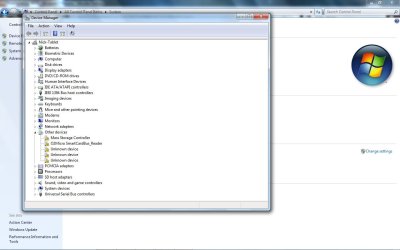
Here it is. Two of the unknown devices are related to my smartCard port, the other three I'm almost 100% certain are the TPM chip also on the motherboard that I have not installed the drivers for. I've tried linking each of those three with the Bluetooth driver just in case one of them was the hardware, but it didn't work at all.

Compatibility mode didn't help at all. Is the picture too large?
 

Attachments

  • devices.jpg
    devices.jpg
    71.6 KB · Views: 13

My Computer

OS
Windows 7
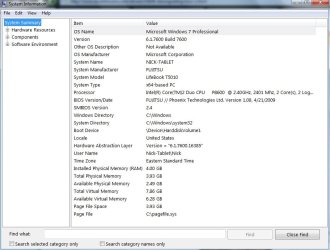
Ok please type into the Start / Search SYS and click on System Information
at the top op the Menu, Post a picture of the first page please. I know what machine you
have, I just want to see something.

Also go back to the site I gave you, and download Everything for your machine meaning all drivers.
 

My Computer

Computer Manufacturer/Model Number
Self Build 64bit
OS
Vista Ult64, Win7600
CPU
Intel Core 2 Quad Q6600 @ 2400 MHz 64bit OS
Motherboard
Asus P5E3 Deluxe WiFi @p 64 bit OS
Memory
4096 MB DDR3-SDRAM
Graphics Card(s)
ATI Radeon HD 3870 Series x2 Crossfired
Sound Card
Realtek on board
Monitor(s) Displays
Samsung SyncMaster - 23 inches
Screen Resolution
1680x1050 pixels at 60 Hz in True Colors
Hard Drives
Hitachi (250 GB)/Samsung 750 GB. /Barracuda 160 GB.
My Book 1 TB external..
PSU
Cooler Master 1000w
Case
Cooler Master Cosmos 1000.
Cooling
Fans and fresh air,
Keyboard
Wireless
Mouse
Wireless
Internet Speed
Never fast enough
Other Info
I use a Magnum.
I don't mean to sound clueless here, but I'm running Windows 7, and you gave the links to the Vista drivers, so I'm a bit confused. I was told only a few of the Vista drivers would work.
 

Attachments

  • sysinfo.jpg
    sysinfo.jpg
    64.5 KB · Views: 8

My Computer

OS
Windows 7
There may not be drivers for 7 yet from that company, I don't know. So the Vista drivers will still work if you install them using compatibility mode.
 

My Computer

Computer Manufacturer/Model Number
Self Build 64bit
OS
Vista Ult64, Win7600
CPU
Intel Core 2 Quad Q6600 @ 2400 MHz 64bit OS
Motherboard
Asus P5E3 Deluxe WiFi @p 64 bit OS
Memory
4096 MB DDR3-SDRAM
Graphics Card(s)
ATI Radeon HD 3870 Series x2 Crossfired
Sound Card
Realtek on board
Monitor(s) Displays
Samsung SyncMaster - 23 inches
Screen Resolution
1680x1050 pixels at 60 Hz in True Colors
Hard Drives
Hitachi (250 GB)/Samsung 750 GB. /Barracuda 160 GB.
My Book 1 TB external..
PSU
Cooler Master 1000w
Case
Cooler Master Cosmos 1000.
Cooling
Fans and fresh air,
Keyboard
Wireless
Mouse
Wireless
Internet Speed
Never fast enough
Other Info
I use a Magnum.

My Computer

Computer Manufacturer/Model Number
Self Build 64bit
OS
Vista Ult64, Win7600
CPU
Intel Core 2 Quad Q6600 @ 2400 MHz 64bit OS
Motherboard
Asus P5E3 Deluxe WiFi @p 64 bit OS
Memory
4096 MB DDR3-SDRAM
Graphics Card(s)
ATI Radeon HD 3870 Series x2 Crossfired
Sound Card
Realtek on board
Monitor(s) Displays
Samsung SyncMaster - 23 inches
Screen Resolution
1680x1050 pixels at 60 Hz in True Colors
Hard Drives
Hitachi (250 GB)/Samsung 750 GB. /Barracuda 160 GB.
My Book 1 TB external..
PSU
Cooler Master 1000w
Case
Cooler Master Cosmos 1000.
Cooling
Fans and fresh air,
Keyboard
Wireless
Mouse
Wireless
Internet Speed
Never fast enough
Other Info
I use a Magnum.
I'm sorry, I'm confused. I've been using the Windows 7 64bit drivers that Fujitsu has provided, and they don't work. Why would the Vista drivers work where those failed? If it helps, the drivers fail because they cannot locate the Bluetooth hardware.
 

My Computer

OS
Windows 7
The mass storgae and sd are your card reader drivers. to install in compatibility mode. download the drivers> unpack if needed> go to the setup.exe file>righ click it> the click compaitibility>drop down meu>choose Vista> then check the box run in compatibility mode. install as admninistrator. hope this will help you undestan compatibility mode. Fabe ( not trying to set on your toes jfar)
 

My Computer

Computer Manufacturer/Model Number
Self Built
OS
Windows 7 ultimate 64 bit / XP Home sp3
CPU
intel Core 2 Duo E8400 3.0ghz
Motherboard
Asus P5ND bios 1401
Memory
8 gigs 1066 OCZ Fata1ty
Graphics Card(s)
EVGA GTX 580 Call of Duty Black Ops Edition
Sound Card
Creative Soundblaster Audigy 2zs
Monitor(s) Displays
Asus 24in LCD's 2MS X2
Screen Resolution
1920x1080p @60Hz
Hard Drives
WD Caviar 500 Black/ WD Caviar 200 Blue
PSU
OCZ 700W GameXtreme
Case
NZXT Apollo
Cooling
Corsair H50 CPU/120mm x3 /60mm x2 /Corsair Dominator Ram
Keyboard
Logitech Bluetooth Wireless MX5000
Mouse
Logitech Bluetooth Wireless MX1000
Internet Speed
Download 19.83 Upload 0.97
Other Info
Logitech Z2300 Speakers/ Bose Noise Cancelling Headphones/Avermedia PCI-e Hybrid TV Bravo/Epson NX415 all in one/ 4 Port Powered USB Hub/ LG 10x Bluray Burner /TSST Corp DVDRW External
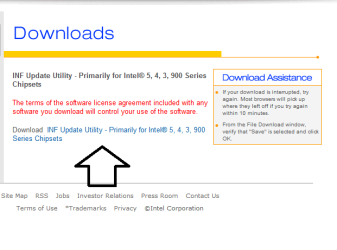
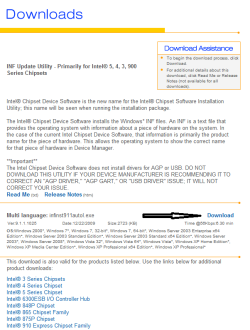
Ok just install the Intel chipset drivers please.
 

My Computer

Computer Manufacturer/Model Number
Self Build 64bit
OS
Vista Ult64, Win7600
CPU
Intel Core 2 Quad Q6600 @ 2400 MHz 64bit OS
Motherboard
Asus P5E3 Deluxe WiFi @p 64 bit OS
Memory
4096 MB DDR3-SDRAM
Graphics Card(s)
ATI Radeon HD 3870 Series x2 Crossfired
Sound Card
Realtek on board
Monitor(s) Displays
Samsung SyncMaster - 23 inches
Screen Resolution
1680x1050 pixels at 60 Hz in True Colors
Hard Drives
Hitachi (250 GB)/Samsung 750 GB. /Barracuda 160 GB.
My Book 1 TB external..
PSU
Cooler Master 1000w
Case
Cooler Master Cosmos 1000.
Cooling
Fans and fresh air,
Keyboard
Wireless
Mouse
Wireless
Internet Speed
Never fast enough
Other Info
I use a Magnum.
Chipset drivers installed.
 

My Computer

OS
Windows 7
Now turn off your machine and restart it manually, meaning don't press reboot choose SHUTDOWN
 

My Computer

Computer Manufacturer/Model Number
Self Build 64bit
OS
Vista Ult64, Win7600
CPU
Intel Core 2 Quad Q6600 @ 2400 MHz 64bit OS
Motherboard
Asus P5E3 Deluxe WiFi @p 64 bit OS
Memory
4096 MB DDR3-SDRAM
Graphics Card(s)
ATI Radeon HD 3870 Series x2 Crossfired
Sound Card
Realtek on board
Monitor(s) Displays
Samsung SyncMaster - 23 inches
Screen Resolution
1680x1050 pixels at 60 Hz in True Colors
Hard Drives
Hitachi (250 GB)/Samsung 750 GB. /Barracuda 160 GB.
My Book 1 TB external..
PSU
Cooler Master 1000w
Case
Cooler Master Cosmos 1000.
Cooling
Fans and fresh air,
Keyboard
Wireless
Mouse
Wireless
Internet Speed
Never fast enough
Other Info
I use a Magnum.
Back
Top