
Solved Downloaded program is problematic

inouno

Banned
Local time
7:19 AM
Messages
132
I use a program (downloaded from the internet) which has become a problem.
It has been OK, but when I updated it to the newer version, it made my startup and shutdown, real slow.
I have uninstalled the program and wiped all traces of it.
My PC then ran as fast as new.
Am I allowed, in this Forum, to say the name of the program?
 

My Computer

OS
MS Windows 7 Home Premium 64-bit SP1
I'd say so? Would help us to identify any common problems with said program. Maybe when you installed the new version, it added itself to the programs that start on boot. Could be something there.
 

My Computer

Computer Manufacturer/Model Number
Custom Build
OS
W7 RTM Ultimate x64
CPU
Intel Q8400 @ 2.66GHZ
Motherboard
Gigabyte GA-EG45M-UD2H
Memory
4GB DDR2-800
Graphics Card(s)
Gainward GTS 450 GLH 1GB Edition
Sound Card
Integrated 8 Channel
Monitor(s) Displays
AOC 23.6 Inch Widescreen LCD
Screen Resolution
1920x1080
Hard Drives
Seagate 500GB Internal
Western Digital 1TB Internal

Hitachi 1TB External
PSU
Apevia Java Power 500W
Case
Cooler Master HAF 922 Black
Cooling
Stock Intel CPU Fan
Keyboard
HP SK-2960 Multimedia Keyboard
Mouse
Logitech M350 Wireless Gaming Mouse
Internet Speed
1.5MB
Yes it's perfectly fine to mention the name of the program.
If it's illegal or cracked software we won't be able to help for two reasons, 1) unethical 2) Cracked/Pirated software is unrealible because it is not in the original state as it was original created.

Just don't post any links

ALso was your computer slow WHILE you ran this program or just after it was install while NOT running the program.
 

My Computer

Computer type
PC/Desktop
Computer Manufacturer/Model Number
Gateway / Slight Modifications
OS
Windows 8 64 bit PRO
CPU
AMD Phenom X4 9100e
Motherboard
Gateway RS780
Memory
2GB X2 DDR2
Graphics Card(s)
Sapphire HD 6850
Sound Card
Integrated
Monitor(s) Displays
Gateway 19" + Dell 19"
Screen Resolution
1440X900 sometimes 2880 by 900
Hard Drives
WD 80GB
WD 640GB
WD 1,000GB
PSU
Antec BP 550watts
Case
Antec 300
Cooling
Stock Cooling
Keyboard
Saitek Eclipse II
Mouse
Gigabyte GM-M6800
Internet Speed
D: 30Mbps U:4Mbps
Antivirus
Avast version 8
Browser
Internet Explorer ver 10 64 bit
Other Info
This is my work computer.
I have another laptop running Windows 7 64 bit.
Another PC running Windows 8 64 bit pro.
Total of 3
The program is called Privacy eraser pro.
I have used this program for ages.
It does load on startup.
But I am hesitant to reinstall the program, (even though I have paid for it)
The real problem is that the shutdown speed of my PC is affected. And oddly, even after uninstalling the program, it (my computer) would remain slow to shut down.
Even after running Ccleaner, including registry clean.
All my antivirus and malware programs are slick and up to date. Believe me..I know what I'm talking about re: virus control.
So..what's your guess ?
 

My Computer

OS
MS Windows 7 Home Premium 64-bit SP1
I haven't try however it could be that if this program is constantly working in the background acessing the HDD you could experience slower performance. The only way i know that something can be deleted "FOREVER" is to OVERWRITE that section of the HDD. So essentially this program is constanly reading and writting the HDD.
TThis is just my assumption though.
How slow are we talking when shutting down?

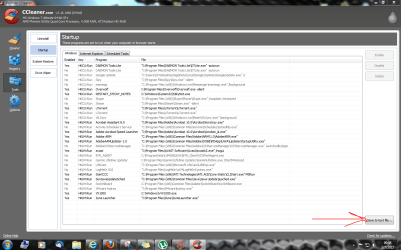
You mention you have CCleaner, would you mind running it, going to tools>Startup> Copy to text file
Please upload the file, it may be too many startup programs, that could increase boot time, and increase shutdown time due to the need to shut those services down
 

Attachments

  • StartupCCleaner.PNG
    StartupCCleaner.PNG
    83.8 KB · Views: 11

My Computer

Computer type
PC/Desktop
Computer Manufacturer/Model Number
Gateway / Slight Modifications
OS
Windows 8 64 bit PRO
CPU
AMD Phenom X4 9100e
Motherboard
Gateway RS780
Memory
2GB X2 DDR2
Graphics Card(s)
Sapphire HD 6850
Sound Card
Integrated
Monitor(s) Displays
Gateway 19" + Dell 19"
Screen Resolution
1440X900 sometimes 2880 by 900
Hard Drives
WD 80GB
WD 640GB
WD 1,000GB
PSU
Antec BP 550watts
Case
Antec 300
Cooling
Stock Cooling
Keyboard
Saitek Eclipse II
Mouse
Gigabyte GM-M6800
Internet Speed
D: 30Mbps U:4Mbps
Antivirus
Avast version 8
Browser
Internet Explorer ver 10 64 bit
Other Info
This is my work computer.
I have another laptop running Windows 7 64 bit.
Another PC running Windows 8 64 bit pro.
Total of 3
Last edited:

My Computer

Computer type
PC/Desktop
Computer Manufacturer/Model Number
home built
OS
Multi-Boot W7_Pro_x64 W8.1_Pro_x64 W10_Pro_x64 +Linux_VMs +Chromium_VM
CPU
AMD Athlon II x4 620
Motherboard
Gigabyte GA-MA785G-UD3H
Memory
6GB GSkill DDR2 800
Graphics Card(s)
AMD 4670 GPU + AMD 4200 IGP
Sound Card
on board Realtek ALC889A
Monitor(s) Displays
RCA 40" LCD TV, Insignia 32" LCD TV, HP 15" LCD monitor
Screen Resolution
1680 x 1050
Hard Drives
OCZ Vertex 3 120GB,
Samsung F3 1TB (3),
Several others - WD, Seagate, Hitachi, ...
PSU
Corsair 500 W
Case
Rosewill mid tower
Cooling
CM 90mm rifle
Keyboard
Gyration wireless, Logitech wireless, Dell USB wired
Mouse
Gyration wireless, Logitech wireless, V7 USB wired
Internet Speed
Spectrum - 100Mbps D / 10Mbps U
Antivirus
Avast, MBAM3, EMET, WinPatrol
Browser
Pale Moon, Firefox, IE
Other Info
2 multi-boot PC's
Mainly HTPC/Office/Gen purpose (no gaming).
Trendnet USB KVM.
LG DVD burner/Blue Ray Player.
Tray system for removable SATA backup drives.

Not currently OCd, under-volted.
I use Hybrid sleep, rarely re-boot or shutdown.

Hauppauge HD-PVR, Avermedia PCIe TV Tuner, Hauppauge PCI TV Tuner.
Yes, I have looked at what you said.
Not sure how to paste that picture of my ccleaner startup things. But, I have looked at it and am aware of startup stuff slowing a computer. I'm real carefull of this. I keep my startup entries to a real small amount, to ensure fast startup.
The close time was about 2 minutes. (when it was going bad)
Since uninstalling the program, my shutdown is faster than Roadrunner.
But, it used to be OK. (the program) ..that is, it didn't interfere.
Until I downloaded the update to the latest version.
I even wiped my computer and started again fresh. Then of course, it ran real well.
But it is so hard to remember all the stuff to put back into your computer. Not even, to remember all the tweaks and adjustments one must make.
I am considering downloading the program again, (it is a legitimate program and I paid for it.)
It might (the new version, have a bug.)
Anyhow, I would like the advice of experts.
 

My Computer

OS
MS Windows 7 Home Premium 64-bit SP1

My Computer

Computer type
PC/Desktop
Computer Manufacturer/Model Number
Gateway / Slight Modifications
OS
Windows 8 64 bit PRO
CPU
AMD Phenom X4 9100e
Motherboard
Gateway RS780
Memory
2GB X2 DDR2
Graphics Card(s)
Sapphire HD 6850
Sound Card
Integrated
Monitor(s) Displays
Gateway 19" + Dell 19"
Screen Resolution
1440X900 sometimes 2880 by 900
Hard Drives
WD 80GB
WD 640GB
WD 1,000GB
PSU
Antec BP 550watts
Case
Antec 300
Cooling
Stock Cooling
Keyboard
Saitek Eclipse II
Mouse
Gigabyte GM-M6800
Internet Speed
D: 30Mbps U:4Mbps
Antivirus
Avast version 8
Browser
Internet Explorer ver 10 64 bit
Other Info
This is my work computer.
I have another laptop running Windows 7 64 bit.
Another PC running Windows 8 64 bit pro.
Total of 3
well..you know, the normal sort of stuff...privacy issues, intrusive behavior by set programs, adjustment to registry defaults, insuring that Google is not my master...that sort of stuff.
 

My Computer

OS
MS Windows 7 Home Premium 64-bit SP1
I use a program (downloaded from the internet) which has become a problem.
It has been OK, but when I updated it to the newer version, it made my startup and shutdown, real slow.
I have uninstalled the program and wiped all traces of it.
My PC then ran as fast as new.
Am I allowed, in this Forum, to say the name of the program?

I have found a solution.

I got in touch with Privacy Eraser Pro, and they emailed me back .

" please uncheck "Erase Windows SWAP File" checkbox at "Windows" tab and try again."

This worked. :)

Thank you everybody for your interest and suggestions.
 

My Computer

OS
MS Windows 7 Home Premium 64-bit SP1
Back
Top