Downloading Windows 7

Did you check rt click , select Properties - the unblock option would be under the properties tab.
 

My Computers

System One System Two

  • Computer type
    PC/Desktop
    OS
    7 X64
    CPU
    i5 8400
    Motherboard
    gigabyte b365m ds3h
    Memory
    2x8gb 3200mhz
    Hard Drives
    various
    PSU
    pure power 11 400w cm
    Case
    Coolermaster
    Cooling
    cryorig m9i
  • Computer type
    PC/Desktop
    OS
    7x64
    CPU
    g5400
    Motherboard
    ga b365m ds3h
    Memory
    8gb ddr4 2400
    PSU
    xfx pro 450w
There is no such option.
 

My Computer

Computer Manufacturer/Model Number
Acer Aspire 4315
OS
Windows 7
Screen Resolution
1280x800
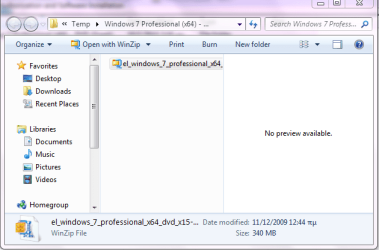
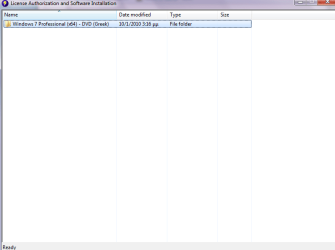
That is the file that I downloaded and that is the content after I open it (before using winzip)
 

Attachments

  • zip file.PNG
    zip file.PNG
    24.3 KB · Views: 3
  • download.PNG
    download.PNG
    10 KB · Views: 5

My Computer

Computer Manufacturer/Model Number
Acer Aspire 4315
OS
Windows 7
Screen Resolution
1280x800
How do you know it is a .zip?

Go to folder options >View >Untick "Hide extensions for known file types" >Apply>OK.

Also that is temp file - only 340mb - that is far too small - where did you get the shot in your previous post - that appears to have all the installation files in it - 2.3gb if it 32 bit , and 3gb if it is 64 bit.
 

My Computers

System One System Two

  • Computer type
    PC/Desktop
    OS
    7 X64
    CPU
    i5 8400
    Motherboard
    gigabyte b365m ds3h
    Memory
    2x8gb 3200mhz
    Hard Drives
    various
    PSU
    pure power 11 400w cm
    Case
    Coolermaster
    Cooling
    cryorig m9i
  • Computer type
    PC/Desktop
    OS
    7x64
    CPU
    g5400
    Motherboard
    ga b365m ds3h
    Memory
    8gb ddr4 2400
    PSU
    xfx pro 450w
I admit that I am a looser.
I apologise for eating your time.
Well the downloaded file says DVD(Greek) and the one when I open it is .iso.
What shall I do now?
 

My Computer

Computer Manufacturer/Model Number
Acer Aspire 4315
OS
Windows 7
Screen Resolution
1280x800
.iso is what you want.

D/L the free trial ( unregistered) version of Ultraiso from here: ( don't forget to unblock it before you install it.

ISO CD DVD image creator, editor and ISZ DMG DAA UIF to ISO converter - UltraISO can extract/create/edit/convert CD and DVD image files directly, make bootable CDs and convert ISZ DMG DAA UIF to ISO.
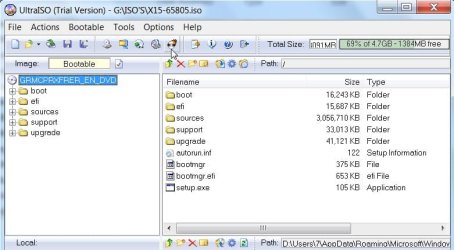
Pick up the .iso with Ultraiso - check it says bootable.

Then put an UNFORMATTED dvd recordable in the drive and click the Burn button at the top of Ultraiso window.

ULTRAISO-BURN-2010-01-10_214636.jpg
 

My Computers

System One System Two

  • Computer type
    PC/Desktop
    OS
    7 X64
    CPU
    i5 8400
    Motherboard
    gigabyte b365m ds3h
    Memory
    2x8gb 3200mhz
    Hard Drives
    various
    PSU
    pure power 11 400w cm
    Case
    Coolermaster
    Cooling
    cryorig m9i
  • Computer type
    PC/Desktop
    OS
    7x64
    CPU
    g5400
    Motherboard
    ga b365m ds3h
    Memory
    8gb ddr4 2400
    PSU
    xfx pro 450w
I have done it!
Hopefully with success
Thanks a lot for your patience.
Now I have to install over both XP and Windows 7.
If you are still here I would appreciate some good advices
 

My Computer

Computer Manufacturer/Model Number
Acer Aspire 4315
OS
Windows 7
Screen Resolution
1280x800
Great - you have a bootable installation dvd?

Post any questions and I will try to help if I am online - otherwise I am sure there are plenty of people willing to help.

Have fun.
 

My Computers

System One System Two

  • Computer type
    PC/Desktop
    OS
    7 X64
    CPU
    i5 8400
    Motherboard
    gigabyte b365m ds3h
    Memory
    2x8gb 3200mhz
    Hard Drives
    various
    PSU
    pure power 11 400w cm
    Case
    Coolermaster
    Cooling
    cryorig m9i
  • Computer type
    PC/Desktop
    OS
    7x64
    CPU
    g5400
    Motherboard
    ga b365m ds3h
    Memory
    8gb ddr4 2400
    PSU
    xfx pro 450w
How do I know that it is bootable?
And if it is how do I install formatting both partitions?
 

My Computer

Computer Manufacturer/Model Number
Acer Aspire 4315
OS
Windows 7
Screen Resolution
1280x800
boot it and see if you get "press any key to boot from cdrom" message.

press Enter and off you go.

When you get the screen asking where you want to install - click Drive Options (Advanced) - I have no idea what that is in Greek.

Click a partition and select delete, or Format.

Do the same on the other partition.

If you deleted them both - you have one large amount of space - you need to click Create and select the size you want. Then Format the partition you just created.

Make sure the partition you want to install on is highlighted - then click Next.

Clean Install Windows 7
 

My Computers

System One System Two

  • Computer type
    PC/Desktop
    OS
    7 X64
    CPU
    i5 8400
    Motherboard
    gigabyte b365m ds3h
    Memory
    2x8gb 3200mhz
    Hard Drives
    various
    PSU
    pure power 11 400w cm
    Case
    Coolermaster
    Cooling
    cryorig m9i
  • Computer type
    PC/Desktop
    OS
    7x64
    CPU
    g5400
    Motherboard
    ga b365m ds3h
    Memory
    8gb ddr4 2400
    PSU
    xfx pro 450w
Back
Top