downloads wont start

boygenius

New member
Local time
3:36 PM
Messages
2
i am having a strange problem while downloading files from the internet. Whenever i click on a file to download , the download confirmation box(the one with save /open option) does not appear ,instead the page page shows a waiting status(in status bar).
However the file continues to be downloaded in the background(and is saved in some other folder). Only after the file is downloaded do i get the download confirmation box asking whether to save or open the file.
I encounter this problem on all browsers i use (firefox/chrome)
 

My Computer My Computer

At a glance

Windows 7 Ultimate (32 bit)intel pentium 4 (3.0 GHz with HT tech)2 GB
OS
Windows 7 Ultimate (32 bit)
CPU
intel pentium 4 (3.0 GHz with HT tech)
Memory
2 GB
Hiya pal and welcome to the forums :)

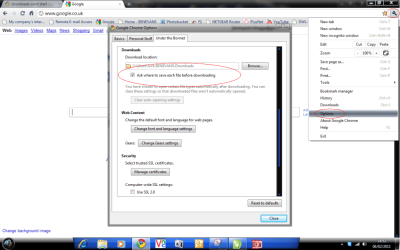
In "Chrome" try changing the "save" option in the "downloads" section.
Click the "spanner" then goto "under the bonnet" "Downloads" Set the destination and check the box that says "ask where to save each file before downloading" let us know how it goes ;)
 

Attachments

  • chrome save option.png
    chrome save option.png
    57.2 KB · Views: 77

My Computer My Computer

At a glance

Windows 7 Ultimate 64bitAMD Phenom Quad core 9950 black edition16Gb2x XFX Radeon 5850
Computer type
PC/Desktop
Computer Manufacturer/Model Number
Self Built
OS
Windows 7 Ultimate 64bit
CPU
AMD Phenom Quad core 9950 black edition
Motherboard
Gigabyte
Memory
16Gb
Graphics Card(s)
2x XFX Radeon 5850
Sound Card
PCI Express X-Fi Titanium / Logitech G35
Monitor(s) Displays
2x HP 2410i
Screen Resolution
1920x1080
Hard Drives
2x 500Gb Seagate
1x 300Gb Seagate
1x 1Tb Seagate
2x 1Tb Hitatchi
PSU
Jean Tech Storm 700W
Case
Cooler Master COSMOS S
Cooling
Akasa Evo Blue Pro
Keyboard
Logitech G15
Mouse
Mad Catz M.M.O. 7
Internet Speed
12mb
thanx for the welcome and the prompt reply


My problem was a bit different than what i think u interpreted it.
Suppose i had to download a 100Mb file then on clicking the file i the status bar would show waiting for somehost.com for sumthing around 20-30 mins(tym it takes to download a 100 MB file on my connection). After that i would get the download confirmation box(open/save etc) nd on selecting "save" the download is successfully finished almost immediately and i can locate the file in my required folder. Basically i can not monitor my downloads.
 

My Computer My Computer

At a glance

Windows 7 Ultimate (32 bit)intel pentium 4 (3.0 GHz with HT tech)2 GB
OS
Windows 7 Ultimate (32 bit)
CPU
intel pentium 4 (3.0 GHz with HT tech)
Memory
2 GB
I am having the same exact problem that boygenius was.

I'm using Firefox 17.0.1

I've already tried resetting Firefox.
 

My Computer My Computer

At a glance

Windows 7 Home Premium 32bit
OS
Windows 7 Home Premium 32bit
I was having this problem, but when I went into the task manager and shut off an process by the name of Web Companion the download started instantly
 

My Computer My Computer

At a glance

Windows 7 Professional 64-bit
Computer type
PC/Desktop
Computer Manufacturer/Model Number
custom build
OS
Windows 7 Professional 64-bit
Back
Top