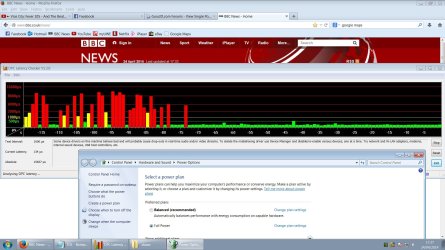
DPC Latency causing audio stuttering, crackling

gordijn

New member
Local time
6:24 AM
Messages
8
Hi,

For the past few days I've been trying to fix the sound stuttering when I'm listening to music, and after monitoring the dpc latency it seems to be caused by a bad driver. I've updated all my drivers and tried finding which one is causing the latency spikes but no luck so far.

DPC latency when i'm not getting stutters:
Yfrog - dpc1

Stuttering:
Yfrog - dpc2
Yfrog - dpc3

Also, I don't know if this means anything but when I open up hwinfo32 and the hardware summary is shown, i get this pattern:
Yfrog - hwinfodpc (big screenshot)

When I close the summary it's back to normal. Does this mean it's related to one of the parts shown in the hwinfo32 summary?
I've tried disabling wlan, vga, sound, and modem in device manager, uninstalled daemon tools and it's driver etc, but that didn't change anything.

Any advice?
I'm using an Acer Aspire 5715Z laptop, Realtek HD audio
 

My Computer

OS
Windows 7
Uninstall the Realtek in the Device Manager then restart the PC and when Windows starts it will detect it and reinstall. Sometimes the reinstall will put it on a different IRQ and fix the problem. No guarantee but worth a try.

FWIW I have an Acer 7720 laptop with Realtek and Win 7 32 bit and it doesn't do it on mine.
 

My Computer

Computer type
PC/Desktop
Computer Manufacturer/Model Number
My Own Build
OS
Windows 10 64 bit
CPU
Intel i7 6700K
Motherboard
ASUS ROG Maximus VIII Hero
Memory
16GB Corsair Dominator
Graphics Card(s)
Intel CPU Graphics
Sound Card
RealTek
Monitor(s) Displays
27" Dell S2719dgf
Screen Resolution
2560X1440
Hard Drives
1 TB Samsung 850 EVO SSD for Win 10 Pro
500GB Samsung 850 EVO SSD for Win 10 Insider
2 TB drive for backup
PSU
EVGA Supernova 750G2
Case
BeQuiet Silent Base 600
Cooling
Deepcool Captain 120EX
Keyboard
Microsoft Wireless 2000
Mouse
Microsoft wireless
Internet Speed
100 MB/sec (Cable)
Antivirus
Microsoft Defender and Malwarebytes
Browser
Edge/Firefox
Other Info
Cakewalk (Sonar) by BandLab and Studio One 4.1 Pro recording studio software. MOTU 896Mk3 Hybrid recording interface, Frontier Tranzport wireless control unit, Behringer X-Touch Control Surface.
Five USB connected optical drives for CD Audio production using Nero BurningROM
Just tried that now, still getting huge dpc latency spikes, and audio stuttering because of it.
 

My Computer

OS
Windows 7
Did you ever get this fixed? I have been getting a lot of high DPC readings which are causing pops and clicks in my audio, too. Below is a link to my post if you want more information.

http://www.sevenforums.com/drivers/56974-dpc-latency.html

I don't think it's an audio driver issue because I've had it with my Creative Labs Xfi and Audio Kontrol interface.
 

My Computer

Computer type
PC/Desktop
Computer Manufacturer/Model Number
Dell XPS
OS
Windows 7 Home Premium - 64 Bit
CPU
i7 870
Memory
8 gb
Graphics Card(s)
ATI HD 5770
Have the exact same problem.
 

My Computer

Computer Manufacturer/Model Number
Started out as an AST180
OS
Windows 7 Ultimate x64 | Windows XP Pro x86 | Windows Vista Ultimate x86
CPU
AMD Athlon 64 X2 Dual Core 5200 2.7 GHz
Motherboard
Acer EM61SM/EM61PM
Memory
3G RAM
Graphics Card(s)
ATI HD Radeon 4670
Screen Resolution
1280x1024
Hard Drives
Western Digital Caviar Black WD1001FALS 1TB 7200 RPM 32MB Cache, 160 GB Seagate
PSU
Corsair 450VX 450W
Keyboard
Microsoft Media Pro 3000
Mouse
Logitech MX310
somehow I fixed it, but I'm not really sure what caused it. I think it was the daemon tools sptd driver which I uninstalled. when I finally figured out how to use xperf and xperfview, to really get a detailed summary of dpc latency, an 'unknown' driver was at the top, uninstalling the sptd driver that comes with daemon tools seems to have fixed this.
so, my advice is: download xperf & xperfview ( it's in the microsoft windows performance toolkit ) and take a good look at the dpc latency summary, this will tell you exactly what's causing the spikes. there's a really good guide i used, to figure out how to use xperf: Pointless Blathering : Measuring DPC time
also take a look at this topic VIRTUAL DJ SOFTWARE - DPC Latency Questions
 

My Computer

OS
Windows 7
Mostly on laptops it is Power Management causes this problem. It changes processor rate to save the power, and this changing of CPU rate causes increased DPC latency.

Fixing the problem:
Simply you can just create (or modify current) a new special power plan in: Control Panel\Hardware and Sound\Power Options
When you do this, just go to plan settings, click advanced settings, and set the minimum and maximum processor rate to equal (minimum = maximum), so this prevents changing of your CPU speed. Personally, I have 60% in my settings, because listening to music does not require a lot o CPU resources.

Just adjust these minimum/maximum settings anyway you want. Just remember to set them two equally.
You can set 100% (maximum performance) but then your CPU will generate more heat and the fun will be noisy... So just choose the best setting for you.

So static CPU rate should solve high DPC latency and fix the sound crackling problem.. It works for me fine!
 

My Computer

OS
Windows 7 x86
I know this is a 4+ year old thread, I have been/was suffering bad audio stuttering/tearing, it was also noticeable with the mouse/scrolling. It started plaguing me awhile back, then appeared to go away, in the past week or two it has come back.

Just wanted to help out others with this problem, after trying basically everything i could find on various form threads on this issue for example:
Performance power management options
Updating drivers: audio, Ethernet, wireless, sata controller, chipset, video etc
Disabling onboard LAN, removing wireless adapters
Reformatting
Isolating hardware components
etc

I couldn't get rid of this annoying problem, when i thought i had it figured, the minute later it was apparent it wasn't. I did notice that this problem didn't occur on another windows installation on a secondary HDD. I figured its obviously not a hardware fault, it must be some sort of software/driver problem.

I went back to the basics and using DPC latency monitor and device manager to disable components i was able to narrow it down, I have both an onboard ethernet adapter and also a PCIe wireless N adapter.

I believed one of these devices to be problematic, after disabling the wireless N adapter in Device manager, the latency and audio tearing was still there using onboard LAN. I then tried disabling the onboard ethernet and using wireless adapter, the problem still persisted.

However with BOTH disabled, there was no latency, no audio stuttering/tearing etc.
So it was obviously an issue linked with internet connectivity, but the chances of both onboard ethernet and a wireless adapter card being faulty is quite high.

I continued to try basically every little tip/trick that people mentioned, and came across one that worked for me, someone mentioned on another forum that DISABLING windows firewall fixed it for them, and alot of people believe it started happening after windows updates.

I was basically to the end of my wits, trying all these "fixes" that people posted and not doing anything for me, when it finally clicked that i actually enable windows firewall a couple of weeks back (co-inciding when it came back) and that my other windows installation had windows firewall disabled.

As soon as i disabled it, the latency in DPC latency monitor dropped, i've been running for the past 3 hours intensively without 1 latency spike, audio sttuter/tear etc where it would previously spike every 20 seconds or so.

I'm not sure why windows firewall causes this problem, my best guess is its some sort of hardware compaitability conflict, maybe this is why it only happens to a select few? whatever it is if you're experiencing latency spikes with audio stuttering and tearing, i HIGHLY recommend giving this a shot, its much quicker and easier then updating drivers, and if it turns out to not fix your problem, can be easily enabled.

I kept thinking it was a hardware problem (RAM) or driver related, but in the end it was something as simple as windows firewall
 

My Computer

Computer type
PC/Desktop
OS
Windows 7 64-BIT
As with the previous poster I understand this is an old thread but I also have experienced this issue and only just resolved it - and with this being the highest ranked in a Google search it may be the first port of call for others.

My fix:

Using Power Options in Windows 7 I disabled the balanced plan and setup my own disabling sleep parameters and such - not sure which was the exact custom setting that remedied it but I shall take a further look when I get the time.

Hope this helps someone as it was driving me somewhat mad as it only occurred after a reformat and I had no idea why as no hardware or drivers had changed - except I was yet to change the power options settings. The DPC latency (and thus audio interruptions/cracks/pops) dropped dramatically as illustrated below.

Cheers
-Shaun
 

Attachments

  • dpc latency.jpg
    dpc latency.jpg
    215.7 KB · Views: 5

My Computer

Computer type
PC/Desktop
Computer Manufacturer/Model Number
Custom Build
OS
Windows 7 Home Premium 64bit
CPU
Intel Q6600
Motherboard
Gigabyte GA-G41MT-S2PT (Rev 1.1)
Memory
4gb DDR3
Graphics Card(s)
Nvidia 9600gt
Hard Drives
Seagate ST1000DX001 1TB Hybrid Internal Solid State Drive
Antivirus
AVG
Browser
Firefox
My DPC latency issues were USB related. Luckily I just managed to solve the issues!

Maybe worth mentioning: I tried the maximum Performance settings in the Windows Power Options prior to this and kept those settings, it may or may not be related to how the following finally solved my issues.

ATTENTION: Before you try this method turn on Mouse Keys cursor control in the Windows Ease of Access Center > Make the mouse easier to use settings to be able to move the cursor with the Numblock-Keys and do Mouseklicks with the Numblock-5-Key as long as possible during this solution. If you can't control the cursor later on even though you enabled this try turning Numlock ON or OFF depending on how you set it to be active in the Ease of Access Center settings.

After doing all that in preparation this is how I solved my DPC latency issues:

- Disabled USB Legacy Support + USB WiFi Functions, both in the BIOS
- Uninstalled the USB Host Controllers in the Device Manager (Win7), in my case they're called "Intel(R) ICH8 Family USB Universal Host Controller - 2830", "Intel(R) ICH8 Family USB Universal Host Controller - 2831", "Intel(R) ICH8 Family USB Universal Host Controller - 2832" etc. until I wasn't able to control the Mouse cursor at all anymore, neither via Mouse nor via Numblock Mouse Keys.

Then I simply pressed the Power button on my computer (which is set to Shutdown in the Power Options) and restarted Windows (cancelling as quick as possible the following Windows Startup Repair attempt that followed in my case as soon as I was given mouse control in that interface). After logging in (obviously the USB Controllers have been re-installed during the loading process of Windows so I was able to type in my login password) I checked the DPC Latency with the DPC Latency Checker (large screenshot in the post above) and everything was fine again.

My guess is the USB Host Controllers were issued different IRQ's during the re-installation of themselves and that resolved the issues. If it doesn't instantly work for you you may have to remove the ones you weren't able to remove due to unable to control the cursor anymore. So it might be helpful remembering which ones you removed. I just uninstalled all USB Host Controllers from top to bottom until I lost all control over the cursor both via the Mouse and the Numblock Mouse Keys.

Good luck!
 

My Computer

Computer type
PC/Desktop
OS
Win7 x64
I would like to point out, that disabling USB Legacy Support isn't solution for everyone, yes it removes huge amout of lag, but it causes mouse cursor moves inaccurate.
Link: Gaming and mouse response BIOS optimization guide for modern PC hardware
Look at point 18.
I completely agree with that, i tested myself it and i unfortunately can't set this of on my motherboard, otherwise my mouse movement is out of control.
 

My Computer

Computer type
PC/Desktop
OS
Windows 7 Ultimate 64bit
Back
Top