New external USB drive causing BSOD

Gwaihir

New member
Hi, I'm not sure if this should be posted under Hardware so if it's in the wrong section please feel free to move it.

I've recently bought a 4Tb Western Digital Elements external drive and have encountered a problem. What happens is this : when I plug it in to one of the USB3 ports on the back of my desktop PC I get the normal 2-tone connection sound. However when I select the 'Safely Remove Hardware and Eject Media' icon on the taskbar, click on 'Eject Elements 2667', receive the message 'Safe to disconnect' and unplug the drive I don't get the corresponding disconnection sound and when I subsequently try to shut the PC down I get a blue screen that shows a crash dump, then the PC reboots instead of shutting down. After the reboot I can shut down normally but the next time I boot up I get a pop-up that Windows suffered an unexpeced shutdown. If I choose to let Windows search online for a fix after a few seconds the pop-up closes with no report of success or failure.

If, instead of disconnecting the drive, I simply shut the PC down this completes without issues and nothing is reported next time I boot up so for now this is an acceptable workaround.

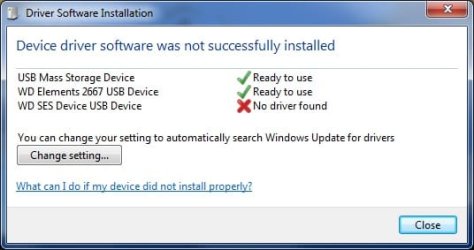
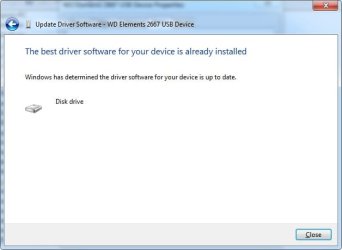
When I first connected the drive Windows reported that one of the driver elements had not installed successfully although the drive appeared to work perfectly well. When the connection problem appeared I naturally thought this installation failure was the cause so I went into Device Manager and used Update Driver to allow Windows to search online after which the offending element was reported as having installed correctly. Update Driver now reports it as up-to-date.

I have an older 1TB WD Elements that I've been using for a number of years which connects and disconnects properly without issues, the only difference being I plug that into one of the USB2 ports on the front of the PC.

I'd be interested to receive any thoughts on the problem.
 

My Computer

Computer type
PC/Desktop
Computer Manufacturer/Model Number
Home build
OS
Windows 7 Professional 64-bit SP1
CPU
Pentium Core i5-2500 3.3GHz
Motherboard
Gigabyte P61-USB3-B3
Memory
2 x 4GB DDR3 1333MHz
Graphics Card(s)
Asus GT440 1GB GDDR5
Sound Card
Realtek integrated sound
Monitor(s) Displays
LG L1942PE
Screen Resolution
1280 x 1024 @ 60Hz
Hard Drives
2 x 1TB Western Digital WD10EARS, 1 x 1TB Seagate ST1000DM010
PSU
EVGA 450BR
Case
Novatech Panther ATX
Cooling
Sharkoon Silent Eagle 1000 120mm in case rear extracting
Keyboard
Logitech K120

My Computer

Computer type
PC/Desktop
Computer Manufacturer/Model Number
medionl/Aspire 6930G/acer x55a
OS
W7 home premium 32bit/W7HP 64bit/w10 tp insider ring
CPU
E5300 dual core
Motherboard
medion MS7366
Memory
3gb
Graphics Card(s)
Nvidia Geforce 7100 Nforce 630i
Monitor(s) Displays
avixc
Internet Speed
n (isp resticted to 72)
Antivirus
mse/pands
Browser
palemoon
Other Info
Belkin Fd7050 n USB using Railink RT2870 drivers, more upto date
I have to disagree with Torchwood here, I'm afraid.

I'm running a Win 7 Pro Hp250 laptop (as one of three machines in a small home network). This has a WD Elements 4Tb external USB3 disk running off it successfully for well over 12 months now. The WD is formatted as a basic GPT with 3726Gb available in a single partition.

The PC is an i5-8265U with 16Gb RAM. BIOS (not UEFI) with the C: drive formatted as MBR and NTFS.

So, amongst things for Gwaihir to try, perhaps first is a simple "chkdsk /f X:", where X: is the WD drive letter. I have found that the WD Elements is somewhat sensitive to being pulled on and off. Fairly regular "chkdsk /f" maintenance is useful.

Also - and this should be done anyway - he should go into Control Panel > Disk Drives > other-click WD Elements > Properties > Policies tab and *ensure* that the external WD is not configured with Write Caching on (that is, configure as Quick Removal). Using Write Cache may increase operational speed of the drive but it risks corruption when the external drive is removed, despite using the "Safely Remove ..." option. At the least, the external drive's controller ROM chip can quickly become knotted up.
 

My Computer

Computer type
Laptop
Computer Manufacturer/Model Number
HP 250 G7
OS
Windows 7 Pro x64
CPU
Intel i5-8265U
Motherboard
Intel Coffee Lake
Memory
8gb
Graphics Card(s)
Intel Iris Plus 655
Sound Card
Realtek HDA
Monitor(s) Displays
Generic
Screen Resolution
1366 x 768
Hard Drives
Crucial P5 NVMe 1Tb internal
WD's 4Tb, 3Tb, 2 x 2Tb external
Mouse
Logi wireless
Internet Speed
45 Mbps
Antivirus
AVG
Browser
Firefox 88, Pale Moon 29, Brave 129
Other Info
Combination of i5-8265U with Crucial P5 achieves Crystal Bench scores > 5000

Iris Plus GPU (Whiskey Lake) driver from BioStar

HP 250 G7 is a budget machine
Thank you both for your replies. I haven't split it into smaller partitions and hadn't considered that the disk capacity might cause a problem but like with ian50 it appears in Windows Explorer as a basic GPT with a capacity of 3.63Tb. This leads me to believe this single partition should be ok and I'd prefer not to split unless really necessary. The Policies tab shows it is already configured as Quick Removal and chkdsk reports no problems detected.

Since there is clearly a difference of opinion on the maximum capacity supported by Windows 7 it would be useful to get some more opinions and see what the general consensus is on this subject.
 

My Computer

Computer type
PC/Desktop
Computer Manufacturer/Model Number
Home build
OS
Windows 7 Professional 64-bit SP1
CPU
Pentium Core i5-2500 3.3GHz
Motherboard
Gigabyte P61-USB3-B3
Memory
2 x 4GB DDR3 1333MHz
Graphics Card(s)
Asus GT440 1GB GDDR5
Sound Card
Realtek integrated sound
Monitor(s) Displays
LG L1942PE
Screen Resolution
1280 x 1024 @ 60Hz
Hard Drives
2 x 1TB Western Digital WD10EARS, 1 x 1TB Seagate ST1000DM010
PSU
EVGA 450BR
Case
Novatech Panther ATX
Cooling
Sharkoon Silent Eagle 1000 120mm in case rear extracting
Keyboard
Logitech K120
It's not really just an opinion on whether a Win7 non-EUFI machine can use an external 4TB USB3 disk as a single partition. It can and does. Whether one might want to is a different question - and not one I'm addressing here. A 4TB disk cannot be used as a C: drive on a non-EUFI machine, but it functions externally perfectly well. I run external WD Elements's as 2, 3 and 4TB - all of them function properly but need the "chkdsk /f" maintenance, perhaps weekly.

So you've done the software moves - "chkdsk /f" and no Write Cache - without result. That seems to leave a hardware issue.

Go into Device Manager and uninstall the external WD disk (just be sure that it's correctly identified first) - then use the Action tab to re-install it. A lot of times re-installing hardware resolves issues. If no joy, can you try the WD disk on another machine (a friend, whoever).

- - - Updated - - -

Just realised I hadn't included another common reason for high capacity external WD Elements USB3 disks to fall over.

They are also sensitive to fluctuations in power supply, even minor fluctuations. I don't run more than two (2) at a time off a USB3 hub. I've found that running three almost guarantees that one at least falls over, with random access reliability. One way to test this is to try different USB ports, adding successive loads to watch what happens.
 

My Computer

Computer type
Laptop
Computer Manufacturer/Model Number
HP 250 G7
OS
Windows 7 Pro x64
CPU
Intel i5-8265U
Motherboard
Intel Coffee Lake
Memory
8gb
Graphics Card(s)
Intel Iris Plus 655
Sound Card
Realtek HDA
Monitor(s) Displays
Generic
Screen Resolution
1366 x 768
Hard Drives
Crucial P5 NVMe 1Tb internal
WD's 4Tb, 3Tb, 2 x 2Tb external
Mouse
Logi wireless
Internet Speed
45 Mbps
Antivirus
AVG
Browser
Firefox 88, Pale Moon 29, Brave 129
Other Info
Combination of i5-8265U with Crucial P5 achieves Crystal Bench scores > 5000

Iris Plus GPU (Whiskey Lake) driver from BioStar

HP 250 G7 is a budget machine
Ok, I'll do a bit more experimenting. I have a second desktop PC with similar specs running the same version of Windows which my wife uses so I'll try the drive on that when I get an opportunity.

Re: the number of USB ports in use I have mouse, keyboard, scanner and printer on USB2 and only the 4Tb drive on USB3. The scanner and printer are turned off. I did use both drives concurrently yesterday with the 4Tb on USB3 and the 1Tb on USB2. I used the "Safely Remove..." for the 1Tb which worked normally (I haven't checked yet but I suspect this is also probably configured for Quick Removal). I left the 4TB connected until I shut the machine down and that completed normally but interestingly this morning when I went to disconnect the 1Tb drive with "Safely Remove..." the pop-up also listed the 4Tb drive even though it wasn't connected.
 

My Computer

Computer type
PC/Desktop
Computer Manufacturer/Model Number
Home build
OS
Windows 7 Professional 64-bit SP1
CPU
Pentium Core i5-2500 3.3GHz
Motherboard
Gigabyte P61-USB3-B3
Memory
2 x 4GB DDR3 1333MHz
Graphics Card(s)
Asus GT440 1GB GDDR5
Sound Card
Realtek integrated sound
Monitor(s) Displays
LG L1942PE
Screen Resolution
1280 x 1024 @ 60Hz
Hard Drives
2 x 1TB Western Digital WD10EARS, 1 x 1TB Seagate ST1000DM010
PSU
EVGA 450BR
Case
Novatech Panther ATX
Cooling
Sharkoon Silent Eagle 1000 120mm in case rear extracting
Keyboard
Logitech K120
I have a similar age Gigabyte motherboard but mine is for AMD. Back then these Gigabyte motherboards had a proprietary EFI BIOS instead of UEFI. With EFI there was some support for drives larger than 2.2GB. It says this in the motherboard manual:

EFI CD/DVD Boot Option
Set this item to EFI if you want to install the operating system to a hard drive larger than 2.2 TB. Make sure the operating system to be installed supports booting from a GPT partition, such as Windows 7 64-bit and Windows Server 2003 64-bit. Auto lets the BIOS automatically configure this setting depending on the hard drive you install. (Default: Auto)
 

My Computers

System One System Two

  • Computer type
    PC/Desktop
    Computer Manufacturer/Model Number
    Custom build
    OS
    Windows 7 Home Premium 64-bits
    CPU
    AMD FX-8350
    Motherboard
    Gigabyte GA-990FXA-UD3 (AM3+)
    Memory
    GSKILL Ripjaw-X PC3 12800 8GB (2x4GB)
    Graphics Card(s)
    ASUS ROG STRIX GTX 1060 6GB
    Sound Card
    Integrated
    Monitor(s) Displays
    Asus VE228H (21.5-in)
    Screen Resolution
    1920x1080 60Hz
    Hard Drives
    SAMSUNG 870 EVO 2.5 Inch SATA SSD (1TB)
    SAMSUNG 870 EVO 2.5 Inch SATA SSD (1TB)
    SAMSUNG 870 EVO 2.5 Inch SATA SSD (1TB)
    PSU
    Corsair RM750x (750 watts)
    Case
    Corsair Carbide Series 200R
    Cooling
    Corsair Hydro Series H60 (CWCH60)
    Keyboard
    Logitech Elite
    Mouse
    Logitech M510 Wireless Mouse
    Internet Speed
    Comcast Gigabit Extra (1200Mbps down / 35Mbps up)
    Antivirus
    Malwarebytes
    Browser
    Firefox, Edge, Chrome
    Other Info
    ASUS DRW-24B1ST DVD-RW (24X) optical drive
    Seagate Expansion Desk (5TB) external SATA/USB HDD
    Comcast XB8 Internet Gateway
  • Computer type
    PC/Desktop
    System Manufacturer/Model Number
    Custom
    OS
    Windows 7 Pro (64-bit)
    CPU
    AMD Phenom II 960T X4
    Motherboard
    ASUS M4N82 Deluxe
    Memory
    Corsair XMS2 DDR2-800 8GB (4x2GB)
    Graphics Card(s)
    ASUS ENGTX560 DCII OC/2DI/1GD5 1GB
    Monitor(s) Displays
    Samsung 930B 19-inch LCD
    Screen Resolution
    1280x1024
    Hard Drives
    Samsung SSD 870 EVO 1000 GB (Windows 10)
    Seagate ST1000DM003 1000 GB (Windows 7)
    PSU
    Antec TruePower (new) TP-650
    Case
    Antec Three Hundred
    Cooling
    AMD stock cooler from FX8350
    Mouse
    Logitech M100
    Internet Speed
    Xfinity Gigabit Extra 1200/35 Mbps
Hi MisterEd, thanks for your reply. The manual for my Gigabyte GA-P61-USB3-B3 motherboard doesn't give many details on the BIOS other than it's an Award Modular BIOS V6.00PG.

I haven't got any further with trying fixes on my own PC but I have tried the drive in the other PC which has a Gigabyte GA-Z77-DS3H with Intel Core i5 3550 3.3GHz cpu. The driver installation reported a partial failure identical to mine, as shown in the attached screenshot, but despite this the drive works and, significantly, disconnects properly with notification sound and does not cause a BSOD when shutting down. I did try letting Windows search online for a driver but it just reported that the existing one was up-to-date, even though one element has clearly not been installed.

I then decided to uninstall the drive but the next time I plugged it in it immediately appeared in the device manager window, which I'd left open, without reporting re-installation of the driver so I'm not sure what happened there.

The architectures of the machines differ markedly in terms of the internal disk drives and interface adaptors installed so I'm not sure this result tells us much.
 

Attachments

  • Driver install failure.jpg
    Driver install failure.jpg
    48.1 KB · Views: 5
Last edited:

My Computer

Computer type
PC/Desktop
Computer Manufacturer/Model Number
Home build
OS
Windows 7 Professional 64-bit SP1
CPU
Pentium Core i5-2500 3.3GHz
Motherboard
Gigabyte P61-USB3-B3
Memory
2 x 4GB DDR3 1333MHz
Graphics Card(s)
Asus GT440 1GB GDDR5
Sound Card
Realtek integrated sound
Monitor(s) Displays
LG L1942PE
Screen Resolution
1280 x 1024 @ 60Hz
Hard Drives
2 x 1TB Western Digital WD10EARS, 1 x 1TB Seagate ST1000DM010
PSU
EVGA 450BR
Case
Novatech Panther ATX
Cooling
Sharkoon Silent Eagle 1000 120mm in case rear extracting
Keyboard
Logitech K120
It is the driver causing the erratic behaviour.

My Device Manager reports for WD SES Device:

Western Digital Technologies as Driver Provider

Driver Date 6/07/2020

Version 4.55.25.661

WD does offer drivers for the Elements drives. You can search their site and try one driver after the other till one works.

The SES driver on my system does not actually show in Device Manager until the drive is plugged in. It's quite annoying in a way that WD decided to go somewhat lone star on this drive type while other drives it supplies use the standard MS drivers. Anyway, you should be able to resolve your issue from the WD websites.
 

My Computer

Computer type
Laptop
Computer Manufacturer/Model Number
HP 250 G7
OS
Windows 7 Pro x64
CPU
Intel i5-8265U
Motherboard
Intel Coffee Lake
Memory
8gb
Graphics Card(s)
Intel Iris Plus 655
Sound Card
Realtek HDA
Monitor(s) Displays
Generic
Screen Resolution
1366 x 768
Hard Drives
Crucial P5 NVMe 1Tb internal
WD's 4Tb, 3Tb, 2 x 2Tb external
Mouse
Logi wireless
Internet Speed
45 Mbps
Antivirus
AVG
Browser
Firefox 88, Pale Moon 29, Brave 129
Other Info
Combination of i5-8265U with Crucial P5 achieves Crystal Bench scores > 5000

Iris Plus GPU (Whiskey Lake) driver from BioStar

HP 250 G7 is a budget machine
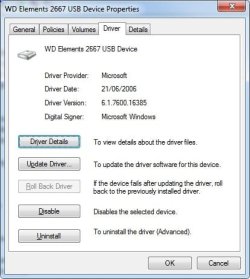
My Device Manager shows the driver provider as Microsoft. I've looked on WD Support but can't find any drivers for download. When I go to 'Download Software, Firmware and Drivers for WD Products', then select 'WD Elements SE' from the list (the only item listed as "Elements") it takes me to a page where the only downloads are for software called 'WD Discovery' and 'WD Drive Utilities'. If you know of another part of WD's site where I might find some drivers I'd be most grateful.

As you can see, if I try to update the driver from within Device Manager it simply says the best driver is already installed and is up to date. I'm ready to try one or more WD drivers if I can find them.
 

Attachments

  • Provider.jpg
    Provider.jpg
    63.3 KB · Views: 6
  • Update.jpg
    Update.jpg
    42.1 KB · Views: 5

My Computer

Computer type
PC/Desktop
Computer Manufacturer/Model Number
Home build
OS
Windows 7 Professional 64-bit SP1
CPU
Pentium Core i5-2500 3.3GHz
Motherboard
Gigabyte P61-USB3-B3
Memory
2 x 4GB DDR3 1333MHz
Graphics Card(s)
Asus GT440 1GB GDDR5
Sound Card
Realtek integrated sound
Monitor(s) Displays
LG L1942PE
Screen Resolution
1280 x 1024 @ 60Hz
Hard Drives
2 x 1TB Western Digital WD10EARS, 1 x 1TB Seagate ST1000DM010
PSU
EVGA 450BR
Case
Novatech Panther ATX
Cooling
Sharkoon Silent Eagle 1000 120mm in case rear extracting
Keyboard
Logitech K120
Try putting:

WD 11.55.25.661 download

in the search box.

This takes you directly to a WD webpage with heaps of stuff ... really.

If none of that helps, try plugging the drive into a Win10 PC and using Device Manager to list which drivers it uses, then search for those to try.
 

My Computer

Computer type
Laptop
Computer Manufacturer/Model Number
HP 250 G7
OS
Windows 7 Pro x64
CPU
Intel i5-8265U
Motherboard
Intel Coffee Lake
Memory
8gb
Graphics Card(s)
Intel Iris Plus 655
Sound Card
Realtek HDA
Monitor(s) Displays
Generic
Screen Resolution
1366 x 768
Hard Drives
Crucial P5 NVMe 1Tb internal
WD's 4Tb, 3Tb, 2 x 2Tb external
Mouse
Logi wireless
Internet Speed
45 Mbps
Antivirus
AVG
Browser
Firefox 88, Pale Moon 29, Brave 129
Other Info
Combination of i5-8265U with Crucial P5 achieves Crystal Bench scores > 5000

Iris Plus GPU (Whiskey Lake) driver from BioStar

HP 250 G7 is a budget machine
I wasn't sure if you meant putting that string into my search engine (DuckDuckGo) or in the search box on WD's site. I tried both. The search engine only offered the same WD pages as previous searches and the WD search only took me to a page offering product documentation downloads.

I will try the drive in my laptop that runs Windows 10 and report back. Actually it's probably not worth pursuing this much further. Once I've finished my current project the drive will be put in a safe place and rarely used after that. I can live with it at the moment as shutting down the machine before disconnecting gives no problems.

Thanks for your help and perseverence.
 

My Computer

Computer type
PC/Desktop
Computer Manufacturer/Model Number
Home build
OS
Windows 7 Professional 64-bit SP1
CPU
Pentium Core i5-2500 3.3GHz
Motherboard
Gigabyte P61-USB3-B3
Memory
2 x 4GB DDR3 1333MHz
Graphics Card(s)
Asus GT440 1GB GDDR5
Sound Card
Realtek integrated sound
Monitor(s) Displays
LG L1942PE
Screen Resolution
1280 x 1024 @ 60Hz
Hard Drives
2 x 1TB Western Digital WD10EARS, 1 x 1TB Seagate ST1000DM010
PSU
EVGA 450BR
Case
Novatech Panther ATX
Cooling
Sharkoon Silent Eagle 1000 120mm in case rear extracting
Keyboard
Logitech K120
Last try ...

As mentioned, I have a 3TB WD external drive on a second, older backup-type HP250 laptop. Again, one single partition.

Details here:

Win7, HP250 8GB RAM. i3 5005UWD Elements 2620 USB Device 3TB, 1 single partition, GPT, NTFS, external driveDriver MS 21/06/06, version 6.1.7601.23403Driver details [\windows\system32\]:disk.sys, fltsrv.sys, laNVMeF.sys, iaStorF.sys, partmgr.sys, secnvmeF.sys

This external disk works ok with "chkdsk /f" maintenance when I try to stick to schedule.

This disk is not an WD SES model but the driver list above may give clues to help you, especially if you can list down what happens when you plug it into a Win10 PC for comparison.
 

My Computer

Computer type
Laptop
Computer Manufacturer/Model Number
HP 250 G7
OS
Windows 7 Pro x64
CPU
Intel i5-8265U
Motherboard
Intel Coffee Lake
Memory
8gb
Graphics Card(s)
Intel Iris Plus 655
Sound Card
Realtek HDA
Monitor(s) Displays
Generic
Screen Resolution
1366 x 768
Hard Drives
Crucial P5 NVMe 1Tb internal
WD's 4Tb, 3Tb, 2 x 2Tb external
Mouse
Logi wireless
Internet Speed
45 Mbps
Antivirus
AVG
Browser
Firefox 88, Pale Moon 29, Brave 129
Other Info
Combination of i5-8265U with Crucial P5 achieves Crystal Bench scores > 5000

Iris Plus GPU (Whiskey Lake) driver from BioStar

HP 250 G7 is a budget machine
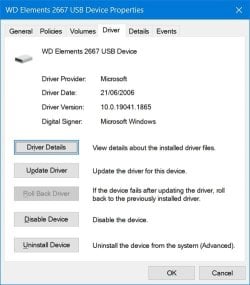
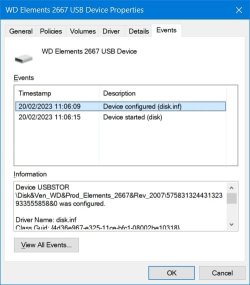
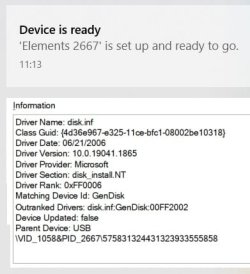
Okay, I've connected the 4TB drive to my laptop. It installed without errors and connects and disconnects cleanly. I wasn't able to grab any of the pop-ups during installation but I've extracted the attached information from Device manager. (using Paint to stitch together the contents of the 'Information' window). I note the driver date is the same as yours but the version is different, I assume because of the different drive capacities.

I also note that your driver is MS whereas I thought you said it was WD.

I honestly don't think it's worth going any further with this. I can live with it and at some point I'm going to have to perform a repair install of Windows as the system file checker reports some corrupted files it can't repair. Whether that's related to this problem is a moot point. The other Windows 7 PC also has corrupted files although they're not the same ones (and the drive performs correctly on that one). Both machines otherwise seem to work ok.
 

Attachments

  • WD1.jpg
    WD1.jpg
    70 KB · Views: 2
  • WD2.jpg
    WD2.jpg
    68.4 KB · Views: 3
  • WD3.jpg
    WD3.jpg
    50.9 KB · Views: 2

My Computer

Computer type
PC/Desktop
Computer Manufacturer/Model Number
Home build
OS
Windows 7 Professional 64-bit SP1
CPU
Pentium Core i5-2500 3.3GHz
Motherboard
Gigabyte P61-USB3-B3
Memory
2 x 4GB DDR3 1333MHz
Graphics Card(s)
Asus GT440 1GB GDDR5
Sound Card
Realtek integrated sound
Monitor(s) Displays
LG L1942PE
Screen Resolution
1280 x 1024 @ 60Hz
Hard Drives
2 x 1TB Western Digital WD10EARS, 1 x 1TB Seagate ST1000DM010
PSU
EVGA 450BR
Case
Novatech Panther ATX
Cooling
Sharkoon Silent Eagle 1000 120mm in case rear extracting
Keyboard
Logitech K120
Ok, you had a really good go at it.

Perhaps you were confused as I have two (2) separate WD drives, 4TB and 3TB, on two separate HP250 laptops. Both are set as single partitions - the 4TB is a WD SES device (the one I've used as a template to try and track your problem with) while the 3TB is stock standard and using standard MS drivers.

The WD SES drive is installed using a driver from WD called "WD SES Driver Setup (x64).msi". Although I have this stored on the disk (and just found it), sadly it's not available online anywhere now. WD have removed it to encourage takeup of Win 11 - at least, that's what the WD sites say.

A familiar story - chasing drivers for Win 7. Perhaps some driver sites such as Station Drivers may have retained older downloads.
 

My Computer

Computer type
Laptop
Computer Manufacturer/Model Number
HP 250 G7
OS
Windows 7 Pro x64
CPU
Intel i5-8265U
Motherboard
Intel Coffee Lake
Memory
8gb
Graphics Card(s)
Intel Iris Plus 655
Sound Card
Realtek HDA
Monitor(s) Displays
Generic
Screen Resolution
1366 x 768
Hard Drives
Crucial P5 NVMe 1Tb internal
WD's 4Tb, 3Tb, 2 x 2Tb external
Mouse
Logi wireless
Internet Speed
45 Mbps
Antivirus
AVG
Browser
Firefox 88, Pale Moon 29, Brave 129
Other Info
Combination of i5-8265U with Crucial P5 achieves Crystal Bench scores > 5000

Iris Plus GPU (Whiskey Lake) driver from BioStar

HP 250 G7 is a budget machine
Pasting your quoted string into my search engine I found this on a site called Techspot. It does say this SES driver is not required for the PC to recognise the drive (and it looks like this is the one that failed to install) so it appears to be an add-on for extra features "such as password protection, LED control, and access to the drives label if applicable" that I'll probably never need.

I think it's probably best to call it a day and I can only thank you again for your patience and perseverance.
 

My Computer

Computer type
PC/Desktop
Computer Manufacturer/Model Number
Home build
OS
Windows 7 Professional 64-bit SP1
CPU
Pentium Core i5-2500 3.3GHz
Motherboard
Gigabyte P61-USB3-B3
Memory
2 x 4GB DDR3 1333MHz
Graphics Card(s)
Asus GT440 1GB GDDR5
Sound Card
Realtek integrated sound
Monitor(s) Displays
LG L1942PE
Screen Resolution
1280 x 1024 @ 60Hz
Hard Drives
2 x 1TB Western Digital WD10EARS, 1 x 1TB Seagate ST1000DM010
PSU
EVGA 450BR
Case
Novatech Panther ATX
Cooling
Sharkoon Silent Eagle 1000 120mm in case rear extracting
Keyboard
Logitech K120
Back
Top