Solved DPC Latency spikes

JoeW

New member
Local time
8:31 PM
Messages
30
Hi

I have been having problems on my PC with pops and clicks in audio on the following setup

Mobo: Gigabyte EP45-UD3P
Proc: Intel E8400
Ram: 16GB OCZ Gold Ram
GPU: NVidia 9600GT
HD: Corsair Force 3 120GB
Sound: Focusrite Saffire Pro 40

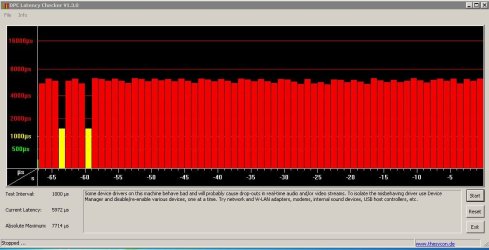
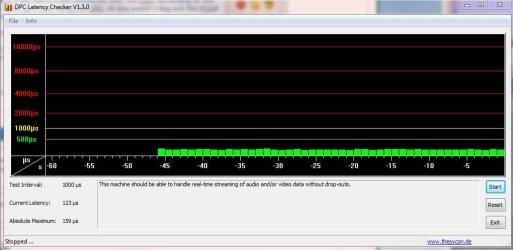
I have stripped back the motherboard to bare minimum, change W7 settings to performance and the DPC latency results for the E8400 are shown as the left pic. For testing I replaced the CPU with a celeron and the celeron results are also shown as the right pic.

I have also tried different RAM with the same results, disabling processor control in BIOS and disabling LAN, Firewire and USB. In addition I have tried the mobo without the GPU and testing via RDP.

Can anyone shed any light on what this might be? Do I have a faulty mobo?

Thanks
 

Attachments
  • E8400.JPG
    E8400.JPG
    91 KB · Views: 160
  • Celeron.JPG
    Celeron.JPG
    78.5 KB · Views: 115

My Computer

OS
Windows 7 Ultimate x64
CPU
Intel Core 2 Duo E8400
Motherboard
Gigabyte GA-EP45-UD3P
Memory
16GB OCZ Gold
Graphics Card(s)
NVidia 9600GT 1024MB
Sound Card
Focusrite Saffire Pro 40
Monitor(s) Displays
2x Samsung 2433BW
Screen Resolution
1920 x 1200
Hard Drives
Corsair Force 3 120GB SSD
PSU
BeQuiet Straightpower 600W White
Case
Lian Li Rack
Cooling
Arctic Freezer Pro
Keyboard
MS Wireless Keyboard 3000
Mouse
MS Wireless Mouse 5000
Internet Speed
8MB
Hi

I have been having problems on my PC with pops and clicks in audio on the following setup

Mobo: Gigabyte EP45-UD3P
Proc: Intel E8400
Ram: 16GB OCZ Gold Ram
GPU: NVidia 9600GT
HD: Corsair Force 3 120GB
Sound: Focusrite Saffire Pro 40

I have stripped back the motherboard to bare minimum, change W7 settings to performance and the DPC latency results for the E8400 are shown as the left pic. For testing I replaced the CPU with a celeron and the celeron results are also shown as the right pic.

I have also tried different RAM with the same results, disabling processor control in BIOS and disabling LAN, Firewire and USB. In addition I have tried the mobo without the GPU and testing via RDP.

Can anyone shed any light on what this might be? Do I have a faulty mobo?

Thanks

More information about audio and latency (and another app to test) here. Resplendence Software - LatencyMon: DPC, ISR and pagefault execution monitor
 

My Computer

Computer Manufacturer/Model Number
HP Pavillion dv-7 1005 Tx
OS
Win 8 Release candidate 8400
CPU
[email protected]
Memory
4 gigs
Graphics Card(s)
Nvidia 9600M
Sound Card
HD built-in
Monitor(s) Displays
17" Wxga
Screen Resolution
1440x900
Cooling
none
Internet Speed
45Mb down 5Mb up
That Resplendence Latency Monitor mis identified a device in my system. It first said everything was OK for audio (which it is) and then later said I should disable the wireless (wi fi) interface and I don't have wireless on my DAW desktop. I can't put much faith in software that mis identifies devices.

I use this PC for Recording with Sonar (X1) and a Focusrite Saffire Pro 40 firewire recording interface unit. I have an Intel motherboard rather than the gigabyte. I built this PC about 3 years ago and it's worked flawlessly for recording.

I would think the original poster's problems could be the motherboard. I've seen other posts about some gigabyte motherboards, but don't remember the models.
 

My Computer

Computer type
PC/Desktop
Computer Manufacturer/Model Number
My Own Build
OS
Windows 10 64 bit
CPU
Intel i7 6700K
Motherboard
ASUS ROG Maximus VIII Hero
Memory
16GB Corsair Dominator
Graphics Card(s)
Intel CPU Graphics
Sound Card
RealTek
Monitor(s) Displays
27" Dell S2719dgf
Screen Resolution
2560X1440
Hard Drives
1 TB Samsung 850 EVO SSD for Win 10 Pro
500GB Samsung 850 EVO SSD for Win 10 Insider
2 TB drive for backup
PSU
EVGA Supernova 750G2
Case
BeQuiet Silent Base 600
Cooling
Deepcool Captain 120EX
Keyboard
Microsoft Wireless 2000
Mouse
Microsoft wireless
Internet Speed
100 MB/sec (Cable)
Antivirus
Microsoft Defender and Malwarebytes
Browser
Edge/Firefox
Other Info
Cakewalk (Sonar) by BandLab and Studio One 4.1 Pro recording studio software. MOTU 896Mk3 Hybrid recording interface, Frontier Tranzport wireless control unit, Behringer X-Touch Control Surface.
Five USB connected optical drives for CD Audio production using Nero BurningROM
I would think the original poster's problems could be the motherboard. I've seen other posts about some gigabyte motherboards, but don't remember the models.

I'm beginning to think along the same lines, I've uninstalled Intel Matrix software which I don't need and was high on the latency mon list. Should I be looking at Highest Execution or TOtal Execution for the problem driver?

Also which Intel mobo are you using? I have my eye on another ep45 board on eBay but if its an inherent fault I'll steer clear. I did a DPC test on my MSI G45M mobo and its flawless. Trouble is that mobo is being used for my media server.

I bought the UD3P because it was recommended for audio and it has a TI firewire chipset.
 

My Computer

OS
Windows 7 Ultimate x64
CPU
Intel Core 2 Duo E8400
Motherboard
Gigabyte GA-EP45-UD3P
Memory
16GB OCZ Gold
Graphics Card(s)
NVidia 9600GT 1024MB
Sound Card
Focusrite Saffire Pro 40
Monitor(s) Displays
2x Samsung 2433BW
Screen Resolution
1920 x 1200
Hard Drives
Corsair Force 3 120GB SSD
PSU
BeQuiet Straightpower 600W White
Case
Lian Li Rack
Cooling
Arctic Freezer Pro
Keyboard
MS Wireless Keyboard 3000
Mouse
MS Wireless Mouse 5000
Internet Speed
8MB
I have an older MB, the DP35DP and it has the T.I. firewire chipset. I'm using a Q6600 CPU.
 

My Computer

Computer type
PC/Desktop
Computer Manufacturer/Model Number
My Own Build
OS
Windows 10 64 bit
CPU
Intel i7 6700K
Motherboard
ASUS ROG Maximus VIII Hero
Memory
16GB Corsair Dominator
Graphics Card(s)
Intel CPU Graphics
Sound Card
RealTek
Monitor(s) Displays
27" Dell S2719dgf
Screen Resolution
2560X1440
Hard Drives
1 TB Samsung 850 EVO SSD for Win 10 Pro
500GB Samsung 850 EVO SSD for Win 10 Insider
2 TB drive for backup
PSU
EVGA Supernova 750G2
Case
BeQuiet Silent Base 600
Cooling
Deepcool Captain 120EX
Keyboard
Microsoft Wireless 2000
Mouse
Microsoft wireless
Internet Speed
100 MB/sec (Cable)
Antivirus
Microsoft Defender and Malwarebytes
Browser
Edge/Firefox
Other Info
Cakewalk (Sonar) by BandLab and Studio One 4.1 Pro recording studio software. MOTU 896Mk3 Hybrid recording interface, Frontier Tranzport wireless control unit, Behringer X-Touch Control Surface.
Five USB connected optical drives for CD Audio production using Nero BurningROM
That Resplendence Latency Monitor mis identified a device in my system. It first said everything was OK for audio (which it is) and then later said I should disable the wireless (wi fi) interface and I don't have wireless on my DAW desktop. I can't put much faith in software that mis identifies devices.

Thanks for the feedback. Still your problem is related to a network device, were you pulling the plug by any chance ? In a next release we will make that "At least one detected problem appears to be network related. In case you are using a wireless adapter, try disabling it to get better results."


Should I be looking at Highest Execution or TOtal Execution for the problem driver?

You should look at "highest execution time" first.

//Daniel
 

My Computer

OS
Win7 x64
I just ran it to see what it does. I don't personally have any problems, either dropouts, static, or whatever, although the program told me I did.

I have a wired Intel NIC (Intel motherboard).

I record using Sonar X1c Professional and a Saffire Pro 40 firewire connected recording interface unit.

My regular PC audio is a PCI HT Omega Striker 7.1 sound card that has worked flawlessly for regular PC audio.
 

My Computer

Computer type
PC/Desktop
Computer Manufacturer/Model Number
My Own Build
OS
Windows 10 64 bit
CPU
Intel i7 6700K
Motherboard
ASUS ROG Maximus VIII Hero
Memory
16GB Corsair Dominator
Graphics Card(s)
Intel CPU Graphics
Sound Card
RealTek
Monitor(s) Displays
27" Dell S2719dgf
Screen Resolution
2560X1440
Hard Drives
1 TB Samsung 850 EVO SSD for Win 10 Pro
500GB Samsung 850 EVO SSD for Win 10 Insider
2 TB drive for backup
PSU
EVGA Supernova 750G2
Case
BeQuiet Silent Base 600
Cooling
Deepcool Captain 120EX
Keyboard
Microsoft Wireless 2000
Mouse
Microsoft wireless
Internet Speed
100 MB/sec (Cable)
Antivirus
Microsoft Defender and Malwarebytes
Browser
Edge/Firefox
Other Info
Cakewalk (Sonar) by BandLab and Studio One 4.1 Pro recording studio software. MOTU 896Mk3 Hybrid recording interface, Frontier Tranzport wireless control unit, Behringer X-Touch Control Surface.
Five USB connected optical drives for CD Audio production using Nero BurningROM
The problems will arise as soon as you will start live playing or recording. For instance if you try to reduce the time you have to wait after a key press on your MIDI keyboard until you hear a sound when using a software synthesizer. This is done by limiting the buffer sizes of your audio driver. In the end it depends on what midi to audio latency you consider acceptable, I can personally live with up to 10ms. If you are used to playing a pipe organ that is probably more. If you start hearing clicks, pops or cracks you know where you can look to solve the problem.
 

My Computer

OS
Win7 x64
The problems will arise as soon as you will start live playing or recording. For instance if you try to reduce the time you have to wait after a key press on your MIDI keyboard until you hear a sound when using a software synthesizer. This is done by limiting the buffer sizes of your audio driver. In the end it depends on what midi to audio latency you consider acceptable, I can personally live with up to 10ms. If you are used to playing a pipe organ that is probably more. If you start hearing clicks, pops or cracks you know where you can look to solve the problem.

This is part of the reason I am trying to sort this. I use my pro40 to record up to 4 instruments which are played by a midi interface (midisport 8). Audio latency is a spontaneity killer and I am also seeking the illusive sub 10ms latency. That given I get pops and clicks from 64 all the way up to 512 sample buffers.

I know my equipment is capable of 64 sample buffer as I have acheived this using Hackintosh on the same hardware through Core Audio.

Using Latency Mon I think I might have found the culprits:

Wdf01000.sys and USBPORT.sys both at 5-6ms.

I am using a microsoft wireless desktop set which I imagine is probably using Logitech drivers.

Just ordering a wired keyboard and mouse now to see if that sorts it.
 

My Computer

OS
Windows 7 Ultimate x64
CPU
Intel Core 2 Duo E8400
Motherboard
Gigabyte GA-EP45-UD3P
Memory
16GB OCZ Gold
Graphics Card(s)
NVidia 9600GT 1024MB
Sound Card
Focusrite Saffire Pro 40
Monitor(s) Displays
2x Samsung 2433BW
Screen Resolution
1920 x 1200
Hard Drives
Corsair Force 3 120GB SSD
PSU
BeQuiet Straightpower 600W White
Case
Lian Li Rack
Cooling
Arctic Freezer Pro
Keyboard
MS Wireless Keyboard 3000
Mouse
MS Wireless Mouse 5000
Internet Speed
8MB
Wdf01000.sys and USBPORT.sys are difinitely the culprits.

Is there any way I can analyse the root cause of this any deeper? I understand both these drivers apply to a a number of bits of hardware.
 

My Computer

OS
Windows 7 Ultimate x64
CPU
Intel Core 2 Duo E8400
Motherboard
Gigabyte GA-EP45-UD3P
Memory
16GB OCZ Gold
Graphics Card(s)
NVidia 9600GT 1024MB
Sound Card
Focusrite Saffire Pro 40
Monitor(s) Displays
2x Samsung 2433BW
Screen Resolution
1920 x 1200
Hard Drives
Corsair Force 3 120GB SSD
PSU
BeQuiet Straightpower 600W White
Case
Lian Li Rack
Cooling
Arctic Freezer Pro
Keyboard
MS Wireless Keyboard 3000
Mouse
MS Wireless Mouse 5000
Internet Speed
8MB
I would try disabling your USB devices one by one by pulling them out or disabling them in the device manager to see if the problem goes away. Did you get your wired desktop set ? Did it not fix the problem ?
 

My Computer

OS
Win7 x64
I would try disabling your USB devices one by one by pulling them out or disabling them in the device manager to see if the problem goes away.

I have tried this and with nothing connected, in addition removing all non essential PCI cards and changing the graphics card there is no change.

Did you get your wired desktop set ? Did it not fix the problem ?

Again made no difference. The two processes mentioned earlier are unchanged. Got another EP45-UD3P mobo arriving soon so will see if that changes anything.
 

My Computer

OS
Windows 7 Ultimate x64
CPU
Intel Core 2 Duo E8400
Motherboard
Gigabyte GA-EP45-UD3P
Memory
16GB OCZ Gold
Graphics Card(s)
NVidia 9600GT 1024MB
Sound Card
Focusrite Saffire Pro 40
Monitor(s) Displays
2x Samsung 2433BW
Screen Resolution
1920 x 1200
Hard Drives
Corsair Force 3 120GB SSD
PSU
BeQuiet Straightpower 600W White
Case
Lian Li Rack
Cooling
Arctic Freezer Pro
Keyboard
MS Wireless Keyboard 3000
Mouse
MS Wireless Mouse 5000
Internet Speed
8MB
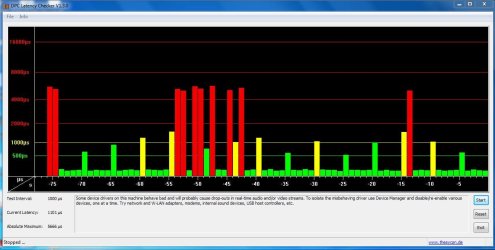
FIXED!

I bought another GA-EP45-UD3P off eBay a rev 1.6 this time.

I also noticed that my ATX 8 pin had a 4 pin connector from the PSU. According to the manual this should have been ok if only using one GPU. In any event I dug out the PCIx8 connector for my PSU and replaced the x4 one.

Latency is now fine as per the pic.

If anyone else has this problem check your PCI power connector. If that makes no difference its your mobo.
 

Attachments

  • DPC.JPG
    DPC.JPG
    56.4 KB · Views: 250

My Computer

OS
Windows 7 Ultimate x64
CPU
Intel Core 2 Duo E8400
Motherboard
Gigabyte GA-EP45-UD3P
Memory
16GB OCZ Gold
Graphics Card(s)
NVidia 9600GT 1024MB
Sound Card
Focusrite Saffire Pro 40
Monitor(s) Displays
2x Samsung 2433BW
Screen Resolution
1920 x 1200
Hard Drives
Corsair Force 3 120GB SSD
PSU
BeQuiet Straightpower 600W White
Case
Lian Li Rack
Cooling
Arctic Freezer Pro
Keyboard
MS Wireless Keyboard 3000
Mouse
MS Wireless Mouse 5000
Internet Speed
8MB
Back
Top