Drag & Drop - Problem

Priyank

New member
Local time
8:32 AM
Messages
15
I am having problem with saving the images wid dragging it on desktop

in all previous versions we were able to drag the images from our browser and drop it on desktop but can't do it in 7 ?

though i can do drag images directly from browsers in FOLDERS !!

if it is still possible it would be much easier, better !! :)


My Computer

Computer Manufacturer/Model Number
HP
OS
Windows 7 RC 7201 - 32 Bit
CPU
Intel core 2 cpu 1.60 GHz
Memory
2.5 GB
Graphics Card(s)
Nvidia Geforce Go 7400 - 128 MB
Hard Drives
160 GB internal, 160 GB & 1 TB External
Internet Speed
Upto 30 MBPS
What build are you running? (e.g. build 7000, 7077, 7100 etc)

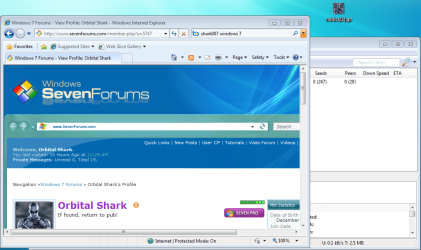
I've just tried it on 7201 & it works fine. Do you get any messages popup?
Capture.PNGCapture1.PNG
 

My Computer

Computer Manufacturer/Model Number
Compaq Desktop
OS
Windows 7 Ultimate x64
CPU
AMD Sempron Dual Core
Memory
3GB
Graphics Card(s)
NVIDIA GeForce 6150SE nForce 430
Screen Resolution
1024x768
Hard Drives
150GB Sata

My Computer

Computer Manufacturer/Model Number
HP
OS
Windows 7 RC 7201 - 32 Bit
CPU
Intel core 2 cpu 1.60 GHz
Memory
2.5 GB
Graphics Card(s)
Nvidia Geforce Go 7400 - 128 MB
Hard Drives
160 GB internal, 160 GB & 1 TB External
Internet Speed
Upto 30 MBPS
I'll try & look into it for you. Did you upgrade, or clean install as upgrades can cause some unpredictable behaviour.
 

My Computer

Computer Manufacturer/Model Number
Compaq Desktop
OS
Windows 7 Ultimate x64
CPU
AMD Sempron Dual Core
Memory
3GB
Graphics Card(s)
NVIDIA GeForce 6150SE nForce 430
Screen Resolution
1024x768
Hard Drives
150GB Sata
I'll try & look into it for you. Did you upgrade, or clean install as upgrades can cause some unpredictable behaviour.

I was running vista before, i directly installed os 7 from that but not dual boot

i choosed the second option the "custom (advanced)"


My Computer

Computer Manufacturer/Model Number
HP
OS
Windows 7 RC 7201 - 32 Bit
CPU
Intel core 2 cpu 1.60 GHz
Memory
2.5 GB
Graphics Card(s)
Nvidia Geforce Go 7400 - 128 MB
Hard Drives
160 GB internal, 160 GB & 1 TB External
Internet Speed
Upto 30 MBPS
Works on RC1(7100) Just try dragging my dp to the desktop. Maybe its the file type or something.
 

My Computer

Computer Manufacturer/Model Number
Hp 530
OS
Windows 7 RC1
CPU
Core Duo,1.6Ghz
Motherboard
T2300
Memory
1GB
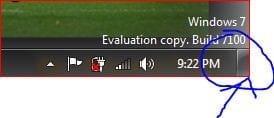
Got it atlast

if we drag the image anywhere on the taskbar, then it doesn't switches to desktop

but if we drag the image to "Show Desktop" on right side of time then i can !!
DD.JPG


This is good
 

My Computer

Computer Manufacturer/Model Number
HP
OS
Windows 7 RC 7201 - 32 Bit
CPU
Intel core 2 cpu 1.60 GHz
Memory
2.5 GB
Graphics Card(s)
Nvidia Geforce Go 7400 - 128 MB
Hard Drives
160 GB internal, 160 GB & 1 TB External
Internet Speed
Upto 30 MBPS
You can also 'restore' the active window (Win Key+Down) & drag & drop that way.
 

My Computer

Computer Manufacturer/Model Number
Compaq Desktop
OS
Windows 7 Ultimate x64
CPU
AMD Sempron Dual Core
Memory
3GB
Graphics Card(s)
NVIDIA GeForce 6150SE nForce 430
Screen Resolution
1024x768
Hard Drives
150GB Sata
Back
Top