
DreamScene - Install in Windows 7 and Vista

How to Install DreamScene in Windows 7 and Vista (non-Ultimate)


   Information
This will show you how to install & configure Windows DreamScene in Windows 7 and in Vista.This article applies to:
Windows 7:Home Basic,Home Premium,Proffessional,Ultimate (x32,x64)
Vista: Home Basic,Home Premium,Business (x32,x64)


Official DreamScenes is only available for Vista Ultimate (more details in this tutorial CLICK ) there is no DreamScene for Vista non-Ultimate versions and for Windows 7.In Windows 7 is only available slideshow pictures (more details here CLICK ).Neverless there are two unofficial methods to enable DreamScenes on Vista non-Ultimate and in Windows 7

METHOD I

This method based on DreamScene from Vista Ultimate, it adds DreamScene.dll to C:\Windows\System32 and DreamScene.dll.mui to C:\Windows\System32\en-us plus special fix to registry. On the Web there are many various DreamScene patches but unfortunatelly many of them is incorect done, some authors of their works seems do not accept fact there are 64bit systems as well :mad:, some installers not working when UAC is on, even more there are also installers not working when UAC is off, or some patches are unconfortable to install. Thus I recommend program made by @alfawaves from mydigitallife.info :) -it work great for all Vista non-Ultimate and Windows 7 all versions both 32 and 64bit.


I.How to install

It's very easy to install,just download application from below:


Download


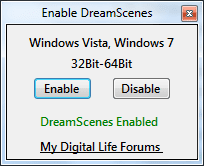
unpack it,and place it in anywhere,run Enable DreamScenes.exe

DreamScene2.png


and click Enable bottom,next choose "reboot Windows",apply and after restarting system you can enjoy DreamScene
DreamScene.png

II.How to use

WHAT KIND OF VIDEO FORMATS ARE SUPPORTED?

Windows DreamScene only allows files in *.MPG and *.WMV extension to be set as wallpaper,and officiall only these media are supported.
However there is way to workaround it and play also other video formats.

HOW TO PLAY OTHER VIDEO FILES (different than *.MPG,*.WMV)

To do that make sure you have proper codec installed.For example if you want play DivX video you have to install DivX codec,etc.Probably you want to play many various video formats,the best solution would be install any good codec pack.I recommend install Shark007 codecs Shark007's FREE Codec solutions - Windows 7 codecs,next add extra extension *.MPG or *.WMV to the end of the file name what do you want play,i.e if the file name is DreamScene.avi you have to rename it to Dreamscene.avi.mpg or to DreamScene.avi.wmv


SET VIDEO CLIP AS WALLPAPER

There are two methods to set video clip as animated wallpaper

1. METHOD I (work only for Vista)

right click on Desktop>>Personalization>>Desktop Background,choose video clip and apply

2.METHOD II (work for Vista and Windows 7)

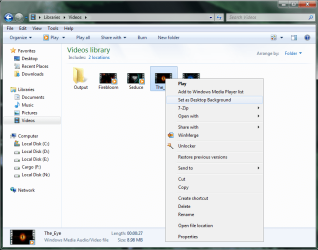
Open folder where you store video clips,right click on video clip and choose "Set as Desktop backgroud"
DreamScene5.png

Option "Set as Desktop Background" is only availabe for files with *.MPG and *.WMV extensions

ADJUST THE DREAMSCENE VOLUME LEVEL

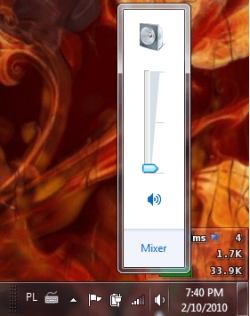
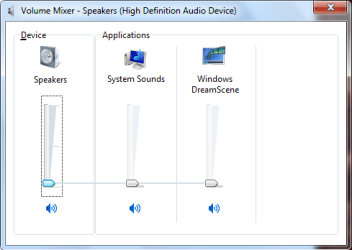
If video clip have included audio stream you can also listen sound too.To set Volume level go to Volume speaker icon in taskbar,left clik on it,choose Mixer option
DS11.png
and now you will have acces to adjusting Volume level for DreamScenes
DS10.png

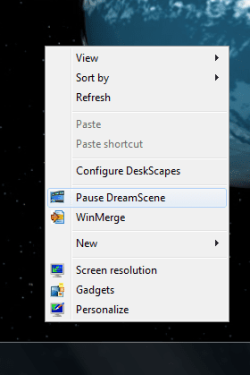
PLAY/PAUSE DREAM SCENE

If you want you can pause wallpaper motion,right click on desktop and choose "pause dream scene"
PauseDreamScene.png,
if you want re-enable wallpaper motion again
right click on desktop and choose "play dream scene"
PlayDreamScene.png

POSSIBLE ISSUES WITH DREAM SCENES

1.HIGH CPU USAGE BY EXPLORER.EXE

The best way to avoid this problem is to have the modern hardware (the newer the better) and up to date BIOS and drivers for chipset and video card.
You can also try convert video files to another format,or change codecs and ensure your video files are not too big.Another method is to use any 3p application for DreamScene (see METHOD II)

2.MESSING UP DESKTOP ICON TEXT

(this problem is only in Windows 7)

At the present time there is no pernamently solution,you can only fix it per session:switch to another video (or image) wallpaper and next back to previous video wallpaper

III.HOW TO UNINSTALL PATCH

If due to any reason you want dispose patch then restore image wallpaper next run Enable DreamScene.exe and choose "Disable".Sometimes this option may not work and following error is returned:
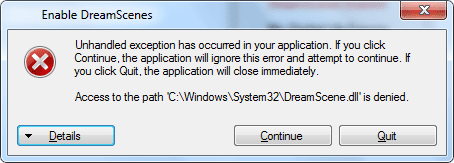
DreamScene6.png

In this case follow below:

1.Close window with error message,and again run Enable DreamScene.exe file
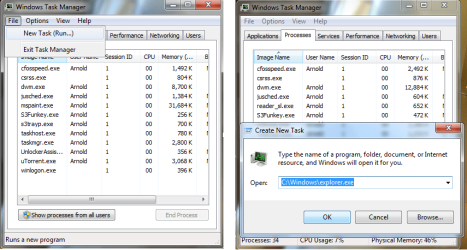
2.Open taskmanager and kill explorer.exe,(click on explorer.exe and press bottom "End process")
3.Go back to Enable DreamScene.exe and click in that "Disable" bottom (this time it should work)
4.Navigate back to taskmanager and rerun explorer.exe

(File>>New Task,type C:\Windows\explorer.exe and apply. (image)
DS5.png


METHOD II

Another method to have DreamScenes is to install any 3p program.Until now I know three programs which let you enjoy animated wallpapers: VLC Media Player,DeskScapes,DreamScene VideoWallpaper
Unfortunatelly only VLC Media Player is freeware.

Maybe there are more of them-Google your friend :).
 

Attachments

Last edited by a moderator:
ive managed to get it working thanks for the earlyer posts that will teach me to read the posts before posting this truly is a brilliant software my computers looking awsome now playing wmv flawlessly not 1 droped frame thanks a million this is perfect program:party:
 

My Computer My Computer

At a glance

windows 7 ultimatequad core amd24gbnvidia 9800gt 1gb
Computer Manufacturer/Model Number
asrock
OS
windows 7 ultimate
CPU
quad core amd2
Motherboard
asrock
Memory
4gb
Graphics Card(s)
nvidia 9800gt 1gb
Monitor(s) Displays
dell 22inch
Hard Drives
3tb
I have a question, Whenever I loose electricity my dreamscene doesn't start next time I start windows, is there a fix for this ?
 

My Computer My Computer

At a glance

Windows 8.1 Pro x64Intel Core i3 (3.0 GHZ)4 GB GDDR3Sapphire ATI Radeon 7790 HD 1 GB GDDR5
Computer type
PC/Desktop
Computer Manufacturer/Model Number
Custom Build
OS
Windows 8.1 Pro x64
CPU
Intel Core i3 (3.0 GHZ)
Motherboard
Asus P7H55-M LX
Memory
4 GB GDDR3
Graphics Card(s)
Sapphire ATI Radeon 7790 HD 1 GB GDDR5
Sound Card
Builtin AMD Hight Defination Audio Controller
Monitor(s) Displays
ASUS MS228H 21.5" Wide LED Monitor
Screen Resolution
1920x1080
Hard Drives
1 TB SATA Seagate
PSU
500W
Case
Orange
Cooling
None
Keyboard
A4TECH
Mouse
Who Cares?
Internet Speed
1 MB Shared Wateen Wireless
Antivirus
Kaspersky Internet Security
Browser
Mozilla Firefox
Is anyone still monitoring this thread? I'm having some problems getting dreamscene stable on my system.
 

My Computer My Computer

At a glance

Windows 7 Ultimate x64Intel Core i7-920xm8GB Vengeance PC3-12800 DDR3 RAMAMD Radeon HD 5870M
Computer type
PC/Desktop
Computer Manufacturer/Model Number
Alienware M17x R2
OS
Windows 7 Ultimate x64
CPU
Intel Core i7-920xm
Motherboard
Intel PM55 Alienware
Memory
8GB Vengeance PC3-12800 DDR3 RAM
Graphics Card(s)
AMD Radeon HD 5870M
Sound Card
Sound Blaster Recon3D (USB)
Monitor(s) Displays
1920x1200 LCD, Sony Bravia 42" HDTV
Screen Resolution
Laptop LCD - 1920x1200, HDTV - 1920x1080
Hard Drives
Samsung 840 256GB SSD (Boot Drive)
2 x Western Digital Scorpio Black HDDs - 1.36TB (RAID 0)
PSU
220W Flextronic
Case
N/a
Cooling
Notepal Cooler Master U3
Keyboard
Standard
Mouse
Synaptics Touchpad, Razer Orochi
Internet Speed
Cox Internet
Antivirus
Kaspersky
Browser
Firefox
Hi I have a windows 7 starter laptop and everytime i download that dreamscene it wont enable it do u have another link for me to go into coz i am trying to set moving pictures as my wallpaper please help would much appreciate it :)
 

My Computer My Computer

At a glance

windows 7 stater
OS
windows 7 stater
i followed your sets on installing dreamscene and it worked 100% and i could use videos with different formats other than WMV n MPG but when i restarted my pc the dreamscene video wasnt enabled when i login so i try to enable video but nothing happens i noticed that my slideshow of pictures stop working n get stuck on picture until i uninstalled dreamscene and reboot my pc i even use restore recovery system to pervious days before installing dreamscene hoping that some fies werent deleted when i uninstalled dreamscene but still dreamscene no longer work for my desktop and the weird thing its working fine on my laptop even when i rebooted laptop still working is there anyway i could get dream scene working again i really love it
 

My Computer My Computer

At a glance

Windows 7 Professtional x64Intel I7 377016 GBASUS 7870 HD
Computer type
PC/Desktop
Computer Manufacturer/Model Number
Custom Made
OS
Windows 7 Professtional x64
CPU
Intel I7 3770
Memory
16 GB
Graphics Card(s)
ASUS 7870 HD
Having issue with Win7 Ultimate. I've ran the dreamscene activator and got the msg "enabled please reboot" yet no right click option on specific dreamscenes i've got from legit websites appear.

Rocstars issue was most likely the dynamic range. On Nvidia drivers you only have to open control panel and under video colour settings there is an advanced tab, then change limited to full. Dynamic range increases the white and black point so if limited black becomes grey.. you can set this under some filters (CoreAVC for one, ffdshow video etc.)as well.
 

My Computer My Computer

At a glance

Windows 7 x64, XP x64Corei7 96512GBCorsair Dom. GT 2Ghz3xGainward GeForce GTX 295 1792MB
OS
Windows 7 x64, XP x64
CPU
Corei7 965
Motherboard
EVGA Classified
Memory
12GBCorsair Dom. GT 2Ghz
Graphics Card(s)
3xGainward GeForce GTX 295 1792MB
Sound Card
Asus Xonar HDAV1.3 Sound Card
Monitor(s) Displays
Dell Ultrasharp 3008WFP 30"
Screen Resolution
2560x1600 XHD
Hard Drives
2x OCZ Vertex Extreme Series 60GB
4x Western Digital RE4-GP 2TB w\64MB Cache
PSU
CoolerMaster Real Power 1250w
Case
Lian Li PC-201A
Internet Speed
20m/bit virgin
Even after rebooting into safe mode and disabling, booting normal once and finally rebooting safe mode again to re-enable, I still cannot succeed in getting them working. No right click option for both Mpeg and WMV dreamscenes :cry:.

This has me stumped :sarc: and I like a flashy dreamscene on my desktop as well :p.I have K-lite codec pack as I prefer MPC over VLC, maybe that is the cause..? :rolleyes:
 

My Computer My Computer

At a glance

Windows 7 x64, XP x64Corei7 96512GBCorsair Dom. GT 2Ghz3xGainward GeForce GTX 295 1792MB
OS
Windows 7 x64, XP x64
CPU
Corei7 965
Motherboard
EVGA Classified
Memory
12GBCorsair Dom. GT 2Ghz
Graphics Card(s)
3xGainward GeForce GTX 295 1792MB
Sound Card
Asus Xonar HDAV1.3 Sound Card
Monitor(s) Displays
Dell Ultrasharp 3008WFP 30"
Screen Resolution
2560x1600 XHD
Hard Drives
2x OCZ Vertex Extreme Series 60GB
4x Western Digital RE4-GP 2TB w\64MB Cache
PSU
CoolerMaster Real Power 1250w
Case
Lian Li PC-201A
Internet Speed
20m/bit virgin
Hi i have a Question is it possible to Change Dreamscene.wmv Videos with 1 Left klick on the Desktop ?
I have more Scene and want switch them fast and not with 'Right Mouse set as Background' maybe this will work with Rainmeter too ?
 

My Computer My Computer

At a glance

windows 7
Computer type
PC/Desktop
OS
windows 7
Hey!
I have windows 7 and Instaled this. BUT!
Windows DreamScene cannot start.
Windows DreamScene can only run when
It says Windows Aero scheme is selected
 

My Computer My Computer

At a glance

Windows7???
Computer type
PC/Desktop
Computer Manufacturer/Model Number
Lenovo,ThinkPad
OS
Windows7
CPU
?
Motherboard
?
Memory
?
Graphics Card(s)
?
Hard Drives
?
Antivirus
?
Browser
google

My Computer My Computer

At a glance

64-bit Windows 11 Pro for WorkstationsIntel i7-8700K OC'd to 5 GHz64 GB (4x16GB) G.SKILL TridentZ RGB DDR4 3600...ASUS ROG-STRIX-GTX1080TI-O11G-GAMING
Computer type
PC/Desktop
Computer Manufacturer/Model Number
Self built custom
OS
64-bit Windows 11 Pro for Workstations
CPU
Intel i7-8700K OC'd to 5 GHz
Motherboard
ASUS ROG Maximus XI Formula Z390
Memory
64 GB (4x16GB) G.SKILL TridentZ RGB DDR4 3600 MHz
Graphics Card(s)
ASUS ROG-STRIX-GTX1080TI-O11G-GAMING
Sound Card
Integrated
Monitor(s) Displays
2 x Samsung Odyssey G7 27"
Screen Resolution
2560x1440
Hard Drives
1TB Samsung 990 PRO M.2,
4TB Samsung 990 PRO PRO M.2,
TerraMaster F8 SSD Plus NAS
PSU
Seasonic Prime Titanium 850W
Case
Thermaltake Core P3
Cooling
Corsair Hydro H115i
Keyboard
Logitech wireless K800
Mouse
Logitech MX Master 4
Internet Speed
2 Gb/s Download and 100 Mb/s Upload
Antivirus
Malwarebyte Anti-Malware Premium
Browser
Google Chrome
Other Info
Logitech Z625 speaker system,
Logitech BRIO 4K Pro webcam,
HP Color LaserJet Pro MFP M477fdn,
APC SMART-UPS RT 1000 XL - SURT1000XLI,
Galaxy S23 Plus phone
no not really. it like i have it but i csant control it
 

My Computer My Computer

At a glance

Windows7???
Computer type
PC/Desktop
Computer Manufacturer/Model Number
Lenovo,ThinkPad
OS
Windows7
CPU
?
Motherboard
?
Memory
?
Graphics Card(s)
?
Hard Drives
?
Antivirus
?
Browser
google
I had an issue with DreamScene on a new Windows 7 laptop. The video was way too bright and blurry and looking like two dreamscenes were playing blended together. I tried all kinds of graphics and video settings for nVidia and the Intel card, but was unable to solve it this way. I ended up disabling switchable graphics and run on the nVidia card exclusively. This solved the issue for me.
 

My Computer My Computer

At a glance

Windows 11 Professional x64AMD Ryzen Threadripper Pro 7955WX, 16 Core 4....4x 16GB DDR5 4800 ECC Registered, Quad channelNVIDIA GeForce RTX 4070 Ti Super Inno3D
Computer type
PC/Desktop
Computer Manufacturer/Model Number
Dell Precision 7875
OS
Windows 11 Professional x64
CPU
AMD Ryzen Threadripper Pro 7955WX, 16 Core 4.5 GHz
Motherboard
Dell Precision 7875 System Board
Memory
4x 16GB DDR5 4800 ECC Registered, Quad channel
Graphics Card(s)
NVIDIA GeForce RTX 4070 Ti Super Inno3D
Sound Card
Creative X-Fi Titanium Fatal1ty Professional PCI-e
Monitor(s) Displays
Dell Ultrasharp U3415W (34" UltraWide IPS TFT)
Screen Resolution
3440x1440
Hard Drives
SK hynix PC801 PCIe Gen4 x4 NVMe M.2 2280 SSD 1TB first SSD
Corsair MP600 Pro NH PCIe Gen4 x4 NVMe M.2 2280 SSD 8TB second SSD
PSU
Dell Precision 7875 1350W PSU
Case
Dell Precision 7875
Keyboard
Microsoft Natural Ergo Keyboard 4000
Mouse
Microsoft Comfort Mouse 4500
Internet Speed
50/15 MBit/sec
Antivirus
ESET
Browser
Firefox
Other Info
LG BU40N 6x BluRay ReWriter DL Slimline
APC Smart-UPS 1500VA USB & Serial 230V
Canon MF8230Cn Color Laser Multifunctional printer
https://www.youtube.com/watch?v=JXXlFNmg22U
Back
Top