Windows 7 and Vista Dual Boot Removal

adamsbryce1695

New member
Local time
2:37 PM
Messages
11
Location
Kansas
I have an Acer Aspire 5349 Laptop. It came preloaded with Win7 Home Premium x64. I got adventurous and dual-booted with a Vista Ultimate x64 installation on the same hard drive, with 2 partitions. It all works flawlessly, but my experimenting is over, i'm bored, and need my hard drive space back, and want to delete the Vista Partition.

Basically, from Win7, using Disk Management, can i simply delete the partition from the G: (vista) Drive, delete the volume, and then Extend my win7 partition back onto the unallocated space, or do I need to use a third-party software?

Also, will i need to do anything as far as repairing the Windows 7 boot? I know that Vista and 7 share a boot file, so if I delete the Vista partition, will the Win7 boot automatically fix itself, or will i be unable to start up?

Thanks in advance,
Bryce
 
Last edited:

My Computer My Computer

At a glance

Windows 7 Ultimate x646GB
Computer Manufacturer/Model Number
Acer Aspire 5349-2592
OS
Windows 7 Ultimate x64
Memory
6GB

My Computer My Computer

At a glance

Windows 7 Ultimate SP1 64-BitIntel Core i7 870 @ 2.93GHz8Gb Dual-Channel DDR3 @ 664MHznVidia GeForce GTX 460 1024MB dedicated RAM
Computer Manufacturer/Model Number
HP Pavilion Elite 495UK
OS
Windows 7 Ultimate SP1 64-Bit
CPU
Intel Core i7 870 @ 2.93GHz
Motherboard
MSI 2A9C (CPU1)
Memory
8Gb Dual-Channel DDR3 @ 664MHz
Graphics Card(s)
nVidia GeForce GTX 460 1024MB dedicated RAM
Sound Card
Realtek HD Audio
Monitor(s) Displays
HP2310i
Screen Resolution
1920 x 1080
Hard Drives
1x1954GB Hitachi HDS22020ALA 330 (RAID), 1x1954GB Hitachi External for backup and storage
PSU
460W
Case
HP Elite
Cooling
Air cooled
Keyboard
Logitech K750 solar-powered keyboard
Mouse
Logitech Wireless M180 mouse
Internet Speed
2Mb
Other Info
Pure Avanti Flow Internet Radio with iPod Dock, 64Gb iPod, HP USB Speakers, Sony MDR-V500 Headphones, Sony Vaio F-Series Laptop
Thanks! i'll give it a try and update this with what happens.
 

My Computer My Computer

At a glance

Windows 7 Ultimate x646GB
Computer Manufacturer/Model Number
Acer Aspire 5349-2592
OS
Windows 7 Ultimate x64
Memory
6GB
You're very welcome.

It's very tempting to take the easy way, I just feel this tutorial ties up all the loose ends and using it should leave you with a fully-operational system.

If you need further help, please post back.
 

My Computer My Computer

At a glance

Windows 7 Ultimate SP1 64-BitIntel Core i7 870 @ 2.93GHz8Gb Dual-Channel DDR3 @ 664MHznVidia GeForce GTX 460 1024MB dedicated RAM
Computer Manufacturer/Model Number
HP Pavilion Elite 495UK
OS
Windows 7 Ultimate SP1 64-Bit
CPU
Intel Core i7 870 @ 2.93GHz
Motherboard
MSI 2A9C (CPU1)
Memory
8Gb Dual-Channel DDR3 @ 664MHz
Graphics Card(s)
nVidia GeForce GTX 460 1024MB dedicated RAM
Sound Card
Realtek HD Audio
Monitor(s) Displays
HP2310i
Screen Resolution
1920 x 1080
Hard Drives
1x1954GB Hitachi HDS22020ALA 330 (RAID), 1x1954GB Hitachi External for backup and storage
PSU
460W
Case
HP Elite
Cooling
Air cooled
Keyboard
Logitech K750 solar-powered keyboard
Mouse
Logitech Wireless M180 mouse
Internet Speed
2Mb
Other Info
Pure Avanti Flow Internet Radio with iPod Dock, 64Gb iPod, HP USB Speakers, Sony MDR-V500 Headphones, Sony Vaio F-Series Laptop
Very true. I've screwed this thing up so many times, just baaaarely getting fixed with a clean install. tired of doing those. haha. but i certainly will post more. thanks :)
 

My Computer My Computer

At a glance

Windows 7 Ultimate x646GB
Computer Manufacturer/Model Number
Acer Aspire 5349-2592
OS
Windows 7 Ultimate x64
Memory
6GB
Well, once you've done your clean install and set it up the way you want with what programs you use, image it and you'll never have to clean install again.
 

My Computer My Computer

At a glance

Windows 7 Ultimate SP1 64-BitIntel Core i7 870 @ 2.93GHz8Gb Dual-Channel DDR3 @ 664MHznVidia GeForce GTX 460 1024MB dedicated RAM
Computer Manufacturer/Model Number
HP Pavilion Elite 495UK
OS
Windows 7 Ultimate SP1 64-Bit
CPU
Intel Core i7 870 @ 2.93GHz
Motherboard
MSI 2A9C (CPU1)
Memory
8Gb Dual-Channel DDR3 @ 664MHz
Graphics Card(s)
nVidia GeForce GTX 460 1024MB dedicated RAM
Sound Card
Realtek HD Audio
Monitor(s) Displays
HP2310i
Screen Resolution
1920 x 1080
Hard Drives
1x1954GB Hitachi HDS22020ALA 330 (RAID), 1x1954GB Hitachi External for backup and storage
PSU
460W
Case
HP Elite
Cooling
Air cooled
Keyboard
Logitech K750 solar-powered keyboard
Mouse
Logitech Wireless M180 mouse
Internet Speed
2Mb
Other Info
Pure Avanti Flow Internet Radio with iPod Dock, 64Gb iPod, HP USB Speakers, Sony MDR-V500 Headphones, Sony Vaio F-Series Laptop
Call me crazy, but I actually like Vista more than 7. Yeah, the features of 7 (like the "superbar", snapping windows, better Start menu Search) are nice, but i've always had a huge liking for Vista, the way it looks, the ways it acts, pretty much everything about it - more than XP, 7, or 8. Plus i think it is wayyy better looking than any of the others. Vista is probably one of my all time favorite OS's, after the service pack updates of course.

So, (after i delete the current vista partition and repair the boot to just have Win7 like posted above) I'm actually seriously debating making a 2nd partition, moving important files (mostly music, school documents, and pictures)
to that 2nd partition, Installing a clean Vista Ultimate x64 over my current Windows 7 partition, then moving the files back to the (new) Vista partition, and then deleting the 2nd file-holding partition and re-expanding the Vista partition over the unallocated space... would that work? what do you think, before I start going around thinking i know everything? (which i dont, haha).

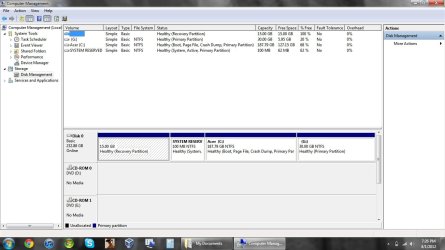
1) Also, what would that do to my "recovery partition"?(see picture) thats what acer has put on my computer, and correct me if i'm wrong, that has the windows 7 system restore and repair files? like a "built-in" Windows 7 OEM disk, basically? at leasat thats how i see it... so technically .. if something happens to my new OS(it’ll no doubt be windows), I can start the boot, press F8 when it’s time, and go to repair system, and if I do clean install, it’ll bring a fresh OEM Windows 7 installation, with built in acer programs and everything, just like stock out of the box, right?

SO MY QUESTION IS: (sorry this is so long and confusing)

2) I can install whatever OS i want where my current (acer partition) Win 7 is, (overwriting it, creating fresh install) and it won't do anything with the G: partition with my saved docs & music, etc., and i can then drag my files from that partition, back to the OS (from within the OS), and then delete that partition, delete the volume, and then extend my OS partition back onto the unallocated space, which will then take full advantage of the drive (minus the system reserved, and “recovery partition” of course), with only one OS. ...is that right? that'd work, wouldn't it?

P.S. the picture attached is my system currently, with Dual Boot vista & 7. the "acer" C: drive is the Windows 7, and the "G:" drive is where i will eventually have the data i want to keep, but as of right now is still my vista installation.

... if any of that even makes sense.
 

Attachments

  • sample.jpg
    sample.jpg
    92 KB · Views: 13
Last edited:

My Computer My Computer

At a glance

Windows 7 Ultimate x646GB
Computer Manufacturer/Model Number
Acer Aspire 5349-2592
OS
Windows 7 Ultimate x64
Memory
6GB
G is good to go. Just Delete in Disk Management.

Recovery partition won't boot if C is overwritten, so be sure to make your Recovery Disks beforehand. Another option is to Save externally a Win7 backup image so you can reimage C exactly as it is now on this or a replacement HD: Backup Complete Computer - Create an Image Backup

During Vista install use Custom>Drive Options to delete Recovery and C then create a New partition in that space, Format before beginning install.

It is risky to store your files in a data partition on the same HD you're reinstalling upon. Better to back up files to DVD, external or another HD, another computer on the network, or MS Skydrive allows up to 15gb free online storage with each Windows Live ID. If forced to do this just be sure you don't touch the data partition, and know it's position on disk and size.
 
so, even if i install a new vista installation where my current 7 resides, on "Acer C:", and got a new installation up and running, and went to windows startup options during the boot and hit "system restore/ recovery", it wouldn't go to what acer already has, which is a custom acer installer that completely wiped everything, and did a fresh, OEM installation of Win7, which is what i've used to reset this whole computer before, it won't just go there? if that's the "recovery partition", but it wouldn't work with a different version of windows, then it's pretty much pointless?
 

My Computer My Computer

At a glance

Windows 7 Ultimate x646GB
Computer Manufacturer/Model Number
Acer Aspire 5349-2592
OS
Windows 7 Ultimate x64
Memory
6GB
OH and (back to my original subject), i dont have any windows 7 Disks... the computer prompted me to make them, but i never succesfully could. however, when i screwed up my 1st win 7 installation (couple months ago), i just booted, and hit F8 and selected "restore/recover system" and it repaired it no problem, just like a new windows 7 installation .. did it REALLY completely reinstall windows, or just fix what wasn't stock? ): im so confused now...
 

My Computer My Computer

At a glance

Windows 7 Ultimate x646GB
Computer Manufacturer/Model Number
Acer Aspire 5349-2592
OS
Windows 7 Ultimate x64
Memory
6GB
Not normally. You can save Recovery partition but it likely won't run after clean reinstall to C which is why you should make your recovery disks first.

That's one of the uses for the Recovery disk set, such as when the HD is replaced.

If you can't make the disks you can order them from Acer for shipping costs, or save a Win7 backup image externally which willl reimage the HD using a Win7 DVD or System Repair Disk - which you should make in case Win7 stops booting. Backup Complete Computer - Create an Image Backup

You can also clean reinstall with the Product Key on your COA sticker which is a superior install anyway: Clean Reinstall - Factory OEM Windows 7
 
Download an ISO for your version of Windows from mydigitiallife.info. You can burn that ISO to a disc and install with it. Any such install would NOT have all the crap Acer pre-loaded onto your PC.

That restore/recover thing you did presumably took you back to factory specifications, wiping out any previous Windows installation.
 

My Computer My Computer

At a glance

Windows 7 Home Premium SP1, 64-bitIntel Skylake i5-6600K, not overclocked8 GB HyperX DDR4-2666 (2 x 4 GB)none; graphics are integrated on CPU
Computer type
PC/Desktop
Computer Manufacturer/Model Number
Ignatz Special; 4 speed manual gearbox; factory air conditioning; one of one
OS
Windows 7 Home Premium SP1, 64-bit
CPU
Intel Skylake i5-6600K, not overclocked
Motherboard
AsRock Z170M Extreme 4, micro ATX
Memory
8 GB HyperX DDR4-2666 (2 x 4 GB)
Graphics Card(s)
none; graphics are integrated on CPU
Sound Card
onboard: Realtek ALC1150; external: USB Behringer UF0-202
Monitor(s) Displays
Dell S2340M 23 inch IPS
Screen Resolution
1600 x 900
Hard Drives
System: Crucial MX100 series SSD, 128 GB;
Data: Samsung Spinpoint 103SJ, 1 TB;
Backup: WD Caviar Green WD30EZRX-00D8PB0, 3 TB
PSU
Rosewill SilentNight 500 watt fanless, semi-modular
Case
Antec Solo II
Cooling
Noctua NH-U12S; Noctua F12 intake, Noctua S12A exhaust
Keyboard
Microsoft 200 6JH-00001 USB
Mouse
Dell or Microsoft optical wired; USB
Antivirus
Microsoft Security Essentials and Malwarebytes Premium
Browser
Pale Moon
Other Info
All fans PWM; speeds at idle: CPU circa 500 rpm; intake circa 600 rpm; exhaust circa 600 rpm; CPU temps 27 idle and 47 C load in a warm room (27 C/81 F) when running Intel Extreme Tuning Utility stress test.
ohhh. i can easily just download a 7 iso and burn it. done that too many times to count. i was just wondering if it would still work. but okay! i might give it a try when i get some time. ill letcha guys know.
 

My Computer My Computer

At a glance

Windows 7 Ultimate x646GB
Computer Manufacturer/Model Number
Acer Aspire 5349-2592
OS
Windows 7 Ultimate x64
Memory
6GB
actually ... i got that old vista/7 dualboot cleared up, and now i have a 7/8 developer preview... hahaha. nevermind all that vista crap. (:
 

My Computer My Computer

At a glance

Windows 7 Ultimate x646GB
Computer Manufacturer/Model Number
Acer Aspire 5349-2592
OS
Windows 7 Ultimate x64
Memory
6GB
Back
Top