Drive letter disappear after reboot

not a lot of options here
 

Attachments

  • photo (Medium).JPG
    photo (Medium).JPG
    71.6 KB · Views: 15

My Computer My Computer

At a glance

Washington
OS
Washington
Yeah, not much there. Have you searched for any supplemental software that supports it?

When you assign the H: drive letter do you see the new key for it in reg's mounted devices?

One odd thing in your last reg screenshot is I don't see a volume entry for that disk. There's a one to one match for every volume entry with a drive letter entry. That seems to say that W7 is not properly recognizing it.

Have you checked for an updated driver for that controller?
 

My Computer My Computer

At a glance

Windows 7 Ultimate x64
OS
Windows 7 Ultimate x64
Yeah, not much there. Have you searched for any supplemental software that supports it?

When you assign the H: drive letter do you see the new key for it in reg's mounted devices?

One odd thing in your last reg screenshot is I don't see a volume entry for that disk. There's a one to one match for every volume entry with a drive letter entry. That seems to say that W7 is not properly recognizing it.

Have you checked for an updated driver for that controller?

No I haven't checked for a driver update... I think I'm just going to bail until the next time I do a disk upgrade.. lol
 

My Computer My Computer

At a glance

Washington
OS
Washington
Yeah, not much there. Have you searched for any supplemental software that supports it?

When you assign the H: drive letter do you see the new key for it in reg's mounted devices?

One odd thing in your last reg screenshot is I don't see a volume entry for that disk. There's a one to one match for every volume entry with a drive letter entry. That seems to say that W7 is not properly recognizing it.

Have you checked for an updated driver for that controller?

No I haven't checked for a driver update... I think I'm just going to bail until the next time I do a disk upgrade.. lol

Well that's fine, I guess. But I think I would worry about why something is not working the way it's supposed to. Especially when it comes to storing my data. Do you have backups of the data on that RAID1?
 

My Computer My Computer

At a glance

Windows 7 Ultimate x64
OS
Windows 7 Ultimate x64
Yeah, not much there. Have you searched for any supplemental software that supports it?

When you assign the H: drive letter do you see the new key for it in reg's mounted devices?

One odd thing in your last reg screenshot is I don't see a volume entry for that disk. There's a one to one match for every volume entry with a drive letter entry. That seems to say that W7 is not properly recognizing it.

Have you checked for an updated driver for that controller?

No I haven't checked for a driver update... I think I'm just going to bail until the next time I do a disk upgrade.. lol

Well that's fine, I guess. But I think I would worry about why something is not working the way it's supposed to. Especially when it comes to storing my data. Do you have backups of the data on that RAID1?
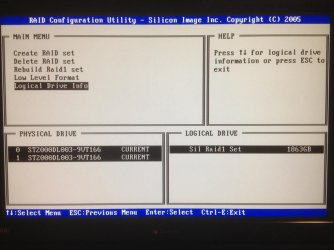
I appreciate your help. I too worry about something not properly working but (correct me if I'm wrong) after the POST it shows both of the arrays being healthy. Since I've had this RAID die once before and it notified me at the DOS prompt prior to Windows, I would think that my data is safe, or am I wrong?

After reading what others have done to resolve this issue, I wonder if I were to write zeros to the drives if it would solve the problem? I think its ironic that I didn't have this problem until restoring the RAID.

I haven't backed up this RAID1 but I was considering doing so soon since New Egg had sale on 2.5tb drives for $89. I figure making an external drive and a copy of that raid once a week or month wouldn't be a bad idea, right?

Again, thanks for everyone's input!
 

My Computer My Computer

At a glance

Washington
OS
Washington
I appreciate your help. I too worry about something not properly working but (correct me if I'm wrong) after the POST it shows both of the arrays being healthy. Since I've had this RAID die once before and it notified me at the DOS prompt prior to Windows, I would think that my data is safe, or am I wrong?
Safe, to an extent. That notification after POST that you had gotten was likely a report by the SMART program on the failing HD. SMART is fairly good, but no where near foolproof. HD's fail sometimes without SMART ever notifying the user.
After reading what others have done to resolve this issue, I wonder if I were to write zeros to the drives if it would solve the problem? I think its ironic that I didn't have this problem until restoring the RAID.
That's hard to respond to without knowing exactly how it was restored. But it sounds like something was going on, especially if you didn't have the problem before the failure.
I haven't backed up this RAID1 but I was considering doing so soon since New Egg had sale on 2.5tb drives for $89. I figure making an external drive and a copy of that raid once a week or month wouldn't be a bad idea, right?
It would be a great idea. RAID1 alone is not a truly complete backup strategy. It protects against a failing hard drive. Nothing more. If the PC gets zapped by a surge (surge suppressors can't stop everything) both drives could die. If a file gets erroneously deleted or corrupted by a virus, it's mirrored to both drives so it's kaput.
RAID adds complexity, and whenever complexity increases the opportunities for failure also increase.
 

My Computer My Computer

At a glance

Windows 7 Ultimate x64
OS
Windows 7 Ultimate x64
nick james, post back if you've still got this problem. I've got something else in mind to check on.
 

My Computer My Computer

At a glance

Windows 7 Ultimate x64
OS
Windows 7 Ultimate x64
I'm having this issue as well.

Tried pretty much all of these suggestions as well as reformatted. I have two pyros set to RAID 0 and two WD Blues tb drives. One shows up fine but the other disappears after every restart. The drive letter is the culprit as everytime I give it a new one it comes back to my computer again.
 

My Computer My Computer

At a glance

Windows 7 Ultimate 64 biti7 2500k16gb CorsairNvidia GTX 465
OS
Windows 7 Ultimate 64 bit
CPU
i7 2500k
Motherboard
Gigabyte Z68AP-D3 ver2.0
Memory
16gb Corsair
Graphics Card(s)
Nvidia GTX 465
Sound Card
Onboard
Hard Drives
2 Pyro 120gb SSD RAID 0
PSU
Ultra LSP 750W
nick james, post back if you've still got this problem. I've got something else in mind to check on.

Sorry I was so late to respond- I have left the problem as is until I find another hard drive to back the RAID on too

Tried pretty much all of these suggestions as well as reformatted. I have two pyros set to RAID 0 and two WD Blues tb drives. One shows up fine but the other disappears after every restart. The drive letter is the culprit as everytime I give it a new one it comes back to my computer again.

I'm having a hard time following what your saying. I read it as you changed the drive letter and Windows started recognizing it upon restarting it?
 

My Computer My Computer

At a glance

Washington
OS
Washington
Try using Diskpart to check the volume details to see if the attribute nodefaultdriveletter is set to "yes". If so try changing it to "no" to see if that'll let you set a drive letter that sticks across boots.
 

My Computer My Computer

At a glance

Windows 7 Ultimate x64
OS
Windows 7 Ultimate x64
I set my two TB drives to RAID 0 and they work fine now. I didn't want to run them in RAID but whatever.
 

My Computer My Computer

At a glance

Windows 7 Ultimate 64 biti7 2500k16gb CorsairNvidia GTX 465
OS
Windows 7 Ultimate 64 bit
CPU
i7 2500k
Motherboard
Gigabyte Z68AP-D3 ver2.0
Memory
16gb Corsair
Graphics Card(s)
Nvidia GTX 465
Sound Card
Onboard
Hard Drives
2 Pyro 120gb SSD RAID 0
PSU
Ultra LSP 750W
Try using Diskpart to check the volume details to see if the attribute nodefaultdriveletter is set to "yes". If so try changing it to "no" to see if that'll let you set a drive letter that sticks across boots.
Did I do it right?
What do you think?

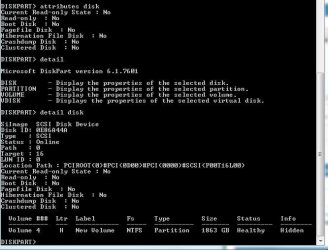
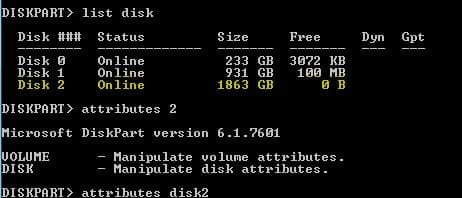
ALSO, why does it say the FREE space is 0 bytes? (see attached photo)
 

Attachments

  • Capture.JPG
    Capture.JPG
    50.9 KB · Views: 43
  • Capture2.JPG
    Capture2.JPG
    21.8 KB · Views: 32

My Computer My Computer

At a glance

Washington
OS
Washington
You've got to detail the volume that's losing it's drive letter.

The 0 free space for that disk simply means there is no unallocated space left on the disk. You have to detail each volume to see the free space within the volume.
 

My Computer My Computer

At a glance

Windows 7 Ultimate x64
OS
Windows 7 Ultimate x64
That is the volume detail of the drive that is losing the letter hence the H:\ drive letter. Thats what I always have to change the drive letter to when I restart. What am I missing here?
 

My Computer My Computer

At a glance

Washington
OS
Washington
That is the volume detail of the drive that is losing the letter hence the H:\ drive letter. Thats what I always have to change the drive letter to when I restart. What am I missing here?

My previous post, for that other poster who had freshly formatted disks, stated:

check the volume details to see if the attribute nodefaultdriveletter is set to "yes". If so try changing it to "no" to see if that'll let you set a drive letter that sticks across boots.

Check to see what H: drive's current setting is. If it's "yes" you can change it to see if it then keeps the letter across boots. But make the change at your own risk. I've not done this before and I doubt there is much risk of data loss, but you never know. As always it's better to have everything backed up already anyway...
 

My Computer My Computer

At a glance

Windows 7 Ultimate x64
OS
Windows 7 Ultimate x64
That is the volume detail of the drive that is losing the letter hence the H:\ drive letter. Thats what I always have to change the drive letter to when I restart. What am I missing here?

My previous post, for that other poster who had freshly formatted disks, stated:

check the volume details to see if the attribute nodefaultdriveletter is set to "yes". If so try changing it to "no" to see if that'll let you set a drive letter that sticks across boots.

Check to see what H: drive's current setting is. If it's "yes" you can change it to see if it then keeps the letter across boots. But make the change at your own risk. I've not done this before and I doubt there is much risk of data loss, but you never know. As always it's better to have everything backed up already anyway...
I don't understand how to find this attribute or howto even check it?
 

My Computer My Computer

At a glance

Washington
OS
Washington
In this screenshot I'm using Diskpart to list attached disks, identify which is my boot disk, select it, detail it to view volumes. I select volume 2 (drive C), detail it and can see the No Default Drive Letter is set to No. So it's drive letter sticks across boots.

I then select volume 1 (System Reserved volume), detail it and can see the No Default Drive Letter is set to Yes. That volume does not have a drive letter.
 

Attachments

  • Capture4.PNG
    Capture4.PNG
    20.1 KB · Views: 60

My Computer My Computer

At a glance

Windows 7 Ultimate x64
OS
Windows 7 Ultimate x64
I get it now, thanks for taking the time to send that screen shot. I see from the detail my drive is set to 'no'- no default drive letter.

Could you help me change the attribute to yes as well? I'm assuming thats what's next?
 

My Computer My Computer

At a glance

Washington
OS
Washington
I get it now, thanks for taking the time to send that screen shot. I see from the detail my drive is set to 'no'- no default drive letter.

Could you help me change the attribute to yes as well? I'm assuming thats what's next?

Yes, that would be next, except:

If No Default Drive Letter is set to No I would expect it's drive letter is set to stick across boots.

Are you sure you're looking at the correct volume? Examine my screenshot again, where I detailed two different volume, one where the drive letter sticks (set to No) and one with no drive letter (set to Yes).

Have you backed up the data on that drive yet?
 

My Computer My Computer

At a glance

Windows 7 Ultimate x64
OS
Windows 7 Ultimate x64
I get it now, thanks for taking the time to send that screen shot. I see from the detail my drive is set to 'no'- no default drive letter.

Could you help me change the attribute to yes as well? I'm assuming thats what's next?

Yes, that would be next, except:

If No Default Drive Letter is set to No I would expect it's drive letter is set to stick across boots.

Are you sure you're looking at the correct volume? Examine my screenshot again, where I detailed two different volume, one where the drive letter sticks (set to No) and one with no drive letter (set to Yes).

Have you backed up the data on that drive yet?
I have no backed up the drive yet. I need to order a 2.5tb drive and put it in an enclosure. I'm a little tight for funds right now but I know it needs to happen sooner than later! I think the last time I checked, newegg had them for $89.99 shipped.

I'm almost positive I'm looking at the right drive (take a look at the screen shot). I know my H:\ is the drive I have selected. I dont have a volume that has 1,8xxGB on it. I can't think of any other dead giveaways. I highlighted the lines in the picture to reassure myself that I have the right volume.

What do you think?
 

Attachments

  • 3.JPG
    3.JPG
    52.1 KB · Views: 17

My Computer My Computer

At a glance

Washington
OS
Washington
Back
Top