Solved Drive not available in list of drives at backup.

Jandek

New member
Local time
11:58 PM
Messages
7
Problem:
I was trying to make a (standard Windows 7) backup, but the backup drive Y: was not shown in the list of drives available for backup.
Note:
The drive Y: was shown in Explorer!

Analysis:
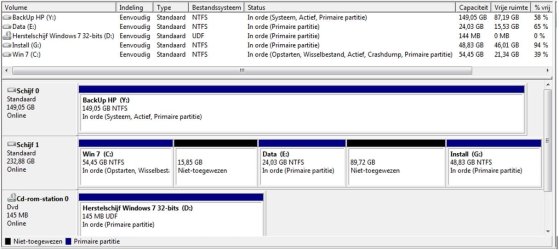
I think the cause of the problem should be found in the fact that drive Y has the attribute System (and a system drive may not be used for storage of backup files)!
The configuration (2 drives) is as shown in the attachment.
Note:
[FONT=&quot]Partition C has as attributes: Opstarten, Wisselbestand, Actief, Crashdump, Prim. Partitie.[/FONT]
[FONT=&quot]When drive Y is disconnected, drive C gets attribute System too!
[/FONT]

Further:
The idea was to use drive Y only for backup purposes. I made a first backup and everything seemed OK. After disconnecting drive Y the PC continued to function.
I want to make a backup now, so I reconnected this drive Y but now it may not be used by the backup!

Question:
How to solve this problem now (I think the attribute System in drive Y has to be removed, but the question is how) and
How to prevent occurring this problem in the future?
 

Attachments

My Computer My Computer

At a glance

Windows 7 HomeIntel core2 duo 84004GbNVidia Quadro FX570
Computer type
PC/Desktop
Computer Manufacturer/Model Number
HP XW4600
OS
Windows 7 Home
CPU
Intel core2 duo 8400
Motherboard
HP
Memory
4Gb
Graphics Card(s)
NVidia Quadro FX570
Hard Drives
Samsung SP2504C
WDC WD1600
Antivirus
AVG
Browser
Firefox
Hello Jan,

Since Y: is considered to be a system and active drive, that would be why you are unable to use is to back up to.

Does your Windows 7 still boot properly if you remove Y: ? If so, then you could format Y: at boot, and should be able to use it to back up to afterwards.

Translation: Partition C has as attributes: Startup, Paging, Active, Crash Dump, Prim. partition

Your screenshot:

Was there a reason why you have unallocated space on Disk 1 like that?

drives.jpg
 
Last edited:

My Computer My Computer

At a glance

64-bit Windows 11 Pro for WorkstationsIntel i7-8700K OC'd to 5 GHz64 GB (4x16GB) G.SKILL TridentZ RGB DDR4 3600...ASUS ROG-STRIX-GTX1080TI-O11G-GAMING
Computer type
PC/Desktop
Computer Manufacturer/Model Number
Self built custom
OS
64-bit Windows 11 Pro for Workstations
CPU
Intel i7-8700K OC'd to 5 GHz
Motherboard
ASUS ROG Maximus XI Formula Z390
Memory
64 GB (4x16GB) G.SKILL TridentZ RGB DDR4 3600 MHz
Graphics Card(s)
ASUS ROG-STRIX-GTX1080TI-O11G-GAMING
Sound Card
Integrated
Monitor(s) Displays
2 x Samsung Odyssey G7 27"
Screen Resolution
2560x1440
Hard Drives
1TB Samsung 990 PRO M.2,
4TB Samsung 990 PRO PRO M.2,
TerraMaster F8 SSD Plus NAS
PSU
Seasonic Prime Titanium 850W
Case
Thermaltake Core P3
Cooling
Corsair Hydro H115i
Keyboard
Logitech wireless K800
Mouse
Logitech MX Master 4
Internet Speed
2 Gb/s Download and 100 Mb/s Upload
Antivirus
Malwarebyte Anti-Malware Premium
Browser
Google Chrome
Other Info
Logitech Z625 speaker system,
Logitech BRIO 4K Pro webcam,
HP Color LaserJet Pro MFP M477fdn,
APC SMART-UPS RT 1000 XL - SURT1000XLI,
Galaxy S23 Plus phone
Hello Brink,

After removing drive Y the system is still running normally.

The solution you gave (Format Y) has as disadvantage that the backups stored on the drive will be lost.
Perhaps there is a solution wich does not result in loosing data?
 

My Computer My Computer

At a glance

Windows 7 HomeIntel core2 duo 84004GbNVidia Quadro FX570
Computer type
PC/Desktop
Computer Manufacturer/Model Number
HP XW4600
OS
Windows 7 Home
CPU
Intel core2 duo 8400
Motherboard
HP
Memory
4Gb
Graphics Card(s)
NVidia Quadro FX570
Hard Drives
Samsung SP2504C
WDC WD1600
Antivirus
AVG
Browser
Firefox
Did you move anything to your Y: drive?

For example: user folders, page file, etc....
 

My Computer My Computer

At a glance

64-bit Windows 11 Pro for WorkstationsIntel i7-8700K OC'd to 5 GHz64 GB (4x16GB) G.SKILL TridentZ RGB DDR4 3600...ASUS ROG-STRIX-GTX1080TI-O11G-GAMING
Computer type
PC/Desktop
Computer Manufacturer/Model Number
Self built custom
OS
64-bit Windows 11 Pro for Workstations
CPU
Intel i7-8700K OC'd to 5 GHz
Motherboard
ASUS ROG Maximus XI Formula Z390
Memory
64 GB (4x16GB) G.SKILL TridentZ RGB DDR4 3600 MHz
Graphics Card(s)
ASUS ROG-STRIX-GTX1080TI-O11G-GAMING
Sound Card
Integrated
Monitor(s) Displays
2 x Samsung Odyssey G7 27"
Screen Resolution
2560x1440
Hard Drives
1TB Samsung 990 PRO M.2,
4TB Samsung 990 PRO PRO M.2,
TerraMaster F8 SSD Plus NAS
PSU
Seasonic Prime Titanium 850W
Case
Thermaltake Core P3
Cooling
Corsair Hydro H115i
Keyboard
Logitech wireless K800
Mouse
Logitech MX Master 4
Internet Speed
2 Gb/s Download and 100 Mb/s Upload
Antivirus
Malwarebyte Anti-Malware Premium
Browser
Google Chrome
Other Info
Logitech Z625 speaker system,
Logitech BRIO 4K Pro webcam,
HP Color LaserJet Pro MFP M477fdn,
APC SMART-UPS RT 1000 XL - SURT1000XLI,
Galaxy S23 Plus phone
Your question "Did you move anything to your Y: drive?" is to be answered with Yes: I stored some installation files (files used rarely) on drive Y, but no pagefile or user data.

Jan
 

My Computer My Computer

At a glance

Windows 7 HomeIntel core2 duo 84004GbNVidia Quadro FX570
Computer type
PC/Desktop
Computer Manufacturer/Model Number
HP XW4600
OS
Windows 7 Home
CPU
Intel core2 duo 8400
Motherboard
HP
Memory
4Gb
Graphics Card(s)
NVidia Quadro FX570
Hard Drives
Samsung SP2504C
WDC WD1600
Antivirus
AVG
Browser
Firefox
In that case, I'm not sure what would be causing Y: to be seen as a "System" drive.

The only thing I can suggest is to temporarily copy the contents of Y: to another location (if able), format Y: at boot, then copy the contents back. :(
 

My Computer My Computer

At a glance

64-bit Windows 11 Pro for WorkstationsIntel i7-8700K OC'd to 5 GHz64 GB (4x16GB) G.SKILL TridentZ RGB DDR4 3600...ASUS ROG-STRIX-GTX1080TI-O11G-GAMING
Computer type
PC/Desktop
Computer Manufacturer/Model Number
Self built custom
OS
64-bit Windows 11 Pro for Workstations
CPU
Intel i7-8700K OC'd to 5 GHz
Motherboard
ASUS ROG Maximus XI Formula Z390
Memory
64 GB (4x16GB) G.SKILL TridentZ RGB DDR4 3600 MHz
Graphics Card(s)
ASUS ROG-STRIX-GTX1080TI-O11G-GAMING
Sound Card
Integrated
Monitor(s) Displays
2 x Samsung Odyssey G7 27"
Screen Resolution
2560x1440
Hard Drives
1TB Samsung 990 PRO M.2,
4TB Samsung 990 PRO PRO M.2,
TerraMaster F8 SSD Plus NAS
PSU
Seasonic Prime Titanium 850W
Case
Thermaltake Core P3
Cooling
Corsair Hydro H115i
Keyboard
Logitech wireless K800
Mouse
Logitech MX Master 4
Internet Speed
2 Gb/s Download and 100 Mb/s Upload
Antivirus
Malwarebyte Anti-Malware Premium
Browser
Google Chrome
Other Info
Logitech Z625 speaker system,
Logitech BRIO 4K Pro webcam,
HP Color LaserJet Pro MFP M477fdn,
APC SMART-UPS RT 1000 XL - SURT1000XLI,
Galaxy S23 Plus phone
I just found the cause of the System attribute for drive Y:
In the boot/repair screen (System properties, Advanced) the option "List of OS" appeared to be checked.
After unchecking this option the attribute System disappeared.
After this I could backup again!!!!!!!
:)
 

My Computer My Computer

At a glance

Windows 7 HomeIntel core2 duo 84004GbNVidia Quadro FX570
Computer type
PC/Desktop
Computer Manufacturer/Model Number
HP XW4600
OS
Windows 7 Home
CPU
Intel core2 duo 8400
Motherboard
HP
Memory
4Gb
Graphics Card(s)
NVidia Quadro FX570
Hard Drives
Samsung SP2504C
WDC WD1600
Antivirus
AVG
Browser
Firefox
Perfect. :party:
 

My Computer My Computer

At a glance

64-bit Windows 11 Pro for WorkstationsIntel i7-8700K OC'd to 5 GHz64 GB (4x16GB) G.SKILL TridentZ RGB DDR4 3600...ASUS ROG-STRIX-GTX1080TI-O11G-GAMING
Computer type
PC/Desktop
Computer Manufacturer/Model Number
Self built custom
OS
64-bit Windows 11 Pro for Workstations
CPU
Intel i7-8700K OC'd to 5 GHz
Motherboard
ASUS ROG Maximus XI Formula Z390
Memory
64 GB (4x16GB) G.SKILL TridentZ RGB DDR4 3600 MHz
Graphics Card(s)
ASUS ROG-STRIX-GTX1080TI-O11G-GAMING
Sound Card
Integrated
Monitor(s) Displays
2 x Samsung Odyssey G7 27"
Screen Resolution
2560x1440
Hard Drives
1TB Samsung 990 PRO M.2,
4TB Samsung 990 PRO PRO M.2,
TerraMaster F8 SSD Plus NAS
PSU
Seasonic Prime Titanium 850W
Case
Thermaltake Core P3
Cooling
Corsair Hydro H115i
Keyboard
Logitech wireless K800
Mouse
Logitech MX Master 4
Internet Speed
2 Gb/s Download and 100 Mb/s Upload
Antivirus
Malwarebyte Anti-Malware Premium
Browser
Google Chrome
Other Info
Logitech Z625 speaker system,
Logitech BRIO 4K Pro webcam,
HP Color LaserJet Pro MFP M477fdn,
APC SMART-UPS RT 1000 XL - SURT1000XLI,
Galaxy S23 Plus phone
Back
Top