Deadtroopers
New member
- Local time
- 10:19 PM
- Messages
- 6
Hi all,
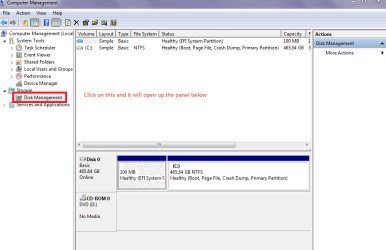
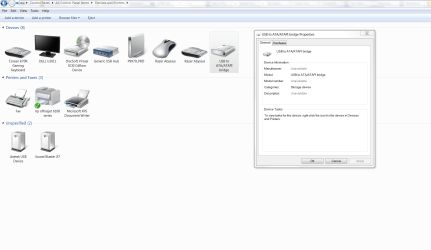
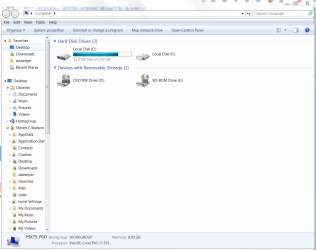
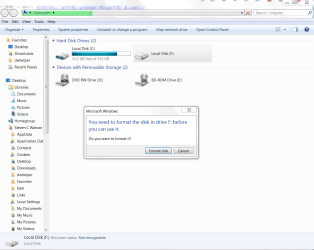
Here's my problem and how far I have got with it: Windows can't see WDC WD25 00JS-60NCB1 250GB SATA hard drive either installed internally or attached by USB in caddy; This drive was migrated from a build that has stood idle for a while without a monitor. I accidentally booted this computer and had to shut it down with the power button. In the build the drive has been migrated to the USB to ATP/ATPI bridge is seen in Device Manager but the drive is marked unavailable. The drive can be seen from an Ubuntu Live disc and some files can be accessed but the drive dismounts after a few minutes and shows as needing formatting. The Disks Accessory shows all the partitions (Drive has a Windows and at least one Linux install); GParted stalls with errors.
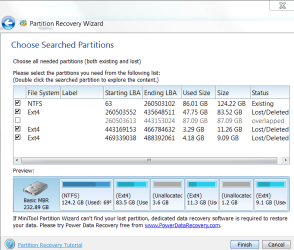
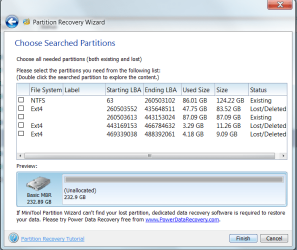
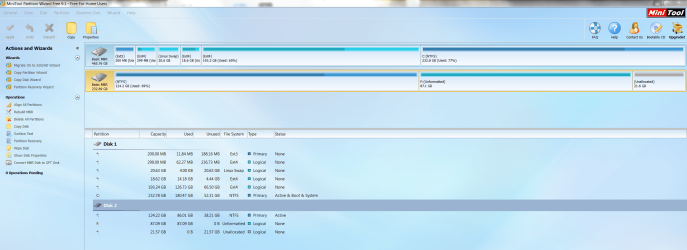
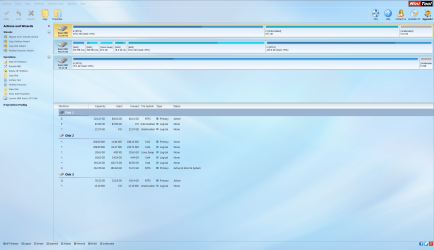
I followed jumanji's Post 3 at http://www.sevenforums.com/hardware...-not-initialized-unallocated.html#post2386144 and installed/ran MiniTool Partition Wizard 9.1; however, when the Partition Recovery Wizard completed scanning it showed one partition overlapped with another and at the recovery prompt said that at least one partition would be deleted and I am unsure how to proceed. An 87.1GB partition is showing as existing but unformatted; this then shows up without a file system and overlapping several Linux Ext4 partitions, see screenshots.
I'm not sure what is going on here; I would have expected it to come back showing a Windows data partition formatted NTFS and a Linux Ext4 partition subdivided Root, Home, Swap etc, both marked as existing: this is what the Disks Accessory shows in Ubuntu and how I remember the drive as set up.
I am going to log out now and reboot into Ubuntu to see if the drive will show up long enough to get some screenies of what the Disks Accessory and the file manager can see.
View attachment 389137
View attachment 389138
View attachment 389139
View attachment 389140
Here's my problem and how far I have got with it: Windows can't see WDC WD25 00JS-60NCB1 250GB SATA hard drive either installed internally or attached by USB in caddy; This drive was migrated from a build that has stood idle for a while without a monitor. I accidentally booted this computer and had to shut it down with the power button. In the build the drive has been migrated to the USB to ATP/ATPI bridge is seen in Device Manager but the drive is marked unavailable. The drive can be seen from an Ubuntu Live disc and some files can be accessed but the drive dismounts after a few minutes and shows as needing formatting. The Disks Accessory shows all the partitions (Drive has a Windows and at least one Linux install); GParted stalls with errors.
I followed jumanji's Post 3 at http://www.sevenforums.com/hardware...-not-initialized-unallocated.html#post2386144 and installed/ran MiniTool Partition Wizard 9.1; however, when the Partition Recovery Wizard completed scanning it showed one partition overlapped with another and at the recovery prompt said that at least one partition would be deleted and I am unsure how to proceed. An 87.1GB partition is showing as existing but unformatted; this then shows up without a file system and overlapping several Linux Ext4 partitions, see screenshots.
I'm not sure what is going on here; I would have expected it to come back showing a Windows data partition formatted NTFS and a Linux Ext4 partition subdivided Root, Home, Swap etc, both marked as existing: this is what the Disks Accessory shows in Ubuntu and how I remember the drive as set up.
I am going to log out now and reboot into Ubuntu to see if the drive will show up long enough to get some screenies of what the Disks Accessory and the file manager can see.
View attachment 389137
View attachment 389138
View attachment 389139
View attachment 389140
My Computer
At a glance
Windows 7 Ultimate x64i7-3930K2x4GB Corsair Dominator PlatinumRadeon R9 290
- Computer type
- PC/Desktop
- Computer Manufacturer/Model Number
- Self build
- OS
- Windows 7 Ultimate x64
- CPU
- i7-3930K
- Motherboard
- Asus P9X79 PRO
- Memory
- 2x4GB Corsair Dominator Platinum
- Graphics Card(s)
- Radeon R9 290
- Hard Drives
- Samsung HD501LJ 500GB
Western Digital WD2500JS-60NCB1 250GB
- Antivirus
- AVG free, Malwarebytes Anti-Malware
- Browser
- Firefox