External drives show in Device Manager & Disk Manager but not Computer
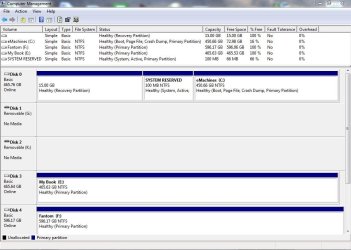
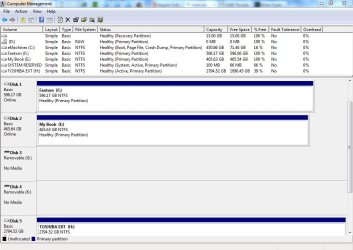
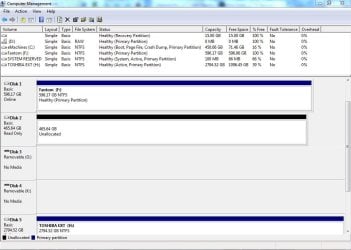
Two of my USB external Hard drives, a Fantom 600 GB and a Western Digital My Book 500GB cannot be seen in My Computer. I can see them in Device Manager and that says that they are working properly and the drivers are up to Date. In Disk Manager the 2 external drives had a black bar unlike the other drives which had blue bars. The 2 external disks had a number assigned to them but no letter.
I have tried diskpart in the command prompt, was able to assign a letter, then had to format the drives and they did show up in My computer as valid empty external hard drives with the correct amount of space on them. But when I tried to recover the backed up data for one of the disks (less than a third of the capacity of either drive) they went back to not being recognized by My Computer ans in disk manager had a black line with no letter again.
I just went through that process again, got both drives back and tried to recover the backed up files to my Fantom drive and lost the Fantom drive once again.
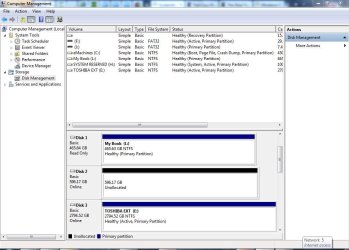
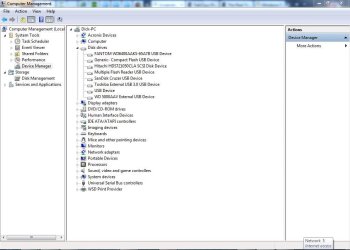
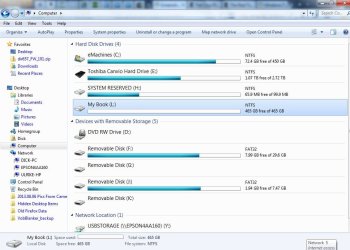
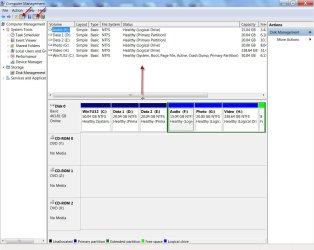
I am attaching screen shots of my current My Computer (Computer in 7) Device Manager and Disk Manager. In Device Manager you can see the Fantom. The My Book is the WD 5000AAV. In Disk Manager the My Book shows healthy with Disk 1 and the letter L. The Fantom is Disk 2 with no letter and a black bar. In My computer, the My Book is there but not the Fantom.
Any ideas for this. I am about to just recover my computer to factory setup and start new. I have saved all my important files and mail to the newer Toshiba Canvio.
Thanks in advance.
Dick
Two of my USB external Hard drives, a Fantom 600 GB and a Western Digital My Book 500GB cannot be seen in My Computer. I can see them in Device Manager and that says that they are working properly and the drivers are up to Date. In Disk Manager the 2 external drives had a black bar unlike the other drives which had blue bars. The 2 external disks had a number assigned to them but no letter.
I have tried diskpart in the command prompt, was able to assign a letter, then had to format the drives and they did show up in My computer as valid empty external hard drives with the correct amount of space on them. But when I tried to recover the backed up data for one of the disks (less than a third of the capacity of either drive) they went back to not being recognized by My Computer ans in disk manager had a black line with no letter again.
I just went through that process again, got both drives back and tried to recover the backed up files to my Fantom drive and lost the Fantom drive once again.
I am attaching screen shots of my current My Computer (Computer in 7) Device Manager and Disk Manager. In Device Manager you can see the Fantom. The My Book is the WD 5000AAV. In Disk Manager the My Book shows healthy with Disk 1 and the letter L. The Fantom is Disk 2 with no letter and a black bar. In My computer, the My Book is there but not the Fantom.
Any ideas for this. I am about to just recover my computer to factory setup and start new. I have saved all my important files and mail to the newer Toshiba Canvio.
Thanks in advance.
Dick
Attachments
My Computer
At a glance
Windows 7 Home Premium 64 bitAMD Sempron 1554 GB DDR3NVIDIA GeForce 61505E
- Computer type
- PC/Desktop
- Computer Manufacturer/Model Number
- eMachines EL1352G-01W
- OS
- Windows 7 Home Premium 64 bit
- CPU
- AMD Sempron 155
- Memory
- 4 GB DDR3
- Graphics Card(s)
- NVIDIA GeForce 61505E
- Hard Drives
- 500 GB Internal Hard Drive Hitachi HDS721050CLA SCSI Disk Device
Toshiba Canvio External Hard Drive USB 3 TB
Fantom WD6400AAKS-65A7B External Hard Drive USB 600 GB
Western Digital My Book 5000AAV External Hard Drive USB 500 GB
- Antivirus
- BitDefender Total Security
- Browser
- Firefox 23.0.1

 - it is necessary that you do the above and restate the problem.)