
drive sharing over lan - driving me nuts

chrysalis

New member
Power User
VIP
Local time
7:21 PM
Messages
529
Location
Leics, UK
ok here is scenario,

originally worked fine on a simple lan setup. between 2 windows 7 machines. same subnet ip range.

I then routed a static internet ip to this desktop machine and of course assigned new gateway to it. the other machine left on the old lan ip range as routing that over other internet connection. these machines are all still on same physical network.

I then added a lan ip to this machine as a second ip on the interface.

this got the other machine able to see this machine shared drives and am able to connect to other machine over remote desktop on lan ip. at this stage I assumed was all fixed.

noticed today I could not from this machine access shared drives on other machine so one way traffic. boh machines can ping each other fine of course.

so thought hmm maybe its because the net ip is first on the interface and lan 2nd so deleted both ip's and made sure lan ip added first, I thought bingo as I was able to access other machine again from this machine, but guess what. The other machine then couldnt see the drives on this machine, so I reversed the one way traffic.

I then played with netbios settings unsure of the role of netbios on modern file sharing and enabled ipv6 on this nic. Now both machines can access each others shared drives but ONLY if I manually know the machine name, here is what I mean. I have 2 explorer windows open on this machine, the first window has the other machine name already listed in left window as remembered it from earlier, so I can click on it there and see all shared drives. If I open a new window the machine doesnt show, and in addition if I click on network in the first window I dont see the other machine, so the drives are accessible but the machine doesnt show itself in the network window. Same on other machine, can access the drives on here but only if I manually type the network address in or have a window which has remembered the name on the left. In addition the machine randomly appears in the network window and then goes again.

This is where I am now.

So this machine

192.168.1.124 and <internet ip> assigned to nic.
192.168.1.125 assigned to other machine.

result dodgy file sharing.
 

My Computer My Computer

Computer type
PC/Desktop
Computer Manufacturer/Model Number
home built
OS
windows 8.1 Pro x64
CPU
intel i5 4670k @ 4.3ghz
Motherboard
asus z87-plus
Memory
16 gig ram ddr3 @ 1600 corsair vengeance
Graphics Card(s)
evga 970 GTX 4 GIG FTW ACX 2.0
Sound Card
asus xonar D2X
Monitor(s) Displays
benq gw2765ht
Screen Resolution
2560x1440
Hard Drives
Samsung 850 pro SSD 512gig - boot device wooosh
WD black cavalier 640gig WD6401AALS
Seagate 500gig ST3500630AS
WD 2TB Green WDC20EARS
2 x WD Red 3TB WD30EFRX
Samsung 750gig HD753LG - on asmedia controller
PSU
coolermaster silent pro 600watt modular
Case
fractal define R4
Cooling
artic freezer i30, 3 case fans
Keyboard
microsoft business ps2 keyboard
Mouse
microsoft optical black mouse
Internet Speed
80/20 FTTC SkyBB
Antivirus
Nod32 AV v8, HitmanProAlert, SRP, System Hardening
Browser
Chrome x64
Other Info
Intel controller is in AHCI mode currently using IaSTOR 12.8.0.1016 drivers
I'm not sure about the IP assignments but if you really need to share entire drives you need to go into the Security Tab of the drive and allow for permissions there as well. Although for a LAN network to work correctly your machines will need to be using the same gateway address. From a security standpoint you would be better off sharing the entire User folder instead.
 

My Computer My Computer

Computer type
PC/Desktop
Computer Manufacturer/Model Number
Home built
OS
Windows 7 Ult, Windows 8.1 Pro,
CPU
Q9650-4.275GHz, E8600 4.5GHz, E6750-3.8GHz
Motherboard
Evga 780i FTW
Memory
G.Skill PC2 9600 1200Mhz 5 5 5 15 2T
Graphics Card(s)
GTX480
Sound Card
Asus Xonar D2
Monitor(s) Displays
HannsG
Screen Resolution
1680X1050
Hard Drives
GSkill Phoenix Pro 120GB SSD
PSU
ThermalTake Toughpower 1000Watt modular
Case
ThermalTake XaserV
Cooling
Xigmatek S1283
Keyboard
Logitech G15
Mouse
Logitech G9
Internet Speed
T1
that side of things is fine, its not a user permission problem. I am not getting access denied messages.
 

My Computer My Computer

Computer type
PC/Desktop
Computer Manufacturer/Model Number
home built
OS
windows 8.1 Pro x64
CPU
intel i5 4670k @ 4.3ghz
Motherboard
asus z87-plus
Memory
16 gig ram ddr3 @ 1600 corsair vengeance
Graphics Card(s)
evga 970 GTX 4 GIG FTW ACX 2.0
Sound Card
asus xonar D2X
Monitor(s) Displays
benq gw2765ht
Screen Resolution
2560x1440
Hard Drives
Samsung 850 pro SSD 512gig - boot device wooosh
WD black cavalier 640gig WD6401AALS
Seagate 500gig ST3500630AS
WD 2TB Green WDC20EARS
2 x WD Red 3TB WD30EFRX
Samsung 750gig HD753LG - on asmedia controller
PSU
coolermaster silent pro 600watt modular
Case
fractal define R4
Cooling
artic freezer i30, 3 case fans
Keyboard
microsoft business ps2 keyboard
Mouse
microsoft optical black mouse
Internet Speed
80/20 FTTC SkyBB
Antivirus
Nod32 AV v8, HitmanProAlert, SRP, System Hardening
Browser
Chrome x64
Other Info
Intel controller is in AHCI mode currently using IaSTOR 12.8.0.1016 drivers
It sounds exactly like my homegroup setup the moment I get both computer seeing each other and everything is fine everything changes after a reboot or something else, I wish I could help ya but this has me confused as well even though your going a different way than I am, it's the most damn frustrating thing I've come across..I do know that windows firewall has to be running along with the dns clients cause when they weren't running then it really was impossible. My 3rd party firewall isn't helping matters either...

No doubt your third party firewall is the root of the problem. You can usually configure them to allow for the range of IP's which you are using in order to get sharing to work past the firewall.
 

My Computer My Computer

Computer type
PC/Desktop
Computer Manufacturer/Model Number
Home built
OS
Windows 7 Ult, Windows 8.1 Pro,
CPU
Q9650-4.275GHz, E8600 4.5GHz, E6750-3.8GHz
Motherboard
Evga 780i FTW
Memory
G.Skill PC2 9600 1200Mhz 5 5 5 15 2T
Graphics Card(s)
GTX480
Sound Card
Asus Xonar D2
Monitor(s) Displays
HannsG
Screen Resolution
1680X1050
Hard Drives
GSkill Phoenix Pro 120GB SSD
PSU
ThermalTake Toughpower 1000Watt modular
Case
ThermalTake XaserV
Cooling
Xigmatek S1283
Keyboard
Logitech G15
Mouse
Logitech G9
Internet Speed
T1
Joules yeah I forgot to mention firewall situation.

no 3rd party firewall on either machine, both machines have windows firewall enabled.

the other machine I manually added an allow rule to allow any traffic from my static net ip range, this improved things which indicates this machine may be sending out random file sharing traffic out on the wrong ip to the other machine. I have of course tried disabling the firewall on both machines but to no fix.
 

My Computer My Computer

Computer type
PC/Desktop
Computer Manufacturer/Model Number
home built
OS
windows 8.1 Pro x64
CPU
intel i5 4670k @ 4.3ghz
Motherboard
asus z87-plus
Memory
16 gig ram ddr3 @ 1600 corsair vengeance
Graphics Card(s)
evga 970 GTX 4 GIG FTW ACX 2.0
Sound Card
asus xonar D2X
Monitor(s) Displays
benq gw2765ht
Screen Resolution
2560x1440
Hard Drives
Samsung 850 pro SSD 512gig - boot device wooosh
WD black cavalier 640gig WD6401AALS
Seagate 500gig ST3500630AS
WD 2TB Green WDC20EARS
2 x WD Red 3TB WD30EFRX
Samsung 750gig HD753LG - on asmedia controller
PSU
coolermaster silent pro 600watt modular
Case
fractal define R4
Cooling
artic freezer i30, 3 case fans
Keyboard
microsoft business ps2 keyboard
Mouse
microsoft optical black mouse
Internet Speed
80/20 FTTC SkyBB
Antivirus
Nod32 AV v8, HitmanProAlert, SRP, System Hardening
Browser
Chrome x64
Other Info
Intel controller is in AHCI mode currently using IaSTOR 12.8.0.1016 drivers
edit firewall settings for 3 zones to allow file sharing... sounds like your stuck in public-ville on the firewall (highest security)?
 

My Computer My Computer

OS
7 Pro
sorry chev, not stalking you honest. :D

Chrysallis the reason you can't type machine names is resolution, you may have come across DNS in your travels around the internets.
and you are right to wonder why a 20 year old protocol introduced to help with networking Windows 3.1 machines is still prevalent in your windows 7 build. I this case most of the local networking relies on NETBIOS. Lol. who'd have thunk it.

Basically Netbios is a broadcast protocol that nowadays is only applicable on a small networks, larger networks would employ internaly cited DNS servers to do this resolution.
Netbios works by sending data packets to every computer on your network addressed to the machinename, once the message reaches a machine with the same name it sends a reply to the "computer browser" service which then keeps a record until you turn your machine off..it's a little like openning your front door and shouting the name of a neighbour you want to speak to...lol. Not very efficient or secure....but that's not really an issue on a home network.

you may find some clues in your event logs.
 
Last edited:

My Computer My Computer

OS
windows 7 enterprise 32bit
edit firewall settings for 3 zones to allow file sharing... sounds like your stuck in public-ville on the firewall (highest security)?

is set to private, and of course I did say I have tried with firewall actually disabled ;)
 

My Computer My Computer

Computer type
PC/Desktop
Computer Manufacturer/Model Number
home built
OS
windows 8.1 Pro x64
CPU
intel i5 4670k @ 4.3ghz
Motherboard
asus z87-plus
Memory
16 gig ram ddr3 @ 1600 corsair vengeance
Graphics Card(s)
evga 970 GTX 4 GIG FTW ACX 2.0
Sound Card
asus xonar D2X
Monitor(s) Displays
benq gw2765ht
Screen Resolution
2560x1440
Hard Drives
Samsung 850 pro SSD 512gig - boot device wooosh
WD black cavalier 640gig WD6401AALS
Seagate 500gig ST3500630AS
WD 2TB Green WDC20EARS
2 x WD Red 3TB WD30EFRX
Samsung 750gig HD753LG - on asmedia controller
PSU
coolermaster silent pro 600watt modular
Case
fractal define R4
Cooling
artic freezer i30, 3 case fans
Keyboard
microsoft business ps2 keyboard
Mouse
microsoft optical black mouse
Internet Speed
80/20 FTTC SkyBB
Antivirus
Nod32 AV v8, HitmanProAlert, SRP, System Hardening
Browser
Chrome x64
Other Info
Intel controller is in AHCI mode currently using IaSTOR 12.8.0.1016 drivers
you may find some clues in your event logs.

ok got this for about 6 hours ago.

The master browser has received a server announcement from the computer CHRIS-TESTPC that believes that it is the master browser for the domain on transport NetBT_Tcpip_{BAB0EDE4-F2D2-4742-A81A-A6E7575F12FA}. The master browser is stopping or an election is being forced.

looks like thats it tho, nothing else in there related.
 

My Computer My Computer

Computer type
PC/Desktop
Computer Manufacturer/Model Number
home built
OS
windows 8.1 Pro x64
CPU
intel i5 4670k @ 4.3ghz
Motherboard
asus z87-plus
Memory
16 gig ram ddr3 @ 1600 corsair vengeance
Graphics Card(s)
evga 970 GTX 4 GIG FTW ACX 2.0
Sound Card
asus xonar D2X
Monitor(s) Displays
benq gw2765ht
Screen Resolution
2560x1440
Hard Drives
Samsung 850 pro SSD 512gig - boot device wooosh
WD black cavalier 640gig WD6401AALS
Seagate 500gig ST3500630AS
WD 2TB Green WDC20EARS
2 x WD Red 3TB WD30EFRX
Samsung 750gig HD753LG - on asmedia controller
PSU
coolermaster silent pro 600watt modular
Case
fractal define R4
Cooling
artic freezer i30, 3 case fans
Keyboard
microsoft business ps2 keyboard
Mouse
microsoft optical black mouse
Internet Speed
80/20 FTTC SkyBB
Antivirus
Nod32 AV v8, HitmanProAlert, SRP, System Hardening
Browser
Chrome x64
Other Info
Intel controller is in AHCI mode currently using IaSTOR 12.8.0.1016 drivers
You guys are right in my lan setting in my third party firewall I forgot to make it trusted to both computers 2 little check boxes and that was it...Thanks for the reminder I can't believe that something like that was eating my lunch...

Well at least it was easy to configure, some aren't so easy. Glad you have it working.
 

My Computer My Computer

Computer type
PC/Desktop
Computer Manufacturer/Model Number
Home built
OS
Windows 7 Ult, Windows 8.1 Pro,
CPU
Q9650-4.275GHz, E8600 4.5GHz, E6750-3.8GHz
Motherboard
Evga 780i FTW
Memory
G.Skill PC2 9600 1200Mhz 5 5 5 15 2T
Graphics Card(s)
GTX480
Sound Card
Asus Xonar D2
Monitor(s) Displays
HannsG
Screen Resolution
1680X1050
Hard Drives
GSkill Phoenix Pro 120GB SSD
PSU
ThermalTake Toughpower 1000Watt modular
Case
ThermalTake XaserV
Cooling
Xigmatek S1283
Keyboard
Logitech G15
Mouse
Logitech G9
Internet Speed
T1
chrysalis,
there are certainly strange things going on.

can you explain the network a little more,

The first pc connects to the web and you then use ICS to share the connection with the other pc?
can you post the results of a couple of tests

can you post results of the commands

open a cmd window on both computers and type

ipconfig /all
 

My Computer My Computer

OS
windows 7 enterprise 32bit
well that event error is probably why your computer keeps disappearing.
you are experiencing a flip flopping browser election!!
this means your computer browser service keeps stopping, clearing the decks of known computers, ready to work on the results of the election. you can "rig" a browser election.
I'll have to consult Technet for the reghacks, but only after Pilates...unless someone else wants to do it.

good luck.
 

My Computer My Computer

OS
windows 7 enterprise 32bit
ok first the test pc. This machine is on my lan ip range only and behind a NAT for internet access. Uses DHCP as well but with manual dns configuration.

Code:
C:\Users\Chris>ipconfig /all
Windows IP Configuration
   Host Name . . . . . . . . . . . . : Chris-testPC
   Primary Dns Suffix  . . . . . . . :
   Node Type . . . . . . . . . . . . : Hybrid
   IP Routing Enabled. . . . . . . . : No
   WINS Proxy Enabled. . . . . . . . : No
Ethernet adapter Local Area Connection:
   Connection-specific DNS Suffix  . :
   Description . . . . . . . . . . . : Intel(R) PRO/1000 GT Desktop Adapter
   Physical Address. . . . . . . . . : 00-1B-21-21-52-F3
   DHCP Enabled. . . . . . . . . . . : Yes
   Autoconfiguration Enabled . . . . : Yes
   IPv4 Address. . . . . . . . . . . : 192.168.1.125(Preferred)
   Subnet Mask . . . . . . . . . . . : 255.255.255.0
   Lease Obtained. . . . . . . . . . : 19 December 2010 17:30:39
   Lease Expires . . . . . . . . . . : 21 January 2011 11:33:03
   Default Gateway . . . . . . . . . : 192.168.1.1
   DHCP Server . . . . . . . . . . . : 192.168.1.1
   DNS Servers . . . . . . . . . . . : 8.8.8.8
                                       208.67.222.222
   NetBIOS over Tcpip. . . . . . . . : Enabled
Tunnel adapter Teredo Tunneling Pseudo-Interface:
   Connection-specific DNS Suffix  . :
   Description . . . . . . . . . . . : Teredo Tunneling Pseudo-Interface
   Physical Address. . . . . . . . . : 00-00-00-00-00-00-00-E0
   DHCP Enabled. . . . . . . . . . . : No
   Autoconfiguration Enabled . . . . : Yes
   IPv6 Address. . . . . . . . . . . : 2001:0:5ef5:73b8:3095:c54:adf8:af76(Prefe
rred)
   Link-local IPv6 Address . . . . . : fe80::3095:c54:adf8:af76%12(Preferred)
   Default Gateway . . . . . . . . . : ::
   NetBIOS over Tcpip. . . . . . . . : Disabled
Tunnel adapter isatap.{2F11348F-3282-4A61-A6C1-3CFA70E74FDD}:
   Media State . . . . . . . . . . . : Media disconnected
   Connection-specific DNS Suffix  . :
   Description . . . . . . . . . . . : Microsoft ISATAP Adapter #2
   Physical Address. . . . . . . . . : 00-00-00-00-00-00-00-E0
   DHCP Enabled. . . . . . . . . . . : No
   Autoconfiguration Enabled . . . . : Yes


2nd machine I will censor part of net ip.

It was been routed over a static non NAT ip to the internet, I have also attached a lan ip to it so it can communicate also with the rest of my lan, all lan stuff works fine except this file sharing, so eg. I can use remote desktop over the lan, access all my routers over the lan and access my xbox360 over the lan. I say 'was' as now I changed the metrics so that although its still attached to both ip ranges, all traffic ic surrently been routed over the NAT connection so the lan gateway is primary at current. I have been playing with it to try and recover full file sharing and I do know that by removing the internet ip address whilst keeping both gateways does not fix it and am about to test with just one gateway added.

The errors I have been getting are,

When clicking on machine in network window with no access "unable to find "machine" on network. I dont get this error now tho as can currently access all drives, just the machines are invisible.

Code:
C:\Windows\system32>ipconfig /all
Windows IP Configuration
   Host Name . . . . . . . . . . . . : i5PC
   Primary Dns Suffix  . . . . . . . :
   Node Type . . . . . . . . . . . . : Hybrid
   IP Routing Enabled. . . . . . . . : No
   WINS Proxy Enabled. . . . . . . . : No
Ethernet adapter Intel:
   Connection-specific DNS Suffix  . :
   Description . . . . . . . . . . . : Intel(R) Gigabit CT Desktop Adapter
   Physical Address. . . . . . . . . : 00-1B-21-3D-E6-43
   DHCP Enabled. . . . . . . . . . . : No
   Autoconfiguration Enabled . . . . : Yes
   IPv4 Address. . . . . . . . . . . : 192.168.1.124(Preferred)
   Subnet Mask . . . . . . . . . . . : 255.255.255.0
   IPv4 Address. . . . . . . . . . . : 212.105.xxx.xxx(Preferred)
   Subnet Mask . . . . . . . . . . . : 255.255.255.248
   Default Gateway . . . . . . . . . : 192.168.1.1
                                       212.105.xxx.xxx
   DNS Servers . . . . . . . . . . . : 8.8.8.8
                                       208.67.222.222
                                       8.8.4.4
                                       192.168.1.252
   NetBIOS over Tcpip. . . . . . . . : Enabled
Tunnel adapter isatap.{BAB0EDE4-F2D2-4742-A81A-A6E7575F12FA}:
   Media State . . . . . . . . . . . : Media disconnected
   Connection-specific DNS Suffix  . :
   Description . . . . . . . . . . . : Microsoft ISATAP Adapter
   Physical Address. . . . . . . . . : 00-00-00-00-00-00-00-E0
   DHCP Enabled. . . . . . . . . . . : No
   Autoconfiguration Enabled . . . . : Yes
Tunnel adapter Local Area Connection* 12:
   Connection-specific DNS Suffix  . :
   Description . . . . . . . . . . . : Teredo Tunneling Pseudo-Interface
   Physical Address. . . . . . . . . : 00-00-00-00-00-00-00-E0
   DHCP Enabled. . . . . . . . . . . : No
   Autoconfiguration Enabled . . . . : Yes
   IPv6 Address. . . . . . . . . . . : 2001:0:5ef5:79fd:ce2:2d4f:a053:1369(Prefe
rred)
   Link-local IPv6 Address . . . . . : fe80::ce2:2d4f:a053:1369%12(Preferred)
   Default Gateway . . . . . . . . . :
   NetBIOS over Tcpip. . . . . . . . : Disabled
Tunnel adapter 6TO4 Adapter:
   Connection-specific DNS Suffix  . :
   Description . . . . . . . . . . . : Microsoft 6to4 Adapter
   Physical Address. . . . . . . . . : 00-00-00-00-00-00-00-E0
   DHCP Enabled. . . . . . . . . . . : No
   Autoconfiguration Enabled . . . . : Yes
   IPv6 Address. . . . . . . . . . . : 2002:d469:a476::d469:a476(Preferred)
   Default Gateway . . . . . . . . . : 2002:c058:6301::c058:6301
   DNS Servers . . . . . . . . . . . : 8.8.8.8
                                       208.67.222.222
                                       8.8.4.4
                                       192.168.1.252
   NetBIOS over Tcpip. . . . . . . . : Disabled
 

My Computer My Computer

Computer type
PC/Desktop
Computer Manufacturer/Model Number
home built
OS
windows 8.1 Pro x64
CPU
intel i5 4670k @ 4.3ghz
Motherboard
asus z87-plus
Memory
16 gig ram ddr3 @ 1600 corsair vengeance
Graphics Card(s)
evga 970 GTX 4 GIG FTW ACX 2.0
Sound Card
asus xonar D2X
Monitor(s) Displays
benq gw2765ht
Screen Resolution
2560x1440
Hard Drives
Samsung 850 pro SSD 512gig - boot device wooosh
WD black cavalier 640gig WD6401AALS
Seagate 500gig ST3500630AS
WD 2TB Green WDC20EARS
2 x WD Red 3TB WD30EFRX
Samsung 750gig HD753LG - on asmedia controller
PSU
coolermaster silent pro 600watt modular
Case
fractal define R4
Cooling
artic freezer i30, 3 case fans
Keyboard
microsoft business ps2 keyboard
Mouse
microsoft optical black mouse
Internet Speed
80/20 FTTC SkyBB
Antivirus
Nod32 AV v8, HitmanProAlert, SRP, System Hardening
Browser
Chrome x64
Other Info
Intel controller is in AHCI mode currently using IaSTOR 12.8.0.1016 drivers
another random event, just now I could see this machine on my test machine, I double clicked it and the drives showed great, clicked back and when it went back to the network page this machine was gone :shock:
 

My Computer My Computer

Computer type
PC/Desktop
Computer Manufacturer/Model Number
home built
OS
windows 8.1 Pro x64
CPU
intel i5 4670k @ 4.3ghz
Motherboard
asus z87-plus
Memory
16 gig ram ddr3 @ 1600 corsair vengeance
Graphics Card(s)
evga 970 GTX 4 GIG FTW ACX 2.0
Sound Card
asus xonar D2X
Monitor(s) Displays
benq gw2765ht
Screen Resolution
2560x1440
Hard Drives
Samsung 850 pro SSD 512gig - boot device wooosh
WD black cavalier 640gig WD6401AALS
Seagate 500gig ST3500630AS
WD 2TB Green WDC20EARS
2 x WD Red 3TB WD30EFRX
Samsung 750gig HD753LG - on asmedia controller
PSU
coolermaster silent pro 600watt modular
Case
fractal define R4
Cooling
artic freezer i30, 3 case fans
Keyboard
microsoft business ps2 keyboard
Mouse
microsoft optical black mouse
Internet Speed
80/20 FTTC SkyBB
Antivirus
Nod32 AV v8, HitmanProAlert, SRP, System Hardening
Browser
Chrome x64
Other Info
Intel controller is in AHCI mode currently using IaSTOR 12.8.0.1016 drivers
I have fix for the computer browsing by making an entry in your local host files for both computers. that won't resolve your browser elections but will make your network browsing a little more stable...

the ipconfigs are perfect, thanks chrys that's tiptop.
I'll have a proper shufty when I get back in an hour or so..

don't worry though it's probably just a tick box somewhere that is easily overlooked.

regards

Ant.
 

My Computer My Computer

OS
windows 7 enterprise 32bit
great anta thanks, I am turning the firewall back on this machine since its got no NAT protection heh.
 

My Computer My Computer

Computer type
PC/Desktop
Computer Manufacturer/Model Number
home built
OS
windows 8.1 Pro x64
CPU
intel i5 4670k @ 4.3ghz
Motherboard
asus z87-plus
Memory
16 gig ram ddr3 @ 1600 corsair vengeance
Graphics Card(s)
evga 970 GTX 4 GIG FTW ACX 2.0
Sound Card
asus xonar D2X
Monitor(s) Displays
benq gw2765ht
Screen Resolution
2560x1440
Hard Drives
Samsung 850 pro SSD 512gig - boot device wooosh
WD black cavalier 640gig WD6401AALS
Seagate 500gig ST3500630AS
WD 2TB Green WDC20EARS
2 x WD Red 3TB WD30EFRX
Samsung 750gig HD753LG - on asmedia controller
PSU
coolermaster silent pro 600watt modular
Case
fractal define R4
Cooling
artic freezer i30, 3 case fans
Keyboard
microsoft business ps2 keyboard
Mouse
microsoft optical black mouse
Internet Speed
80/20 FTTC SkyBB
Antivirus
Nod32 AV v8, HitmanProAlert, SRP, System Hardening
Browser
Chrome x64
Other Info
Intel controller is in AHCI mode currently using IaSTOR 12.8.0.1016 drivers
ok more info and more bizzareness.

if I remove all instances of the other network from this machine the problem doesnt fix itself, so at the moment its on 192.168.1.124 and 192.168.1.1 gateway and thats it, no other ip's or gateways.

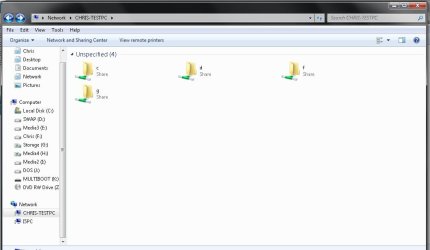
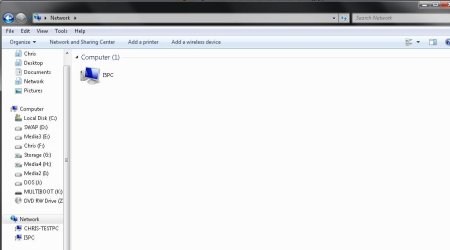
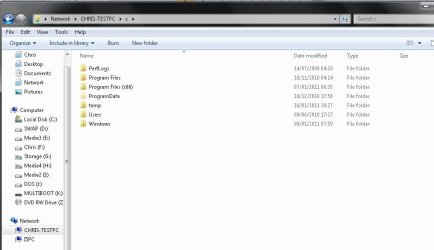
here is some screenshots.

lan1 shows unspecified at top corner of main window.
lan2 shows a missing CHRIS-TESTPC
lan3 shows I can access the drive fine but had to navigate to it via the cached icon on the left side which is not present in new windows.
 

Attachments

  • lan1.jpg
    lan1.jpg
    39.3 KB · Views: 4
  • lan2.jpg
    lan2.jpg
    33 KB · Views: 2
  • lan3.jpg
    lan3.jpg
    42.3 KB · Views: 2

My Computer My Computer

Computer type
PC/Desktop
Computer Manufacturer/Model Number
home built
OS
windows 8.1 Pro x64
CPU
intel i5 4670k @ 4.3ghz
Motherboard
asus z87-plus
Memory
16 gig ram ddr3 @ 1600 corsair vengeance
Graphics Card(s)
evga 970 GTX 4 GIG FTW ACX 2.0
Sound Card
asus xonar D2X
Monitor(s) Displays
benq gw2765ht
Screen Resolution
2560x1440
Hard Drives
Samsung 850 pro SSD 512gig - boot device wooosh
WD black cavalier 640gig WD6401AALS
Seagate 500gig ST3500630AS
WD 2TB Green WDC20EARS
2 x WD Red 3TB WD30EFRX
Samsung 750gig HD753LG - on asmedia controller
PSU
coolermaster silent pro 600watt modular
Case
fractal define R4
Cooling
artic freezer i30, 3 case fans
Keyboard
microsoft business ps2 keyboard
Mouse
microsoft optical black mouse
Internet Speed
80/20 FTTC SkyBB
Antivirus
Nod32 AV v8, HitmanProAlert, SRP, System Hardening
Browser
Chrome x64
Other Info
Intel controller is in AHCI mode currently using IaSTOR 12.8.0.1016 drivers
chris, wow back, Pilates isn't something to be sniffed at. SERIOUSLY.

your home network and specifically your second connection to the web, don't worry I don't need details and I won't ask for them....is that work related?
I am trying to understand why you would have two...as this is certainly complicating things.

lets see if we can't sort something.
lets start with the first machine I assume it doesn't need access through your other internet connection.
also have you been having internet problems with your ISP and that's why you've manually added DNS servers other than your isps.
you can usually be safe just to use the router as it forwards DNS queries to your ISPs' DNS servers out on the web. unless there's a specific need you should remove those settings replacing them with just the router addy, 192.168.1.1. It's also quite a security risk. if you think anyone can access those DNS servers and possibly update them with their own records...maybe not the Google one...:) but you get my drift.

I wont look at the 2nd pc until you confirm what the second link to web is for, don't really want to f it up for you.
as I was saying before I went out, we could try some stuff to sort the browsing and stuff..

navigate through explorer to C:\Windows\System32\drivers\etc
there should be some files in there.

hosts, protocols, networks, services...

open the hosts file on the first computer, add an entry below the # entries. the gap between ip address and hostname should be a tab.
you can make the same changes to the host file on the second pc.

192.168.1.125 chris-testpc
192.168.1.125 i5pc

let us know when you've done.
 

My Computer My Computer

OS
windows 7 enterprise 32bit
hi anta, they both just broadband connections. the one with static ip's an adsl connection that gives me 8ip's and is handy mainly for me assigning ip's to virtual machines I run to test stuff, but assigned one to the desktop also as the other isp is somewhat oversubscribed and slow to use.

I have done the edit now on the 2nd pc.
 

My Computer My Computer

Computer type
PC/Desktop
Computer Manufacturer/Model Number
home built
OS
windows 8.1 Pro x64
CPU
intel i5 4670k @ 4.3ghz
Motherboard
asus z87-plus
Memory
16 gig ram ddr3 @ 1600 corsair vengeance
Graphics Card(s)
evga 970 GTX 4 GIG FTW ACX 2.0
Sound Card
asus xonar D2X
Monitor(s) Displays
benq gw2765ht
Screen Resolution
2560x1440
Hard Drives
Samsung 850 pro SSD 512gig - boot device wooosh
WD black cavalier 640gig WD6401AALS
Seagate 500gig ST3500630AS
WD 2TB Green WDC20EARS
2 x WD Red 3TB WD30EFRX
Samsung 750gig HD753LG - on asmedia controller
PSU
coolermaster silent pro 600watt modular
Case
fractal define R4
Cooling
artic freezer i30, 3 case fans
Keyboard
microsoft business ps2 keyboard
Mouse
microsoft optical black mouse
Internet Speed
80/20 FTTC SkyBB
Antivirus
Nod32 AV v8, HitmanProAlert, SRP, System Hardening
Browser
Chrome x64
Other Info
Intel controller is in AHCI mode currently using IaSTOR 12.8.0.1016 drivers
How many routers are we talking about here?
Also the 8 static ips I'm assuming they are associated to the gateway device starting with the ip 212.x.x.x

NB. you will definately rectify network sharing by removing ALL gateway addresses assuming all the other devices share the same subnet and not seperate by a router!!
but this will somewhat hamper your browsing of the web...lol.

I am also missing a little bit of info related to how these two networks communicate,
have you daisy chained the routers? or is there a device/computer not listed with two network cards ?
or is one of the routers connected via USB ?

blimey this is a complicated one..I am thinking the problems you are having are routing/browsing related, not something that is insummountable but very much hampered by the number of devices.

regards

Ant.
 

My Computer My Computer

OS
windows 7 enterprise 32bit
Back
Top