Driver, Epson stylus BX610FW

MikeJamesDean

New member
Local time
6:42 PM
Messages
3
Hi All

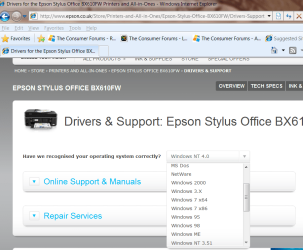
I have the above printer and wish to install the driver on to my Mini HP netbook. Problem is i have no CD drive and the Epson website thinks I have Windows NT?

Would be great if i could get a driver installed and running so i can print via wireless!

I have Windows 7starter.

Can anyone help me out?

Regards
Michael
 

My Computer My Computer

At a glance

7 starter
OS
7 starter
Hi there

on the Epson UK site just scroll down to W7 (chose whether X-64 / x-86)

seems to work fine.

Couldn't find this model on the USA site so it must be a European version.

Here's a screenshot of the Epson support area

Cheers
jimbo


Cheers
jimbo
 

Attachments

  • epson.png
    epson.png
    53 KB · Views: 147

My Computer My Computer

At a glance

Linux CENTOS 7 / various Windows OS'es and se...Intel i7 Intel i58GB, 16GBOn Motherboard
Computer type
PC/Desktop
Computer Manufacturer/Model Number
Custom built, several laptops HP/ASUS
OS
Linux CENTOS 7 / various Windows OS'es and servers
CPU
Intel i7 Intel i5
Memory
8GB, 16GB
Graphics Card(s)
On Motherboard
Sound Card
Realtek HD audio
Monitor(s) Displays
Apple Cinema display, Samsung LCD
Screen Resolution
1920 X 1080
Hard Drives
4 X 1TB SATA
Mouse
Toshiba wireless laser
Internet Speed
> 20MB up
is my hp mini 110 netbook not 32?
 

My Computer My Computer

At a glance

7 starter
OS
7 starter
Hi there
probably - so just download the W7 X86 driver

If you get stuck setting it up post again as it's quite easy to do -- there's a little trick I'll post. Then this printer will work with ALL your computers on your network.

First however plug in the printer and let me know its IP address -- I assume you will be using this as a wireless printer and not have it connected to a computer.

I don't need the whole IP address but just the nn in this string 192 .x.x.nn.

Your router will probably have an address like 192.x.x.01

Cheers

jimbo
 

My Computer My Computer

At a glance

Linux CENTOS 7 / various Windows OS'es and se...Intel i7 Intel i58GB, 16GBOn Motherboard
Computer type
PC/Desktop
Computer Manufacturer/Model Number
Custom built, several laptops HP/ASUS
OS
Linux CENTOS 7 / various Windows OS'es and servers
CPU
Intel i7 Intel i5
Memory
8GB, 16GB
Graphics Card(s)
On Motherboard
Sound Card
Realtek HD audio
Monitor(s) Displays
Apple Cinema display, Samsung LCD
Screen Resolution
1920 X 1080
Hard Drives
4 X 1TB SATA
Mouse
Toshiba wireless laser
Internet Speed
> 20MB up
Hi there
probably - so just download the W7 X86 driver

If you get stuck setting it up post again as it's quite easy to do -- there's a little trick I'll post. Then this printer will work with ALL your computers on your network.

First however plug in the printer and let me know its IP address -- I assume you will be using this as a wireless printer and not have it connected to a computer.

I don't need the whole IP address but just the nn in this string 192 .x.x.nn.

Your router will probably have an address like 192.x.x.01

Cheers

jimbo

Sorry i have been away with work and havnt had chance to thank you!

Driver installed and works perfect via usb cable. would love to get it working wirelessly if you are still willing to help.

Regards
Mike
 

My Computer My Computer

At a glance

7 starter
OS
7 starter
Hi there
probably - so just download the W7 X86 driver

If you get stuck setting it up post again as it's quite easy to do -- there's a little trick I'll post. Then this printer will work with ALL your computers on your network.

First however plug in the printer and let me know its IP address -- I assume you will be using this as a wireless printer and not have it connected to a computer.

I don't need the whole IP address but just the nn in this string 192 .x.x.nn.

Your router will probably have an address like 192.x.x.01

Cheers

jimbo

Sorry i have been away with work and havnt had chance to thank you!

Driver installed and works perfect via usb cable. would love to get it working wirelessly if you are still willing to help.

Regards
Mike

Hi there
probably - so just download the W7 X86 driver

If you get stuck setting it up post again as it's quite easy to do -- there's a little trick I'll post. Then this printer will work with ALL your computers on your network.

First however plug in the printer and let me know its IP address -- I assume you will be using this as a wireless printer and not have it connected to a computer.

I don't need the whole IP address but just the nn in this string 192 .x.x.nn.

Your router will probably have an address like 192.x.x.01

Cheers

jimbo

Hi Jimbo.

I have a Epson Stylus Pro 7000 and windows 7 64.
Can you tell me which driver to install and where I can find it. I have been searching for long time now, but whithout luck.

If you have an answer can you tell me step by step how to install it and how to do it. also with screen shoot.. It will help me alot. Right now Im so lost, I cant find anything in the internet that can help me.

Thank you
Krenare
 

My Computer My Computer

At a glance

Windows 7 64 bit
OS
Windows 7 64 bit
I have a Epson Stylus Pro 7000 and windows 7 64.

Can you tell me which driver to install and where I can find it. I have been searching for long time now, but without luck.
I don't have any experience with this printer, but according to this other thread on the Drivers forum it's a very old printer and per the Microsoft Win7 Compatibility web site does not seem to have support from Epson for Win7.

However it was suggested to install Windows Virtual PC under Win7, install the x64 drivers for WinXP for the Pro 7000 printer, and print from inside the Virtual PC (i.e. from WinXP under Win7). Apparently that worked successfully for the original poster on that other thread (from two years ago) why had a similar request as you do.

Or... maybe look for a newer printer???
 

My Computer My Computer

At a glance

Windows 7 Pro x64 (1), Win7 Pro X64 (2)i5-3350p 3.1Ghz/6MB-cache (1); E8400 3.0Ghz/6...8GB PC3-12800 DDR3 (1); 4GB PC3-10600 DDR3 (2)ATI HD7750 (1), (see TV cards); ATI R7 250 (2)
Computer type
PC/Desktop
Computer Manufacturer/Model Number
Home-built, two systems (1) and (2)
OS
Windows 7 Pro x64 (1), Win7 Pro X64 (2)
CPU
i5-3350p 3.1Ghz/6MB-cache (1); E8400 3.0Ghz/6MB-cache (2)
Motherboard
ASUS P8Z77-V Pro (1); ASUS P5Q3 (2)
Memory
8GB PC3-12800 DDR3 (1); 4GB PC3-10600 DDR3 (2)
Graphics Card(s)
ATI HD7750 (1), (see TV cards); ATI R7 250 (2)
Sound Card
Realtek ALC892 HD Audio (1); Realtek ALC1200 HD Audio (2)
Monitor(s) Displays
Eizo HD2441W LCD, Eizo S2433W (1); Eizo 24" S2433W (2)
Screen Resolution
1920x1200, 1920x1200 (1); 1920x1200 (2)
Hard Drives
(1) 1TB SATA-II (7200RPM), 2x2TB SATA-III (7200RPM), 250GB SATA-III (10000RPM) for OS; 2x2TB external USB 3.0

(2) 320GB SATA-II (7200RPM), 750GB SATA-II (7200RPM), 150GB SATA-II (10000RPM) for OS; 2TB external USB 3.0
PSU
Nesteq ECS-6001 600W (1); Nesteq ECS-5001 500W (2)
Case
Acousti-Case 360 (1) and (2)
Cooling
Noctua NH-U12P SE2 for CPU, 2x120mm case fans (1) and (2)
Keyboard
IBM PS/2 (1) and (2)
Mouse
Logitech MX Revolution wireless (1); Microsoft wired (2)
Internet Speed
100mbps down / 10mbps up
Antivirus
Microsoft Security Essentials; Malwarebyte Anti-Malware Pro
Browser
Firefox
Other Info
Ceton InfiniTV 4-tuner cablecard-enabled TV card as well as Hauppauge HVR-2250 OTA/ATSC 2-tuner TV card in (1), running under Win7 WMC
Back
Top