
Driver Installation Alienware Bios Problem

Scorcht

New member
Local time
12:10 PM
Messages
58
Hello, I was recently updating my drivers for my x51 from alienware, and after installation it said I needed reboot, so I did, and it shows a black screen saying:

Intel UNDI, PXE2.1 (build 083)
Copyright (C) 1997-2000 Intel Corporation

This Product is covered by one or more of the following patents:
US5,307,459, US5,434,872, US732,094, US6,570,884, US6,115,776 and
US6,327,625

Realtek PCIe GBE Family Controller Series v2.41 (06/08/11)

Client MAC ADDR: xx xx xx xx xx xx GUID: xxxxxxxx-xxxx-xxxx-xxxx-xxxxxxxxxxxx

PXE-MOF: Exiting PCE ROM.

Reboot and Select proper Boot device
or Insert Boot Media in selected Boot device and press a key_


I'm not going to give my Mac Address our nor my Guid, whatever that is. I have an alienware, I can't open my hardware, and f2 and f12 doesnt work in boot to open my bios editor. I've tried using an hp, corsair, and dell keyboard, neither of them works. Someone tell me how to "Insert Boot Media in selected Boot device and press a key"?
 

My Computer

Computer type
PC/Desktop
Computer Manufacturer/Model Number
Acer
OS
Windows 7 Home Premium
CPU
Intel(R) Core(TM) i3-2370M CPU @ 2.40GHz 2.40GHz
Motherboard
Laptop
Memory
4.00(3.85 GB usable)
Graphics Card(s)
Laptop
Hard Drives
Laptop
Antivirus
None (Because they all had annoying ads and did nothing)
Why were you changing the drivers on a driver-complete OS? Did you think it's like XP? It's not. Nor should a BIOS be updated due to risk unless there is an applicable reason to do so listed, and a rescue method ready to go.

If you cannot get the F-key to work to access the BIOS to check the SATA controller and Boot order settings which likely changed, then reset the CMOS to see if that helps access the BIOS: How To Clear CMOS (Reset BIOS) [Easy, 10 to 15 Min]
 
Why were you changing the drivers on a driver-complete OS? Did you think it's like XP? It's not. Nor should a BIOS be updated due to risk unless there is an applicable reason to do so listed, and a rescue method ready to go.

If you cannot get the F-key to work to access the BIOS to check the SATA controller and Boot order settings which likely changed, then reset the CMOS to see if that helps access the BIOS: How To Clear CMOS (Reset BIOS) [Easy, 10 to 15 Min]

I don't know which one is the motherboard
Nor do I find any battery of switch in the computer
I also updated driver through the dell website, which the alienware website for drivers redirected me to, using auto service tag detector
 

Attachments

  • image.jpg
    image.jpg
    875.7 KB · Views: 7
Last edited:

My Computer

Computer type
PC/Desktop
Computer Manufacturer/Model Number
Acer
OS
Windows 7 Home Premium
CPU
Intel(R) Core(TM) i3-2370M CPU @ 2.40GHz 2.40GHz
Motherboard
Laptop
Memory
4.00(3.85 GB usable)
Graphics Card(s)
Laptop
Hard Drives
Laptop
Antivirus
None (Because they all had annoying ads and did nothing)
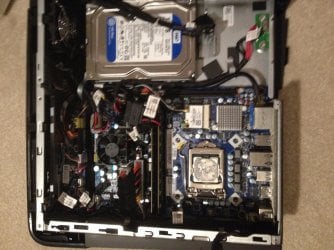
Could you give me the system specs of the computer please? I'm looking at what appears to be a CPU cooler on the left and a CPU with no cooler on it on the right. That can't be right.
 

My Computers

System One System Two

  • Computer type
    PC/Desktop
    Computer Manufacturer/Model Number
    ALWAYS UNDER CONSTRUCTION
    OS
    Windows 11 Pro
    CPU
    Ryzen 9 5900X
    Motherboard
    Asus X570 Crosshair Viii Hero
    Memory
    32GB G Skill DDR4-3600
    Graphics Card(s)
    EVGA RTX 3080 FTW 3 Ultra
    Sound Card
    On Board/Sennheiser PC37X Headset
    Monitor(s) Displays
    3 X Asus 27"
    Screen Resolution
    2560x1440
    Hard Drives
    2 X 1 TB NVME drives
    PSU
    EVGA 850
    Case
    Phanteks Eclipse P400A
    Cooling
    EVGA 280 AIO
    Keyboard
    Logitech G510s/ Logitech G13
    Mouse
    Logitech G502
    Internet Speed
    24/1
    Antivirus
    ESET/MBAM Pro/SAS Pro
    Browser
    Chrome/ Firefox/ Edge
  • Computer type
    Laptop
    System Manufacturer/Model Number
    Dell 16 Plus
    OS
    Windows 11 Pro
    CPU
    Intel Ultra 9 288V
    Memory
    32 GB LPDDR5X 8533
    Monitor(s) Displays
    16" Mini-LED HDR600 Touch 90 Hz
    Screen Resolution
    2560X1600
    Hard Drives
    1 TB NVME
This is what a desktop CMOS battery looks like it's slightly smaller than a quarter.
cmos.JPG
 

My Computers

System One System Two

  • Computer type
    PC/Desktop
    Computer Manufacturer/Model Number
    ALWAYS UNDER CONSTRUCTION
    OS
    Windows 11 Pro
    CPU
    Ryzen 9 5900X
    Motherboard
    Asus X570 Crosshair Viii Hero
    Memory
    32GB G Skill DDR4-3600
    Graphics Card(s)
    EVGA RTX 3080 FTW 3 Ultra
    Sound Card
    On Board/Sennheiser PC37X Headset
    Monitor(s) Displays
    3 X Asus 27"
    Screen Resolution
    2560x1440
    Hard Drives
    2 X 1 TB NVME drives
    PSU
    EVGA 850
    Case
    Phanteks Eclipse P400A
    Cooling
    EVGA 280 AIO
    Keyboard
    Logitech G510s/ Logitech G13
    Mouse
    Logitech G502
    Internet Speed
    24/1
    Antivirus
    ESET/MBAM Pro/SAS Pro
    Browser
    Chrome/ Firefox/ Edge
  • Computer type
    Laptop
    System Manufacturer/Model Number
    Dell 16 Plus
    OS
    Windows 11 Pro
    CPU
    Intel Ultra 9 288V
    Memory
    32 GB LPDDR5X 8533
    Monitor(s) Displays
    16" Mini-LED HDR600 Touch 90 Hz
    Screen Resolution
    2560X1600
    Hard Drives
    1 TB NVME
Back
Top