Driver Stopped Responding And Recovered!

Abhimanyu

New member
Power User
Local time
6:21 PM
Messages
114
Location
New Delhi,India
83952146wf5.jpg


Has anyone experienced it? :confused: This was weird. :|
 

My Computer

Computer Manufacturer/Model Number
Hp 530
OS
Windows 7 RC1
CPU
Core Duo,1.6Ghz
Motherboard
T2300
Memory
1GB
No not me ,question you using on board graphics
 

My Computer

OS
Windows 7 build x64
CPU
Intel I7 920 @ 4000mhz
Motherboard
MSi Eclipse Plus
Memory
3x2 Gig G-Skill 1600mhz
Graphics Card(s)
GTX285
Monitor(s) Displays
Samsung T260 HDMI
Screen Resolution
1920*1200
Hard Drives
4*500 Seagates
PSU
Silverstone 1000w
Case
Silverstone TJ09
Cooling
Watercooling
Keyboard
MS Reclusa & Zboard Fang
Mouse
MS Sidewinder
Internet Speed
South Africa 4 meg
What are you doing when it happens. I only got it when I ran the WEI score update.
 

My Computer

Computer Manufacturer/Model Number
HP Compaq Presario/SR5113WM
OS
Windows 7 Ultimate x64/ Windows Vista Ultimate x64
CPU
AMD Athlon 64 X2 3600+ 1.9Ghz
Motherboard
Asus M2N68-LA
Memory
PNY Optima Memory DDR2 2GB 2x1 kit
Graphics Card(s)
PNY Nvidia 8400 GS 256MB
Sound Card
On board RealTek
Monitor(s) Displays
Acer X163W LCD
Screen Resolution
1366x768
Hard Drives
Western Digital 160 GB SATA 3G (3.0Gb/sec)
7200 rpm
Western Digital 160 GB IDE
PSU
Dynex 400w
Case
Nothin Special
Cooling
Stock
Keyboard
Standard 102 key with volume and sleep buttons
Mouse
Wireless Logitech LX7
Internet Speed
Comcrap 10mb cable
Other Info
Insignia 2.1 speakers, wireless Xbox 360 controller w/plug n play charger, Belkin wireless G + mimo usb network adapter.
it happens to me quite a bit, the usual cause is either an unstable BETA driver or unstable OC on the GFX card....?

do either of these apply to you..?

EDIT:
i see you have on board graphics, what drivers are you using, generic ones..??


:)SK
 

My Computer

Computer Manufacturer/Model Number
myself
OS
SEVEN x64
CPU
Q9450 @ 3.6GHZ 1.34v
Motherboard
ASUS P5K PREMIUM P35
Memory
8GB 1066 buffalo firestix @ 1152mhz CL5
Graphics Card(s)
Sapphire HD 5970 + GTX260 (physX)
Sound Card
Creative X-FI Xtreme Gamer
Monitor(s) Displays
SAMSUNG 20'' & SAMSUNG 23'' (dual screens)
Screen Resolution
2048x1152 & 1680x1050
Hard Drives
1x seagate 160gb IDE & 1x seagate 160gb SATA
PSU
XCILIO 850w (78A)
Case
CM590 1x 120x38mm & 2x92x38mm / 4x 120x25mm
Cooling
AC7 PRO @ 92x38mm blower, Lamptron military bus bay controll
Keyboard
LOGITECH E110
Mouse
logitech NX5
Internet Speed
2MB
Other Info
its a continual ''work in progress''....
Yup! I didnt install any drivers,its the one that windows 7 installed itself.
And i right clicked on a link in firefox when this happened.
 

My Computer

Computer Manufacturer/Model Number
Hp 530
OS
Windows 7 RC1
CPU
Core Duo,1.6Ghz
Motherboard
T2300
Memory
1GB
Try and install the drivers for you computer from HP's website and see if it goes away.
 

My Computer

Computer Manufacturer/Model Number
HP Compaq Presario/SR5113WM
OS
Windows 7 Ultimate x64/ Windows Vista Ultimate x64
CPU
AMD Athlon 64 X2 3600+ 1.9Ghz
Motherboard
Asus M2N68-LA
Memory
PNY Optima Memory DDR2 2GB 2x1 kit
Graphics Card(s)
PNY Nvidia 8400 GS 256MB
Sound Card
On board RealTek
Monitor(s) Displays
Acer X163W LCD
Screen Resolution
1366x768
Hard Drives
Western Digital 160 GB SATA 3G (3.0Gb/sec)
7200 rpm
Western Digital 160 GB IDE
PSU
Dynex 400w
Case
Nothin Special
Cooling
Stock
Keyboard
Standard 102 key with volume and sleep buttons
Mouse
Wireless Logitech LX7
Internet Speed
Comcrap 10mb cable
Other Info
Insignia 2.1 speakers, wireless Xbox 360 controller w/plug n play charger, Belkin wireless G + mimo usb network adapter.
Actually it has happened just once. I just wanted to know if it happened to anyone else or not. If it happens again ill install the Hp drivers.
 

My Computer

Computer Manufacturer/Model Number
Hp 530
OS
Windows 7 RC1
CPU
Core Duo,1.6Ghz
Motherboard
T2300
Memory
1GB
It happened to me a lot using ATI drivers and dual screens.
 

My Computer

Computer type
PC/Desktop
Computer Manufacturer/Model Number
Systems by SmartEyeball
OS
8 Pro x64
CPU
i7 3770K 4.6GHz
Motherboard
ASUS P8Z77 WS
Memory
16GB G.Skill Trident X 2666mhz
Graphics Card(s)
x2 EVGA 780 Ti Superclocked SLI
Sound Card
SB X-FI Surround 5.1 PRO USB / ATH-AD900 Headphones
Monitor(s) Displays
x3 Dell U2410 / 58" Samsung
Screen Resolution
5760*1200/ 1920*1200
Hard Drives
2x Intel 520 240GB (RAID 0) * 2x WD Caviar Blacks 2TB (RAID 0) * 2TB WD Caviar Black * Sony Optirac DVD
PSU
Silverstone Strider Evolution 1200W
Case
Thermaltake Level 10 GT Snow Edition
Cooling
Noctua NH-D14
Keyboard
Topre Realforce // Ducky Shine MX Black // Filco Ninja TKL
Mouse
Thermaltake Theron (Highly Recommended) + Razer Imperator
Antivirus
MSE
Browser
IE, FF, WaterFox
Other Info
GT Extreme V2 Sim Racing Cockpit + 40" LCD and K/B Mouse stand ▼
Fanatec CSR Elite Wheel + Clubsport V1 Pedals + CSR shifter/7G-H ▼Saitek X52 Pro ▼ TrackIR 5 Pro
Buttkicker v2 Seat Rumbler with Dedicated 5.1 and Sub Woofer attached to frame ▼
=
Bloody Big Grin
Yup, me too. In vista with ATI. I would get it randomly for no reason. Every update wouldn't fix it, until 8.12 for me , that is. I haven't had it since 8.12 came out.
 

My Computer

Computer type
PC/Desktop
Computer Manufacturer/Model Number
Airbot 2.0
OS
Windows 7 Ultimate x64 SP1
CPU
Core i7 920 (D0) @ 4Ghz, *26c idle *65c full load on air
Motherboard
Asus P6X58D Premium - Sata 6Gb/s - USB 3.0
Memory
12GB DDR3 Corsair Dominator -CMD12GX3M6A1600C8 at 1600MHz
Graphics Card(s)
Zotac Geforce GTX 770
Sound Card
ASUS Xonar D2X
Monitor(s) Displays
1 LG 24" Flatron W2453V-PF 1 Samsung 24" P2450H both 2ms RT
Screen Resolution
1920x1080@60hz
Hard Drives
1 Samsung 250GB 840 Evo SSD
1 OCZ Vertex2 180GB SSD
1 TB Samsung Spinpoint F1 7200RPM 32MB cache
2 500GB WD Caviar Blacks 7200RPM 32MB cache (WD5001AALS)

Pioneer DVD Burner DVR-S18M
PSU
Corsair HX1000W
Case
Cooler Master HAF 932
Cooling
Case Fans *3 230mm, *1 140mm/CPU - *Tuniq Tower 120 Extreme
Keyboard
Logitech Wireless MK700
Mouse
Logitech Wireless MK700
Internet Speed
DL 15 Mbps UL 0.98 Mbps
Antivirus
None
Browser
Firefox Nightly
Other Info
Processor-7.7 *RAM- 7.9 *Graphics-7.9 *Gaming Graphics- 7.9 *SSD- 7.8 W.E.I final score= 7.7
*Phone- LG Nexus 5
I only get that error when my card reaches to 110c :sarc:
 

My Computer

Computer Manufacturer/Model Number
Me
OS
Windows 7 Home Premium 64-bit (6.1, Build 7600)
CPU
Intel(R) Core(TM) i7 CPU 870 @ 2.93GHz (8 CPUs), ~2.9GHz
Memory
8192MB RAM
Graphics Card(s)
Nvidia Geforce 560 GTX Non-Ti
Sound Card
Speakers (Realtek High Definition Audio)
Monitor(s) Displays
Generic PnP Monitor
Screen Resolution
1920x1080
Hard Drives
1 TB
I had this problem just after Christmas, only with Aero enabled (ATI Driver) :S
It disappeared with a System Restore...
 

My Computer

Computer Manufacturer/Model Number
Packard Bell
OS
Windows 7
CPU
AMD Turion 64 x2
Memory
3 GB
Graphics Card(s)
ATI Mobility Radeon HD 2400
Screen Resolution
1280*800
Internet Speed
2 MB
does Windows Update show a new driver for that?
 

My Computer

Computer Manufacturer/Model Number
ENIAC
OS
Windows 7 RC 7100 32bit/64bit
CPU
Intel Core2Duo E4500 2.20 GHz
Motherboard
ASUS P5LD2-X/1333
Memory
2x1GB Kinsgston DDR2 800MHz
Graphics Card(s)
Nvidia 8500GT
Sound Card
Onboard High Definition Audio Device
Monitor(s) Displays
Sony Bravia 42"
Case
LINKW 2222
Cooling
Standard Intel
Keyboard
Some cheap one
Mouse
Microsoft Intellimouse something
Internet Speed
24MBps ADSL
I think that depends on the model of the graphic card.
In all cases, it's an optional update. So you must select and install it manually.
 

My Computer

Computer Manufacturer/Model Number
Packard Bell
OS
Windows 7
CPU
AMD Turion 64 x2
Memory
3 GB
Graphics Card(s)
ATI Mobility Radeon HD 2400
Screen Resolution
1280*800
Internet Speed
2 MB
That is the TDR. It happens when Windows detects your FPS drops below a certain number for a certain period of time, and it assumes your video driver has crashed. There are registry entries available if you need to disable it (I kept getting it when I was benchmarking with 3DMark Vantage, cause it was dipping below 20 fps).
 

My Computer

OS
Windows 7 Ultimate x64
CPU
Intel Q6600 Quad
Motherboard
Abit P35 Pro clocked at 325 FSB
Memory
2x 2GB Corsair Dominator DDR2 5-5-5-15 1066mhz
Graphics Card(s)
ATI Radeon 4870 1GB
Sound Card
Soundblaster X-Fi xtremegamer
Monitor(s) Displays
24"
Screen Resolution
1920x1200
Hard Drives
Two 750 GB Seagate 7200.10 in RAID 0, Intel ICH9R controller
Case
Antec Ninehundred
Keyboard
Logitec G15
Mouse
Microsoft Sidewinder Mouse
Internet Speed
Cable
Very strange, after updating my graphic driver via Microsoft Update, it's not recognized by the Catalyst Control Center. I've my driver installed, but I don't have access to graphic settings with Control Center :(...
 

My Computer

Computer Manufacturer/Model Number
Packard Bell
OS
Windows 7
CPU
AMD Turion 64 x2
Memory
3 GB
Graphics Card(s)
ATI Mobility Radeon HD 2400
Screen Resolution
1280*800
Internet Speed
2 MB
Very strange, after updating my graphic driver via Microsoft Update, it's not recognized by the Catalyst Control Center. I've my driver installed, but I don't have access to graphic settings with Control Center :(...

I had same problem. Try reinstalling the ATI Windows 7 Beta Catalyst.
 

My Computer

OS
Windows 7 Ultimate x64
CPU
Intel Q6600 Quad
Motherboard
Abit P35 Pro clocked at 325 FSB
Memory
2x 2GB Corsair Dominator DDR2 5-5-5-15 1066mhz
Graphics Card(s)
ATI Radeon 4870 1GB
Sound Card
Soundblaster X-Fi xtremegamer
Monitor(s) Displays
24"
Screen Resolution
1920x1200
Hard Drives
Two 750 GB Seagate 7200.10 in RAID 0, Intel ICH9R controller
Case
Antec Ninehundred
Keyboard
Logitec G15
Mouse
Microsoft Sidewinder Mouse
Internet Speed
Cable
I had same problem. Try reinstalling the ATI Windows 7 Beta Catalyst.

I tried reinstalling ATI Drivers and they work, but I lose a setting which not appears in Control Center : the scaling when I change the screen resolution : with Windows driver, the display is full screen, whereas it's centered with ATI driver. I can't change that in Control Center :confused:
 

My Computer

Computer Manufacturer/Model Number
Packard Bell
OS
Windows 7
CPU
AMD Turion 64 x2
Memory
3 GB
Graphics Card(s)
ATI Mobility Radeon HD 2400
Screen Resolution
1280*800
Internet Speed
2 MB
I'm having similar issues while playing LOTRO on my Dell Studio XPS 16 laptop. This laptop has a Mobility Radeon HD3670 in it. I get the "driver has stopped responding and has recovered" messages. This is on both Windows 7 x64 and on my Vista Home Premium x64. The problem has to do with the atikmdag.sys (ATI Kernel Mode Driver). I am using the latest drivers on both Vista and 7. It will do this 3 or 4 times, and then it will just lock the laptop up. I have none of these issues on my XP machine which also has an ATI card in it. At this point in time, I'm wondering whether it's a compability issue between that driver and DirectX, or if I've got a hardware issue(altho, if I had a hardware issue with the card itself, surely watching videos would also cause problems, which seem fine to me).
If anyone has experienced the same thing and has resolved it, I would appreciate the help.
 

My Computer

OS
XP/Vista Home Premium 64-bit/Windows 7 Ultimate 64 Bit.
Hi,
I'm having a similar problem with my video card drivers (I think).
I'm using nVidia 9600GT (latest driver) on Windows 7 RC1

Everytime I open a new document in Adobe Dreamweaver my video card stops and restarts. Screen goes blank for 2 seconds then it comes back.

This is happening only in DW CS3.
Anyone has a solution for this ? Everything else works just fine and smooth.
It's preety anoying, cuz I open alot of files...

Thanks.
 

My Computer

OS
Windows Seven RC1
Could anyone help me please?

I ALWAYS get this message after playing Fallout 3 for 5 seconds and I don't know what to do to make things work. I didn't tried other games though, but I think they wouldn't work either.
I have:
• ASUS P5QL-E motherboard
• Pentium Dual-Core E5200 @ 2.50 GHz
• 2 GB memoryx
• ASUS EAX1950PRO video card with 256 MB memory...
...which may be insufficent but I could play on Windows XP without any problems - on Low settings, after installing of ASUS Smart Doctor but I CAN'T install it properly on Windows 7 because it "Can not find graphics card information"

Windows 7 automatically installed the driver which is fine for regular things - Photoshop (CS2), watching movies and stuff but it's not working properly with Fallout 3
nor which were from the ATI homepage for
XP - I tried to install it with troubleshooting compatibility --> XP, XP SP2 and i think even SP 3
Vista - I tried to install with troubleshooting compatibility --> Vista
Same thing with Catalyst Control Centre - doesn't recognize the display driver...
Even had somekind of PC Probe ASUS, I think but didn't change anything.

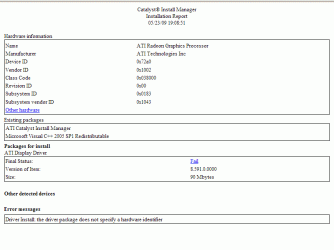
Tried to install driver package from game.amd.com and:

Am I missing something?
I don't want to buy a new video card if there is some way to make it work...
 

Attachments

  • Untitled.gif
    Untitled.gif
    16.2 KB · Views: 478
Last edited:

My Computer

OS
Windows 7
Back
Top
