Solved Drivers being deleted by something in Windows 7

superzeeman

New member
Local time
7:26 PM
Messages
13
I have a strange situation. Every week or so, my monitor driver is getting deleted and replaced with the standard MS " NonPNPMonitor" Driver. I can replace it with the right driver but it keeps getting deleted on it's own. I know the person that uses the computer is not deleting it. It doesn't seem related to reboot but I guess it could be happening. My systems are set to reboot at 6am so I am not here to see what happens. I am using the most current and correct driver. I have reinstalled this 6 times in 2 months. Can anyone enlighten me as to how to fix/stop this annoying situation?
 

My Computer My Computer

Computer type
PC/Desktop
Computer Manufacturer/Model Number
Lenovo
OS
Win 7 home premium 32 bit
CPU
Intel(R) Core(TM)2 Duo CPU E6550 @ 2.33GHz
Graphics Card(s)
Intel(R) Q35 Express Chipset Family
Screen Resolution
1600x900
Hard Drives
Hitachi HDS721680PLA380 ATA Device
Internet Speed
20/2 meg
Antivirus
Sonicwall enforced client with Kaperski
Browser
Chrome
all or none

Hi,
Unfortunately the only solution is all or nothing.

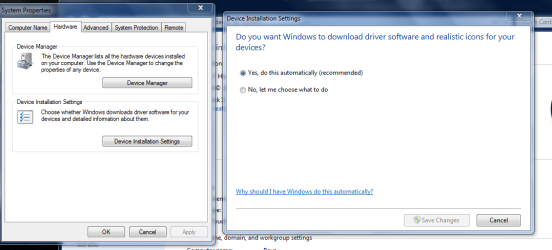
Go Controlpanel>system>advanced>hardware>dissable windows driver check.

Roy
 

Attachments

  • allornot.PNG
    allornot.PNG
    32.5 KB · Views: 1

My Computer My Computer

Computer type
PC/Desktop
Computer Manufacturer/Model Number
medionl/Aspire 6930G/acer x55a
OS
W7 home premium 32bit/W7HP 64bit/w10 tp insider ring
CPU
E5300 dual core
Motherboard
medion MS7366
Memory
3gb
Graphics Card(s)
Nvidia Geforce 7100 Nforce 630i
Monitor(s) Displays
avixc
Internet Speed
n (isp resticted to 72)
Antivirus
mse/pands
Browser
palemoon
Other Info
Belkin Fd7050 n USB using Railink RT2870 drivers, more upto date
Thanks!

Hi,
Unfortunately the only solution is all or nothing.

Go Controlpanel>system>advanced>hardware>dissable windows driver check.

Roy

I will change that setting and see what happens. Give me a week or so to see if it happens then if it does not I will mark this solved. Thanks again
 

My Computer My Computer

Computer type
PC/Desktop
Computer Manufacturer/Model Number
Lenovo
OS
Win 7 home premium 32 bit
CPU
Intel(R) Core(TM)2 Duo CPU E6550 @ 2.33GHz
Graphics Card(s)
Intel(R) Q35 Express Chipset Family
Screen Resolution
1600x900
Hard Drives
Hitachi HDS721680PLA380 ATA Device
Internet Speed
20/2 meg
Antivirus
Sonicwall enforced client with Kaperski
Browser
Chrome
Well, I turned off the auto driver install and this morning the driver was again replaced with the Microsoft generic driver. It's funny cuz it wont even let me roll back driver. It's greyed out as if there was never a driver installed but I know I did it the other day. Anything else anyone can think of to fix this mess?
 

My Computer My Computer

Computer type
PC/Desktop
Computer Manufacturer/Model Number
Lenovo
OS
Win 7 home premium 32 bit
CPU
Intel(R) Core(TM)2 Duo CPU E6550 @ 2.33GHz
Graphics Card(s)
Intel(R) Q35 Express Chipset Family
Screen Resolution
1600x900
Hard Drives
Hitachi HDS721680PLA380 ATA Device
Internet Speed
20/2 meg
Antivirus
Sonicwall enforced client with Kaperski
Browser
Chrome
As a matter of interest can you goto windows updatelogs and post the details since you followed my instructions.

Roy
 

My Computer My Computer

Computer type
PC/Desktop
Computer Manufacturer/Model Number
medionl/Aspire 6930G/acer x55a
OS
W7 home premium 32bit/W7HP 64bit/w10 tp insider ring
CPU
E5300 dual core
Motherboard
medion MS7366
Memory
3gb
Graphics Card(s)
Nvidia Geforce 7100 Nforce 630i
Monitor(s) Displays
avixc
Internet Speed
n (isp resticted to 72)
Antivirus
mse/pands
Browser
palemoon
Other Info
Belkin Fd7050 n USB using Railink RT2870 drivers, more upto date
Will grab those first thing in the morning and post the logs.
 

My Computer My Computer

Computer type
PC/Desktop
Computer Manufacturer/Model Number
Lenovo
OS
Win 7 home premium 32 bit
CPU
Intel(R) Core(TM)2 Duo CPU E6550 @ 2.33GHz
Graphics Card(s)
Intel(R) Q35 Express Chipset Family
Screen Resolution
1600x900
Hard Drives
Hitachi HDS721680PLA380 ATA Device
Internet Speed
20/2 meg
Antivirus
Sonicwall enforced client with Kaperski
Browser
Chrome
Here is the log that you requested. Let me know if that helps.
 

My Computer My Computer

Computer type
PC/Desktop
Computer Manufacturer/Model Number
Lenovo
OS
Win 7 home premium 32 bit
CPU
Intel(R) Core(TM)2 Duo CPU E6550 @ 2.33GHz
Graphics Card(s)
Intel(R) Q35 Express Chipset Family
Screen Resolution
1600x900
Hard Drives
Hitachi HDS721680PLA380 ATA Device
Internet Speed
20/2 meg
Antivirus
Sonicwall enforced client with Kaperski
Browser
Chrome
update

I think its being superceeded by this,

COMAPI -------------
2015-09-12 06:10:48:857 3000 f70 COMAPI -- START -- COMAPI: Search [ClientId = LanGuard]
2015-09-12 06:10:48:857 3000 f70 COMAPI ---------
2015-09-12 06:10:48:904 956 fec Agent *************
2015-09-12 06:10:48:904 956 fec Agent ** START ** Agent: Finding updates [CallerId = LanGuard]
2015-09-12 06:10:48:904 956 fec Agent *********
2015-09-12 06:10:48:904 956 fec Agent * Include potentially superseded updates
2015-09-12 06:10:48:904 956 fec Agent * Online = Yes; Ignore download priority = No

Roy
 

My Computer My Computer

Computer type
PC/Desktop
Computer Manufacturer/Model Number
medionl/Aspire 6930G/acer x55a
OS
W7 home premium 32bit/W7HP 64bit/w10 tp insider ring
CPU
E5300 dual core
Motherboard
medion MS7366
Memory
3gb
Graphics Card(s)
Nvidia Geforce 7100 Nforce 630i
Monitor(s) Displays
avixc
Internet Speed
n (isp resticted to 72)
Antivirus
mse/pands
Browser
palemoon
Other Info
Belkin Fd7050 n USB using Railink RT2870 drivers, more upto date
I have Languard doing my windows update. I will have their tech support see if we can stop it. Whats funny is there were no updates scheduled to install on that date. Perhaps I will uninstall the agent on that computer for a month and see what happens. Thanks for all the help Roy!
 

My Computer My Computer

Computer type
PC/Desktop
Computer Manufacturer/Model Number
Lenovo
OS
Win 7 home premium 32 bit
CPU
Intel(R) Core(TM)2 Duo CPU E6550 @ 2.33GHz
Graphics Card(s)
Intel(R) Q35 Express Chipset Family
Screen Resolution
1600x900
Hard Drives
Hitachi HDS721680PLA380 ATA Device
Internet Speed
20/2 meg
Antivirus
Sonicwall enforced client with Kaperski
Browser
Chrome
Just happend today. Driver gone replaced with generic MS driver.
 

My Computer My Computer

Computer type
PC/Desktop
Computer Manufacturer/Model Number
Lenovo
OS
Win 7 home premium 32 bit
CPU
Intel(R) Core(TM)2 Duo CPU E6550 @ 2.33GHz
Graphics Card(s)
Intel(R) Q35 Express Chipset Family
Screen Resolution
1600x900
Hard Drives
Hitachi HDS721680PLA380 ATA Device
Internet Speed
20/2 meg
Antivirus
Sonicwall enforced client with Kaperski
Browser
Chrome
Just curious.
From you post #9
I have Languard doing my windows update.

Why don't you just download and install Windows 7 Updates using the normal Windows 7 Update method.
You don't need a 3rd party program messing with Windows 7 Updates.

Of course this is just my opinion.
 

My Computer My Computer

Computer type
PC/Desktop
Computer Manufacturer/Model Number
Home made Desktop
OS
Windows 10 Pro. 64/ version 1709 Windows 7 Pro/64
CPU
Intel i7-6800K @ 4.3
Motherboard
ASUS X-99 Deluxe II
Memory
Corsair Platinum 16 gig @2400
Graphics Card(s)
EVGA GTX 1070 OC
Monitor(s) Displays
Asus 27" LED LCD/VE278Q
Screen Resolution
1920-1080 or 1280-720 HDMI
Hard Drives
INTEL SSD 730-240 Gb Sata 3.0/
PSU
EVGA Platium 1200W
Case
Phanteks Luxe Tempered Glass 8 fans/ one radiator
Cooling
XSPC/ Water Cooled CPU
Keyboard
Das 4 Professional
Mouse
Logitech M705/MX Anywhere 2-S
Internet Speed
100 mbits
Antivirus
Microsoft Security Essentials/ Malwarebytes Premium 3.0/ SAS
Browser
I.E. 11 default/Firefox/ ISP Time Warner Cable/Spectrum
Other Info
LG BluRay Burner/
Sound system-KLipsch-THX/
Icy Dock ssd Hot Swap bays.
I do it for PCI compliance that states that you must have a way of updating all software affecting the credit card environment. I have 50 terminals that need updating and believe it or not, Windows miss updates sometimes especially a new build that needs updates. I do let windows process most updates but for a network I find it much easier to have LanGuard do it. Plus it updates about 100 programs that Windows does not touch. It keeps my systems as secure as possible.
 

My Computer My Computer

Computer type
PC/Desktop
Computer Manufacturer/Model Number
Lenovo
OS
Win 7 home premium 32 bit
CPU
Intel(R) Core(TM)2 Duo CPU E6550 @ 2.33GHz
Graphics Card(s)
Intel(R) Q35 Express Chipset Family
Screen Resolution
1600x900
Hard Drives
Hitachi HDS721680PLA380 ATA Device
Internet Speed
20/2 meg
Antivirus
Sonicwall enforced client with Kaperski
Browser
Chrome
Well you post #12 puts a whole different meaning on your problem compared to your post #1.
Glad you added the extra information.

I will just go back to watching and leave you alone.
 

My Computer My Computer

Computer type
PC/Desktop
Computer Manufacturer/Model Number
Home made Desktop
OS
Windows 10 Pro. 64/ version 1709 Windows 7 Pro/64
CPU
Intel i7-6800K @ 4.3
Motherboard
ASUS X-99 Deluxe II
Memory
Corsair Platinum 16 gig @2400
Graphics Card(s)
EVGA GTX 1070 OC
Monitor(s) Displays
Asus 27" LED LCD/VE278Q
Screen Resolution
1920-1080 or 1280-720 HDMI
Hard Drives
INTEL SSD 730-240 Gb Sata 3.0/
PSU
EVGA Platium 1200W
Case
Phanteks Luxe Tempered Glass 8 fans/ one radiator
Cooling
XSPC/ Water Cooled CPU
Keyboard
Das 4 Professional
Mouse
Logitech M705/MX Anywhere 2-S
Internet Speed
100 mbits
Antivirus
Microsoft Security Essentials/ Malwarebytes Premium 3.0/ SAS
Browser
I.E. 11 default/Firefox/ ISP Time Warner Cable/Spectrum
Other Info
LG BluRay Burner/
Sound system-KLipsch-THX/
Icy Dock ssd Hot Swap bays.
No sweat. I can fix many things but this has me stumped. Oh well, if all else fails, do a fresh install but I hate to do it. :D
 

My Computer My Computer

Computer type
PC/Desktop
Computer Manufacturer/Model Number
Lenovo
OS
Win 7 home premium 32 bit
CPU
Intel(R) Core(TM)2 Duo CPU E6550 @ 2.33GHz
Graphics Card(s)
Intel(R) Q35 Express Chipset Family
Screen Resolution
1600x900
Hard Drives
Hitachi HDS721680PLA380 ATA Device
Internet Speed
20/2 meg
Antivirus
Sonicwall enforced client with Kaperski
Browser
Chrome
Group policy

OK,
lets try this

Use method 2 see KB 2500967.

Roy
 

My Computer My Computer

Computer type
PC/Desktop
Computer Manufacturer/Model Number
medionl/Aspire 6930G/acer x55a
OS
W7 home premium 32bit/W7HP 64bit/w10 tp insider ring
CPU
E5300 dual core
Motherboard
medion MS7366
Memory
3gb
Graphics Card(s)
Nvidia Geforce 7100 Nforce 630i
Monitor(s) Displays
avixc
Internet Speed
n (isp resticted to 72)
Antivirus
mse/pands
Browser
palemoon
Other Info
Belkin Fd7050 n USB using Railink RT2870 drivers, more upto date
Yea, thought about doing that but I think I will follow your advice and do it tomorrow. I will post back what happens. Thanks again.
 

My Computer My Computer

Computer type
PC/Desktop
Computer Manufacturer/Model Number
Lenovo
OS
Win 7 home premium 32 bit
CPU
Intel(R) Core(TM)2 Duo CPU E6550 @ 2.33GHz
Graphics Card(s)
Intel(R) Q35 Express Chipset Family
Screen Resolution
1600x900
Hard Drives
Hitachi HDS721680PLA380 ATA Device
Internet Speed
20/2 meg
Antivirus
Sonicwall enforced client with Kaperski
Browser
Chrome
I don't know if this will help but might add a clue.. Windows traces Device Manager install and uninstalls when they occur. The device is (probably) being uninstalled so am hoping for a trace. That would give you a date/time stamp to check against the LanGuard log to see if it's doing something at that time

It'll be a large file. Let's save current data. Rename C:\Windows\inf\setupapi.dev.log to setupapi.dev.log.old. Wait for the problem to happen again. Windows will write a new file. Look in the log for the word Uninstall. And post the new log file

fyi.. When I manually un-install the Generic monitor driver, I have an uninstall trace log entry as shown below. Hope you have a similar entry that starts Device Uninstall for your monitor device driver.
Code:
>>>  [Device Uninstall (Device Manager) - DISPLAY\SAM0945\5&2814FC75&0&UID1048849]
>>>  Section start 2015/09/28 20:02:55.678
      20:02:55.678 cmd: "C:\Windows\system32\mmc.exe" "C:\Windows\system32\compmgmt.msc" /s
     dvi: 20:02:55.679 {DIF_REMOVE}
     dvi: 20:02:55.680      Looking for class installer for 'Generic PnP Monitor'...
     dvi: 20:02:55.681      Using exported function 'MonitorClassInstaller' in module 'C:\Windows\system32\Montr_CI.dll'.
     dvi: 20:02:55.682      Class installer == Montr_CI.dll,MonitorClassInstaller
     dvi: 20:02:55.682      Looking for co-installer modules for 'Generic PnP Monitor'.
     dvi: 20:02:55.683      No CoInstallers found
     dvi: 20:02:55.683      Class installer: Enter
     dvi: 20:02:55.684      Class installer: Exit
     dvi: 20:02:55.685      Default installer: Enter
     dvi: 20:02:55.685           {Remove DEVICE}
     dvi: 20:02:55.686                InstanceID = 'DISPLAY\SAM0945\5&2814FC75&0&UID1048849'
     dvi: 20:02:55.686                Devnode Status = 0x0180600a
     dvi: 20:02:55.698                CM_Query_And_Remove_Subtree_Ex returns 0x00000000
     dvi: 20:02:55.701                Devnode Status after CM_Query_And_Remove_Subtree_Ex = 0x01806400
     dvi: 20:02:55.701                Query-and-Remove succeeded
     dvi: 20:02:55.702                {Delete DEVICE}
     dvi: 20:02:55.717                     Device Instance uninstalled.
     dvi: 20:02:55.718                {Delete DEVICE exit (0x00000000)}
     dvi: 20:02:55.719           {Remove DEVICE exit (0x00000000)}
     dvi: 20:02:55.720      Default installer: Exit
     dvi: 20:02:55.720 {DIF_REMOVE - exit(0x00000000)}
<<<  Section end 2015/09/28 20:02:55.720
<<<  [Exit status: SUCCESS]
 

My Computer My Computer

Computer type
PC/Desktop
Computer Manufacturer/Model Number
Dell Optiplex 360 and Optiplex 755
OS
Desk 1: Win 7 Pro x32; Desk 2: Windows 10 x64
Hard Drives
500GB Crucial SSD in both Desktops
Other Info
Buffalo 6TB NAS, Raid 1
I will get those logs and post as soon as I have them thanks!
 

My Computer My Computer

Computer type
PC/Desktop
Computer Manufacturer/Model Number
Lenovo
OS
Win 7 home premium 32 bit
CPU
Intel(R) Core(TM)2 Duo CPU E6550 @ 2.33GHz
Graphics Card(s)
Intel(R) Q35 Express Chipset Family
Screen Resolution
1600x900
Hard Drives
Hitachi HDS721680PLA380 ATA Device
Internet Speed
20/2 meg
Antivirus
Sonicwall enforced client with Kaperski
Browser
Chrome
OK I am forgetting to get that log before the employee comes in and I will write myself a note and do it tomorrow. Anyway, I have new wrinkle. The person came in and and the driver was uninstalled. I went to install the driver again and it told me access denied. I used an admin account so I should not be blocked out. There are no group policies preventing me from installing drivers. So it would not install so I rebooted the computer and the driver was back in place and the monitor was working correctly. Any thoughts on that one? It's starting to get annoying.
 

My Computer My Computer

Computer type
PC/Desktop
Computer Manufacturer/Model Number
Lenovo
OS
Win 7 home premium 32 bit
CPU
Intel(R) Core(TM)2 Duo CPU E6550 @ 2.33GHz
Graphics Card(s)
Intel(R) Q35 Express Chipset Family
Screen Resolution
1600x900
Hard Drives
Hitachi HDS721680PLA380 ATA Device
Internet Speed
20/2 meg
Antivirus
Sonicwall enforced client with Kaperski
Browser
Chrome
Did you rename the old log file? Zip a copy of the old log you renamed as well as the current C:\Windows\inf\setupapi.dev.log. Don't know that the log files will have the answers but is worth a look to see if anything jumps out
 

My Computer My Computer

Computer type
PC/Desktop
Computer Manufacturer/Model Number
Dell Optiplex 360 and Optiplex 755
OS
Desk 1: Win 7 Pro x32; Desk 2: Windows 10 x64
Hard Drives
500GB Crucial SSD in both Desktops
Other Info
Buffalo 6TB NAS, Raid 1
Back
Top