First let me give a bit of a backstory.
I have an Acer laptop that I got recently that came with Windows 7 Home Premium 64 bit. I bought a Windows 7 Upgrade CD before that to upgrade the computer I'm using right now from Vista to Windows 7.
Anyway, I'm planning to sell the laptop. Windows worked perfectly fine on the machine, albiet a bit slow, but it worked well enough to use for basic tasks. But I thought maybe it would be faster and better for the sale if I installed it over the existing version. In retrospect I really hate myself for doing this, because now from what I can tell, none of the drivers work properly, including the Wireless drivers that would normally detect a network. The resolution is also less than it was when I got the machine and there are no options to put it back to the proper resolution.
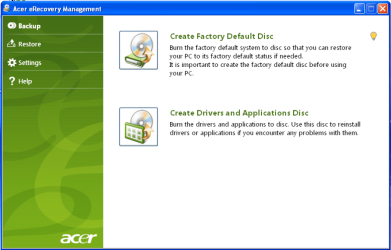
I don't have a drivers CD from Acer so I don't know what I can do. I've tried booting into the previous Windows 7 installation but it won't work properly.
So now I'm wondering if I have to get a CD from Acer with the drivers or am I just messed up here?
I really would appreciate any help guys. Thank you.
I have an Acer laptop that I got recently that came with Windows 7 Home Premium 64 bit. I bought a Windows 7 Upgrade CD before that to upgrade the computer I'm using right now from Vista to Windows 7.
Anyway, I'm planning to sell the laptop. Windows worked perfectly fine on the machine, albiet a bit slow, but it worked well enough to use for basic tasks. But I thought maybe it would be faster and better for the sale if I installed it over the existing version. In retrospect I really hate myself for doing this, because now from what I can tell, none of the drivers work properly, including the Wireless drivers that would normally detect a network. The resolution is also less than it was when I got the machine and there are no options to put it back to the proper resolution.
I don't have a drivers CD from Acer so I don't know what I can do. I've tried booting into the previous Windows 7 installation but it won't work properly.
So now I'm wondering if I have to get a CD from Acer with the drivers or am I just messed up here?
I really would appreciate any help guys. Thank you.
My Computer
At a glance
Windows 7 Home Premium 64 bit
- OS
- Windows 7 Home Premium 64 bit