
Hi,
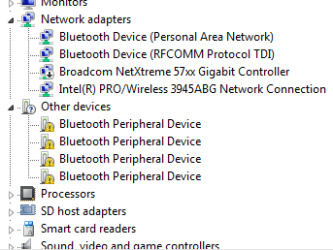
All my laps drivers are updated with none yellow icon, but when ever I try sending a file from it to my cell via BT, get 4 yellow peripheral device driver icons.
The cell gets paired and the file sent.
The cell is shown in My computer as a device, the only way to remove the yellow icons is to remove the cell from My Computer.
Any thoughts, suggestions?
Thanks.
All my laps drivers are updated with none yellow icon, but when ever I try sending a file from it to my cell via BT, get 4 yellow peripheral device driver icons.
The cell gets paired and the file sent.
The cell is shown in My computer as a device, the only way to remove the yellow icons is to remove the cell from My Computer.
Any thoughts, suggestions?
Thanks.
Attachments
My Computers
System One System Two
-
- Computer type
- Laptop
- Computer Manufacturer/Model Number
- Dell
- OS
- W7 Pro 32bit
- CPU
- Intel(R) Core(TM)2 CPU T7200 @ 2.00GHz
- Motherboard
- Dell Inc. 0CF456
- Memory
- 4.00 GB
- Graphics Card(s)
- NVIDIA GTX 7980 512 MB
- Sound Card
- (1) HD Pro Webcam C910 (2) Bluetooth Stereo Audio (3) Si
- Hard Drives
- SSD
- Browser
- Brave
-
- Computer type
- PC/Desktop
- System Manufacturer/Model Number
- Dell XPS Special Edition 8940
- OS
- W10 Pro
- CPU
- core i7 11th gen, 11700, 2.5-4.9 GHZ
- Memory
- 32 GBB, 2 X16 GB @2933 MHz.
- Graphics Card(s)
- NVIDIA GeForce RTX 3070 8GB GDDR6
- Monitor(s) Displays
- Dell UltraSharp 32 4K monitor.
- Hard Drives
- 1. 1TB M.2 PCIe NVMe SSD.
2. 1TB 7200 rpm 3.5" SATA Hard Drive.
- PSU
- 500W.
- Case
- Mineral White Bezel Chassis.


