Dual boot 7 and XP: Uninstall of XP

4left

New member
Local time
11:23 PM
Messages
61
Location
NCR
I browsed several threads and tutorials here, most talk of partitions and such. My situation is this:

XP Pro SP3 is installed on C. Drive D is storage. Win 7 is installed on G.

When I boot first I get the Win 7 or earlier version option. If I choose earlier version, I get a second screen asking me to choose between two versions of XP Pro. Not sure what this means, I always choose the first option.

Bottom line is I want to uninstall XP and go with 7. Can I do this safely since XP is installed on C? How do I do this?

Thanks in advance for your guidance, I REALLY need it!;)
 

My Computer My Computer

At a glance

Win 7 HP (upgrade from XP Pro SP3)Intel(R) Pentium(R) 4 CPU 3.00GHz4 GBATI Radeon HD 3800 Series
Computer Manufacturer/Model Number
Custom built, McGyver style ;)
OS
Win 7 HP (upgrade from XP Pro SP3)
CPU
Intel(R) Pentium(R) 4 CPU 3.00GHz
Motherboard
Intel D865GBF
Memory
4 GB
Graphics Card(s)
ATI Radeon HD 3800 Series
Sound Card
CMI8738/C3DX PCI Audio Device
Monitor(s) Displays
Acer H233H
Screen Resolution
1920X1080
Hard Drives
Drive: C:
Free Space: 84.4 GB
Total Space: 84.4 GB
File System: NTFS
Model: Maxtor 6Y080P0

Drive: D:
Free Space: 42.3 GB
Total Space: 58.6 GB
File System: NTFS
Model: Maxtor 4D060H3

Drive: G: (Win7HP drive)
Free Spa
Case
Antec
Cooling
some fans, in cool dry basement
Keyboard
Logitech MK700 wireless
Mouse
HID-compliant MX500 Optical Mouse and wireless MK700 mouse
Internet Speed
100.0 Mbps
Sounds like the XP HD is first in the Bios boot order.

Put the 7 HD first in Bios boot order , then run startup repair frm the 7 dvd 3 times.

You should then only boot into 7, and be able to delete/format the Xp installation.
 

My Computers My Computers

  • At a glance

    7 X64i5 84002x8gb 3200mhz
    Computer type
    PC/Desktop
    OS
    7 X64
    CPU
    i5 8400
    Motherboard
    gigabyte b365m ds3h
    Memory
    2x8gb 3200mhz
    Hard Drives
    various
    PSU
    pure power 11 400w cm
    Case
    Coolermaster
    Cooling
    cryorig m9i
  • At a glance

    7x64g54008gb ddr4 2400
    Computer type
    PC/Desktop
    OS
    7x64
    CPU
    g5400
    Motherboard
    ga b365m ds3h
    Memory
    8gb ddr4 2400
    PSU
    xfx pro 450w
TYVM for the reply SIW2.

This sounds too easy. Let me see if I have this correct:

Put the 7 HD first in Bios boot order ...should I do this in the BIOS screen, or is it done easily by unplugging the other drives?

then run startup repair frm the 7 dvd 3 times ...if I have done the first step by unplugging the drives, do I keep them unplugged during this step? If I didn't unplug, should I unplug for this step?

You should then only boot into 7, and be able to delete/format the Xp installation ...what is the best method for doing this?

Sorry for the simpleton Qs, I just don't want to muck it up since this is my first try at this.
 

My Computer My Computer

At a glance

Win 7 HP (upgrade from XP Pro SP3)Intel(R) Pentium(R) 4 CPU 3.00GHz4 GBATI Radeon HD 3800 Series
Computer Manufacturer/Model Number
Custom built, McGyver style ;)
OS
Win 7 HP (upgrade from XP Pro SP3)
CPU
Intel(R) Pentium(R) 4 CPU 3.00GHz
Motherboard
Intel D865GBF
Memory
4 GB
Graphics Card(s)
ATI Radeon HD 3800 Series
Sound Card
CMI8738/C3DX PCI Audio Device
Monitor(s) Displays
Acer H233H
Screen Resolution
1920X1080
Hard Drives
Drive: C:
Free Space: 84.4 GB
Total Space: 84.4 GB
File System: NTFS
Model: Maxtor 6Y080P0

Drive: D:
Free Space: 42.3 GB
Total Space: 58.6 GB
File System: NTFS
Model: Maxtor 4D060H3

Drive: G: (Win7HP drive)
Free Spa
Case
Antec
Cooling
some fans, in cool dry basement
Keyboard
Logitech MK700 wireless
Mouse
HID-compliant MX500 Optical Mouse and wireless MK700 mouse
Internet Speed
100.0 Mbps
First, make sure 7 partition is marked Active ( In Disk Management rt click and mark as active).


It is probably easiest to either go into BIOS setup ( press F2 or DEL, or whatever key it tells you on the first screen you see when you startup - the white writing on black screen) and set the 7 HD first in the HD boot order.

OR - just swap the SATA lead connections - so 7 HD is first in boot order.

Run startup repair 3 times.

[The trouble with unpluging the other drives is - when you plug them back - one of those may still be first in the boot order.]

Once booted back into 7 - you can use Disk Management to do whatever to the XP partition.

Hope it helps
 

My Computers My Computers

  • At a glance

    7 X64i5 84002x8gb 3200mhz
    Computer type
    PC/Desktop
    OS
    7 X64
    CPU
    i5 8400
    Motherboard
    gigabyte b365m ds3h
    Memory
    2x8gb 3200mhz
    Hard Drives
    various
    PSU
    pure power 11 400w cm
    Case
    Coolermaster
    Cooling
    cryorig m9i
  • At a glance

    7x64g54008gb ddr4 2400
    Computer type
    PC/Desktop
    OS
    7x64
    CPU
    g5400
    Motherboard
    ga b365m ds3h
    Memory
    8gb ddr4 2400
    PSU
    xfx pro 450w
OK, first thanks again. Second, I apologize for not including more info:o.

7 HDD is G and is a SATA. XP is on C, and both C and D are IDE. None of the HDDs have partitions.

I can get into BIOS, that's no problem. My concern is about the data on D and mostly D. C drive is where XP was initially installed and D drive was added for storage. G was added as an upgrade, as the two IDE drives are old and I don't expect them to last that long.

Once again, I really appreciate the help. I want to make sure I have all the steps ironed out before I dive into this.:D
 

My Computer My Computer

At a glance

Win 7 HP (upgrade from XP Pro SP3)Intel(R) Pentium(R) 4 CPU 3.00GHz4 GBATI Radeon HD 3800 Series
Computer Manufacturer/Model Number
Custom built, McGyver style ;)
OS
Win 7 HP (upgrade from XP Pro SP3)
CPU
Intel(R) Pentium(R) 4 CPU 3.00GHz
Motherboard
Intel D865GBF
Memory
4 GB
Graphics Card(s)
ATI Radeon HD 3800 Series
Sound Card
CMI8738/C3DX PCI Audio Device
Monitor(s) Displays
Acer H233H
Screen Resolution
1920X1080
Hard Drives
Drive: C:
Free Space: 84.4 GB
Total Space: 84.4 GB
File System: NTFS
Model: Maxtor 6Y080P0

Drive: D:
Free Space: 42.3 GB
Total Space: 58.6 GB
File System: NTFS
Model: Maxtor 4D060H3

Drive: G: (Win7HP drive)
Free Spa
Case
Antec
Cooling
some fans, in cool dry basement
Keyboard
Logitech MK700 wireless
Mouse
HID-compliant MX500 Optical Mouse and wireless MK700 mouse
Internet Speed
100.0 Mbps
That's fine.

You do have partitions - impossible to use an HD without.

You just have 1 partition on each HD - which is the size of the entire drive.

Setting the 7 partition Active, putting it as first HD in bios HD boot order and running startup repair 3 times - will not affect your D drive in any way.

It just means the 7 drive will now be the "system" drive. That is the one that contains the boot critical files - and the one Bios needs to boot.

If you wish to then delete the XP partition - you can do that in 7 Disk Management.

As long you rt click the XP partition and delete ( not the one with your data , D) - you will be fine.
 

My Computers My Computers

  • At a glance

    7 X64i5 84002x8gb 3200mhz
    Computer type
    PC/Desktop
    OS
    7 X64
    CPU
    i5 8400
    Motherboard
    gigabyte b365m ds3h
    Memory
    2x8gb 3200mhz
    Hard Drives
    various
    PSU
    pure power 11 400w cm
    Case
    Coolermaster
    Cooling
    cryorig m9i
  • At a glance

    7x64g54008gb ddr4 2400
    Computer type
    PC/Desktop
    OS
    7x64
    CPU
    g5400
    Motherboard
    ga b365m ds3h
    Memory
    8gb ddr4 2400
    PSU
    xfx pro 450w
Cool, thanks again. Will give it a go tonite (I hope) and report back.
 

My Computer My Computer

At a glance

Win 7 HP (upgrade from XP Pro SP3)Intel(R) Pentium(R) 4 CPU 3.00GHz4 GBATI Radeon HD 3800 Series
Computer Manufacturer/Model Number
Custom built, McGyver style ;)
OS
Win 7 HP (upgrade from XP Pro SP3)
CPU
Intel(R) Pentium(R) 4 CPU 3.00GHz
Motherboard
Intel D865GBF
Memory
4 GB
Graphics Card(s)
ATI Radeon HD 3800 Series
Sound Card
CMI8738/C3DX PCI Audio Device
Monitor(s) Displays
Acer H233H
Screen Resolution
1920X1080
Hard Drives
Drive: C:
Free Space: 84.4 GB
Total Space: 84.4 GB
File System: NTFS
Model: Maxtor 6Y080P0

Drive: D:
Free Space: 42.3 GB
Total Space: 58.6 GB
File System: NTFS
Model: Maxtor 4D060H3

Drive: G: (Win7HP drive)
Free Spa
Case
Antec
Cooling
some fans, in cool dry basement
Keyboard
Logitech MK700 wireless
Mouse
HID-compliant MX500 Optical Mouse and wireless MK700 mouse
Internet Speed
100.0 Mbps
OK, went into bios, selected 7 HDD (G) as the first boot priority. It still gave me the dual boot screen. What now? Is it possible that XP might be phantomly installed on G?
 

My Computer My Computer

At a glance

Win 7 HP (upgrade from XP Pro SP3)Intel(R) Pentium(R) 4 CPU 3.00GHz4 GBATI Radeon HD 3800 Series
Computer Manufacturer/Model Number
Custom built, McGyver style ;)
OS
Win 7 HP (upgrade from XP Pro SP3)
CPU
Intel(R) Pentium(R) 4 CPU 3.00GHz
Motherboard
Intel D865GBF
Memory
4 GB
Graphics Card(s)
ATI Radeon HD 3800 Series
Sound Card
CMI8738/C3DX PCI Audio Device
Monitor(s) Displays
Acer H233H
Screen Resolution
1920X1080
Hard Drives
Drive: C:
Free Space: 84.4 GB
Total Space: 84.4 GB
File System: NTFS
Model: Maxtor 6Y080P0

Drive: D:
Free Space: 42.3 GB
Total Space: 58.6 GB
File System: NTFS
Model: Maxtor 4D060H3

Drive: G: (Win7HP drive)
Free Spa
Case
Antec
Cooling
some fans, in cool dry basement
Keyboard
Logitech MK700 wireless
Mouse
HID-compliant MX500 Optical Mouse and wireless MK700 mouse
Internet Speed
100.0 Mbps
Did you mark the 7 partition Active? Then put it first in bios boot order. Then run startup repair 3 times?

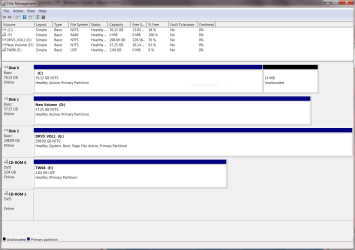
In 7 Disk Management, which is the "system" partition?

Post a screenie of Disk Management
 

My Computers My Computers

  • At a glance

    7 X64i5 84002x8gb 3200mhz
    Computer type
    PC/Desktop
    OS
    7 X64
    CPU
    i5 8400
    Motherboard
    gigabyte b365m ds3h
    Memory
    2x8gb 3200mhz
    Hard Drives
    various
    PSU
    pure power 11 400w cm
    Case
    Coolermaster
    Cooling
    cryorig m9i
  • At a glance

    7x64g54008gb ddr4 2400
    Computer type
    PC/Desktop
    OS
    7x64
    CPU
    g5400
    Motherboard
    ga b365m ds3h
    Memory
    8gb ddr4 2400
    PSU
    xfx pro 450w
Sorry, forgot about marking G as active.

When I try now I cannot do this, that link is greyed out.
 

Attachments

  • Capture.PNG
    Capture.PNG
    36.4 KB · Views: 46

My Computer My Computer

At a glance

Win 7 HP (upgrade from XP Pro SP3)Intel(R) Pentium(R) 4 CPU 3.00GHz4 GBATI Radeon HD 3800 Series
Computer Manufacturer/Model Number
Custom built, McGyver style ;)
OS
Win 7 HP (upgrade from XP Pro SP3)
CPU
Intel(R) Pentium(R) 4 CPU 3.00GHz
Motherboard
Intel D865GBF
Memory
4 GB
Graphics Card(s)
ATI Radeon HD 3800 Series
Sound Card
CMI8738/C3DX PCI Audio Device
Monitor(s) Displays
Acer H233H
Screen Resolution
1920X1080
Hard Drives
Drive: C:
Free Space: 84.4 GB
Total Space: 84.4 GB
File System: NTFS
Model: Maxtor 6Y080P0

Drive: D:
Free Space: 42.3 GB
Total Space: 58.6 GB
File System: NTFS
Model: Maxtor 4D060H3

Drive: G: (Win7HP drive)
Free Spa
Case
Antec
Cooling
some fans, in cool dry basement
Keyboard
Logitech MK700 wireless
Mouse
HID-compliant MX500 Optical Mouse and wireless MK700 mouse
Internet Speed
100.0 Mbps
The screenie helps.

G is Active. It is also system .

You need to adjust the bcd entries.

Easybcd will be good for that:

http://neosmart.net/forums/showthread.php?t=642


You don't this atm - but you may as well get it:

Free partition manager.

Install it on 7 - ( d/l the boot disc as well, in case you need it in future ):

Download Partition Wizard Home Edition NOW

Download Partition Wizard Boot Disc .iso NOW

Info :Free Download Partition Wizard

Also suggest you get an image program - Macrium Free is excellent:

Macrium Reflect FREE Edition - Information and download
 

My Computers My Computers

  • At a glance

    7 X64i5 84002x8gb 3200mhz
    Computer type
    PC/Desktop
    OS
    7 X64
    CPU
    i5 8400
    Motherboard
    gigabyte b365m ds3h
    Memory
    2x8gb 3200mhz
    Hard Drives
    various
    PSU
    pure power 11 400w cm
    Case
    Coolermaster
    Cooling
    cryorig m9i
  • At a glance

    7x64g54008gb ddr4 2400
    Computer type
    PC/Desktop
    OS
    7x64
    CPU
    g5400
    Motherboard
    ga b365m ds3h
    Memory
    8gb ddr4 2400
    PSU
    xfx pro 450w
Sorry for the delay, real life ya know.

I've installed Easybcd. What do I do with it? Is it as easy as the add/remove entries button, select the earlier version, then select delete?
 

My Computer My Computer

At a glance

Win 7 HP (upgrade from XP Pro SP3)Intel(R) Pentium(R) 4 CPU 3.00GHz4 GBATI Radeon HD 3800 Series
Computer Manufacturer/Model Number
Custom built, McGyver style ;)
OS
Win 7 HP (upgrade from XP Pro SP3)
CPU
Intel(R) Pentium(R) 4 CPU 3.00GHz
Motherboard
Intel D865GBF
Memory
4 GB
Graphics Card(s)
ATI Radeon HD 3800 Series
Sound Card
CMI8738/C3DX PCI Audio Device
Monitor(s) Displays
Acer H233H
Screen Resolution
1920X1080
Hard Drives
Drive: C:
Free Space: 84.4 GB
Total Space: 84.4 GB
File System: NTFS
Model: Maxtor 6Y080P0

Drive: D:
Free Space: 42.3 GB
Total Space: 58.6 GB
File System: NTFS
Model: Maxtor 4D060H3

Drive: G: (Win7HP drive)
Free Spa
Case
Antec
Cooling
some fans, in cool dry basement
Keyboard
Logitech MK700 wireless
Mouse
HID-compliant MX500 Optical Mouse and wireless MK700 mouse
Internet Speed
100.0 Mbps
The problem is three drives are marked Active.

Unplug the XP and active data drive, boot into the Win7 installer and run Startup Repair 3 times as there are multiple issues to fix including rewriting the MBR to the Win7 drive.

Once Win7 has boot configured properly, you can plug back in the XP drive to format it. Use a third party bootable partition manager like Partition Wizard if Disk Management still reads it as System drive (doubtful) and won't let you delete/format XP drive.

Now you can plug your data drive back in to see if it conflicts with Win7's boot (again, doubtful). If so, you need to move your data off to force format it to remove the active flag, then format it as a logical data drive so it doesn't again seize the Active flag, copy your data back.
 
Click Add/Remove Entries and highlight each XP entry by clicking on it in the top window - click Delete.

That's all - if you don't want to be able to boot into XP.

The XP boot menu entries will be gone.

To remove XP itself, just rt click it in Disk Management and Delete.


[If you want to add a correct XP entry in the Type dropdown , select Windows NT/2k/XP/2K3. The Drive will automatically be selected. Click Add Entry and let Easy Autoconfigure.]


Sorry for the delay, real life ya know.

I've installed Easybcd. What do I do with it? Is it as easy as the add/remove entries button, select the earlier version, then select delete?
 

My Computers My Computers

  • At a glance

    7 X64i5 84002x8gb 3200mhz
    Computer type
    PC/Desktop
    OS
    7 X64
    CPU
    i5 8400
    Motherboard
    gigabyte b365m ds3h
    Memory
    2x8gb 3200mhz
    Hard Drives
    various
    PSU
    pure power 11 400w cm
    Case
    Coolermaster
    Cooling
    cryorig m9i
  • At a glance

    7x64g54008gb ddr4 2400
    Computer type
    PC/Desktop
    OS
    7x64
    CPU
    g5400
    Motherboard
    ga b365m ds3h
    Memory
    8gb ddr4 2400
    PSU
    xfx pro 450w
Click Add/Remove Entries and highlight each XP entry by clicking on it in the top window - click Delete.

That's all - if you don't want to be able to boot into XP.

If you want to add a correct XP entry in the Type dropdown , select Windows NT/2k/XP/2K3

The Drive will automatically be selected.

Click Add Entry and let Easy Autoconfigure.
OK, did that, not sure if there is a big to do for Autoconfigure. Does it happen quick?

What next? Do I still run the 7 DVD 3 times?
 

My Computer My Computer

At a glance

Win 7 HP (upgrade from XP Pro SP3)Intel(R) Pentium(R) 4 CPU 3.00GHz4 GBATI Radeon HD 3800 Series
Computer Manufacturer/Model Number
Custom built, McGyver style ;)
OS
Win 7 HP (upgrade from XP Pro SP3)
CPU
Intel(R) Pentium(R) 4 CPU 3.00GHz
Motherboard
Intel D865GBF
Memory
4 GB
Graphics Card(s)
ATI Radeon HD 3800 Series
Sound Card
CMI8738/C3DX PCI Audio Device
Monitor(s) Displays
Acer H233H
Screen Resolution
1920X1080
Hard Drives
Drive: C:
Free Space: 84.4 GB
Total Space: 84.4 GB
File System: NTFS
Model: Maxtor 6Y080P0

Drive: D:
Free Space: 42.3 GB
Total Space: 58.6 GB
File System: NTFS
Model: Maxtor 4D060H3

Drive: G: (Win7HP drive)
Free Spa
Case
Antec
Cooling
some fans, in cool dry basement
Keyboard
Logitech MK700 wireless
Mouse
HID-compliant MX500 Optical Mouse and wireless MK700 mouse
Internet Speed
100.0 Mbps
NO, that's it.

If you have removed the XP entries from boot menu - just Delete XP partition in Disk Management.


If you still want to hang on to XP for a while - add the new XP entry as described - later - remove the XP entry it with Easy. The delete the XP partition.
 

My Computers My Computers

  • At a glance

    7 X64i5 84002x8gb 3200mhz
    Computer type
    PC/Desktop
    OS
    7 X64
    CPU
    i5 8400
    Motherboard
    gigabyte b365m ds3h
    Memory
    2x8gb 3200mhz
    Hard Drives
    various
    PSU
    pure power 11 400w cm
    Case
    Coolermaster
    Cooling
    cryorig m9i
  • At a glance

    7x64g54008gb ddr4 2400
    Computer type
    PC/Desktop
    OS
    7x64
    CPU
    g5400
    Motherboard
    ga b365m ds3h
    Memory
    8gb ddr4 2400
    PSU
    xfx pro 450w
Cool. I'll try a reboot and see how it goes.
 

My Computer My Computer

At a glance

Win 7 HP (upgrade from XP Pro SP3)Intel(R) Pentium(R) 4 CPU 3.00GHz4 GBATI Radeon HD 3800 Series
Computer Manufacturer/Model Number
Custom built, McGyver style ;)
OS
Win 7 HP (upgrade from XP Pro SP3)
CPU
Intel(R) Pentium(R) 4 CPU 3.00GHz
Motherboard
Intel D865GBF
Memory
4 GB
Graphics Card(s)
ATI Radeon HD 3800 Series
Sound Card
CMI8738/C3DX PCI Audio Device
Monitor(s) Displays
Acer H233H
Screen Resolution
1920X1080
Hard Drives
Drive: C:
Free Space: 84.4 GB
Total Space: 84.4 GB
File System: NTFS
Model: Maxtor 6Y080P0

Drive: D:
Free Space: 42.3 GB
Total Space: 58.6 GB
File System: NTFS
Model: Maxtor 4D060H3

Drive: G: (Win7HP drive)
Free Spa
Case
Antec
Cooling
some fans, in cool dry basement
Keyboard
Logitech MK700 wireless
Mouse
HID-compliant MX500 Optical Mouse and wireless MK700 mouse
Internet Speed
100.0 Mbps
It goes well! Thanks a bunch, you guys know your stuff.
 

My Computer My Computer

At a glance

Win 7 HP (upgrade from XP Pro SP3)Intel(R) Pentium(R) 4 CPU 3.00GHz4 GBATI Radeon HD 3800 Series
Computer Manufacturer/Model Number
Custom built, McGyver style ;)
OS
Win 7 HP (upgrade from XP Pro SP3)
CPU
Intel(R) Pentium(R) 4 CPU 3.00GHz
Motherboard
Intel D865GBF
Memory
4 GB
Graphics Card(s)
ATI Radeon HD 3800 Series
Sound Card
CMI8738/C3DX PCI Audio Device
Monitor(s) Displays
Acer H233H
Screen Resolution
1920X1080
Hard Drives
Drive: C:
Free Space: 84.4 GB
Total Space: 84.4 GB
File System: NTFS
Model: Maxtor 6Y080P0

Drive: D:
Free Space: 42.3 GB
Total Space: 58.6 GB
File System: NTFS
Model: Maxtor 4D060H3

Drive: G: (Win7HP drive)
Free Spa
Case
Antec
Cooling
some fans, in cool dry basement
Keyboard
Logitech MK700 wireless
Mouse
HID-compliant MX500 Optical Mouse and wireless MK700 mouse
Internet Speed
100.0 Mbps
Thanks for posting back

Glad it worked for you.:D
 

My Computers My Computers

  • At a glance

    7 X64i5 84002x8gb 3200mhz
    Computer type
    PC/Desktop
    OS
    7 X64
    CPU
    i5 8400
    Motherboard
    gigabyte b365m ds3h
    Memory
    2x8gb 3200mhz
    Hard Drives
    various
    PSU
    pure power 11 400w cm
    Case
    Coolermaster
    Cooling
    cryorig m9i
  • At a glance

    7x64g54008gb ddr4 2400
    Computer type
    PC/Desktop
    OS
    7x64
    CPU
    g5400
    Motherboard
    ga b365m ds3h
    Memory
    8gb ddr4 2400
    PSU
    xfx pro 450w
OK, I thought I was done, but...

I'm still getting a dual boot screen. First option is 7, second is Microsoft Windows. I clicked on the second option once, gave me a boot error, then a black screen. I did a forced reboot, 7 did some repairing, now everything is ok except for the dual boot screen.

How do I get rid of this? XP is long gone (I think), I formatted the drive (C) that XP was on...could there be remnants of XP on the 7 HDD (G)?
 

My Computer My Computer

At a glance

Win 7 HP (upgrade from XP Pro SP3)Intel(R) Pentium(R) 4 CPU 3.00GHz4 GBATI Radeon HD 3800 Series
Computer Manufacturer/Model Number
Custom built, McGyver style ;)
OS
Win 7 HP (upgrade from XP Pro SP3)
CPU
Intel(R) Pentium(R) 4 CPU 3.00GHz
Motherboard
Intel D865GBF
Memory
4 GB
Graphics Card(s)
ATI Radeon HD 3800 Series
Sound Card
CMI8738/C3DX PCI Audio Device
Monitor(s) Displays
Acer H233H
Screen Resolution
1920X1080
Hard Drives
Drive: C:
Free Space: 84.4 GB
Total Space: 84.4 GB
File System: NTFS
Model: Maxtor 6Y080P0

Drive: D:
Free Space: 42.3 GB
Total Space: 58.6 GB
File System: NTFS
Model: Maxtor 4D060H3

Drive: G: (Win7HP drive)
Free Spa
Case
Antec
Cooling
some fans, in cool dry basement
Keyboard
Logitech MK700 wireless
Mouse
HID-compliant MX500 Optical Mouse and wireless MK700 mouse
Internet Speed
100.0 Mbps
Back
Top