Dual boot 7 and XP: Uninstall of XP

type msconfig into your Start or Run box, look on the boot tab for the stray Windows listing and delete it.

Otherwise, browse to Computer>Properties>Advanced tools>Startup and uncheck the timer for a dual boot menu.
 
As Greg says, just Delete the XP entry in msconfig.
 

My Computers My Computers

  • At a glance

    7 X64i5 84002x8gb 3200mhz
    Computer type
    PC/Desktop
    OS
    7 X64
    CPU
    i5 8400
    Motherboard
    gigabyte b365m ds3h
    Memory
    2x8gb 3200mhz
    Hard Drives
    various
    PSU
    pure power 11 400w cm
    Case
    Coolermaster
    Cooling
    cryorig m9i
  • At a glance

    7x64g54008gb ddr4 2400
    Computer type
    PC/Desktop
    OS
    7x64
    CPU
    g5400
    Motherboard
    ga b365m ds3h
    Memory
    8gb ddr4 2400
    PSU
    xfx pro 450w
type msconfig into your Start or Run box, look on the boot tab for the stray Windows listing and delete it.

Otherwise, browse to Computer>Properties>Advanced tools>Startup and uncheck the timer for a dual boot menu.
No second listing in the boot tab. I did go and do the second thing and unchecked the boot timer. Hope it works.
 

My Computer My Computer

At a glance

Win 7 HP (upgrade from XP Pro SP3)Intel(R) Pentium(R) 4 CPU 3.00GHz4 GBATI Radeon HD 3800 Series
Computer Manufacturer/Model Number
Custom built, McGyver style ;)
OS
Win 7 HP (upgrade from XP Pro SP3)
CPU
Intel(R) Pentium(R) 4 CPU 3.00GHz
Motherboard
Intel D865GBF
Memory
4 GB
Graphics Card(s)
ATI Radeon HD 3800 Series
Sound Card
CMI8738/C3DX PCI Audio Device
Monitor(s) Displays
Acer H233H
Screen Resolution
1920X1080
Hard Drives
Drive: C:
Free Space: 84.4 GB
Total Space: 84.4 GB
File System: NTFS
Model: Maxtor 6Y080P0

Drive: D:
Free Space: 42.3 GB
Total Space: 58.6 GB
File System: NTFS
Model: Maxtor 4D060H3

Drive: G: (Win7HP drive)
Free Spa
Case
Antec
Cooling
some fans, in cool dry basement
Keyboard
Logitech MK700 wireless
Mouse
HID-compliant MX500 Optical Mouse and wireless MK700 mouse
Internet Speed
100.0 Mbps
You are getting an XP entry in the boot menu when you startup?

Might be you added it with Easy - you only needed to do that if you were going to keep XP a bit longer and wanted to be able keep booting into it.

Have a look with Easybcd and Remove the entry that contains ntldr.
 

My Computers My Computers

  • At a glance

    7 X64i5 84002x8gb 3200mhz
    Computer type
    PC/Desktop
    OS
    7 X64
    CPU
    i5 8400
    Motherboard
    gigabyte b365m ds3h
    Memory
    2x8gb 3200mhz
    Hard Drives
    various
    PSU
    pure power 11 400w cm
    Case
    Coolermaster
    Cooling
    cryorig m9i
  • At a glance

    7x64g54008gb ddr4 2400
    Computer type
    PC/Desktop
    OS
    7x64
    CPU
    g5400
    Motherboard
    ga b365m ds3h
    Memory
    8gb ddr4 2400
    PSU
    xfx pro 450w
What the second option does is hide the stray listing, so if you want to get rid of it completely your next attempt would be to download EasyBCD, look for the XP entry on listings page, then click Add/Remove tab and remove it by name, drive and type.

edit: SIW2 (my teacher) was posting at the exact same time. Use his advice :D
 
No second listing in the boot tab. I did go and do the second thing and unchecked the boot timer. Hope it works.
Well this worked sorta. Only have done one restart at the moment, and that got me to a frozen screen for the MB manufacturer. I went into the BIOS to check things out, and for some reason it did not list my 7 HDD at all! Weird.

So I exited out of that, got the messages about the boot record being missing or damaged or something like that asking me to hit any key to continue. I'm starting to freak a little at this point. But as I was reaching for my 7 disc to insert it to try and repair, Win7 starts booting up!

I still think something needs to be fixed.

You are getting an XP entry in the boot menu when you startup?

Might be you added it with Easy - you only needed to do that if you were going to keep XP a bit longer and wanted to be able keep booting into it.

Have a look with Easybcd and Remove the entry that contains ntldr.
It was not an XP entry in the boot menu, or even the "earlier version of Windows" blurb, rather the option just said Microsoft Windows. I did try it once and it came up with the boot error(why do those fly by so fast you can't write them down?).

I will try easybcd and see if I can remove the entry, I just want to try and get a few things done first while the PC is up. TYVM to both of you, I will report back later.

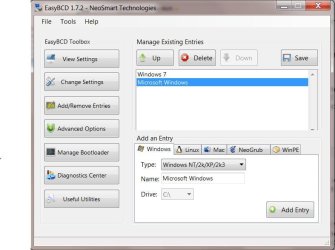
Is this where I delete the Micrsoft Windows?

 

Attachments

  • easybcd.JPG
    easybcd.JPG
    54.4 KB · Views: 16
Last edited:

My Computer My Computer

At a glance

Win 7 HP (upgrade from XP Pro SP3)Intel(R) Pentium(R) 4 CPU 3.00GHz4 GBATI Radeon HD 3800 Series
Computer Manufacturer/Model Number
Custom built, McGyver style ;)
OS
Win 7 HP (upgrade from XP Pro SP3)
CPU
Intel(R) Pentium(R) 4 CPU 3.00GHz
Motherboard
Intel D865GBF
Memory
4 GB
Graphics Card(s)
ATI Radeon HD 3800 Series
Sound Card
CMI8738/C3DX PCI Audio Device
Monitor(s) Displays
Acer H233H
Screen Resolution
1920X1080
Hard Drives
Drive: C:
Free Space: 84.4 GB
Total Space: 84.4 GB
File System: NTFS
Model: Maxtor 6Y080P0

Drive: D:
Free Space: 42.3 GB
Total Space: 58.6 GB
File System: NTFS
Model: Maxtor 4D060H3

Drive: G: (Win7HP drive)
Free Spa
Case
Antec
Cooling
some fans, in cool dry basement
Keyboard
Logitech MK700 wireless
Mouse
HID-compliant MX500 Optical Mouse and wireless MK700 mouse
Internet Speed
100.0 Mbps
Bump :)
 

My Computer My Computer

At a glance

Win 7 HP (upgrade from XP Pro SP3)Intel(R) Pentium(R) 4 CPU 3.00GHz4 GBATI Radeon HD 3800 Series
Computer Manufacturer/Model Number
Custom built, McGyver style ;)
OS
Win 7 HP (upgrade from XP Pro SP3)
CPU
Intel(R) Pentium(R) 4 CPU 3.00GHz
Motherboard
Intel D865GBF
Memory
4 GB
Graphics Card(s)
ATI Radeon HD 3800 Series
Sound Card
CMI8738/C3DX PCI Audio Device
Monitor(s) Displays
Acer H233H
Screen Resolution
1920X1080
Hard Drives
Drive: C:
Free Space: 84.4 GB
Total Space: 84.4 GB
File System: NTFS
Model: Maxtor 6Y080P0

Drive: D:
Free Space: 42.3 GB
Total Space: 58.6 GB
File System: NTFS
Model: Maxtor 4D060H3

Drive: G: (Win7HP drive)
Free Spa
Case
Antec
Cooling
some fans, in cool dry basement
Keyboard
Logitech MK700 wireless
Mouse
HID-compliant MX500 Optical Mouse and wireless MK700 mouse
Internet Speed
100.0 Mbps
Yes, delete the entry you highlighted in Easy - like your pic above.

It is no biggie - just an extra boot menu entry.
 

My Computers My Computers

  • At a glance

    7 X64i5 84002x8gb 3200mhz
    Computer type
    PC/Desktop
    OS
    7 X64
    CPU
    i5 8400
    Motherboard
    gigabyte b365m ds3h
    Memory
    2x8gb 3200mhz
    Hard Drives
    various
    PSU
    pure power 11 400w cm
    Case
    Coolermaster
    Cooling
    cryorig m9i
  • At a glance

    7x64g54008gb ddr4 2400
    Computer type
    PC/Desktop
    OS
    7x64
    CPU
    g5400
    Motherboard
    ga b365m ds3h
    Memory
    8gb ddr4 2400
    PSU
    xfx pro 450w
It took a couple of reboots, one getting the "load error" then "bootmgr is missing" messages, but I believe all is good now. Thanks again guys!
 

My Computer My Computer

At a glance

Win 7 HP (upgrade from XP Pro SP3)Intel(R) Pentium(R) 4 CPU 3.00GHz4 GBATI Radeon HD 3800 Series
Computer Manufacturer/Model Number
Custom built, McGyver style ;)
OS
Win 7 HP (upgrade from XP Pro SP3)
CPU
Intel(R) Pentium(R) 4 CPU 3.00GHz
Motherboard
Intel D865GBF
Memory
4 GB
Graphics Card(s)
ATI Radeon HD 3800 Series
Sound Card
CMI8738/C3DX PCI Audio Device
Monitor(s) Displays
Acer H233H
Screen Resolution
1920X1080
Hard Drives
Drive: C:
Free Space: 84.4 GB
Total Space: 84.4 GB
File System: NTFS
Model: Maxtor 6Y080P0

Drive: D:
Free Space: 42.3 GB
Total Space: 58.6 GB
File System: NTFS
Model: Maxtor 4D060H3

Drive: G: (Win7HP drive)
Free Spa
Case
Antec
Cooling
some fans, in cool dry basement
Keyboard
Logitech MK700 wireless
Mouse
HID-compliant MX500 Optical Mouse and wireless MK700 mouse
Internet Speed
100.0 Mbps
Back
Top