Dual Boot 7/XP Partition Not Showing

Collin

New member
Local time
9:26 PM
Messages
59
So I made a new NTFS partition with the help of some tutorials & even tried Partition Wizard. But when I restart to boot from the CD I only get my C:\ drive that is in use.

I am using the H:\ for the new one. Why will it now show?

i6i24l.jpg
 

My Computer My Computer

At a glance

Windows 72.3hz3GB
OS
Windows 7
CPU
2.3hz
Memory
3GB
Monitor(s) Displays
SAMSUNG
Screen Resolution
1280x1024
Hard Drives
250GB
Case
Compaq
Mouse
Compaq

My Computer My Computer

At a glance

ME/XP/Vista/Win7
OS
ME/XP/Vista/Win7
I have had XP on here before. I went from Vista, Xp to Seven.

And I changed the drive letter to H:/ and it still wont show. I looked at that Dual 7/XP tutorial but I am confused on that. From what i saw on HowToGeek was. Make a new partition and format it to NTFS and its good to go. I think I am wrong.
 

My Computer My Computer

At a glance

Windows 72.3hz3GB
OS
Windows 7
CPU
2.3hz
Memory
3GB
Monitor(s) Displays
SAMSUNG
Screen Resolution
1280x1024
Hard Drives
250GB
Case
Compaq
Mouse
Compaq
1) Delete the partition. H:
2) Remake partition in Win XP setup.
 

My Computer My Computer

At a glance

ME/XP/Vista/Win7
OS
ME/XP/Vista/Win7
Boot the XP CD to get the options to Delete, create and Full Format the partition as suggested.

XP has a slightly different partition table which can in some cases make the difference.
 
I can't really make a new one in the setup. All i can do is delete C:\ and reformat to ONE OS.

It does say Press C to create new partition but that does not do anything.
 

My Computer My Computer

At a glance

Windows 72.3hz3GB
OS
Windows 7
CPU
2.3hz
Memory
3GB
Monitor(s) Displays
SAMSUNG
Screen Resolution
1280x1024
Hard Drives
250GB
Case
Compaq
Mouse
Compaq
Does XP installer show the unallocated space after you delete H in Win7 Disk Mgmt? Camera snaps would be helpful.

Create a partiiton there, full format.

Is this the XP CD you used successfully before? Make sure it's clean and not scratched, or burn another.
 
I am currently making a video of what steps i took in making my partition.
 

My Computer My Computer

At a glance

Windows 72.3hz3GB
OS
Windows 7
CPU
2.3hz
Memory
3GB
Monitor(s) Displays
SAMSUNG
Screen Resolution
1280x1024
Hard Drives
250GB
Case
Compaq
Mouse
Compaq
Here is the video, sorry for the double post

www.youtube.com/watch?v=Lj3CbRr8ndk


I had taken a picture of the screen where WinXP wants me to setup.

The only partition showing is C:/ which is used.

No "Un-Partitioned" space is anywhere to be seen
 

My Computer My Computer

At a glance

Windows 72.3hz3GB
OS
Windows 7
CPU
2.3hz
Memory
3GB
Monitor(s) Displays
SAMSUNG
Screen Resolution
1280x1024
Hard Drives
250GB
Case
Compaq
Mouse
Compaq
Screenshot needed from Win XP installer, please.

1) Delete the partition. H:
2) Remake partition in Win XP setup.
 

My Computer My Computer

At a glance

ME/XP/Vista/Win7
OS
ME/XP/Vista/Win7
How do you screen shot that? My camera is broke.
 

My Computer My Computer

At a glance

Windows 72.3hz3GB
OS
Windows 7
CPU
2.3hz
Memory
3GB
Monitor(s) Displays
SAMSUNG
Screen Resolution
1280x1024
Hard Drives
250GB
Case
Compaq
Mouse
Compaq
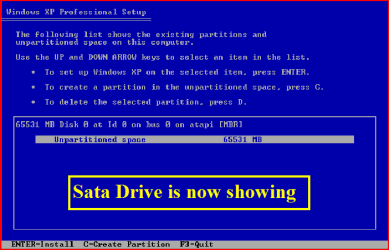
This is the screenshot needed.

19.PNG
 

My Computer My Computer

At a glance

ME/XP/Vista/Win7
OS
ME/XP/Vista/Win7
Mine does not show a kind of SATA drive. And it does NOT show "Un-Partitioned" Space

And how did you take that?

I heard something about installing SATA drivers. I do not know where to get them from.
 

My Computer My Computer

At a glance

Windows 72.3hz3GB
OS
Windows 7
CPU
2.3hz
Memory
3GB
Monitor(s) Displays
SAMSUNG
Screen Resolution
1280x1024
Hard Drives
250GB
Case
Compaq
Mouse
Compaq
And how did you take that?

VM.

I heard something about installing SATA drivers. I do not know where to get them from.

Did you not read post 2.
 

My Computer My Computer

At a glance

ME/XP/Vista/Win7
OS
ME/XP/Vista/Win7
I do not understand this step.

I did everything up to this step and i am now stuck. Am i supposed to do this on an XP system or... what.

61768d1269006927-sata-drivers-slipstream-into-windows-xp-cd-10.png


20gfhns.jpg
 

My Computer My Computer

At a glance

Windows 72.3hz3GB
OS
Windows 7
CPU
2.3hz
Memory
3GB
Monitor(s) Displays
SAMSUNG
Screen Resolution
1280x1024
Hard Drives
250GB
Case
Compaq
Mouse
Compaq
NO, can be done on Win XP, Vista, Windows 7.
You will need the Sata Controller Drivers.
 

My Computer My Computer

At a glance

ME/XP/Vista/Win7
OS
ME/XP/Vista/Win7
Great so is what I am doing useless? Do i need to find and download the SATA Drivers first?
 

My Computer My Computer

At a glance

Windows 72.3hz3GB
OS
Windows 7
CPU
2.3hz
Memory
3GB
Monitor(s) Displays
SAMSUNG
Screen Resolution
1280x1024
Hard Drives
250GB
Case
Compaq
Mouse
Compaq
That would be a yes, you will need the Sata Controller Drivers.
 

My Computer My Computer

At a glance

ME/XP/Vista/Win7
OS
ME/XP/Vista/Win7
I do not know where to download them.
 

My Computer My Computer

At a glance

Windows 72.3hz3GB
OS
Windows 7
CPU
2.3hz
Memory
3GB
Monitor(s) Displays
SAMSUNG
Screen Resolution
1280x1024
Hard Drives
250GB
Case
Compaq
Mouse
Compaq
Back
Top