Dual Boot both windows 7 in same hard disk different partition

cool1123

New member
Local time
2:31 AM
Messages
4
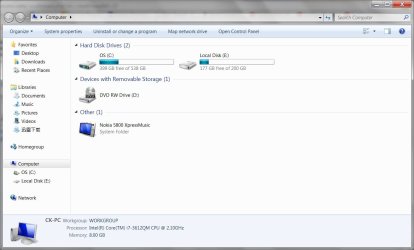
Hi everyone, I just created dual boot with both Windows 7 home edition and Windows 7 Professional 64-bit. Both windows also original license. I want to use another Windows 7 for testing purpose, but I don`t want to use virtual machine. After I installed the Windows 7 Professional, I able to see another partition windows 7 from My Computer. Is there any way to hide another partition from My Computer or disallow to access to it? If one of my Windows 7 got virus will it affect to another Windows 7 as it can access to another Windows partition?
mycomputer.jpg
 

My Computer My Computer

OS
Windows 7 home premium 64 bit
There's no good reason to hide the other OS partition, although it is done in Disk Mgmt by removing it's drive letter from view.

But it won't protect it any more or less, and the convenience of being able to transfer files makes it silly not to keep it accessible.

Any other reason?
 
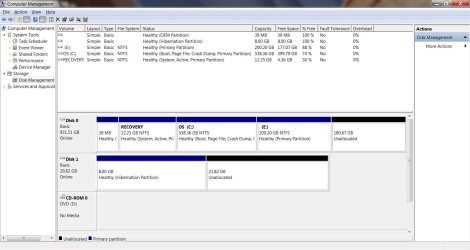
Thanks for u all reply. The screen shoot as below. E: partition is for another windows 7.
ComputerManagement.jpg

I just want to keep it safe from virus as 1 of the OS is used for testing and easy to get virus.
 

My Computer My Computer

OS
Windows 7 home premium 64 bit
If you wanted to hide the other OS then in Disk Mgmt you'd remove the drive letter E. But there's no good reason to do that unless it makes you feel better.

Be aware you have the boot files for both OS's on the Recovery partition, probably because that's how your OEM keeps it bootable too.

But if you don't want Recovery, ever want to recover its space and rely just on Recovery disks, or want to get rid of the bloated factory install altogether, we can show you how to absorb the System boot files into C, or even construct the 100mb System Reserved boot partition.

Or even better you can Clean Reinstall - Factory OEM Windows 7 while deleting all partitions except your new install which will then be configured during reinstall as a Dual Boot.

If you've already reinstalled to the first partition then you should test if Recovery will boot as it is very likely it won't after reinstall, so you can recover its space and the Win7 boot files into C if you want.
 
Last edited:
Well the best safeguard for that is to have a good antivirus and don`t download any garbage and scan everything before you open it.

But that is an excellent question and I don`t see why a virus won`t run rampat on any partition on your drive.
 

My Computer My Computer

Computer type
PC/Desktop
Computer Manufacturer/Model Number
Skylake Special #666
OS
Windows 10 Pro x64
CPU
Intel Core i7 6700K
Motherboard
Asus Sabertooth Z170 Mark 1
Memory
GSkill TridentZ RGB 16GB 3600 16-16-16-36
Graphics Card(s)
EVGA GTX 980 Ti SC x2
Sound Card
Realtek High Definition
Monitor(s) Displays
AOC G2460PG
Screen Resolution
1920 x 1080 144Hz
Hard Drives
Samsung 860 Pro 256GB, Seagate Barracuda 4TB x2
PSU
EVGA 1000 P2, EVGA White Custom Braided Cables
Case
Corsair Vengeance C70 Gunmetal Black
Cooling
Corsair H100i v2, Corsair ML120 x2, Thermal Grizzly Kryonaut
Keyboard
Logitech G910 Orion Spectrum
Mouse
Logitech G700s
Internet Speed
Verizon Fios Quantum Gateway 75/75
Antivirus
Windows Defender, Malwarebytes Free 3.8.3
Browser
Chrome
Other Info
Corsair SP120 x4, LG Blu-ray Drive, Durabrand HT-395 100 Watt Dolby Digital Amp, Corsair H2100 Wireless 7.1 Headset
Is it good to keep the factory recovery as it can change back to factory mode anytime? is there anyway to protect another partition away from virus/,malware?

I saw some videos on how people uses backtrack to backdoor on windows. I`m bit concern on way to prevent it as well. As I thinking to use another Windows to try out all the software.
 
Last edited:

My Computer My Computer

OS
Windows 7 home premium 64 bit
It`s totally up to you, personally I would wipe the drive and reinstall windows as soon as I got the pc home, but that`s just me. And you could also void a warranty by doing it.

Actually, I would pull the drive, put it in the drawer, buy a new one and install windows on it.:p

You should be using that unallocated 180 GB to backup your data if you have nowhere else to store it. Just a suggestion.

I would leave your recovery partition alone if you`re not tech savvy. It could save you in the future and it`s only 13 Gigs.
 

My Computer My Computer

Computer type
PC/Desktop
Computer Manufacturer/Model Number
Skylake Special #666
OS
Windows 10 Pro x64
CPU
Intel Core i7 6700K
Motherboard
Asus Sabertooth Z170 Mark 1
Memory
GSkill TridentZ RGB 16GB 3600 16-16-16-36
Graphics Card(s)
EVGA GTX 980 Ti SC x2
Sound Card
Realtek High Definition
Monitor(s) Displays
AOC G2460PG
Screen Resolution
1920 x 1080 144Hz
Hard Drives
Samsung 860 Pro 256GB, Seagate Barracuda 4TB x2
PSU
EVGA 1000 P2, EVGA White Custom Braided Cables
Case
Corsair Vengeance C70 Gunmetal Black
Cooling
Corsair H100i v2, Corsair ML120 x2, Thermal Grizzly Kryonaut
Keyboard
Logitech G910 Orion Spectrum
Mouse
Logitech G700s
Internet Speed
Verizon Fios Quantum Gateway 75/75
Antivirus
Windows Defender, Malwarebytes Free 3.8.3
Browser
Chrome
Other Info
Corsair SP120 x4, LG Blu-ray Drive, Durabrand HT-395 100 Watt Dolby Digital Amp, Corsair H2100 Wireless 7.1 Headset
Why would another Windows allow you to try out any other software? I don't follow you. All versions are the same with a few extra expensive features unlocked in the upper versions which most consumers don't need.

I asked you if you have reinstalled the WIn7 which came with the PC, as if you did the Recovery Partition might not run. But if you're unsure you should keep it in place. I would however try to generate my Recovery Disks if you haven't already, since you'll then know for sure the partition works and have a second backup method.

But keep in mind that the factory preinstalled Win7 is an inferior install crippled by the sponsored bloatware and duplicate utilities which interfere with and throttle Win7 from its native state. So that's why I showed you how to Clean Reinstall - Factory OEM Windows 7 if you decide you'd like the best install of all.

In my opinion the fears you've expressed are otherwise superstitious. It's good to know you're concerned and vigilant, but instead of coming up with plans to hide partitions from viruses, and install another OS version to use non-existant "software" you imagine it contains, why don't you ask us first?

It`s totally up to you, personally I would wipe the drive and reinstall windows as soon as I got the pc home, but that`s just me. And you could also void a warranty by doing it.

This is what most tech enthusiasts do.

Doing a Clean Reinstall can only void your 1 year tech support warranty for as long as you have a Clean Reinstall, and only if you tell them that you did so which you do not need to do to get support. The support is also not that good and you'll get much better help here.

An OEM cannot void the hardware warranty as courts have repeatedly ruled. If you had to send it back for repairs you can always put the factory image back on it via the Recovery Disks or a backup image we recommend you make and save.

 
Excellent advice !!
 

My Computer My Computer

Computer type
PC/Desktop
Computer Manufacturer/Model Number
Skylake Special #666
OS
Windows 10 Pro x64
CPU
Intel Core i7 6700K
Motherboard
Asus Sabertooth Z170 Mark 1
Memory
GSkill TridentZ RGB 16GB 3600 16-16-16-36
Graphics Card(s)
EVGA GTX 980 Ti SC x2
Sound Card
Realtek High Definition
Monitor(s) Displays
AOC G2460PG
Screen Resolution
1920 x 1080 144Hz
Hard Drives
Samsung 860 Pro 256GB, Seagate Barracuda 4TB x2
PSU
EVGA 1000 P2, EVGA White Custom Braided Cables
Case
Corsair Vengeance C70 Gunmetal Black
Cooling
Corsair H100i v2, Corsair ML120 x2, Thermal Grizzly Kryonaut
Keyboard
Logitech G910 Orion Spectrum
Mouse
Logitech G700s
Internet Speed
Verizon Fios Quantum Gateway 75/75
Antivirus
Windows Defender, Malwarebytes Free 3.8.3
Browser
Chrome
Other Info
Corsair SP120 x4, LG Blu-ray Drive, Durabrand HT-395 100 Watt Dolby Digital Amp, Corsair H2100 Wireless 7.1 Headset
thanks for your advise. I will try on it.
 

My Computer My Computer

OS
Windows 7 home premium 64 bit
Back
Top