Dual boot BSOD

CCM

New member
Member
Local time
7:42 PM
Messages
24
Hi,

I have an ACER 7535g in which the HDD recently failed.

I swapped it out for a Toshiba MK1246GSX, and clean installed Win 7 on it.

Since then ive been getting horrendous CPU spikes (really ever since I upgraded to win 7) and want to check if its Audiodg.exe, which seems the only extra process to suddenly spike during the freezes.

So I am trying to install a dual boot of XP pro as this service/process whatever was brought in on Vista.

Ive added Intel Sata drivers to an XP image using nlite, and created a partition. When I try and boot from the CD it goes through the process of loading everything from the CD then bluescreens just after showing Windows is starting.

I never get to the screen where I can see if it recognises the HDD.

I chaned the SATA BIOS setting to IDE and tried again and the same thing happened, except this time the laptop just turns itself off at the Windows is starting point.

To check everything was ok, I successfully installed a copy of win 7 32 on the partition with no problems.

Any ideas?

Could it be the wrong SATA drivers?

Cheers
 

My Computer

OS
Windows 7 Home Premium 32bit.
Yeah I thought that. But I have tried a couple of different disks. Neither mine.

I figured I can install it without a serial and at least get it working to test my theory, no?

Is there some easily run virtual environment I can test the images in on Win 7?
 

My Computer

OS
Windows 7 Home Premium 32bit.
Intel(R)Rapid Storage Technology service IAStorDataMgrSvc.exe hogs the CPU, causes overheating and is not necessary. Stop the service. Either disable the service or set it to manual if it is running as automatic, and you will notice the improvement.
 

My Computer

Computer Manufacturer/Model Number
Acer 7520, Packard Bell dot se, Acer travelmate 2423
OS
Win 7 Ult + Starter, XP Pro +Home, 2kAS, Linux Mint 8, SuperOS
CPU
AMD 64 Athlon X2 , Intel Atom N450, Intel Celeron M 1.50 Ghz
Motherboard
Acer Fuquene
Memory
2.5GB ; 1GB; 2GB
Graphics Card(s)
Nvidia GeForce7000m; Intel; Intel
Sound Card
Realtek AC57
Monitor(s) Displays
17" ;10.1"; 19"
Screen Resolution
1440x900;1024x600;1440x900;
Hard Drives
WD 80, WD 320;
PSU
19v
Case
Laptop
Cooling
Air
Internet Speed
9.7Mb/s down 0.99Mb/s up
Other Info
ISP VIRGINMEDIA 10M cable broadband - D-Link DIR615 wireless router, 3Com OfficeConnect ASDL router used as wireless extender switch
Intel(R)Rapid Storage Technology service IAStorDataMgrSvc.exe hogs the CPU, causes overheating and is not necessary. Stop the service. Either disable the service or set it to manual if it is running as automatic, and you will notice the improvement.

I dont seem to have that service
 

My Computer

OS
Windows 7 Home Premium 32bit.
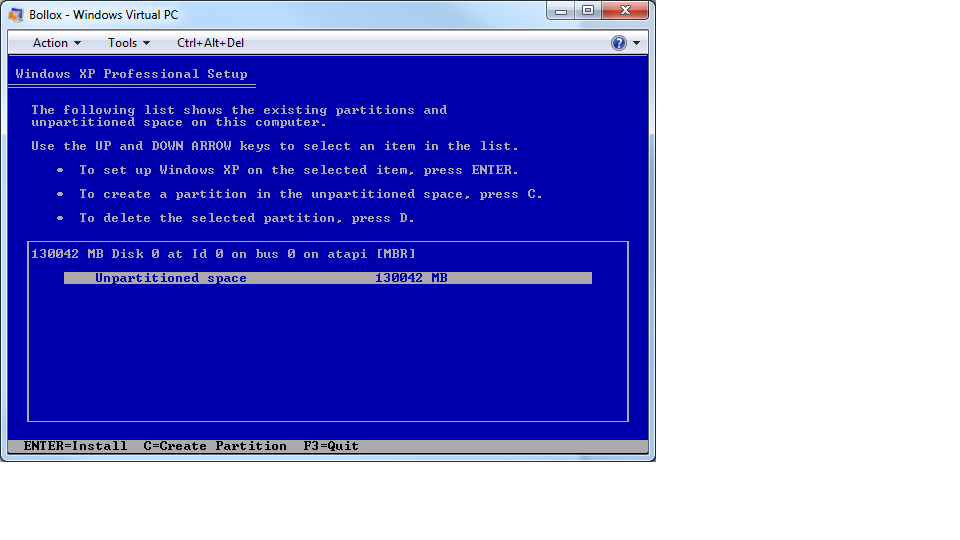
Well the xp image seems to want to install fine on a virtual machine.

R0IWL.png


Why would it work virtually but fail when I try and boot from a CD on the real machine?

Does this mean I can install it and run apps as if they were running on a physical XP machine?

Also, the virtual machine is offering 130gb unpartitioned space. Where is this from?

My physical HDD is 120Gb and partitioned. If I go ahead and install XP on this virtual machine will anything happen to my current 7 installs? Probably obvious, but I thought id check.
 

My Computer

OS
Windows 7 Home Premium 32bit.
Ok. So I tested the XP disks and successfully installed them on a virtual machine.

Is there any reason why they would fail physically then?
 

My Computer

OS
Windows 7 Home Premium 32bit.
Physically installing XP? Try it to see. Create and full format the target partition using XP CD.

Post camera snaps or verbatim error messages.

Did you extract and load all storage drivers given, using Nlite text mode?
 
I mean booting from the install cd. It crashes before I get to select where to install it.

Whereas in the virtual machine it installs fine.

I put the SATA drivers in the image as per the tutorial.
 

My Computer

OS
Windows 7 Home Premium 32bit.
Can you run XP virtually? This is probably the best approach unless you want to work with Theog to get your SATA drivers slipstreamed correctly as it can be dicey. XP is nearly XPired and hardly worth the effort otherwise.
 
I can run it virtually fine yes.

I wanted to install it directly so I can see how various programs run on it. As at the moment im getting crippling CPU spikes in 7
 

My Computer

OS
Windows 7 Home Premium 32bit.
Open Task Manager, Process tab, show processes from All Users, click CPU column to see what is spiking CPU.

In msconfig>Startup uncheck everything except AV and gadgets. Reboot. If anything shows up again in list turn it off in it's Program Preferences. Startup Programs - Change - Windows 7 Forums

Next in msconfig>Services, Hide all MS Services, then uncheck anything you have not started yourself, either turn it off in Program Prefs or uninstall it.
 
Done and done.

The thing is the spikes only happen when applications are running. It will be fine then spike then be ok again then spike etc, with gaps of a few mins.

Ive tested the cpu with a program that says its working at 100% efficiency with the right speed.
 

My Computer

OS
Windows 7 Home Premium 32bit.
Try resetting your BIOS back to default.
 

My Computer

OS
ME/XP/Vista/Win7
Theres two versions of BIOS available on the website.

One Win 7 and one for Vista, which the machine was originally sold with.

Are you saying put the Vista version back on, even though it has Win 7?
 

My Computer

OS
Windows 7 Home Premium 32bit.
Try resetting your BIOS back to default.

Theres two versions of BIOS available on the website.

One Win 7 and one for Vista, which the machine was originally sold with.

Are you saying put the Vista version back on, even though it has Win 7?


I'm sure Ray meant to reset the CMOS back to default click here to see where I just explained the process to someone in another thread.
 

My Computer

Computer Manufacturer/Model Number
* BFK Customs *
OS
W 7 64-bit Ultimate
CPU
Intel Q9550 Yorkfield
Motherboard
ASUS P5Q Pro
Memory
8GB Dominator 8500C5D
Graphics Card(s)
ATI : XFX 5870
Sound Card
Realtek HD Audio 7-1
Monitor(s) Displays
1x 47" LCD HDMI & 3x 26" LCD HDMI
Screen Resolution
1920x1080P & 1920x1200
Hard Drives
1x 80GB Intel X25-M G2 SSD : 1x 500GB & 1x 640GB WD Caviar Black(s)
PSU
Corsair 620HX
Case
Cooler Master RC-690
Cooling
Tuniq Tower 120, 2x 140mm and 3x 120mm case fans
Keyboard
Microsoft 500
Mouse
Razer Diamondback 3G
Internet Speed
14 Mb/s
Other Info
1x Koutech 3Gb/s SATA HDD Hot Swap Rack
Hi, I didnt get a chance to do this until today.

Seems to have reset fine, but CPU still spiking when i run certain apps.
 

My Computer

OS
Windows 7 Home Premium 32bit.
Back
Top