Dual Boot: Cannot "see" data partition

jlm86

New member
Member
Local time
7:05 PM
Messages
30
Dual Boot WP/Win7.
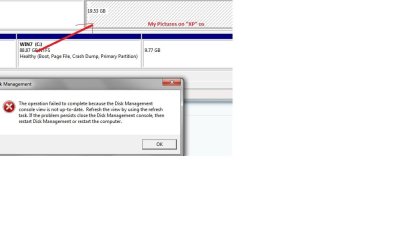
My pictures are located on P:\ on separate HD, I can view the partition in Disk Management, but it will not let me set drive letter.

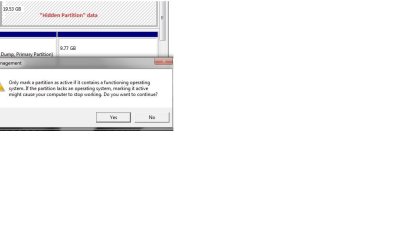
IF i attempt to make "active", i get a warning about "...if contains operating system...." etc..

Here is screenshot of when i attempt to add drive letter:, and a screenshot of warning when i attempt to make "active"
 

Attachments
  • Partion.jpg
    Partion.jpg
    34.7 KB · Views: 62
  • partitionwarning.jpg
    partitionwarning.jpg
    27.5 KB · Views: 35

My Computer

Computer Manufacturer/Model Number
gigabyte
OS
winxp
CPU
Intel Dual Core 7300
Memory
2G
Yes, its true. It is not to activate a partition that doednt contain os. In this case your computer will stop working (bcoz that partition doesnt have any boot image).

Look for the "system reserved" partition (about 100 mb). If it is activated, there is no problem at all. The partitions containing os should have boot flag. In this situation, I think you will be able to operate all the partitions in explorer in either os, if there is not a ownership problem.

I think it is wise to have a third party disk manager (like acronis or paragon) to have a good dual boot system, and a bcd editor like vista boot pro or easybcd.
 

My Computer

Computer type
PC/Desktop
Computer Manufacturer/Model Number
Self Assembled
OS
Microsoft Windows 10 Pro Insider Preview 64-bit
CPU
Intel(R) Core(TM) i3-4130 CPU @ 3.40GHz
Motherboard
Gigabyte Technology Co., Ltd. B85M-D3H
Memory
Corsair Vengence 4GB x2 (8.00GB Dual-Channel DDR3 @ 798MHz)
Graphics Card(s)
2047MB GeForce GTS 450 (ZOTAC International)
Sound Card
Onboard (Realtek High Definition Audio)
Monitor(s) Displays
LG Flatron E2040T
Screen Resolution
1600x900
Hard Drives
Western Digital 1 TB
Seagate 500 GB
PSU
Corsair VS550
Case
Cooler Master K380
Cooling
Cooler Master Seidon 120V Plus
Keyboard
Logitech MK260r
Mouse
Logitech MK260r
Internet Speed
PMPL Broadband
Antivirus
Windows Defender + MBAM
Browser
Firefox
Other Info
Dell Studio 15" Laptop
Please post the full Disk Management screenshot so we can see it to advise you better.

As Arc warns, do not mark the data drive active. XP needs to remain System Active with WIn7 holding boot.
 
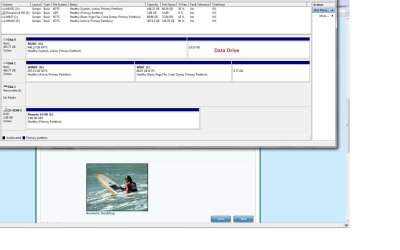
Here is my full display of Data Management screenshot..thanks for the assistance.
 

Attachments

  • Partion_ALL.jpg
    Partion_ALL.jpg
    113.8 KB · Views: 90

My Computer

Computer Manufacturer/Model Number
gigabyte
OS
winxp
CPU
Intel Dual Core 7300
Memory
2G
Here is my full display of Data Management screenshot..thanks for the assistance.

The partition in disc 0 (19.53 GB) and another in disc 1 (9.77 Gb) seems to be not formatted. Are you sure they contain any data? If so, a software "Recover My Files"
(Data Recovery Software to Undelete Files; Disk recovery; Recover Deleted Files) may help you. But if it a free partition, Then format those partitions (first delete, then format). In my opinion, the partitions other than system better to be logical drives, not primary partitions (with a deep sky blue color, not navy blue).
 

My Computer

Computer type
PC/Desktop
Computer Manufacturer/Model Number
Self Assembled
OS
Microsoft Windows 10 Pro Insider Preview 64-bit
CPU
Intel(R) Core(TM) i3-4130 CPU @ 3.40GHz
Motherboard
Gigabyte Technology Co., Ltd. B85M-D3H
Memory
Corsair Vengence 4GB x2 (8.00GB Dual-Channel DDR3 @ 798MHz)
Graphics Card(s)
2047MB GeForce GTS 450 (ZOTAC International)
Sound Card
Onboard (Realtek High Definition Audio)
Monitor(s) Displays
LG Flatron E2040T
Screen Resolution
1600x900
Hard Drives
Western Digital 1 TB
Seagate 500 GB
PSU
Corsair VS550
Case
Cooler Master K380
Cooling
Cooler Master Seidon 120V Plus
Keyboard
Logitech MK260r
Mouse
Logitech MK260r
Internet Speed
PMPL Broadband
Antivirus
Windows Defender + MBAM
Browser
Firefox
Other Info
Dell Studio 15" Laptop
In addition to the two unformatted partitions, your System Active drive has been derailed to G partition on DISK0. This means that critical boot files have been placed there because it was somehow marked Active, and as the first Active drive Win7 placed the MBR there.

As Arc says, data partitions should be formatted logical since they cannot be marked active.

You need to attempt to recover your pictures, then consider if you would like to move data off of G in order to format all of DISK0, recover the MBR into Win7, then reconfigure the Dual Boot correctly.

It will run the way it is now but is not correct because DISK1 is dependent upon DISK0 to boot. Let us know if you want to fix it and we will give you the exact steps.
 
Why do you think your data is on space? Could you be confused about where you put the files?

It looks a little strange, since it does not say unallocated, it does to seem to be a partition, but a partition normally gives its condition.

Could some utility have set the partition up just for you music and you might need that utility to access it?

You say it will not let you add a drive letter? Have you tried a command line utility to add a letter? Could it be formatted with something Win 7 doesn't recognize?

There are several different typed of partitons, so this might be something I haven't seen.
 

My Computer

Computer Manufacturer/Model Number
Homebuilt
OS
Windows 7 x64
CPU
i7-2600K
Motherboard
Asus P8Z77-v Pro
Memory
8 G
Graphics Card(s)
GTX 480
Sound Card
Onboard
Monitor(s) Displays
LG W2753V
Screen Resolution
1920x1080
Hard Drives
Crucial M4 128 G SSD
Yes I need to get it right, how about if i disengage drive 0, and boot back up on the drive with the dual boot os's?
Then start from there?

If not, please tell me the steps....I don't really know why i want to hang onto the Dual Boot, but feel confident that i have a 32 bit system in case i have an app that won't load on the jWin7 64 bit..
 

My Computer

Computer Manufacturer/Model Number
gigabyte
OS
winxp
CPU
Intel Dual Core 7300
Memory
2G
It doesn't hurt to try. It might be that XP will boot if Drive 0 goes away, but hard to tell.

If it won't boot, then all your boot files are on the current drive 0.

If you have to reinstall it to boot, make sure you set it first in the drive order in the bios.

There may be some files on the Drive 0 you may need later. If you can, copy them to an external drive, or the root of Drive 1. They are, the bootmgr file, and the Boot folder.
 

My Computer

Computer Manufacturer/Model Number
Homebuilt
OS
Windows 7 x64
CPU
i7-2600K
Motherboard
Asus P8Z77-v Pro
Memory
8 G
Graphics Card(s)
GTX 480
Sound Card
Onboard
Monitor(s) Displays
LG W2753V
Screen Resolution
1920x1080
Hard Drives
Crucial M4 128 G SSD
Drive 1 view only

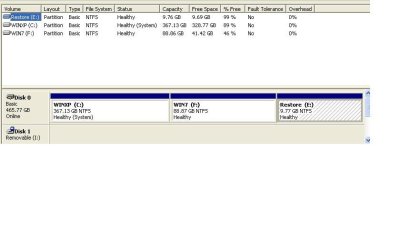
Ok, i disconnected my Data Drive that contains the Data and Pictures. Here is the Disk Management view now of the Dual Boot drive.

Do i just do a reinstall of Win7 now?
moz-screenshot.png
 

Attachments

  • dualboot_1drive.JPG
    dualboot_1drive.JPG
    30.2 KB · Views: 46

My Computer

Computer Manufacturer/Model Number
gigabyte
OS
winxp
CPU
Intel Dual Core 7300
Memory
2G
Also:

I can boot up on this single disk to XP only, I do see the Dual Boot screen come up, but the Win7 does not load, saying "...cannot find...."
 

My Computer

Computer Manufacturer/Model Number
gigabyte
OS
winxp
CPU
Intel Dual Core 7300
Memory
2G
I can boot to XP on this single drive, but cannot get to the Win7..I do see the dual boot screen, but the Win7 will say "....cannot find....."
 

My Computer

Computer Manufacturer/Model Number
gigabyte
OS
winxp
CPU
Intel Dual Core 7300
Memory
2G
cannot find what?

Does it say this:

“The boot selection failed because a required device is inaccessible.”
 

My Computers

System One System Two

  • Computer type
    PC/Desktop
    OS
    7 X64
    CPU
    i5 8400
    Motherboard
    gigabyte b365m ds3h
    Memory
    2x8gb 3200mhz
    Hard Drives
    various
    PSU
    pure power 11 400w cm
    Case
    Coolermaster
    Cooling
    cryorig m9i
  • Computer type
    PC/Desktop
    OS
    7x64
    CPU
    g5400
    Motherboard
    ga b365m ds3h
    Memory
    8gb ddr4 2400
    PSU
    xfx pro 450w
Wait..mistake

Wait, I got that "..could not find..." when i booted up on the other drive.

With this drive shown, that has the XP/Win 7 os's, it only goes straight to the XP os.

So that means the dual boot .ini is on the other drive liked you said at first. I do have a Boot Manager application, so I could use that to possibly reconfigure (?)

IF i just reinstalled Win7 currently , would this not just add the proper dual boot.ini?

thanks for assistance
 

My Computer

Computer Manufacturer/Model Number
gigabyte
OS
winxp
CPU
Intel Dual Core 7300
Memory
2G
Boot Loader image

Here is the screenshot of the Boot Loader app that displays....
Seems like things are somewhat amis....
 

Attachments

  • bootloader.JPG
    bootloader.JPG
    12.5 KB · Views: 14

My Computer

Computer Manufacturer/Model Number
gigabyte
OS
winxp
CPU
Intel Dual Core 7300
Memory
2G
Suggest you try Easy BCD 2.0 to configure the dual boot from XP.
 
Last edited:
why not just Reinstall win7?

Will a re-install of win7 not do the trick?
 

My Computer

Computer Manufacturer/Model Number
gigabyte
OS
winxp
CPU
Intel Dual Core 7300
Memory
2G
EasyBCD or repair install is less trouble.
 
Last edited:
3 files: only on XP os.

The 3 files are ONLY in the root of the C:\ XP os.

My thinking is if i copy them to the F:\ WIN7 os, how does this create the dual boot.ini that is obviously on the other drive the i have disconnected now?

hmmmmm.....

Again, I have that EasyDCD application that SHOULD recreate the Dual Boot environment should it now?
 

My Computer

Computer Manufacturer/Model Number
gigabyte
OS
winxp
CPU
Intel Dual Core 7300
Memory
2G
Yes you'll need to install Net Framework 2.0 to run Easy BCD in XP.

Use Easy 2.0 which is automated: View attachment 45297

Confirm the listings are correct by using the Change or Add/Remove tabs if necessary.

I would personally boot Win7 DVD to run Startup Repair 3 times to rewrite the MBR to Win7, then either add Vista using EasyBCD or run a http://www.sevenforums.com/tutorials/3413-repair-install.html?ltr=R from Win7 to reconfigure the dual boot.

If you don't care about saving Win7 install you have then you could also reinstall.
 
Back
Top