Dual Boot: Cannot "see" data partition

Repair Win 7..

IF i do run the repair install for Win 7, will not this automatically create the dual boot environment by default, since it will see both os' then?
 

My Computer

Computer Manufacturer/Model Number
gigabyte
OS
winxp
CPU
Intel Dual Core 7300
Memory
2G
Yes, Repair Install is a solution for borked dual boots. It saves everything in place, reinstalls the OS and freshly reconfigures the dual boot correctly as Win7 does when it is last installed OS.
 
Last edited:
copy 3 files...?

I really worry about corrupting the boot process by copying the identical 3 files to the Win7 os root.

How will this prompt at the boot for a selection if the .ini only contains win xp reference.?
 

My Computer

Computer Manufacturer/Model Number
gigabyte
OS
winxp
CPU
Intel Dual Core 7300
Memory
2G
In that case stick with the failsafe Repair Install option.

Did you get Win7 started using Startup Repair? It may need to be marked active first.

Open command line from DVD Repair console:

diskpart
select disk 0
list partition
select partition # (for Win7 partition)
active
exit

Now return to tools list and run Startup Repair 3 times to rewrite MBR to WIn7.
 
Re-installed, boot good, But..

I repaired the Win7 os, and got it to boot back up on the single drive, with correct Dual Boot information.

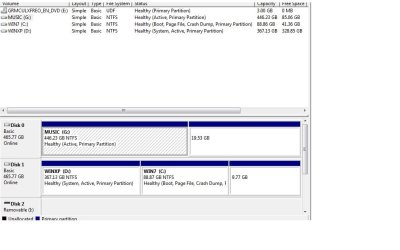
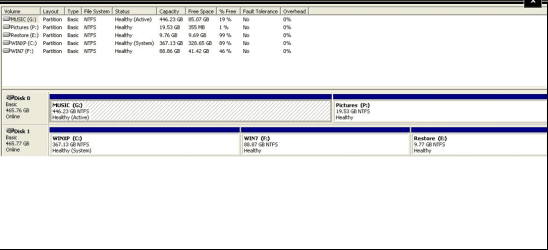
But now, when i add the 2nd Data Drive, it looks like it did before? So how now can i get this data drive to be a NON-Active Paritition without scrubbing the data?

here is current screenshot..
 

Attachments

  • Partion_ALL2.jpg
    Partion_ALL2.jpg
    54.1 KB · Views: 22

My Computer

Computer Manufacturer/Model Number
gigabyte
OS
winxp
CPU
Intel Dual Core 7300
Memory
2G
Boot into Win7 DVD Repair console, click through to Recovery tools list, open a command line and type:

DISKPART
SELECT DISK 0
LIST PARTITION
SELECT PARTITION # (for G:Music partition)
INACTIVE
EXIT

Now check again in Disk Management.
 
Last edited:
Drive 0 vs. 1

I guess one question is does the data disk need to be at Drive 1, and system disks need to be Drive 0?
 

My Computer

Computer Manufacturer/Model Number
gigabyte
OS
winxp
CPU
Intel Dual Core 7300
Memory
2G
Data drive can be DISK0.

The problem is that primary-formatted data drives which are marked active in DISK0 position will be made System partition when Win7 configures a multi-boot, since the installer looks for the first active partition to place boot critical files.

You can avoid this by formatting all data drives logical.
 
Hi jim. Log on in xp and see if you can access to all the partitions. If so, then there is not a big trouble, but it will need some work.
 

My Computer

Computer type
PC/Desktop
Computer Manufacturer/Model Number
Self Assembled
OS
Microsoft Windows 10 Pro Insider Preview 64-bit
CPU
Intel(R) Core(TM) i3-4130 CPU @ 3.40GHz
Motherboard
Gigabyte Technology Co., Ltd. B85M-D3H
Memory
Corsair Vengence 4GB x2 (8.00GB Dual-Channel DDR3 @ 798MHz)
Graphics Card(s)
2047MB GeForce GTS 450 (ZOTAC International)
Sound Card
Onboard (Realtek High Definition Audio)
Monitor(s) Displays
LG Flatron E2040T
Screen Resolution
1600x900
Hard Drives
Western Digital 1 TB
Seagate 500 GB
PSU
Corsair VS550
Case
Cooler Master K380
Cooling
Cooler Master Seidon 120V Plus
Keyboard
Logitech MK260r
Mouse
Logitech MK260r
Internet Speed
PMPL Broadband
Antivirus
Windows Defender + MBAM
Browser
Firefox
Other Info
Dell Studio 15" Laptop
Yes, All partitions seen in XP

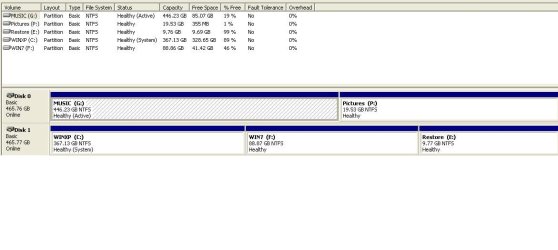
Yes, all my data partitions, G:\Music, P:\Pictures , which are Drive 0, can be seen and accessed in XP...

I CAN access the G:\Music in Win7, but cannot see the P: partition....

Must I use command line to convert to logical drive?

Seems like a mess? but am getting there ...

Here is screenshot of XP Disk Managment....
 

Attachments

  • DiskManagemet_XP.JPG
    DiskManagemet_XP.JPG
    48.9 KB · Views: 15

My Computer

Computer Manufacturer/Model Number
gigabyte
OS
winxp
CPU
Intel Dual Core 7300
Memory
2G
Did you run the diskpart commands given to set G inactive?

It still shows Active in screenshot.

It isn't important to convert to logical.


Can you now boot into either Win7 or XP through a correctly listed Dual Boot menu?
 
Last edited:
Yes, all my data partitions, G:\Music, P:\Pictures , which are Drive 0, can be seen and accessed in XP...

I CAN access the G:\Music in Win7, but cannot see the P: partition....

Must I use command line to convert to logical drive?

Seems like a mess? but am getting there ...

Here is screenshot of XP Disk Managment....

Your problem (in my openion) is due to the storage of dual boot information in disc 0 partition G. It is to be recovered.
Had I been in place of you, I would have done the following things:
1. Log on in xp
2. format the partition in disc 1 containing win 7
3. use easy bcd to delete the windows 7 bootoader
4. copy all files in disc 0 in disc 1, creating a partition out of the xp partition coz xp dont require so much place
5. Install xp in disc 0
6. install 7 in disc 1
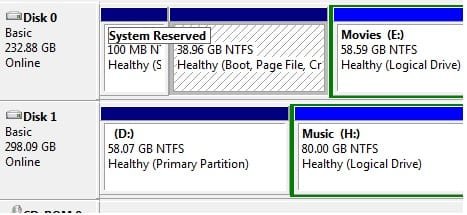
In my machine I use a partition named "system reserved" (100mb) to contain all the boot informations (in pic). I seem this plase is taken by partition G in your machine
It may be a labourous process, but the easy and secure way to overcome this situation
 

Attachments

  • Untitled.jpg
    Untitled.jpg
    20.7 KB · Views: 1

My Computer

Computer type
PC/Desktop
Computer Manufacturer/Model Number
Self Assembled
OS
Microsoft Windows 10 Pro Insider Preview 64-bit
CPU
Intel(R) Core(TM) i3-4130 CPU @ 3.40GHz
Motherboard
Gigabyte Technology Co., Ltd. B85M-D3H
Memory
Corsair Vengence 4GB x2 (8.00GB Dual-Channel DDR3 @ 798MHz)
Graphics Card(s)
2047MB GeForce GTS 450 (ZOTAC International)
Sound Card
Onboard (Realtek High Definition Audio)
Monitor(s) Displays
LG Flatron E2040T
Screen Resolution
1600x900
Hard Drives
Western Digital 1 TB
Seagate 500 GB
PSU
Corsair VS550
Case
Cooler Master K380
Cooling
Cooler Master Seidon 120V Plus
Keyboard
Logitech MK260r
Mouse
Logitech MK260r
Internet Speed
PMPL Broadband
Antivirus
Windows Defender + MBAM
Browser
Firefox
Other Info
Dell Studio 15" Laptop
Did you run the diskpart commands given to set G inactive?

It still shows Active in screenshot.

It isn't important to convert to logical.

Can you now boot into either Win7 or XP through a correctly listed Dual Boot menu?

Hi Greg! what do u think? Is my opinion workable? I tried the entire situation in my machine, but could'nt found a wayout other than this.
 

My Computer

Computer type
PC/Desktop
Computer Manufacturer/Model Number
Self Assembled
OS
Microsoft Windows 10 Pro Insider Preview 64-bit
CPU
Intel(R) Core(TM) i3-4130 CPU @ 3.40GHz
Motherboard
Gigabyte Technology Co., Ltd. B85M-D3H
Memory
Corsair Vengence 4GB x2 (8.00GB Dual-Channel DDR3 @ 798MHz)
Graphics Card(s)
2047MB GeForce GTS 450 (ZOTAC International)
Sound Card
Onboard (Realtek High Definition Audio)
Monitor(s) Displays
LG Flatron E2040T
Screen Resolution
1600x900
Hard Drives
Western Digital 1 TB
Seagate 500 GB
PSU
Corsair VS550
Case
Cooler Master K380
Cooling
Cooler Master Seidon 120V Plus
Keyboard
Logitech MK260r
Mouse
Logitech MK260r
Internet Speed
PMPL Broadband
Antivirus
Windows Defender + MBAM
Browser
Firefox
Other Info
Dell Studio 15" Laptop
Hi Arc. We see this situation where MBR is derailed to an active data drive all the time here.

The solution is to mark the data drive inactive, mark Win7 active and then recover the MBR into the Win7 partition by running Startup Repair 3 times.

In this case, he ran a Repair Install which correctly reconfigured the dual boot with System Active MBR on XP and boot in 7. I believe he says the dual boot is working.

If not, then the data partition needs to be marked inactive. I am not sure why it hasn't been done already since I've given him the commands twice now.

If there is a problem, then the backup is to move the data off of DISK0 and use Diskpart commands to clean or force delete the drive.
 
Why does the screenshot taken from Win7 after the Repair Install correctly show XP to be System Active and WIn7 to be Boot, but the screenshot taken shortly thereafter from XP show only the data drive to be marked Active?

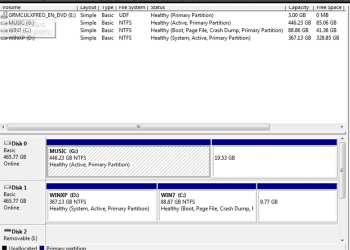
Capture.PNG Capture2.PNG

Did you accidentally use the Diskpart commands given to mark XP inactive?

It may be necessary to not only mark the data drive Inactive, but also mark the XP drive active to be sure, since it is not marked active in the XP screenshot you posted even though it is in the Win7 screenshot.

Also after Repair Install you say you have a Dual boot menu and can boot into "the single drive" but then post screenshots taken from both Win7 and XP? This is very confusing, and then you disappear.
 
Last edited:
Then what may be the reason behind not accessing the data drive p when 7 is logged on? Is the partition is formatted in such a type that may be accessed by xp but not by 7? IS there such a format?
 

My Computer

Computer type
PC/Desktop
Computer Manufacturer/Model Number
Self Assembled
OS
Microsoft Windows 10 Pro Insider Preview 64-bit
CPU
Intel(R) Core(TM) i3-4130 CPU @ 3.40GHz
Motherboard
Gigabyte Technology Co., Ltd. B85M-D3H
Memory
Corsair Vengence 4GB x2 (8.00GB Dual-Channel DDR3 @ 798MHz)
Graphics Card(s)
2047MB GeForce GTS 450 (ZOTAC International)
Sound Card
Onboard (Realtek High Definition Audio)
Monitor(s) Displays
LG Flatron E2040T
Screen Resolution
1600x900
Hard Drives
Western Digital 1 TB
Seagate 500 GB
PSU
Corsair VS550
Case
Cooler Master K380
Cooling
Cooler Master Seidon 120V Plus
Keyboard
Logitech MK260r
Mouse
Logitech MK260r
Internet Speed
PMPL Broadband
Antivirus
Windows Defender + MBAM
Browser
Firefox
Other Info
Dell Studio 15" Laptop
I can't say why he can only see P:Pictures in XP, but am only glad to hear that he has them back.

This is not a reason to reconfigure the dual boot now, though, since it appears it is working (isn't it?).

What I would do is move the pictures into the free space in XP drive, use WIn7 Disk Management to delete the P partition, create new and format it Logical, then move the pictures back through explorer.

If the G partition cannot be marked inactive, then I would move Music off of it into XP and WIn7 partitions, force delete and format it Logical as well, then move data back.

What do you think of that approach?
 
I can't say why he can only see P:Pictures in XP, but am only glad to hear that he has them back.

This is not a reason to reconfigure the dual boot now, though, since it appears it is working (isn't it?).

What I would do is move the pictures into the free space in XP drive, use WIn7 Disk Management to delete the P partition, create new and format it Logical, then move the pictures back through explorer.

If the G partition cannot be marked inactive, then I would move Music off of it into XP and WIn7 partitions, force delete and format it Logical as well, then move data back.

What do you think of that approach?

Nice! it should work. I think you mean to log on in xp first, move the items using xp, then log on in 7, use disc management and so on. isn' it? (coz they are not accessible in 7)

I think it is better to have a third party disk management program. I use Acronis. It helps me a lot to manage my disks. But the experts dont need it at all :).
 

My Computer

Computer type
PC/Desktop
Computer Manufacturer/Model Number
Self Assembled
OS
Microsoft Windows 10 Pro Insider Preview 64-bit
CPU
Intel(R) Core(TM) i3-4130 CPU @ 3.40GHz
Motherboard
Gigabyte Technology Co., Ltd. B85M-D3H
Memory
Corsair Vengence 4GB x2 (8.00GB Dual-Channel DDR3 @ 798MHz)
Graphics Card(s)
2047MB GeForce GTS 450 (ZOTAC International)
Sound Card
Onboard (Realtek High Definition Audio)
Monitor(s) Displays
LG Flatron E2040T
Screen Resolution
1600x900
Hard Drives
Western Digital 1 TB
Seagate 500 GB
PSU
Corsair VS550
Case
Cooler Master K380
Cooling
Cooler Master Seidon 120V Plus
Keyboard
Logitech MK260r
Mouse
Logitech MK260r
Internet Speed
PMPL Broadband
Antivirus
Windows Defender + MBAM
Browser
Firefox
Other Info
Dell Studio 15" Laptop
Right, move Pics within XP, then delete/create/format in Win7 which is more advanced.

I only recommend third party for what Disk Management can't do, because Disk Mgmt doesn't fail while 3rd party apps can sometimes.

The one we find that works the best with Win7 is free Partition WIzard bootable CD. People we help here like its graphical interface with slider buttons, full automation.
 
Hey! I didnt know about this. I should try it. which edition goes well with home premium?
 

My Computer

Computer type
PC/Desktop
Computer Manufacturer/Model Number
Self Assembled
OS
Microsoft Windows 10 Pro Insider Preview 64-bit
CPU
Intel(R) Core(TM) i3-4130 CPU @ 3.40GHz
Motherboard
Gigabyte Technology Co., Ltd. B85M-D3H
Memory
Corsair Vengence 4GB x2 (8.00GB Dual-Channel DDR3 @ 798MHz)
Graphics Card(s)
2047MB GeForce GTS 450 (ZOTAC International)
Sound Card
Onboard (Realtek High Definition Audio)
Monitor(s) Displays
LG Flatron E2040T
Screen Resolution
1600x900
Hard Drives
Western Digital 1 TB
Seagate 500 GB
PSU
Corsair VS550
Case
Cooler Master K380
Cooling
Cooler Master Seidon 120V Plus
Keyboard
Logitech MK260r
Mouse
Logitech MK260r
Internet Speed
PMPL Broadband
Antivirus
Windows Defender + MBAM
Browser
Firefox
Other Info
Dell Studio 15" Laptop
Back
Top