Dual boot didn't work...

FredTastic

New member
Member
Local time
9:43 AM
Messages
78
Location
Olympia, WA
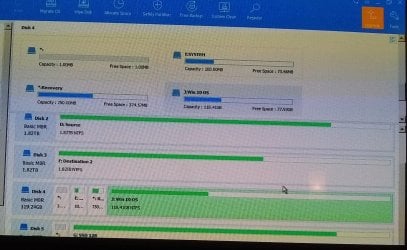
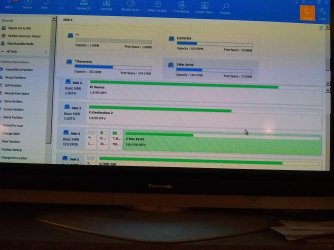
That refurb'd 9020 I've posted endlessly about came with a 128 gig SSD running win 10. I partitioned the SSD (something I've done many times before), leaving 60 gig free to load Win 7. Loaded 7, OS runs though it needs drivers for video, etc. Fine. Not the 1st time I've run a dual (and more) boot PC, and figured I could still boot into 10, go online, dl drivers. The boot menu seems to only pull up the DRIVES, rather than a list of installed OS's/partitions as I've always seen in BIOS previously. No apparent way to boot into the still completely intact 10 OS. So, I connected the SSD to my older PC & deleted just the 7 partition. Now, when I attempt to boot to 10 in the 9020, selecting the SSD, it says it cannot find an OS. 7 of course was deleted, but why doesn't it detect the intact 10? Below is a pic of the drive's partitions after I deleted the new 7 partition. What might be the issue with the 9020 not finding the win 10 OS? The SSD has 4 partitions, the main & 3 very small ones, perhaps during the partitioning the letters got scrambled? How can I get the win 10 to boot? Thanks in advance!

IMG_20201017_213005803.jpg
 

My Computer

Computer type
PC/Desktop
OS
7 Home 64 bit, 7 Pro 64 bit
Can't understand your post. Can you rephrase it?

Also can't see the picture.

Better to attach it directly to your post.

attach.jpg
 

My Computers

System One System Two

  • Computer type
    PC/Desktop
    OS
    7 X64
    CPU
    i5 8400
    Motherboard
    gigabyte b365m ds3h
    Memory
    2x8gb 3200mhz
    Hard Drives
    various
    PSU
    pure power 11 400w cm
    Case
    Coolermaster
    Cooling
    cryorig m9i
  • Computer type
    PC/Desktop
    OS
    7x64
    CPU
    g5400
    Motherboard
    ga b365m ds3h
    Memory
    8gb ddr4 2400
    PSU
    xfx pro 450w
... Fine. Not the 1st time I've run a dual (and more) boot PC, and figured I could still boot into 10, go online, dl drivers. The boot menu seems to only pull up the DRIVES, rather than a list of installed OS's/partitions as I've always seen in BIOS previously. No apparent way to boot into the still completely intact 10 OS.
So, I connected the SSD to my older PC & deleted just the 7 partition. Now, when I attempt to boot to 10 in the 9020, selecting the SSD, it says it cannot find an OS. 7 of course was deleted, but why doesn't it detect the intact 10? Below is a pic of the drive's partitions after I deleted the new 7 partition. What might be the issue with the 9020 not finding the win 10 OS? The SSD has 4 partitions, the main & 3 very small ones, perhaps during the partitioning the letters got scrambled? How can I get the win 10 to boot? Thanks in advance!

Presumably Disk 4 in the photo is the disk containing your Windows installation? The partitions are MBR, so you could have deleted the bootloader, when you deleted Win 7. Secondly, I cannot see from the photo - is there a partition marked as "Active"?
 

My Computer

Computer type
PC/Desktop
OS
Windows 7 x64, Vista x64, 8.1 smartphone
CPU
Intel E8400 65W 64-bit
Motherboard
Gigabyte EP45-UD3LR
Memory
DDR2 2 x 2GB, 1GB x 2
Graphics Card(s)
XFX Radeon HD5750
Sound Card
AMD High Definition Audio; Realtek High Definition Audio
Monitor(s) Displays
iiyama prolite X2377HDS
Screen Resolution
1920 x 1080
Hard Drives
500GB 7200 rpm Seagate ST3500413AS 16MB, 500GB 5400 rpm Toshiba MQ02ABF050H 32MB, 200GB 7200 rpm Seagate ST3200820AS 8MB, 2TB 7200 rpm Western Digital WD20EZRX 64MB
PSU
Enermax Liberty Modular
Case
Antec P193 Midi Tower
Keyboard
Mionix ZIBAL 60
Mouse
Razer USB 2.0 Diamondback Mouse or Huion Graphics Tablet
Browser
Internet Explorer, Lunascape, Firefox, Opera, Avast Safezone
If your duel booting you must install the oldest o/s first as if you dont it wont understand new boot sequence and mess it up. Its best practice to have the bootable o/s on disk 0 as it saves the bios searching 4 disk to find the boot records. We need a better photo showing all the disk details and paritions
 

My Computer

Computer type
PC/Desktop
OS
win 8 32 bit
If your Dell OptiPlex 9020 came with a 128 GB (119 GB actual capacity) SSD, dividing it into 2 partitions was NOT a good idea.

The Windows operating systems and the installed apps in each one will quickly consume most, if not all, the free space in each partition.

Installing and creating 2 partitions in a larger capacity SSD or installing 2 separate SSD's would have been a better option.

And as already stated, Windows 7 should be installed first before installing Windows 10.
 
Last edited:

My Computer

Computer type
PC/Desktop
Computer Manufacturer/Model Number
Dell OptiPlex 9020
OS
Windows 7 Professional SP1 64-bit
CPU
Intel Core i7-4790 3.60 GHz
Memory
32 GB DDR3-1600 MHz
Graphics Card(s)
Integrated Intel HD Graphics 4600
Monitor(s) Displays
Viewsonic 32" LCD
Hard Drives
Kingston SATA 3 240 GB SSD
Internet Speed
Spectrum Internet 1000 Mbps
Thanks for the replies. My plan was to retain both OS's until I got 7 up & fully running, then delete the partition containing 10 & just run 7. Really don't like 10. I know ~60 gig is small for an OS, but it is doable (currently running 7 pro on a 60 gig on the older PC I'm still using until I get the 9020 running). The 9020 also came with a 2 TB HDD, I've loaded 7 home there, but I need to configure it w/the Dell ethernet, video, etc. Not as straightforward as doing this with a "non proprietary" mobo & associated cards; finding the right drivers is proving to be a challenge.

Anyone know how I can reinstate the boot info on that SSD, so I can boot into 10?


Here's a better pic of the drive in question, #4. The others aren't at a problem.


Thanks again everyone.
 

Attachments

  • pic 2.jpg
    pic 2.jpg
    861.3 KB · Views: 1

My Computer

Computer type
PC/Desktop
OS
7 Home 64 bit, 7 Pro 64 bit
Still can't understand your question.

1. Can you boot into either os. If so, which one?

2. It looks like that screenshot was taken from boot media ?

3. Disk 4 partition 4 has the Label Win 10 OS. Is that where win10 is installed?

4. Where is win7 installed? Or is it no longer there?

Anyone know how I can reinstate the boot info on that SSD, so I can boot into 10?

It depends. Which partition is marked ACTIVE on each of the MBR disks? We can't see that from your screenshots.
 

My Computers

System One System Two

  • Computer type
    PC/Desktop
    OS
    7 X64
    CPU
    i5 8400
    Motherboard
    gigabyte b365m ds3h
    Memory
    2x8gb 3200mhz
    Hard Drives
    various
    PSU
    pure power 11 400w cm
    Case
    Coolermaster
    Cooling
    cryorig m9i
  • Computer type
    PC/Desktop
    OS
    7x64
    CPU
    g5400
    Motherboard
    ga b365m ds3h
    Memory
    8gb ddr4 2400
    PSU
    xfx pro 450w
You might be better borrowing my boot media so you can see what you are doing.

It includes windows explorer, disk management, a desktop you will recognize, internet connection, browser several partition managers, antivirus, and lots more


17514x64v24.iso

The iso is best extracted to bootable usb which can be done with this :ar: View attachment Usb7ice.zip
 

My Computers

System One System Two

  • Computer type
    PC/Desktop
    OS
    7 X64
    CPU
    i5 8400
    Motherboard
    gigabyte b365m ds3h
    Memory
    2x8gb 3200mhz
    Hard Drives
    various
    PSU
    pure power 11 400w cm
    Case
    Coolermaster
    Cooling
    cryorig m9i
  • Computer type
    PC/Desktop
    OS
    7x64
    CPU
    g5400
    Motherboard
    ga b365m ds3h
    Memory
    8gb ddr4 2400
    PSU
    xfx pro 450w
The 9020 also came with a 2 TB HDD, I've loaded 7 home there, but I need to configure it w/the Dell ethernet, video, etc.

You can use win7 Pro on that machine. They came with win8 pro, and switch to win7 pro as an option. It has the slic table in bios you can use for win7 Pro.

If you want the official DELL install media it is big because it is multilanguage. It is win 7 Pro installation media with some updates included, lots of languages and will activate automatically. However, as far as I know, it doesn't include your network drivers, etc.

OR

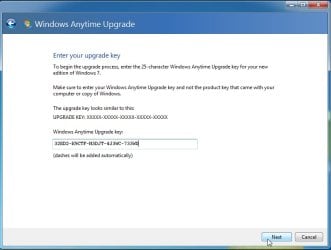
If you want, you can change your current win7 home installation to pro edition just by typing

anytime upgrade in start search box.

anytime upgrade.jpg

Then put in any win7 pro key. this is NOT for activation, it just tells the os to upgrade the EDITION to Pro.

anytime upgrade2.jpg

It will run for a minute and claim to have failed. It hasn't. Reboot and your home edition will now be Pro.

After that you can activate it on a DEll macine that has slic 2.1 in bios - which includes your 9020.. Unzip this View attachment DELL-OEM.zip. Then rt click and run as administrator on the slp.cmd
 
Last edited:

My Computers

System One System Two

  • Computer type
    PC/Desktop
    OS
    7 X64
    CPU
    i5 8400
    Motherboard
    gigabyte b365m ds3h
    Memory
    2x8gb 3200mhz
    Hard Drives
    various
    PSU
    pure power 11 400w cm
    Case
    Coolermaster
    Cooling
    cryorig m9i
  • Computer type
    PC/Desktop
    OS
    7x64
    CPU
    g5400
    Motherboard
    ga b365m ds3h
    Memory
    8gb ddr4 2400
    PSU
    xfx pro 450w
SIW2 - Thanks for the reply, sorry for the confusion.

1) I cannot boot into the SSD, which now only contains the 10 OS and a single partition. I am able to boot into the 7 install on the HDD in the 9020, but have to add a bunch of drivers for functionality. Cannot get online, for instance. Since the SSD approach didn't work, I thought I'd get 7 up & running on the HDD, then format the SSD (single partition) & transfer 7 to it from the HDD. HDD will then only be storage.
2) The screen shot is from a partition utility called AOMEI. This is with the SSD connected to my older PC, not the 9020. Not running the OS from the SSD on the older PC, just accessing the files.
3) Yes, I renamed that partition Win 10 OS for clarity.
4) 7 is no longer installed on the 9020 SSD. I am running a 7 pro install on my older PC.

Though I plan to run only 7 once I get it functioning, I would like to make the original 10 OS on the OEM SSD working until I accomplish that. Apparently, through all this partitioning/departitioning, I've inadvertently removed files required for the 9020 to recognize the 10 install on that SSD.

Thanks for the boot media, I'll take a look at it. I appreciate your input.
 

My Computer

Computer type
PC/Desktop
OS
7 Home 64 bit, 7 Pro 64 bit

My Computers

System One System Two

  • Computer type
    PC/Desktop
    OS
    7 X64
    CPU
    i5 8400
    Motherboard
    gigabyte b365m ds3h
    Memory
    2x8gb 3200mhz
    Hard Drives
    various
    PSU
    pure power 11 400w cm
    Case
    Coolermaster
    Cooling
    cryorig m9i
  • Computer type
    PC/Desktop
    OS
    7x64
    CPU
    g5400
    Motherboard
    ga b365m ds3h
    Memory
    8gb ddr4 2400
    PSU
    xfx pro 450w

My Computer

Computer type
PC/Desktop
OS
7 Home 64 bit, 7 Pro 64 bit
On an mbr system, bios works down through the boot order having a look at each device. Then it hands control to the first bootable device it finds.

So it depends what disks you have in there, where they are in the bios boot order, and whether there is an active partition marker in the partition table.

The mbr executable code will hand control to the code on the ACTIVE partition on that disk. That is where bootmgr and the bcd store should be. Then bootmgr has a look in the bcd store for directions.

So you can see why your previous screenshot is useless.
 

My Computers

System One System Two

  • Computer type
    PC/Desktop
    OS
    7 X64
    CPU
    i5 8400
    Motherboard
    gigabyte b365m ds3h
    Memory
    2x8gb 3200mhz
    Hard Drives
    various
    PSU
    pure power 11 400w cm
    Case
    Coolermaster
    Cooling
    cryorig m9i
  • Computer type
    PC/Desktop
    OS
    7x64
    CPU
    g5400
    Motherboard
    ga b365m ds3h
    Memory
    8gb ddr4 2400
    PSU
    xfx pro 450w
I cannot boot into the SSD, which now only contains the 10 OS and a single partition.

It appears like 4 partitions in your screenshot. The first block is 1mb free space.

One of the partitions should be marked active. If it isn't then you can either mark E active or mark J active. Either will do.

You then open admin command prompt and type bcdboot windowspartitionletter:\windows / s active partitionletter:

for example if J is windows partition and E is active partition

bcdboot j:\windows /s E:

Or, If J is windows partition and you have marked J active , then

bcdboot j:\windows /s j:

Then if disk4 is first bootable device in the bios order, bios will hand control to mbr on disk 4 which will hand onto the active partition on disk4, which should then load windows.

But if there is another bootable device before disk4 in the bios boot order, then bios will attempt to hand control to that, which might lead nowhere.
 

My Computers

System One System Two

  • Computer type
    PC/Desktop
    OS
    7 X64
    CPU
    i5 8400
    Motherboard
    gigabyte b365m ds3h
    Memory
    2x8gb 3200mhz
    Hard Drives
    various
    PSU
    pure power 11 400w cm
    Case
    Coolermaster
    Cooling
    cryorig m9i
  • Computer type
    PC/Desktop
    OS
    7x64
    CPU
    g5400
    Motherboard
    ga b365m ds3h
    Memory
    8gb ddr4 2400
    PSU
    xfx pro 450w
Still trying to get 10 back, thanks for the continued input. I'm also moving forward with configuring 7 on the HDD, to migrate to the SSD if I EVER get it running properly. 1st step, network. Every time I attempt to load a driver (software so far OK), I get the following error, any ideas?
 

Attachments

  • IMG_20201018_210846140_BURST001[1].jpg
    IMG_20201018_210846140_BURST001[1].jpg
    568 KB · Views: 0

My Computer

Computer type
PC/Desktop
OS
7 Home 64 bit, 7 Pro 64 bit

My Computer

Computer type
PC/Desktop
OS
7 Home 64 bit, 7 Pro 64 bit

My Computers

System One System Two

  • Computer type
    PC/Desktop
    OS
    7 X64
    CPU
    i5 8400
    Motherboard
    gigabyte b365m ds3h
    Memory
    2x8gb 3200mhz
    Hard Drives
    various
    PSU
    pure power 11 400w cm
    Case
    Coolermaster
    Cooling
    cryorig m9i
  • Computer type
    PC/Desktop
    OS
    7x64
    CPU
    g5400
    Motherboard
    ga b365m ds3h
    Memory
    8gb ddr4 2400
    PSU
    xfx pro 450w
I may need 7 home 64 SP1 also

Do you mean you need the installation iso file? You can use win7 Pro on the dell.

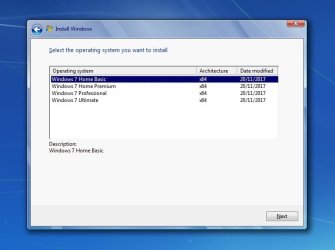
The MS official iso files contain all the editions. You can get any one and point this at it View attachment eicfg_removal_utility.zip

Then when you install you will be offered all editions like this:

editions-win7.jpg
 

My Computers

System One System Two

  • Computer type
    PC/Desktop
    OS
    7 X64
    CPU
    i5 8400
    Motherboard
    gigabyte b365m ds3h
    Memory
    2x8gb 3200mhz
    Hard Drives
    various
    PSU
    pure power 11 400w cm
    Case
    Coolermaster
    Cooling
    cryorig m9i
  • Computer type
    PC/Desktop
    OS
    7x64
    CPU
    g5400
    Motherboard
    ga b365m ds3h
    Memory
    8gb ddr4 2400
    PSU
    xfx pro 450w

My Computer

Computer type
PC/Desktop
OS
7 Home 64 bit, 7 Pro 64 bit
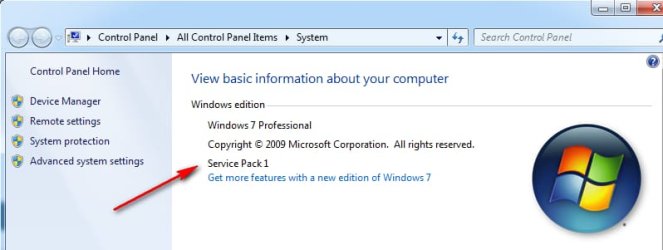
Easy to find out. Press the windows and pause/break keys together. The system window will pop up.

That will tell you if SP1 is already included.

sp1.jpg
 

My Computers

System One System Two

  • Computer type
    PC/Desktop
    OS
    7 X64
    CPU
    i5 8400
    Motherboard
    gigabyte b365m ds3h
    Memory
    2x8gb 3200mhz
    Hard Drives
    various
    PSU
    pure power 11 400w cm
    Case
    Coolermaster
    Cooling
    cryorig m9i
  • Computer type
    PC/Desktop
    OS
    7x64
    CPU
    g5400
    Motherboard
    ga b365m ds3h
    Memory
    8gb ddr4 2400
    PSU
    xfx pro 450w
Back
Top