dual boot from a cloned disk image

stano5

New member
Local time
10:06 PM
Messages
5
Hi, I just bought a new laptop with Windows 7 installed on it and was wondering if it would be possible to clone the XP hard disk from my old computer as a disk image and use it to dual boot my new computer as this would save a hell of a lot of time trying to reinstall XP, then reinstalling all the programs and move all data. Any help would be greatly appreciated.
 

My Computer

Computer Manufacturer/Model Number
Toshiba L500 satellite
OS
windows 7 32 bit
Memory
3 gb
Hard Drives
320 gb
Hi, I just bought a new laptop with Windows 7 installed on it and was wondering if it would be possible to clone the XP hard disk from my old computer as a disk image and use it to dual boot my new computer as this would save a hell of a lot of time trying to reinstall XP, then reinstalling all the programs and move all data. Any help would be greatly appreciated.
I'm not sure that will work, because all the new drivers would have to be loaded.

Furthermore, I don't think that would be legal, because the OEM licenses are tied to the original hardware they were installed in.
 

My Computer

Computer Manufacturer/Model Number
Custom
OS
Windows 7 Professional x64
CPU
Intel i7 2600K OC'd @ 4620 MHz
Motherboard
Asus P8Z68-V Pro
Memory
16GB GSkill Sniper 2133 Mhz (4x4GB)
Graphics Card(s)
EVGA GeForce GTX 480 SuperClocked+
Sound Card
Realtek High Definition Audio
Monitor(s) Displays
2x Acer S273HLbmii 27"
Screen Resolution
2 x 1920x1080
Hard Drives
64GB Crucial M4 SSD

Storage: Hitachi 1TB 5400RPM, Samsung 1.5TB 5400RPM
PSU
Corsair HW Series 750w (modular)
Case
Cooler Master HAF 932 Advanced Blue Edition
Cooling
CM Hyper 212+ CPU cooler, 3x 230mm + 1x 140mm case fans
Keyboard
Logitech MK320 (wireless)
Mouse
Logitech MK320 (wireless)
Internet Speed
30 Mb/s : 2 Mb/s
Hi Stan,

You would need to adjust XP to the new hardware - Paragon P2P Adjust program is made for that purpose.

You also need to have the right kind of XP product key to use it on a different machine.
 

My Computers

System One System Two

  • Computer type
    PC/Desktop
    OS
    7 X64
    CPU
    i5 8400
    Motherboard
    gigabyte b365m ds3h
    Memory
    2x8gb 3200mhz
    Hard Drives
    various
    PSU
    pure power 11 400w cm
    Case
    Coolermaster
    Cooling
    cryorig m9i
  • Computer type
    PC/Desktop
    OS
    7x64
    CPU
    g5400
    Motherboard
    ga b365m ds3h
    Memory
    8gb ddr4 2400
    PSU
    xfx pro 450w
Thanks for the quick reply Jonathan_King, the XP version is a copy I bought to update my old computer a few years ago so I don't think there'd be any problems with OEM licensing (although I'm not 100% sure). Would it be possible to do the cloned XP install first, then add Windows 7 as the second bootable OS?
 

My Computer

Computer Manufacturer/Model Number
Toshiba L500 satellite
OS
windows 7 32 bit
Memory
3 gb
Hard Drives
320 gb
Hi Stan,

You would need to adjust XP to the new hardware - Paragon P2P Adjust program is made for that purpose.

You also need to have the right kind of XP product key to use it on a different machine.

Thanks for the reply. I got an original copy of xp to upgrade my old computer a few years back so I assumed that would work, (then again I also know what they say about assume).

Would P2P Adjust have to be installed before XP or after.
 

My Computer

Computer Manufacturer/Model Number
Toshiba L500 satellite
OS
windows 7 32 bit
Memory
3 gb
Hard Drives
320 gb
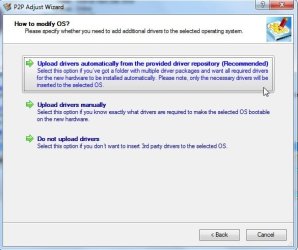
Normally you install P2P on another o/s partition or machine , or run it from the boot disc.

Just point it at the problem partition -in 2 secs, it makes all the drivers currently in the o/s )( and the hal ) adjust to the new hardware.

The issue you may have is XP may not have the drivers neded for the new hardware.

You would need to d/l XP drivers for the new hardware ( check the mobo site for XP drivers).

Then you can use P2P Adjust to inject those .

PSPADJUST-2010-04-06_150744.jpg
 

My Computers

System One System Two

  • Computer type
    PC/Desktop
    OS
    7 X64
    CPU
    i5 8400
    Motherboard
    gigabyte b365m ds3h
    Memory
    2x8gb 3200mhz
    Hard Drives
    various
    PSU
    pure power 11 400w cm
    Case
    Coolermaster
    Cooling
    cryorig m9i
  • Computer type
    PC/Desktop
    OS
    7x64
    CPU
    g5400
    Motherboard
    ga b365m ds3h
    Memory
    8gb ddr4 2400
    PSU
    xfx pro 450w
Thanks a lot SIW2, I'll give this a try and let you know how it goes. Again, cheers for the help.
 

My Computer

Computer Manufacturer/Model Number
Toshiba L500 satellite
OS
windows 7 32 bit
Memory
3 gb
Hard Drives
320 gb
Back
Top