- Local time
- 2:21 PM
- Messages
- 50,634
Why are you the only one who can't reinstall by booting a DVD? You either set the DVD drive first to boot in BIOS setup or trigger it using the one-time BIOS Boot Menu key at boot. If it won't boot burn another using ImgBurn at 4x speed which always works.
I must have repeated a dozen times that you have to boot the DVD but it still didn't sink in. If you had a problem booting it you should have asked. There is no way Win8 will be on C now as the OS will be when correctly installed from boot. There will be other issues down the line because of this, because of stubbornness that you will ignore the advice you don't want to hear.
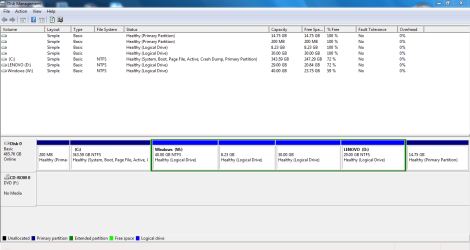
You should post back a Disk Mgmt screenshot so we can see what additional mess has been made.
I must have repeated a dozen times that you have to boot the DVD but it still didn't sink in. If you had a problem booting it you should have asked. There is no way Win8 will be on C now as the OS will be when correctly installed from boot. There will be other issues down the line because of this, because of stubbornness that you will ignore the advice you don't want to hear.
You should post back a Disk Mgmt screenshot so we can see what additional mess has been made.