dual boot problem

pvl10

New member
Local time
10:47 PM
Messages
7
Hi Guys

Please help.
I have installed XP in C (first) and win7 in D. Everything works fine. When I use win7 I can see and access to drive C (XP) but when using XP I cannot see and access to drive D (win7). What can I do to?

Thanks
 

My Computer

OS
win 7

My Computer

Computer Manufacturer/Model Number
Dell XPS420
OS
Vista Ult 64 bit Seven Ult RTM x64
CPU
Intel Core2 Quad Q6600 2.40 gigahertz
Memory
Crucial Ballistix 4x2GB PC2 6400
Graphics Card(s)
NVIDIA GeForce 8600 GTS 256 MB
Sound Card
Creative SB X-Fi audio
Monitor(s) Displays
HP w2207 + HPvs15
Screen Resolution
1680x1050 + 1024x768
Hard Drives
2-WD5000AAKS-500 GB
WD5000AAV-500 GB external
Keyboard
Microsoft Comfort Curve
Mouse
MX Revolution
Other Info
Wacom Intuos 2 Graphics Tablet
Experience Index=5.5
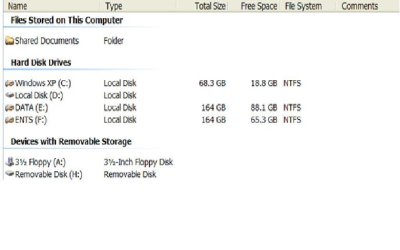
Thanks Gary. Yes the drive D has a letter while booted into XP but I cannot access to it. In my computer it shows: Local Disk(D) but no file system and total size, free space.
 

My Computer

OS
win 7
Please see attachment.
 

Attachments

  • pic.JPG
    pic.JPG
    30.2 KB · Views: 24

My Computer

OS
win 7
Open a command prompt and type in;
diskpart
list vol
select vol #
active
exit
exit
 

My Computer

Computer Manufacturer/Model Number
HP Touchsmart IQ771.uk
OS
Windows 7 Ultimate x64
CPU
AMD Turion(tm) 64 X2 Mobile Technology TL-56
Motherboard
ASUS Pheonix
Memory
3GB Nanya PC2-6400 DDR2-SDRAM SO-DIM (400MHz)
Graphics Card(s)
NVIDIA GeForce Go 7600 256MB GDDR3 SDRAM
Sound Card
High Definition Intergrated NVIDIA MCP51
Monitor(s) Displays
46" Sony Bravia HDTV
Screen Resolution
1600x1200
Hard Drives
1.5TB Samsug
320GB Seagate ST3320820AS - SATA 3Gb/s 8MB
500GB Maxtor Basics STM305003EHD301-RK
Internet Speed
↓6.32 Mb/s ↑0.35 Mb/s ↔26ms
Other Info
BIOS - American Megatrends Inc. 5.07
Ethernet Port - NVIDIA nForce 10/100/1000 Mbps
DVD Drive - TSSTcorp DVDR/RW TS-T632L
Thanks RSVR85. I ve done what you suggested but then I could not boot into either XP or 7. I had to use Hiren CD to reactive C. Now I can boot into both Xp and 7 but still having problem as described above. Anyone has any ideal? Cheers
 

My Computer

OS
win 7
Do you have your Seven partition hidden from XP? You might have done this to prevent XP from deleting Seven's restore points.

See this Vista tutorial: Hide restore points, it works the same for Seven. Look in the XP registry (run regedit.exe) for the XP registry setting mentioned in the tutorial (.../MountedDevices/Offline).

WARNING! If you enable XP to see the Seven partition, XP will delete Seven's restore points. This is not a good thing.

If you absolutely must see some of the files in the Seven partition, you can simply (from within Seven) put them into a folder in the XP partition or create a separate partition that both Seven and XP can see.

CAUTION! Be very careful about using Seven to create and save files or even access files within the XP partition. Seven may apply its permissions to files it has accessed making those files unavailable to XP, it might even make those files unusable or undeletable from XP. This can cause XP to become unstable or even prevent it from running.

There are reasons that Microsoft did not allow upgrading from XP to Seven, the above reason is one of them. MS wants you to totally abandon XP and has made little effort to provide side-by-side compatibility between Seven and XP.

 

My Computer

OS
XP SP3 32bit, Vista HP 64bit, Seven Pro 64bit
CPU
Q6600 G0 @ 3.2GHz
Motherboard
GA-P965-DS3
Memory
4Gb OCZ
Graphics Card(s)
nVidia GTX275 896Mb
Sound Card
X-Fi Fatal1ty Platinum
Monitor(s) Displays
Acer H243H
Screen Resolution
1920x1080
Hard Drives
Samsung 1Tb SATA2
MAXTOR 1Tb SATA2
MAXTOR 500Gb SATA2
MAXTOR 300Gb SATA2
PSU
Antec 650 Trio
Cooling
Zalman 9700
Keyboard
G15,G13
Mouse
MX518
Internet Speed
330Kbps down
Thanks for your solution zBobG. It works and XP now can see 7.
Have a great weekend.
 

My Computer

OS
win 7
Back
Top