Dual boot - remove 1st partition

archmisha

New member
Local time
6:45 AM
Messages
34
Hi,
I hope this is the right place to post.

I have 2 partitions with windows 7 on both of them in dual boot.

I would like to destroy the first partition, and merge the empty space in to the second partition. At the end i need the second windows to work as single boot.

What is the best way (or the right way) to do it.
I am afraid if i simply delete the first partition the computer wont boot at all, because of the mbr etc...

Please advice, thanks.
 

My Computer

OS
windows 7 ultimate
I've a solution but need to know if you have two disk drives or just one?
 

My Computer

Computer Manufacturer/Model Number
Built by OpSysWiz
OS
Win 7 Ultimate x64
CPU
i5-750
Motherboard
ASUS P7P55D-E
Memory
2 x 2GB Corsair DDR3 1600
Graphics Card(s)
eVGA 260 Core 216
Sound Card
X-FI Fatal1ty
Monitor(s) Displays
Samsung 21" S-PVA
Screen Resolution
1600x1200
Hard Drives
OCZ Vertex Turbo 60GB SSD, WD VelociRaptor
PSU
Antec Signature 850W
Case
Lian-Li PC-80B
Cooling
CoolerMaster Hyper 212 Plus, OCZ Freeze
Keyboard
Saitek Gamer
Mouse
MS Wheel Mouse Optical
Internet Speed
3Mb/sec
Your correct, your MBR is likely in the first partition. Was it installed first?
If it has the 'System' listed in Disk Manager then it has the boot manager files.

Have a look at this Seven Forums tutorial How to Delete a Listed Operating System at Boot in Windows 7.

After following the tutorial check Disk management, look for 'System' and 'Active' in the Win7 partition you want to keep.

Post a picture of Disk Management.
Start button, click Snipping Tool, save somewhere.

How to Post a Screenshot in Seven Forums
 
Last edited:

My Computer

Computer type
PC/Desktop
Computer Manufacturer/Model Number
76~2.0
OS
Windows 7 Ult x64 - SP1/ Windows 8 Pro x64
CPU
Intel Core i5-3570K 4.6GHz
Motherboard
Gigabyte GA-Z77X UD3H, f18
Memory
8GB (2X4GB) DDR3 1600 Corsair Vengeance CL8 1.5v
Graphics Card(s)
Sapphire HD 7770 Vapor-X OC 1GB DDR5
Sound Card
Onboard VIA VT2021
Monitor(s) Displays
22" LCD Dell
Screen Resolution
1680x1050
Hard Drives
Samsung 840Pro 128GB SSD,
Seagate Barracuda 500GB SATA2 7200rpm 32MB cache, Seagate Barracuda 1TB SATA2 7200rpm 32MB cache,
PSU
Corsair HX650W
Case
Cooler Master Storm Scout
Cooling
Corsair H80 2x12cm Noctua NF P12 , 2x14cm case fans
Keyboard
Logitech Wave
Mouse
CM Sentinel
Internet Speed
Dismal
Antivirus
Avast
Browser
Opera Next
Other Info
Haswell laptop: HP Envy 17t-j, i7-4700MQ, GeForce 740M 2GB DDR3, 17.3" Full HD 1920x1080, 16GB RAM, Samsung 840 Pro 128GB, 1TB Hitachi 7200 HDD,
Desktop: eSATA ports,
External eSATA Seagate 500GB SATA2 7200rpm,
External WD USB 500GB
Thank you for the help, i will follow the steps.
I have a single disk, but I have an external disk too if it helps.

First partition was indeed installed first.
 

My Computer

OS
windows 7 ultimate
I am following the steps now, but i dont understand how i remove the partition.
By changing my boot menu.....
 

My Computer

OS
windows 7 ultimate
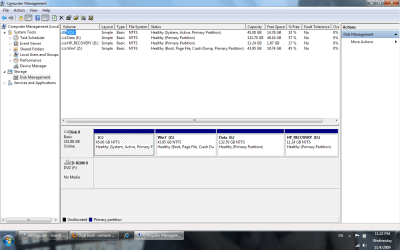
attached my disk management screen shot
 

Attachments

  • diskmanage.png
    diskmanage.png
    52.3 KB · Views: 466

My Computer

OS
windows 7 ultimate
archmisha, which one you intend to keep, C or Z?

I will let Dave elaborate, but I believe he will now instruct you how to delete the partition without affecting your boot (or preparing it so it is not affected). We need to know the above to proceed, since you might have to edit your boot options or not.
 

My Computer

Computer Manufacturer/Model Number
Wally, Innc.
OS
Windows 7 x64 finally!
CPU
AMD Athlon II X2 240
Motherboard
Biostar TA790GX XE
Memory
OCZ Platinum 4GB DDR2 1066 (will not work past 800MHz)
Graphics Card(s)
MSI R4670-MD1G Radeon HD 4670 1GB 128-bit GDDR3
Sound Card
ATI High Definition Audio Device Realtek ALC888
Monitor(s) Displays
HP w19e
Screen Resolution
1440x900
Hard Drives
Western Digital Caviar Green WD5000AADS 500GB SATA
Western Digital Caviar Blue WD5000AAKS 500GB SATA
PSU
Athena Power Micro ATX 400W
Case
HEC 6T 6T10BB Black MicroATX Mini Tower
Cooling
stock
Keyboard
wired, many keys
Mouse
HP wireless, 2 buttons, 1 wheel
Internet Speed
DSL 2Mb (recently getting 1.65M!)
I need to remove C and leave Z.
(removing z could be easier :) )
 

My Computer

OS
windows 7 ultimate
Is there enough free space on the external drive to handle the entire Z: drive (non-compressed)? Can you boot from your external drive? Go to Acronis True Image site and read about its capabilities. Also, read up on Partition Magic. Then get back to us.
 

My Computer

Computer Manufacturer/Model Number
Built by OpSysWiz
OS
Win 7 Ultimate x64
CPU
i5-750
Motherboard
ASUS P7P55D-E
Memory
2 x 2GB Corsair DDR3 1600
Graphics Card(s)
eVGA 260 Core 216
Sound Card
X-FI Fatal1ty
Monitor(s) Displays
Samsung 21" S-PVA
Screen Resolution
1600x1200
Hard Drives
OCZ Vertex Turbo 60GB SSD, WD VelociRaptor
PSU
Antec Signature 850W
Case
Lian-Li PC-80B
Cooling
CoolerMaster Hyper 212 Plus, OCZ Freeze
Keyboard
Saitek Gamer
Mouse
MS Wheel Mouse Optical
Internet Speed
3Mb/sec
Hi archmisha,

Open an elevated command prompt and type:

bcdboot z:\windows /s z:

then press enter.

close command prompt.

In Disk Management Rt click Z and select Mark as Active.

Restart.
 

My Computers

System One System Two

  • Computer type
    PC/Desktop
    OS
    7 X64
    CPU
    i5 8400
    Motherboard
    gigabyte b365m ds3h
    Memory
    2x8gb 3200mhz
    Hard Drives
    various
    PSU
    pure power 11 400w cm
    Case
    Coolermaster
    Cooling
    cryorig m9i
  • Computer type
    PC/Desktop
    OS
    7x64
    CPU
    g5400
    Motherboard
    ga b365m ds3h
    Memory
    8gb ddr4 2400
    PSU
    xfx pro 450w
Hi archmisha,

Open an elevated command prompt and type:

bcdboot z:\windows /s z:

then press enter.

close command prompt.

In Disk Management Rt click Z and select Mark as Active.

Restart.

If this moves the Active System partition to Z as desired, then you can delete the C; partition and use a 3rd party partition manager like Partition Wizard to recover the space from deleted C: into your Z partition.

The easiest way to do this, after making sure Z: is now set as active, is to boot into Partition Wizard, right click on C: and delete, then right click on Z: choose Resize/Move then just slide the left border of Z over the deleted C space to encompass it all.

There is the slight possibility you will have to run Startup Repair from the Installer disk's Repair console.

Suggest before doing anything you type Backup in the Win7 start box, then Create an Image of your HDD to save to your external so you can easily reimage the HDD if you need to start over, since moving operations can fail.
 
Hi archmisha,

Open an elevated command prompt and type:

bcdboot z:\windows /s z:

then press enter.

close command prompt.

In Disk Management Rt click Z and select Mark as Active.

Restart.
That won't get the space back from the C: partition.

Wating for a reply from archmisha ...
 

My Computer

Computer Manufacturer/Model Number
Built by OpSysWiz
OS
Win 7 Ultimate x64
CPU
i5-750
Motherboard
ASUS P7P55D-E
Memory
2 x 2GB Corsair DDR3 1600
Graphics Card(s)
eVGA 260 Core 216
Sound Card
X-FI Fatal1ty
Monitor(s) Displays
Samsung 21" S-PVA
Screen Resolution
1600x1200
Hard Drives
OCZ Vertex Turbo 60GB SSD, WD VelociRaptor
PSU
Antec Signature 850W
Case
Lian-Li PC-80B
Cooling
CoolerMaster Hyper 212 Plus, OCZ Freeze
Keyboard
Saitek Gamer
Mouse
MS Wheel Mouse Optical
Internet Speed
3Mb/sec
Of course it won't.

It makes it possible for him to do so.

After that, just delete C.

Any better ideas?

BTW Partition Magic is not comaptible with the NT6 partitioning rules.
 

My Computers

System One System Two

  • Computer type
    PC/Desktop
    OS
    7 X64
    CPU
    i5 8400
    Motherboard
    gigabyte b365m ds3h
    Memory
    2x8gb 3200mhz
    Hard Drives
    various
    PSU
    pure power 11 400w cm
    Case
    Coolermaster
    Cooling
    cryorig m9i
  • Computer type
    PC/Desktop
    OS
    7x64
    CPU
    g5400
    Motherboard
    ga b365m ds3h
    Memory
    8gb ddr4 2400
    PSU
    xfx pro 450w
Hi archmisha,

Open an elevated command prompt and type:

bcdboot z:\windows /s z:

then press enter.

close command prompt.

In Disk Management Rt click Z and select Mark as Active.

Restart.

If this moves the Active System partition to Z as desired, then you can delete the C; partition and use a 3rd party partition manager like Partition Wizard to recover the space from deleted C: into your Z partition.

The easiest way to do this, after making sure Z: is now set as active, is to boot into Partition Wizard, right click on C: and delete, then right click on Z: choose Resize/Move then just slide the left border of Z over the deleted C space to encompass it all.

There is the slight possibility you will have to run Startup Repair from the Installer disk's Repair console.

Suggest before doing anything you type Backup in the Win7 start box, then Create an Image of your HDD to save to your external so you can easily reimage the HDD if you need to start over, since moving operations can fail.
Yup, I use to use Partition Magic, but it's about 50-50 taking a chance. I'm thinking if OP has enough room on the external drive to use Acronis True Image Copy to copy the Z: to the external, boot from the external, full format the C:/Z: and Image copy from the external to the newly formatted C:
 

My Computer

Computer Manufacturer/Model Number
Built by OpSysWiz
OS
Win 7 Ultimate x64
CPU
i5-750
Motherboard
ASUS P7P55D-E
Memory
2 x 2GB Corsair DDR3 1600
Graphics Card(s)
eVGA 260 Core 216
Sound Card
X-FI Fatal1ty
Monitor(s) Displays
Samsung 21" S-PVA
Screen Resolution
1600x1200
Hard Drives
OCZ Vertex Turbo 60GB SSD, WD VelociRaptor
PSU
Antec Signature 850W
Case
Lian-Li PC-80B
Cooling
CoolerMaster Hyper 212 Plus, OCZ Freeze
Keyboard
Saitek Gamer
Mouse
MS Wheel Mouse Optical
Internet Speed
3Mb/sec
He could do that - use an image tool make an image - get a bootable partition tool - boot it - delete the partitions - restore the image - then run startup repair repeatedly.

I would rather use one simple command - then just delete C in Disk Management.

If he later wants to have the installation in the lower address spaces - then just use the copy function on a free partition manager - Paragon is probably best IMO - it updates bcd for you. Or - if you like the idea of image /restore - Macrium free is unbeatable for efficiency.

Alternatively - Greg already suggested Partition Wizard - doesn't update bcd afaik.
 

My Computers

System One System Two

  • Computer type
    PC/Desktop
    OS
    7 X64
    CPU
    i5 8400
    Motherboard
    gigabyte b365m ds3h
    Memory
    2x8gb 3200mhz
    Hard Drives
    various
    PSU
    pure power 11 400w cm
    Case
    Coolermaster
    Cooling
    cryorig m9i
  • Computer type
    PC/Desktop
    OS
    7x64
    CPU
    g5400
    Motherboard
    ga b365m ds3h
    Memory
    8gb ddr4 2400
    PSU
    xfx pro 450w
I need to remove C and leave Z.
(removing z could be easier :) )

Partition C has the MBR files, so they need to be installed or repaired to Z partition.

Are both Win7 in C & Z partitions identical?

No Win7 Beta, RC or pre-release RTM?

If possible, it would be easier to format/delete the Z partition, you still need to adjust the MBR before you do anything to the HD.

Let us know if you have done anything yet, if yes what have you tried.
If your Disk Management has changed in any way give us another snip.

The first step is make sure your computer will bootup to the desired partition, with the correct designations 'Active, Boot and System'.

Then the other partition can easily be removed, deleted or formatted.
 

My Computer

Computer type
PC/Desktop
Computer Manufacturer/Model Number
76~2.0
OS
Windows 7 Ult x64 - SP1/ Windows 8 Pro x64
CPU
Intel Core i5-3570K 4.6GHz
Motherboard
Gigabyte GA-Z77X UD3H, f18
Memory
8GB (2X4GB) DDR3 1600 Corsair Vengeance CL8 1.5v
Graphics Card(s)
Sapphire HD 7770 Vapor-X OC 1GB DDR5
Sound Card
Onboard VIA VT2021
Monitor(s) Displays
22" LCD Dell
Screen Resolution
1680x1050
Hard Drives
Samsung 840Pro 128GB SSD,
Seagate Barracuda 500GB SATA2 7200rpm 32MB cache, Seagate Barracuda 1TB SATA2 7200rpm 32MB cache,
PSU
Corsair HX650W
Case
Cooler Master Storm Scout
Cooling
Corsair H80 2x12cm Noctua NF P12 , 2x14cm case fans
Keyboard
Logitech Wave
Mouse
CM Sentinel
Internet Speed
Dismal
Antivirus
Avast
Browser
Opera Next
Other Info
Haswell laptop: HP Envy 17t-j, i7-4700MQ, GeForce 740M 2GB DDR3, 17.3" Full HD 1920x1080, 16GB RAM, Samsung 840 Pro 128GB, 1TB Hitachi 7200 HDD,
Desktop: eSATA ports,
External eSATA Seagate 500GB SATA2 7200rpm,
External WD USB 500GB
Yes there is enough space on drive Z.
First partition got windows 7 ultimate rtm , upgraded from rc1
Second partition is a clean install of windows 7 ultimate rtm.
 

My Computer

OS
windows 7 ultimate
He could do that - use an image tool make an image - get a bootable partition tool - boot it - delete the partitions - restore the image - then run startup repair repeatedly.

I would rather use one simple command - then just delete C in Disk Management.

If he later wants to have the installation in the lower address spaces - then just use the copy function on a free partition manager - Paragon is probably best IMO - it updates bcd for you. Or - if you like the idea of image /restore - Macrium free is unbeatable for efficiency.

Alternatively - Greg already suggested Partition Wizard - doesn't update bcd afaik.

If he marks Win7 partition active and moves it into that deleted XP space, then won' t Win7 startup repair rewrite the bootloader?
 
Hi archmisha,

Open an elevated command prompt and type:

bcdboot z:\windows /s z:

then press enter.

close command prompt.

In Disk Management Rt click Z and select Mark as Active.

Restart.


Now i get message: "NTLDR is missing" when i reboot....
What do I do?
 

My Computer

OS
windows 7 ultimate
NTLDR is the boot loader for XP. Did you previously have XP installed?

Take another snip of Disk Management and post so we can see what the partition designations are, we're looking for 'Active, Boot,System'.

Does your computer boot to Win7 in the Z partition?
 

My Computer

Computer type
PC/Desktop
Computer Manufacturer/Model Number
76~2.0
OS
Windows 7 Ult x64 - SP1/ Windows 8 Pro x64
CPU
Intel Core i5-3570K 4.6GHz
Motherboard
Gigabyte GA-Z77X UD3H, f18
Memory
8GB (2X4GB) DDR3 1600 Corsair Vengeance CL8 1.5v
Graphics Card(s)
Sapphire HD 7770 Vapor-X OC 1GB DDR5
Sound Card
Onboard VIA VT2021
Monitor(s) Displays
22" LCD Dell
Screen Resolution
1680x1050
Hard Drives
Samsung 840Pro 128GB SSD,
Seagate Barracuda 500GB SATA2 7200rpm 32MB cache, Seagate Barracuda 1TB SATA2 7200rpm 32MB cache,
PSU
Corsair HX650W
Case
Cooler Master Storm Scout
Cooling
Corsair H80 2x12cm Noctua NF P12 , 2x14cm case fans
Keyboard
Logitech Wave
Mouse
CM Sentinel
Internet Speed
Dismal
Antivirus
Avast
Browser
Opera Next
Other Info
Haswell laptop: HP Envy 17t-j, i7-4700MQ, GeForce 740M 2GB DDR3, 17.3" Full HD 1920x1080, 16GB RAM, Samsung 840 Pro 128GB, 1TB Hitachi 7200 HDD,
Desktop: eSATA ports,
External eSATA Seagate 500GB SATA2 7200rpm,
External WD USB 500GB
Back
Top