Solved Dual boot showing??

Iceberg

New member
Local time
4:04 PM
Messages
7
I just installed Windows 7 64bit over XP. There is only one system on the machine, no dual boot setup. At startup I am getting the screen that asks me what OS I want to boot to and shows Windows 7 twice instead of going right in Windows. Is ther a fix for thisso I do not hsave to make a selection or wait for the count down?
 

My Computer

OS
windows 7 64bit
CPU
Pentium D830
Motherboard
Asus P5WD2
Hello Iceberg, welcome to Seven Forums!


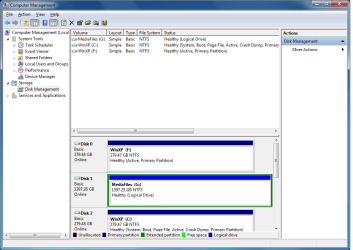
Before we make any specific recommendations will you please post a snip/screen-shot of the entire disk management drive map with a full description as to which drive/partition is which, so we can see what you have going on as there may be a fairly simple way to resolve the situation.

In the Windows start menu right click computer and click manage, in the left pane of the "Computer Management" window that opens click disk management and post a maximized snip of that.


How to Upload and Post a Screenshot and File in Seven Forums
 

My Computer

Computer Manufacturer/Model Number
* BFK Customs *
OS
W 7 64-bit Ultimate
CPU
Intel Q9550 Yorkfield
Motherboard
ASUS P5Q Pro
Memory
8GB Dominator 8500C5D
Graphics Card(s)
ATI : XFX 5870
Sound Card
Realtek HD Audio 7-1
Monitor(s) Displays
1x 47" LCD HDMI & 3x 26" LCD HDMI
Screen Resolution
1920x1080P & 1920x1200
Hard Drives
1x 80GB Intel X25-M G2 SSD : 1x 500GB & 1x 640GB WD Caviar Black(s)
PSU
Corsair 620HX
Case
Cooler Master RC-690
Cooling
Tuniq Tower 120, 2x 140mm and 3x 120mm case fans
Keyboard
Microsoft 500
Mouse
Razer Diamondback 3G
Internet Speed
14 Mb/s
Other Info
1x Koutech 3Gb/s SATA HDD Hot Swap Rack
Thanks! I will get what you want tonight when I get home. The drive is not partitioned. I do have three hard drives. One for media storage, one has XP and the other is 7. When I did the install the other 2 drives were disconnected and I got the screen before I hooked the other drives up again.
 

My Computer

OS
windows 7 64bit
CPU
Pentium D830
Motherboard
Asus P5WD2
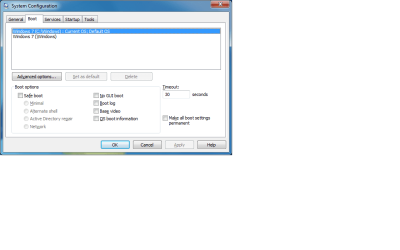
Look in Windows 7 at the msconfig boot tab to see if there's more than one entry for Windows 7, XP would not be listed there and be sure to post back here with any further questions you may have and to keep us informed.
 

My Computer

Computer Manufacturer/Model Number
* BFK Customs *
OS
W 7 64-bit Ultimate
CPU
Intel Q9550 Yorkfield
Motherboard
ASUS P5Q Pro
Memory
8GB Dominator 8500C5D
Graphics Card(s)
ATI : XFX 5870
Sound Card
Realtek HD Audio 7-1
Monitor(s) Displays
1x 47" LCD HDMI & 3x 26" LCD HDMI
Screen Resolution
1920x1080P & 1920x1200
Hard Drives
1x 80GB Intel X25-M G2 SSD : 1x 500GB & 1x 640GB WD Caviar Black(s)
PSU
Corsair 620HX
Case
Cooler Master RC-690
Cooling
Tuniq Tower 120, 2x 140mm and 3x 120mm case fans
Keyboard
Microsoft 500
Mouse
Razer Diamondback 3G
Internet Speed
14 Mb/s
Other Info
1x Koutech 3Gb/s SATA HDD Hot Swap Rack
I will check it tonight. If there is, what should I do?
 

My Computer

OS
windows 7 64bit
CPU
Pentium D830
Motherboard
Asus P5WD2
Let's see the disk management snip first.
 

My Computer

Computer Manufacturer/Model Number
* BFK Customs *
OS
W 7 64-bit Ultimate
CPU
Intel Q9550 Yorkfield
Motherboard
ASUS P5Q Pro
Memory
8GB Dominator 8500C5D
Graphics Card(s)
ATI : XFX 5870
Sound Card
Realtek HD Audio 7-1
Monitor(s) Displays
1x 47" LCD HDMI & 3x 26" LCD HDMI
Screen Resolution
1920x1080P & 1920x1200
Hard Drives
1x 80GB Intel X25-M G2 SSD : 1x 500GB & 1x 640GB WD Caviar Black(s)
PSU
Corsair 620HX
Case
Cooler Master RC-690
Cooling
Tuniq Tower 120, 2x 140mm and 3x 120mm case fans
Keyboard
Microsoft 500
Mouse
Razer Diamondback 3G
Internet Speed
14 Mb/s
Other Info
1x Koutech 3Gb/s SATA HDD Hot Swap Rack
Here is the screen shot.
 

Attachments

  • screen.png
    screen.png
    30.5 KB · Views: 20
  • boot screeen.png
    boot screeen.png
    15.5 KB · Views: 15

My Computer

OS
windows 7 64bit
CPU
Pentium D830
Motherboard
Asus P5WD2
You said that you installed Win7 over XP, but that you also unplugged the XP and data drives during install. Which was it?

You can remove the Dual Boot menu by highlighting the second Win7 listing in the msconfig>boot tab, then Delete.

Did you unplug Xp because you plan to boot it using BIOS Boot Menu key at bootup? If so, test it now to see if it will boot because it seems to have lost its System flag although it is Active.

There is no way for us to know if you in fact deleted XP since you cut off the columns in the manager's listings showing the size on disk. If you dont' want XP I would delete it in Win7 DIsk Mgmt since the Active flag will steal the System boot from Win7 if repairs are done. For this reason it is best to have your System HD in DISK0 slot, set first to boot in BIOS setup.
 
Before I installed 7 I cloned my HD onto a second one. I then unplugged 2 of the HDs and installed 7 on one of the cloned drives. I plan to boot using BIOS Boot Menu key at bootup.
 

My Computer

OS
windows 7 64bit
CPU
Pentium D830
Motherboard
Asus P5WD2
The Disk 2 is the Windows 7 that was booted when the snip was taken.

If both Disk 0 and Disk 2 have separate bootable Windows 7 versions and you want to use the BIOS one-time boot menu to boot them independently?

Power down and disconnect the data cables from the mobo of Disks 1 & 2 and set Disk 0 as second boot device after the CD/DVD drive, boot the Windows 7 installer and do the 3 separate startup repairs to create separate boot files to Disk 0.

Startup Repair - Run 3 Separate Times

When Disk 0 is booting on its own, power down and connect (the previous) Disk 2 to the #1 SATA port of the mobo and set it as the first boot device in the main BIOS.

Then you should have the option to use the one-time BIOS boot menu to select which OS/HDD to boot at machine startup.


Be sure to post back here with an update.
 

My Computer

Computer Manufacturer/Model Number
* BFK Customs *
OS
W 7 64-bit Ultimate
CPU
Intel Q9550 Yorkfield
Motherboard
ASUS P5Q Pro
Memory
8GB Dominator 8500C5D
Graphics Card(s)
ATI : XFX 5870
Sound Card
Realtek HD Audio 7-1
Monitor(s) Displays
1x 47" LCD HDMI & 3x 26" LCD HDMI
Screen Resolution
1920x1080P & 1920x1200
Hard Drives
1x 80GB Intel X25-M G2 SSD : 1x 500GB & 1x 640GB WD Caviar Black(s)
PSU
Corsair 620HX
Case
Cooler Master RC-690
Cooling
Tuniq Tower 120, 2x 140mm and 3x 120mm case fans
Keyboard
Microsoft 500
Mouse
Razer Diamondback 3G
Internet Speed
14 Mb/s
Other Info
1x Koutech 3Gb/s SATA HDD Hot Swap Rack
You can remove the Dual Boot menu by highlighting the second Win7 listing in the msconfig>boot tab, then Delete.

Problem solved. Thanks!
 

My Computer

OS
windows 7 64bit
CPU
Pentium D830
Motherboard
Asus P5WD2
That didn't really solve the issue of having 2 separate OSs installed and how to use the one-time boot menu to choose which to start at system startup.

Did you see my post #10 in this same thread, or are you happy with what you ended-up with?
 

My Computer

Computer Manufacturer/Model Number
* BFK Customs *
OS
W 7 64-bit Ultimate
CPU
Intel Q9550 Yorkfield
Motherboard
ASUS P5Q Pro
Memory
8GB Dominator 8500C5D
Graphics Card(s)
ATI : XFX 5870
Sound Card
Realtek HD Audio 7-1
Monitor(s) Displays
1x 47" LCD HDMI & 3x 26" LCD HDMI
Screen Resolution
1920x1080P & 1920x1200
Hard Drives
1x 80GB Intel X25-M G2 SSD : 1x 500GB & 1x 640GB WD Caviar Black(s)
PSU
Corsair 620HX
Case
Cooler Master RC-690
Cooling
Tuniq Tower 120, 2x 140mm and 3x 120mm case fans
Keyboard
Microsoft 500
Mouse
Razer Diamondback 3G
Internet Speed
14 Mb/s
Other Info
1x Koutech 3Gb/s SATA HDD Hot Swap Rack
I have it set the way I need it. I need XP to boot first. There is someone else using this computer and they use XP. I will be using 7 and the other person does not know how to use the Boot menu. I had the HD that 7 is on plugeed in as the primary when I did the install but then switched cables to make XP the Primary HD.

Thanks
 

My Computer

OS
windows 7 64bit
CPU
Pentium D830
Motherboard
Asus P5WD2
As long as it is the way you need it, well done and thanks for the update.
 

My Computer

Computer Manufacturer/Model Number
* BFK Customs *
OS
W 7 64-bit Ultimate
CPU
Intel Q9550 Yorkfield
Motherboard
ASUS P5Q Pro
Memory
8GB Dominator 8500C5D
Graphics Card(s)
ATI : XFX 5870
Sound Card
Realtek HD Audio 7-1
Monitor(s) Displays
1x 47" LCD HDMI & 3x 26" LCD HDMI
Screen Resolution
1920x1080P & 1920x1200
Hard Drives
1x 80GB Intel X25-M G2 SSD : 1x 500GB & 1x 640GB WD Caviar Black(s)
PSU
Corsair 620HX
Case
Cooler Master RC-690
Cooling
Tuniq Tower 120, 2x 140mm and 3x 120mm case fans
Keyboard
Microsoft 500
Mouse
Razer Diamondback 3G
Internet Speed
14 Mb/s
Other Info
1x Koutech 3Gb/s SATA HDD Hot Swap Rack
Back
Top