Cruci
New member
Hello, I am sure this has been covered.
Which I have found many post, regarding this. However, I cannot seem to get it to work.
First of all, I am trying to get Windows, XP pro x32. To install and Be recognized. For a dual boot installation.
I have Windows 7 Ultimate x64 installed on C:\, before. The XP Partition, E:\. Every time I install the XP. I Dont get a Boot screen. Allowing me to choose, between the two. ( it automatically boots to XP. )
So, in reading all these postings. I have come across this one. That looks like it may work.
http://www.sevenforums.com/tutorials/8057-dual-boot-installation-windows-7-xp.html
However, when I am using the XP. I cannot connect to Internet. To download and install. The NET Framework. So that I can install "EasyBCD 2.0"
( Seems, that for some reason. The drivers are not there, or are not recognizing, hardware ) OR lol. I cannot find out where to turn, Items on, in XP. As another post I read suggested.
So, in short. Is there a way to do this. While not having an internet connection. To Download and install Programs. To the XP install?
Or is there a way to manually Change or modify. The Bootrec for Win 7 / Boot.ini in XP. So that, It will recognize separate partition and allow booting. To both the OS's
(plus, in case i do get the internet connection, to work in XP. Does, this "EasyBCD" mentioned. Mean I have to do, The same. In XP as I have done, In Windows 7? Meaning "add new entry to boot menu" )
Sorry if this is long winded and full of questions. I tried to keep it short. It been days, that I been trying to figure this out.
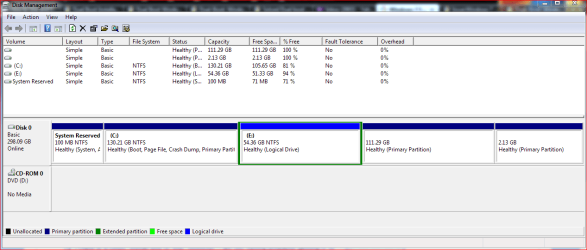
Also, if it helps and I have noticed form other posts. Here is Disk Management snip.
(There is a Linux, Install end of this. However, i am not having problems getting it to boot)
Thanks for your time and to anybody that may help me out with this.
Which I have found many post, regarding this. However, I cannot seem to get it to work.
First of all, I am trying to get Windows, XP pro x32. To install and Be recognized. For a dual boot installation.
I have Windows 7 Ultimate x64 installed on C:\, before. The XP Partition, E:\. Every time I install the XP. I Dont get a Boot screen. Allowing me to choose, between the two. ( it automatically boots to XP. )
So, in reading all these postings. I have come across this one. That looks like it may work.
http://www.sevenforums.com/tutorials/8057-dual-boot-installation-windows-7-xp.html
However, when I am using the XP. I cannot connect to Internet. To download and install. The NET Framework. So that I can install "EasyBCD 2.0"
( Seems, that for some reason. The drivers are not there, or are not recognizing, hardware ) OR lol. I cannot find out where to turn, Items on, in XP. As another post I read suggested.
So, in short. Is there a way to do this. While not having an internet connection. To Download and install Programs. To the XP install?
Or is there a way to manually Change or modify. The Bootrec for Win 7 / Boot.ini in XP. So that, It will recognize separate partition and allow booting. To both the OS's
(plus, in case i do get the internet connection, to work in XP. Does, this "EasyBCD" mentioned. Mean I have to do, The same. In XP as I have done, In Windows 7? Meaning "add new entry to boot menu" )
Sorry if this is long winded and full of questions. I tried to keep it short. It been days, that I been trying to figure this out.
Also, if it helps and I have noticed form other posts. Here is Disk Management snip.
(There is a Linux, Install end of this. However, i am not having problems getting it to boot)
Thanks for your time and to anybody that may help me out with this.
Attachments
My Computer
- Computer Manufacturer/Model Number
- eMachines D620
- OS
- Windows 7 x64, Windows XP Pro x32, Linux 10.4 x64
- CPU
- ACPI x64
- Memory
- 1.00 GB (RAM)
- Graphics Card(s)
- ATI Radeon X1200
- Monitor(s) Displays
- Generic PnP monitor
- Hard Drives
- single 320 GB SATA