Dual Boot Win XP BSOD at setup

I give up. Nothing wants to work so I want to stop dual booting. I went to the tutorial "How to Delete a Listed Operating System at Boot in Windows 7". It said to go to the System Configuration Boot tab and select the operating system to delete. Unfortunately the only one that appeared was Windows 7 but no Windows XP. I thought I'd try EasyBCD in Windows XP to see if it had any suggestions but it came up with a message "Valid BCD Registry no Detected" saying " "EasyBCD has detected that you BCD boot data and MBR are either not from the latest version of Windows Vista, or don't yet exist." Another dead end. Suggestions???
huh.gif
 

My Computer My Computer

At a glance

Microsoft Windows 7 Professional 32 BitIntel Corei3 m330 @2.13GHZ4.00 GBIntel Graphics Media Accelerator HD
Computer Manufacturer/Model Number
Toshiba Satellite l500
OS
Microsoft Windows 7 Professional 32 Bit
CPU
Intel Corei3 m330 @2.13GHZ
Motherboard
Toshiba
Memory
4.00 GB
Graphics Card(s)
Intel Graphics Media Accelerator HD
Sound Card
Intel
Screen Resolution
1366 x 768 x59 hertz
Hard Drives
TI105774WOB
PSU
Standard Laptop Supply
Case
Standard Laptop Case
Cooling
Standard Laptop Cooling
Keyboard
Integrated Laptop
Mouse
Mitsumi
Internet Speed
52kbps
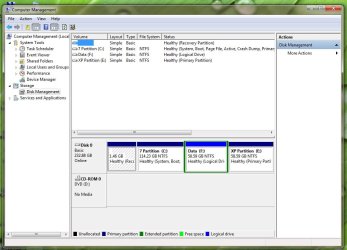
Attached is the Disc Management screen. I forgot to mention that I am getting options to start either Windows 7 or Windows XP at bootup.
 

Attachments

  • Computer Management.jpg
    Computer Management.jpg
    76 KB · Views: 15

My Computer My Computer

At a glance

Microsoft Windows 7 Professional 32 BitIntel Corei3 m330 @2.13GHZ4.00 GBIntel Graphics Media Accelerator HD
Computer Manufacturer/Model Number
Toshiba Satellite l500
OS
Microsoft Windows 7 Professional 32 Bit
CPU
Intel Corei3 m330 @2.13GHZ
Motherboard
Toshiba
Memory
4.00 GB
Graphics Card(s)
Intel Graphics Media Accelerator HD
Sound Card
Intel
Screen Resolution
1366 x 768 x59 hertz
Hard Drives
TI105774WOB
PSU
Standard Laptop Supply
Case
Standard Laptop Case
Cooling
Standard Laptop Cooling
Keyboard
Integrated Laptop
Mouse
Mitsumi
Internet Speed
52kbps
If the labels are to be believed, this is an easy one.

Just delete XP in Disk Mgmt. If Dual Boot menu remains, remove XP listing in msconfig>Boot tab, or if required on the EasyBCD Add/Remove tab.

You can then extend your Data partition into the deleted space.
 
Last edited:
I deleted the XP Partition but had to use EasyBCD to get rid of the Dual Boot menu so that's fixed. :D
I was unable however to extend the Data partition as the right click Extend Volume was grayed out. The Extend Volume was also grayed with a right click of the 7 Partition. I would like to expand the Data partition so I could use some help here. :geek:

The Advanced Boot Tools menu did not show "Repair My Computer". I never saw a 100mb SysReserved partition. Although I don't have a screen print the three original partitions as the computer was received were (printed in a column):

1.46 GB
1.46 GB Free
Health
(Active
Partition)
Right Click
Option
"Help"

(C)
2.23.24 GB NTFS
Healthy
(System, Boot, PageFile,
Crash Dump,
Primary Partition)

8.18 GB
8.18 GB Free
Healthy
(Primary
Partition)

In a call to Toshiba, they advised that there was nothing in the 8.18 GB partition so it could be deleted. So I deleted it so I could get a Primary partition for XP and added the Data partition.
 

My Computer My Computer

At a glance

Microsoft Windows 7 Professional 32 BitIntel Corei3 m330 @2.13GHZ4.00 GBIntel Graphics Media Accelerator HD
Computer Manufacturer/Model Number
Toshiba Satellite l500
OS
Microsoft Windows 7 Professional 32 Bit
CPU
Intel Corei3 m330 @2.13GHZ
Motherboard
Toshiba
Memory
4.00 GB
Graphics Card(s)
Intel Graphics Media Accelerator HD
Sound Card
Intel
Screen Resolution
1366 x 768 x59 hertz
Hard Drives
TI105774WOB
PSU
Standard Laptop Supply
Case
Standard Laptop Case
Cooling
Standard Laptop Cooling
Keyboard
Integrated Laptop
Mouse
Mitsumi
Internet Speed
52kbps
The problem with extending your data partition may be that it is logical which cannot extend into Unallocated Space as it is Primary, while Logical creates its own type of deleted space called Free Space.

I know it sounds confusing, but the way we have solved this in the past is to use free Partition Wizard bootable CD.

Boot PW then rightclick on Data partition to attempt to resize it to the right. If PW also blocks this, then you can either:

1) rightclick the logical partition to Modify>Convert to Primary, OK, then rightclick Resize it into the unalloc space to right, OK. Apply all steps.

or 2) create a new Logical Partition in the empty Space, OK. Then delete it to see if it leaves Logical Free Space, then try Resizing Data into that space.
 
Last edited:

My Computer My Computer

At a glance

ME/XP/Vista/Win7
OS
ME/XP/Vista/Win7
Thanks Gregroker,
I ran the bootable Partition Wizard and the right click worked like a charm. While I was at it I expanded the 7 Partition to 130GB and the Data partition to 100GB and that worked too. I really appreciate you patience and help through this ordeal. You folks are wonderful and so smart.

biggrin.gif

Jim
 

My Computer My Computer

At a glance

Microsoft Windows 7 Professional 32 BitIntel Corei3 m330 @2.13GHZ4.00 GBIntel Graphics Media Accelerator HD
Computer Manufacturer/Model Number
Toshiba Satellite l500
OS
Microsoft Windows 7 Professional 32 Bit
CPU
Intel Corei3 m330 @2.13GHZ
Motherboard
Toshiba
Memory
4.00 GB
Graphics Card(s)
Intel Graphics Media Accelerator HD
Sound Card
Intel
Screen Resolution
1366 x 768 x59 hertz
Hard Drives
TI105774WOB
PSU
Standard Laptop Supply
Case
Standard Laptop Case
Cooling
Standard Laptop Cooling
Keyboard
Integrated Laptop
Mouse
Mitsumi
Internet Speed
52kbps
After cleaning up the dual boot mess I installed Windows Virtual Disc and Windows XP Mode. It was quite simple to do and it works like a charm with out any problems with installing printers, modems or network connections. My older programs work just like they used to in XP. It's also simple to switch back and forth from XP to 7 modes. Fortunately I had Windows 7 Professional which is necessary to make it all work.
 

My Computer My Computer

At a glance

Microsoft Windows 7 Professional 32 BitIntel Corei3 m330 @2.13GHZ4.00 GBIntel Graphics Media Accelerator HD
Computer Manufacturer/Model Number
Toshiba Satellite l500
OS
Microsoft Windows 7 Professional 32 Bit
CPU
Intel Corei3 m330 @2.13GHZ
Motherboard
Toshiba
Memory
4.00 GB
Graphics Card(s)
Intel Graphics Media Accelerator HD
Sound Card
Intel
Screen Resolution
1366 x 768 x59 hertz
Hard Drives
TI105774WOB
PSU
Standard Laptop Supply
Case
Standard Laptop Case
Cooling
Standard Laptop Cooling
Keyboard
Integrated Laptop
Mouse
Mitsumi
Internet Speed
52kbps
Glad it worked out for you, Jim, and thanks for reporting back what worked and recommending XP Virtual Mode.
 
Back
Top