Solved Dual boot with Win7 - problem with boot menus on Lenovo laptop

bcdedit attempt - failure

Well, SIW2, after exploring all these other angles and after the firm telling-off from you, I finally bit the bullet this evening and set about tackling the BCD editing using the commands you provided in your post #19.

Er - didn't work. Fell at the first hurdle. I cut and pasted the first command.

This is what I got:

cmd prompt image of BCD edit.JPG

What now?
 

My Computer My Computer

At a glance

Windows 7 Professional 64-bit SP1 dual boot w...Intel Core i5-3320M 2.60GHz8 GB
Computer type
Laptop
Computer Manufacturer/Model Number
Lenovo ThinkPad T430
OS
Windows 7 Professional 64-bit SP1 dual boot with Linux Mint 18.2
CPU
Intel Core i5-3320M 2.60GHz
Memory
8 GB
Screen Resolution
1600 x 900
Hard Drives
240 GB SSD
Browser
Firefox
Hi br1anstorm,

Well, SIW2, after exploring all these other angles and after the firm telling-off from you, I finally bit the bullet this evening and set about tackling the BCD editing using the commands you provided in your post #19.

Er - didn't work. Fell at the first hurdle. I cut and pasted the first command.

This is what I got:

View attachment 407558

What now?

Those commands must be run from an elevated command prompt:
  • Click Start.
  • In the search box type cmd.
  • Right-click the cmd icon from the search results under Programs and select Run as administrator.
  • The elevated command prompt window will now open.
Type in the commands ...

bcdedit /set {current} osdevice boot
bcdedit /set {current} device boot
bcdedit /set {bootmgr} device boot
bcdedit /set {memdiag} device boot
bcdedit /set {a6ea9bab-24b4-11e9-8e96-f82fa8e876d9} device boot
bcdedit /set {ae5534e0-a924-466c-b836-758539a3ee3a} SDIdevice boot

... one by one, pressing Enter after each one.

I hope this helps!
 

My Computer My Computer

At a glance

Win 7 HP SP1 64-bit Vista HB SP2 32-bit Linux...Intel(R) Pentium(R) CPU P6200 @ 2.13GHz4.00 GBIntel(R) Graphics Media Accelerator HD
Computer type
Laptop
Computer Manufacturer/Model Number
Fujitsu LIFEBOOK
OS
Win 7 HP SP1 64-bit Vista HB SP2 32-bit Linux Mint 18.3
CPU
Intel(R) Pentium(R) CPU P6200 @ 2.13GHz
Motherboard
FUJITSU FJNBB06
Memory
4.00 GB
Graphics Card(s)
Intel(R) Graphics Media Accelerator HD
Sound Card
[1] Realtek High Definition Audio [2] Intel(R) Display Audio
Screen Resolution
1366 x 768 x 32 bits (4294967296 colors) @ 59 Hz
Hard Drives
TOSHIBA MK5076GSX
Antivirus
AVG FREE
But Paul, that is exactly and I mean absolutely exactly, what I did.

Definitely ran elevated command prompt following exactly the steps you outline (as SIW2 had advised before).

Have just made a second attempt, in order to double-check. No joy. Exactly the same result as in the image in my previous post.

So I'm still stumped....
 

My Computer My Computer

At a glance

Windows 7 Professional 64-bit SP1 dual boot w...Intel Core i5-3320M 2.60GHz8 GB
Computer type
Laptop
Computer Manufacturer/Model Number
Lenovo ThinkPad T430
OS
Windows 7 Professional 64-bit SP1 dual boot with Linux Mint 18.2
CPU
Intel Core i5-3320M 2.60GHz
Memory
8 GB
Screen Resolution
1600 x 900
Hard Drives
240 GB SSD
Browser
Firefox
Try this command first:

bcdedit /default {current}

(then press enter)

Then try the others one at a time
 

My Computers My Computers

  • At a glance

    7 X64i5 84002x8gb 3200mhz
    Computer type
    PC/Desktop
    OS
    7 X64
    CPU
    i5 8400
    Motherboard
    gigabyte b365m ds3h
    Memory
    2x8gb 3200mhz
    Hard Drives
    various
    PSU
    pure power 11 400w cm
    Case
    Coolermaster
    Cooling
    cryorig m9i
  • At a glance

    7x64g54008gb ddr4 2400
    Computer type
    PC/Desktop
    OS
    7x64
    CPU
    g5400
    Motherboard
    ga b365m ds3h
    Memory
    8gb ddr4 2400
    PSU
    xfx pro 450w
Thanks SIW2, for getting back into this saga!

Have just tried your suggestion. This is what I got:

cmd prompt image v2.JPG

I guess I could do what it tells me and put in the '?' command. Shall I try that and post the result? UPDATE: Have just done so. It seems to produce simply a standard 'help' list showing and explaining all the bcdedit commands (which of course you know!). I can't see anything in it which sheds light on why the commands you asked me to use aren't working.


Edit: We may be faced with a time-zone issue -it's after 2am here in Scotland and i fear I'll have to turn in and resume the task tomorrow. Hope that's OK - will look forward to the next bit of advice and help - it's all greatly appreciated.
 
Last edited:

My Computer My Computer

At a glance

Windows 7 Professional 64-bit SP1 dual boot w...Intel Core i5-3320M 2.60GHz8 GB
Computer type
Laptop
Computer Manufacturer/Model Number
Lenovo ThinkPad T430
OS
Windows 7 Professional 64-bit SP1 dual boot with Linux Mint 18.2
CPU
Intel Core i5-3320M 2.60GHz
Memory
8 GB
Screen Resolution
1600 x 900
Hard Drives
240 GB SSD
Browser
Firefox
There is no device setting for bootmgr, so try doing it in this order:

bcdedit /set {bootmgr} device boot

(press enter)

bcdedit /default {current}
(press enter)

then the others

If that doesn't work, you are best resetting the bcd to erase the crud in your current store. Then add an entry for your win7 partition.
You can do that with easybcd.
 

My Computers My Computers

  • At a glance

    7 X64i5 84002x8gb 3200mhz
    Computer type
    PC/Desktop
    OS
    7 X64
    CPU
    i5 8400
    Motherboard
    gigabyte b365m ds3h
    Memory
    2x8gb 3200mhz
    Hard Drives
    various
    PSU
    pure power 11 400w cm
    Case
    Coolermaster
    Cooling
    cryorig m9i
  • At a glance

    7x64g54008gb ddr4 2400
    Computer type
    PC/Desktop
    OS
    7x64
    CPU
    g5400
    Motherboard
    ga b365m ds3h
    Memory
    8gb ddr4 2400
    PSU
    xfx pro 450w
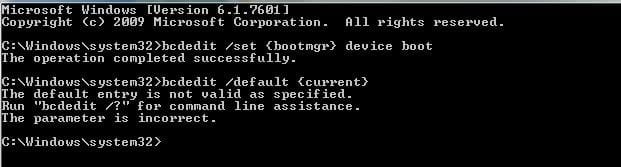
You win some, you lose some?

Well, SIW2, I tried this latest approach - and initially I had a glimmer of hope. That 'new' command you suggested - to set the bootmgr - worked...

So then I tried the next one - default. Unfortunately I got the same result as I did last night - the default entry was described as 'not valid'. See screenshot below

cmd prompt image v3.JPG

I conclude from your comment that this is pretty much the end of the road in terms of trying bcdedit commands.
So now I will try what you call "resetting" the bcd. I take that is what EasyBCD (and others) also describe as recreating or rebuilding the bcd? I suppose (and hope) I have nothing much to lose!

I did notice that the guidance on using EasyBCD does say that it does not change whatever is in the MBR; it simply repairs the BCD store and re-creates the bootloader(s). That's OK.

But - doing a bit of contingency thinking or planning - we already know there are in fact three BCD stores on this computer because I have copied all three to you and posted all three in this thread. We also know that Easy BCD has already modified one of them to include Linux Mint (and we've seen a Windows Boot Loader which lists it).

So the $64k dollar question is: which BCD will EasyBCD recreate ? One of them, or all of them? And will it also reprogram the earlier steps in the booting process (driven from the MBR) so that they lead onward to the BCD which has been reset?

I guess I'll only know when I try it. Whatever happens, I'll report back......
 
Last edited:

My Computer My Computer

At a glance

Windows 7 Professional 64-bit SP1 dual boot w...Intel Core i5-3320M 2.60GHz8 GB
Computer type
Laptop
Computer Manufacturer/Model Number
Lenovo ThinkPad T430
OS
Windows 7 Professional 64-bit SP1 dual boot with Linux Mint 18.2
CPU
Intel Core i5-3320M 2.60GHz
Memory
8 GB
Screen Resolution
1600 x 900
Hard Drives
240 GB SSD
Browser
Firefox
Oh what joy!........ Problem solved!

After how long - some weeks and about 30-plus posts in this thread - I am able to mark it "SOLVED".

EasyBCD really does live up to its name. As was probably obvious, I was a little wary of using its automated repair tools in case that simply dug me into a deeper hole and left me with a computer that wouldn't boot at all.

But after the detailed descriptions of what boot screens I was seeing and what bootloaders seemed to be operating, and after extensive efforts by SIW2 to diagnose the problem(s) by looking at the BCD stores, I tried the commands suggested by SIW2 to edit/reconfigure the BCD store. This didn't work - as described in the various posts in this thread.

Today we seemed to have reached the end of that road, so I took SIW2's advice - again - and hit the "Reset BCD configuration" in EasyBCD. It did its stuff.... and when it was done I followed the instructions and re-entered, within EasyBCD, entries for both Win7 and Linux Mint, the two OSs on the system.

I took a deep breath, and rebooted. Magic! After the initial "ThinkPad" screen, up came the Windows Boot Manager, and there on the list were Win7 and Mint (and below them, the usual Diagnostics option). Clicking on each of them in turn successfully booted each OS. Even better, on that Windows Boot Manager menu is also the F8 option which takes me into the Advanced Boot Options/Safe Mode etc menus.

So the laptop is now working exactly as it should, and as I had hoped and expected. I still don't know why there was "crud" in the BCD and why I kept getting that weird 'Boot or Restore' screen. All that has now gone, and as far as I can tell I have a "normal" booting and functioning system.

Just for interest, here is a screenshot (from EasyBCD) of the new "clean" rebuilt BCD configuration, for anyone interested to compare with the previous troublesome one in my post #3 two weeks ago. The peculiar 'custom' entries have gone and there are proper/familiar entries instead. I still don't know how and why the BCD was such a mess (it wasn't anything I did!). But it is all sorted now.
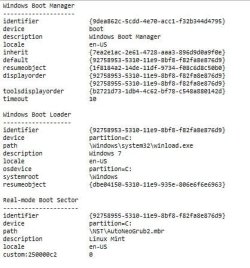

BCD after EasyBCD repair.JPG

So I owe SIW2 a huge thankyou for his patience, tolerance and constructive suggestions (and thanks to Paul Black who dropped in and commented too). I also have to offer an apology for taking so much time and attention in seeking help with the diagnostic process (even if in the end the bcdedit route didn't solve things). I've learned a lot.

I'm very grateful to this forum and its members. And I have increased respect for EasyBCD as a tool which helps those like me who are non-experts in this complicated field.

So this thread is marked "Solved". I'll continue to browse the forums from time to time - but I'll hope not to have to come here too often with further problems!

 
Last edited:

My Computer My Computer

At a glance

Windows 7 Professional 64-bit SP1 dual boot w...Intel Core i5-3320M 2.60GHz8 GB
Computer type
Laptop
Computer Manufacturer/Model Number
Lenovo ThinkPad T430
OS
Windows 7 Professional 64-bit SP1 dual boot with Linux Mint 18.2
CPU
Intel Core i5-3320M 2.60GHz
Memory
8 GB
Screen Resolution
1600 x 900
Hard Drives
240 GB SSD
Browser
Firefox
:-)
 

My Computers My Computers

  • At a glance

    7 X64i5 84002x8gb 3200mhz
    Computer type
    PC/Desktop
    OS
    7 X64
    CPU
    i5 8400
    Motherboard
    gigabyte b365m ds3h
    Memory
    2x8gb 3200mhz
    Hard Drives
    various
    PSU
    pure power 11 400w cm
    Case
    Coolermaster
    Cooling
    cryorig m9i
  • At a glance

    7x64g54008gb ddr4 2400
    Computer type
    PC/Desktop
    OS
    7x64
    CPU
    g5400
    Motherboard
    ga b365m ds3h
    Memory
    8gb ddr4 2400
    PSU
    xfx pro 450w
Don't you just love it when a plan comes together!:thumbsup:
 

My Computer My Computer

At a glance

Win 7 HP SP1 64-bit Vista HB SP2 32-bit Linux...Intel(R) Pentium(R) CPU P6200 @ 2.13GHz4.00 GBIntel(R) Graphics Media Accelerator HD
Computer type
Laptop
Computer Manufacturer/Model Number
Fujitsu LIFEBOOK
OS
Win 7 HP SP1 64-bit Vista HB SP2 32-bit Linux Mint 18.3
CPU
Intel(R) Pentium(R) CPU P6200 @ 2.13GHz
Motherboard
FUJITSU FJNBB06
Memory
4.00 GB
Graphics Card(s)
Intel(R) Graphics Media Accelerator HD
Sound Card
[1] Realtek High Definition Audio [2] Intel(R) Display Audio
Screen Resolution
1366 x 768 x 32 bits (4294967296 colors) @ 59 Hz
Hard Drives
TOSHIBA MK5076GSX
Antivirus
AVG FREE
:ditto:
 

My Computer My Computer

At a glance

Win 10 x64, Linux Lite, Win 7 x64, BlackArch,...
Computer type
PC/Desktop
Computer Manufacturer/Model Number
HP Desktop & Compaq Laptop
OS
Win 10 x64, Linux Lite, Win 7 x64, BlackArch, & Kali
Hard Drives
Samsung 850 Pro 256Gb,
Hitachi HDD 1Tb,
Crucial MX SSD 250Gb
Segate 3Tb USB 3.0 Ext. Backup HDD
Internet Speed
150Mbps dn, 20Mbps up
Antivirus
Avast Free, Malwarebytes Anti-Exploit & Anti-Ransomware
Browser
Firefox, Chrome, Opera, & VPN
Back
Top