
Solved How to properly remove Vista from dual boot with Windows 7?

howardrg

New member
Local time
3:23 PM
Messages
11
I have a Vista x64/Win7 x64 dual boot setup with Vista as the original OS. I'd now like to get rid of Vista and expand Win7's partition into Vista's old space. I have read up on this and have found lots of advice, some simple and some complicated. For example:

Simple: http://www.sevenforums.com/installation-setup/15546-remove-windows-vista-dual-boot-system.html

Complicated: complicated: http://www.sevenforums.com/tutorials/210983-dual-boot-delete-os.html

Could anyone point me to the best tutorial on this (bearing in mind that I have 64-bit OSs). Many thanks!

Howard
 

My Computer My Computer

At a glance

Windows 7 Home Premium 64 bitIntel® Core™2 Duo Processor E8500G.SKILL 8GB (4 x 2GB) 240-Pin DDR2 SDRAM DDR2ASUS GeForce GTX 750 Ti DirectX 11 GTX750TI-O...
Computer type
PC/Desktop
Computer Manufacturer/Model Number
custom build
OS
Windows 7 Home Premium 64 bit
CPU
Intel® Core™2 Duo Processor E8500
Motherboard
ASUS P5Q Deluxe
Memory
G.SKILL 8GB (4 x 2GB) 240-Pin DDR2 SDRAM DDR2
Graphics Card(s)
ASUS GeForce GTX 750 Ti DirectX 11 GTX750TI-OC-2GD5 2GB
Sound Card
on board
Hard Drives
1. SanDisk Ultra II 2.5" 960GB SATA III Internal Solid State Drive

2. Western Digital Blue WD6400AAKS 640GB 7200 RPM 16MB Cache SATA 3.0Gb/s
PSU
OCZ StealthXStream OCZ500SXS 500W
Case
Antec Three Hundred Black Steel ATX Mid Tower
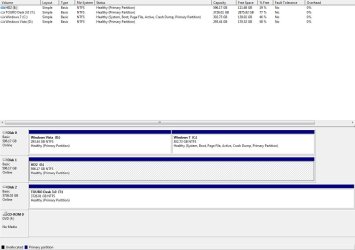
Thank you. Here is the screenshot.
 

Attachments

  • 2014-11-23 12_46_47-Disk Management.jpg
    2014-11-23 12_46_47-Disk Management.jpg
    73.7 KB · Views: 8

My Computer My Computer

At a glance

Windows 7 Home Premium 64 bitIntel® Core™2 Duo Processor E8500G.SKILL 8GB (4 x 2GB) 240-Pin DDR2 SDRAM DDR2ASUS GeForce GTX 750 Ti DirectX 11 GTX750TI-O...
Computer type
PC/Desktop
Computer Manufacturer/Model Number
custom build
OS
Windows 7 Home Premium 64 bit
CPU
Intel® Core™2 Duo Processor E8500
Motherboard
ASUS P5Q Deluxe
Memory
G.SKILL 8GB (4 x 2GB) 240-Pin DDR2 SDRAM DDR2
Graphics Card(s)
ASUS GeForce GTX 750 Ti DirectX 11 GTX750TI-OC-2GD5 2GB
Sound Card
on board
Hard Drives
1. SanDisk Ultra II 2.5" 960GB SATA III Internal Solid State Drive

2. Western Digital Blue WD6400AAKS 640GB 7200 RPM 16MB Cache SATA 3.0Gb/s
PSU
OCZ StealthXStream OCZ500SXS 500W
Case
Antec Three Hundred Black Steel ATX Mid Tower
Unplug all other drives, boot into Windows 7 partition, move the Bootmgr - Move to C:\ with EasyBCD - Windows 7 Forums.

Reboot, confirm the System and Active labels are now on Win7 signifying it is booting itself. Then you can either delete Vista partition in Disk Mgmt Partition or Volume - Delete, or use Partition Wizard bootable CD to Delete Vista and then if desired Partition Wizard to Resize C Partition - Video Help

Since the left hand side of drive is slightly faster I would resize C all the way to the left, then if you don't want it to be full disk partition adjust the right border at the same time to make room for a storage partition. If you don't care about resizing C you can create the storage partition in the space where Vista is and not need to use PW. Partition or Volume - Create New
 
Thank you gregrocker. Is it really necessary for me to open the computer case and unplug Disk 1? I can easily unplug Disk 2 because it's an external USB drive, but Disk 1 is mounted in the case.
 

My Computer My Computer

At a glance

Windows 7 Home Premium 64 bitIntel® Core™2 Duo Processor E8500G.SKILL 8GB (4 x 2GB) 240-Pin DDR2 SDRAM DDR2ASUS GeForce GTX 750 Ti DirectX 11 GTX750TI-O...
Computer type
PC/Desktop
Computer Manufacturer/Model Number
custom build
OS
Windows 7 Home Premium 64 bit
CPU
Intel® Core™2 Duo Processor E8500
Motherboard
ASUS P5Q Deluxe
Memory
G.SKILL 8GB (4 x 2GB) 240-Pin DDR2 SDRAM DDR2
Graphics Card(s)
ASUS GeForce GTX 750 Ti DirectX 11 GTX750TI-OC-2GD5 2GB
Sound Card
on board
Hard Drives
1. SanDisk Ultra II 2.5" 960GB SATA III Internal Solid State Drive

2. Western Digital Blue WD6400AAKS 640GB 7200 RPM 16MB Cache SATA 3.0Gb/s
PSU
OCZ StealthXStream OCZ500SXS 500W
Case
Antec Three Hundred Black Steel ATX Mid Tower
The main risk of interference by other drives is if there is a drive preceding C which could derail the System files during repairs or reinstall. Since that doesn't apply here go ahead and move the Bootmgr, but be sure to confirm that only C is labeled System and Active after reboot.
 

My Computer My Computer

At a glance

Windows 7 Home Premium 64 bitIntel® Core™2 Duo Processor E8500G.SKILL 8GB (4 x 2GB) 240-Pin DDR2 SDRAM DDR2ASUS GeForce GTX 750 Ti DirectX 11 GTX750TI-O...
Computer type
PC/Desktop
Computer Manufacturer/Model Number
custom build
OS
Windows 7 Home Premium 64 bit
CPU
Intel® Core™2 Duo Processor E8500
Motherboard
ASUS P5Q Deluxe
Memory
G.SKILL 8GB (4 x 2GB) 240-Pin DDR2 SDRAM DDR2
Graphics Card(s)
ASUS GeForce GTX 750 Ti DirectX 11 GTX750TI-OC-2GD5 2GB
Sound Card
on board
Hard Drives
1. SanDisk Ultra II 2.5" 960GB SATA III Internal Solid State Drive

2. Western Digital Blue WD6400AAKS 640GB 7200 RPM 16MB Cache SATA 3.0Gb/s
PSU
OCZ StealthXStream OCZ500SXS 500W
Case
Antec Three Hundred Black Steel ATX Mid Tower
I gave you the steps to do this above. Those steps are not included. Where did they come from?
 

My Computer My Computer

At a glance

Windows 7 Home Premium 64 bitIntel® Core™2 Duo Processor E8500G.SKILL 8GB (4 x 2GB) 240-Pin DDR2 SDRAM DDR2ASUS GeForce GTX 750 Ti DirectX 11 GTX750TI-O...
Computer type
PC/Desktop
Computer Manufacturer/Model Number
custom build
OS
Windows 7 Home Premium 64 bit
CPU
Intel® Core™2 Duo Processor E8500
Motherboard
ASUS P5Q Deluxe
Memory
G.SKILL 8GB (4 x 2GB) 240-Pin DDR2 SDRAM DDR2
Graphics Card(s)
ASUS GeForce GTX 750 Ti DirectX 11 GTX750TI-OC-2GD5 2GB
Sound Card
on board
Hard Drives
1. SanDisk Ultra II 2.5" 960GB SATA III Internal Solid State Drive

2. Western Digital Blue WD6400AAKS 640GB 7200 RPM 16MB Cache SATA 3.0Gb/s
PSU
OCZ StealthXStream OCZ500SXS 500W
Case
Antec Three Hundred Black Steel ATX Mid Tower
I used Easy BCD and my disk now looks like the attached screen shot. Before I delete the Vista partition and resize the Win7 partition I want to be sure that the multiboot selection screenwill not come up anymore (I'd like to boot directly into Win7 without being asked to select an OS). Should I first go into System Configuration/Boot tab and delete the Vista OS?
 

Attachments

  • disk management 2014.11.29.jpg
    disk management 2014.11.29.jpg
    87.8 KB · Views: 0

My Computer My Computer

At a glance

Windows 7 Home Premium 64 bitIntel® Core™2 Duo Processor E8500G.SKILL 8GB (4 x 2GB) 240-Pin DDR2 SDRAM DDR2ASUS GeForce GTX 750 Ti DirectX 11 GTX750TI-O...
Computer type
PC/Desktop
Computer Manufacturer/Model Number
custom build
OS
Windows 7 Home Premium 64 bit
CPU
Intel® Core™2 Duo Processor E8500
Motherboard
ASUS P5Q Deluxe
Memory
G.SKILL 8GB (4 x 2GB) 240-Pin DDR2 SDRAM DDR2
Graphics Card(s)
ASUS GeForce GTX 750 Ti DirectX 11 GTX750TI-OC-2GD5 2GB
Sound Card
on board
Hard Drives
1. SanDisk Ultra II 2.5" 960GB SATA III Internal Solid State Drive

2. Western Digital Blue WD6400AAKS 640GB 7200 RPM 16MB Cache SATA 3.0Gb/s
PSU
OCZ StealthXStream OCZ500SXS 500W
Case
Antec Three Hundred Black Steel ATX Mid Tower
That's fine. Be sure to save a backup image of 7 first. Use the PW boot disk to resize into deleted Vista Video above.
 
It went well. This is how it turned out. Thanks for your help!
 

Attachments

  • disk config sans Vista.jpg
    disk config sans Vista.jpg
    78.1 KB · Views: 1

My Computer My Computer

At a glance

Windows 7 Home Premium 64 bitIntel® Core™2 Duo Processor E8500G.SKILL 8GB (4 x 2GB) 240-Pin DDR2 SDRAM DDR2ASUS GeForce GTX 750 Ti DirectX 11 GTX750TI-O...
Computer type
PC/Desktop
Computer Manufacturer/Model Number
custom build
OS
Windows 7 Home Premium 64 bit
CPU
Intel® Core™2 Duo Processor E8500
Motherboard
ASUS P5Q Deluxe
Memory
G.SKILL 8GB (4 x 2GB) 240-Pin DDR2 SDRAM DDR2
Graphics Card(s)
ASUS GeForce GTX 750 Ti DirectX 11 GTX750TI-OC-2GD5 2GB
Sound Card
on board
Hard Drives
1. SanDisk Ultra II 2.5" 960GB SATA III Internal Solid State Drive

2. Western Digital Blue WD6400AAKS 640GB 7200 RPM 16MB Cache SATA 3.0Gb/s
PSU
OCZ StealthXStream OCZ500SXS 500W
Case
Antec Three Hundred Black Steel ATX Mid Tower
Back
Top