Dual boot XP with windows 7 already installed

muss5138

New member
Local time
6:38 AM
Messages
4
I currently have Windows 7 Ultimate 64-bit installed on my SATA 1TB HDD. I also have an IDE 250GB HDD onto which I've installed Windows XP Professional 32-bit. Using DualBootPro,I was able to get Windows 7 to boot correctly, however XP now gives me the error:

"Windows could not start because the following file is missing or corrupt:
<Windows root>\system32\hal.dll
Please re-install a copy of the above file."

I have Googled the heck out of this problem and tried a number of fixes that have not worked:

I tried replacing the hal.dll file with the one from the XP install disc.
I tried rebuilding the boot.ini file.
I tried adding Windows XP boot info to the windows 7 bootloader.

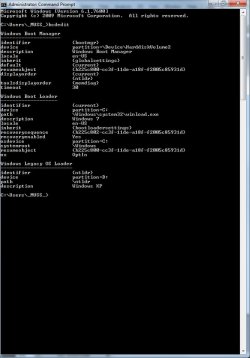
My bcdedit output in command prompt can be viewed on the Untitled-1.jpg attached.

I am fairly experienced in dealing with some of this stuff but I'm stumped. Please help!
 

Attachments
  • Untitled-1.jpg
    Untitled-1.jpg
    65.9 KB · Views: 666

My Computer My Computer

OS
Windows 7 Ultimate x64
Hard Drives
1x SATA: 1TB (Windows 7 Ultimate x64)
1x IDE: 250GB (Windows XP Professional x86)
Hello, welcome!
It is unlikely you are really missing hal.dll. What is most likely happening is that XP is looking at the wrong place to boot from. You were on the right track rebuilding the boot.ini file, but perhaps you need to go farther. The fact that you are getting that message means nothing is wrong with the MBR.
What you need to do it manually edit your boot.ini file. Rembember that the drive/partition numbering starts at 0. I have attached a sample boot.ini file for you to look at. Your problem is probably the drive number.
View attachment boot.ini.txt
 

My Computer My Computer

Computer Manufacturer/Model Number
Custom
OS
Windows 7 Professional x64
CPU
Intel i7 2600K OC'd @ 4620 MHz
Motherboard
Asus P8Z68-V Pro
Memory
16GB GSkill Sniper 2133 Mhz (4x4GB)
Graphics Card(s)
EVGA GeForce GTX 480 SuperClocked+
Sound Card
Realtek High Definition Audio
Monitor(s) Displays
2x Acer S273HLbmii 27"
Screen Resolution
2 x 1920x1080
Hard Drives
64GB Crucial M4 SSD

Storage: Hitachi 1TB 5400RPM, Samsung 1.5TB 5400RPM
PSU
Corsair HW Series 750w (modular)
Case
Cooler Master HAF 932 Advanced Blue Edition
Cooling
CM Hyper 212+ CPU cooler, 3x 230mm + 1x 140mm case fans
Keyboard
Logitech MK320 (wireless)
Mouse
Logitech MK320 (wireless)
Internet Speed
30 Mb/s : 2 Mb/s
I think what is confusing me is that:

While logged into Windows 7, my Windows 7 system partition is C:\, the windows 7 'System Reserved' partition is B:\, and my XP system partition is D:\

While I'm logged into XP, my Windows 7 system partition is K:\, the windows 7 'System Reserved' partition is J:\, and my Windows XP system partition is C:\

Which boot file do I need to change and what do I need to change it to?
 

My Computer My Computer

OS
Windows 7 Ultimate x64
Hard Drives
1x SATA: 1TB (Windows 7 Ultimate x64)
1x IDE: 250GB (Windows XP Professional x86)
This can be avoided by installing WIn7 last as required to correctly configure a dual boot.

If you installed XP last, then it is added best using EasyBCD Add/Remove tab.

Using another method and then trying to edit boot.ini frequently ends up with unfixable problems.

If EasyBCD doesn't show the OS's listed correctly, correct them there using the drive letters relative to the drive you are running. Drive letters are frequently relative in Win7 dual boots.

Otherwise, run a http://www.sevenforums.com/tutorials/3413-repair-install.html?ltr=R of Windows 7 which will correctly reconfigure the dual boot as it would have done originally if installed second as required.

Actually, I just noticed SIW2 is here so this will all be solved shortly.:cool:

He/we may need a screenshot of the EasyBCD listings panel, using Snipping tool in start menu, attached using paper clip in reply box.
 
This can be avoided by installing WIn7 last as required to correctly configure a dual boot.

If you installed XP last, then it is added best using EasyBCD Add/Remove tab.

Using another method and then trying to edit boot.ini frequently ends up with unfixable problems.

If EasyBCD doesn't show the OS's listed correctly, correct them there.

Otherwise, run a http://www.sevenforums.com/tutorials/3413-repair-install.html?ltr=R of Windows 7 which will correctly reconfigure the dual boot as it would have done originally if installed second as required.
Greg, it sounds as if his 7 MBR is doing its job okay. 7 will not return that error, as it does not look at those files. It sounds like an XP error to me. The machine successfully tries to boot from the right drive, but the boot.ini file is wrong.
Just my theory, of course.
 

My Computer My Computer

Computer Manufacturer/Model Number
Custom
OS
Windows 7 Professional x64
CPU
Intel i7 2600K OC'd @ 4620 MHz
Motherboard
Asus P8Z68-V Pro
Memory
16GB GSkill Sniper 2133 Mhz (4x4GB)
Graphics Card(s)
EVGA GeForce GTX 480 SuperClocked+
Sound Card
Realtek High Definition Audio
Monitor(s) Displays
2x Acer S273HLbmii 27"
Screen Resolution
2 x 1920x1080
Hard Drives
64GB Crucial M4 SSD

Storage: Hitachi 1TB 5400RPM, Samsung 1.5TB 5400RPM
PSU
Corsair HW Series 750w (modular)
Case
Cooler Master HAF 932 Advanced Blue Edition
Cooling
CM Hyper 212+ CPU cooler, 3x 230mm + 1x 140mm case fans
Keyboard
Logitech MK320 (wireless)
Mouse
Logitech MK320 (wireless)
Internet Speed
30 Mb/s : 2 Mb/s
Hi muss,

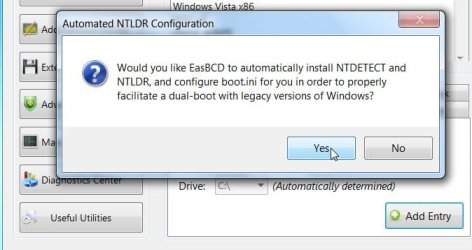
You would be best having the XP bootfiles, ntldr, ntdetect.com and boot.ini on the system reserved partition.

Make sure boot.ini is pointing at the correct drive and partition, then add the XP entry to bcd , pointing at B.

If you get Easybcd 2.0 - it will do all that for you - let it autoconfigure:

EasyBCD 2.0 Beta Builds - The NeoSmart Forums
 

My Computers My Computers

System One System Two

  • Computer type
    PC/Desktop
    OS
    7 X64
    CPU
    i5 8400
    Motherboard
    gigabyte b365m ds3h
    Memory
    2x8gb 3200mhz
    Hard Drives
    various
    PSU
    pure power 11 400w cm
    Case
    Coolermaster
    Cooling
    cryorig m9i
  • Computer type
    PC/Desktop
    OS
    7x64
    CPU
    g5400
    Motherboard
    ga b365m ds3h
    Memory
    8gb ddr4 2400
    PSU
    xfx pro 450w
LOL I was uploading Easy beta then look up and notice SIW2 already did! (My teacher!) :D

This can be avoided by installing WIn7 last as required to correctly configure a dual boot.

If you installed XP last, then it is added best using EasyBCD Add/Remove tab.

Using another method and then trying to edit boot.ini frequently ends up with unfixable problems.

If EasyBCD doesn't show the OS's listed correctly, correct them there.

Otherwise, run a http://www.sevenforums.com/tutorials/3413-repair-install.html?ltr=R of Windows 7 which will correctly reconfigure the dual boot as it would have done originally if installed second as required.
Greg, it sounds as if his 7 MBR is doing its job okay. 7 will not return that error, as it does not look at those files. It sounds like an XP error to me. The machine successfully tries to boot from the right drive, but the boot.ini file is wrong.
Just my theory, of course.

Yes, but all of it is solved upfront by installing Win7 last (with no other plugged drives to derail the boot) to properly auto-configure the dual boot, or using EasyBCD to easily add XP to dual boot if XP installed last.

Anything done beyond that other than Win7 repair install will start bollixing things, unless SIW2 is handy! ;)
 
alright thanks guys! I'm going to try doing the auto configure with easybcd 2.0 quick and I'll get back to ya.... fingers crossed...
 

My Computer My Computer

OS
Windows 7 Ultimate x64
Hard Drives
1x SATA: 1TB (Windows 7 Ultimate x64)
1x IDE: 250GB (Windows XP Professional x86)
LOL I was uploading Easy beta then look up and notice SIW2 already did! (My teacher!) :D

This can be avoided by installing WIn7 last as required to correctly configure a dual boot.

If you installed XP last, then it is added best using EasyBCD Add/Remove tab.

Using another method and then trying to edit boot.ini frequently ends up with unfixable problems.

If EasyBCD doesn't show the OS's listed correctly, correct them there.

Otherwise, run a http://www.sevenforums.com/tutorials/3413-repair-install.html?ltr=R of Windows 7 which will correctly reconfigure the dual boot as it would have done originally if installed second as required.
Greg, it sounds as if his 7 MBR is doing its job okay. 7 will not return that error, as it does not look at those files. It sounds like an XP error to me. The machine successfully tries to boot from the right drive, but the boot.ini file is wrong.
Just my theory, of course.

Yes, but all of it is solved upfront by installing Win7 last (with no other plugged drives to derail the boot) to properly auto-configure the dual boot, or using EasyBCD to easily add XP to dual boot if XP installed last.

Anything done beyond that other than Win7 repair install will start bollixing things, unless SIW2 is handy! ;)
True. Although if they are both installed already...
 

My Computer My Computer

Computer Manufacturer/Model Number
Custom
OS
Windows 7 Professional x64
CPU
Intel i7 2600K OC'd @ 4620 MHz
Motherboard
Asus P8Z68-V Pro
Memory
16GB GSkill Sniper 2133 Mhz (4x4GB)
Graphics Card(s)
EVGA GeForce GTX 480 SuperClocked+
Sound Card
Realtek High Definition Audio
Monitor(s) Displays
2x Acer S273HLbmii 27"
Screen Resolution
2 x 1920x1080
Hard Drives
64GB Crucial M4 SSD

Storage: Hitachi 1TB 5400RPM, Samsung 1.5TB 5400RPM
PSU
Corsair HW Series 750w (modular)
Case
Cooler Master HAF 932 Advanced Blue Edition
Cooling
CM Hyper 212+ CPU cooler, 3x 230mm + 1x 140mm case fans
Keyboard
Logitech MK320 (wireless)
Mouse
Logitech MK320 (wireless)
Internet Speed
30 Mb/s : 2 Mb/s
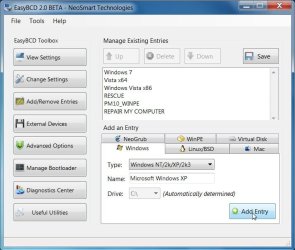
Click Add/Remove Entries .

Under the Windows Tab, select Windows NT/2K/XP/2K3 in the drop down.

The correct drive letter will already be detected.

EASY-AUTOCON-1-2009-12-13_003433.jpg

Click Add Entry, then Yes to let Easy Autoconfigure.

EASY-AUTOCON-2-2009-12-13_003513.jpg

I did quite a bit of testing on Easy 2.0, which I hope helped Mahmoud in some small way to get up the most recent build.

Still need people dual booting with OSX to test it - any volunteers?
 

My Computers My Computers

System One System Two

  • Computer type
    PC/Desktop
    OS
    7 X64
    CPU
    i5 8400
    Motherboard
    gigabyte b365m ds3h
    Memory
    2x8gb 3200mhz
    Hard Drives
    various
    PSU
    pure power 11 400w cm
    Case
    Coolermaster
    Cooling
    cryorig m9i
  • Computer type
    PC/Desktop
    OS
    7x64
    CPU
    g5400
    Motherboard
    ga b365m ds3h
    Memory
    8gb ddr4 2400
    PSU
    xfx pro 450w
Okay guys, here was my full process in case anyone else does the same thing I did.
1. I had Windows 7 installed on my SATA drive to begin with
2. I Installed XP on a clean, internal IDE Drive
3. To get it to boot to Windows 7, I installed DualbootPro and installed the Windows 7 bootloader to all drives
4. It was at this point that XP would no longer boot correctly because it was giving the error message:
"Windows could not start because the following file is missing or corrupt:
<Windows root>\system32\hal.dll.
Please re-install a copy of the above file."
5. I tried everything.
i.e.: Rebuilding the boot.ini file,
repairing Windows XP using the disk,
copying the hal.dll file from the disk,
reinstalling XP from scratch,
But nothing worked
6. I got on here, and SIW2 suggested that I use the auto-configure function in EasyBCD 2.0 Beta software
7. IT WORKED!

If anyone does the same thing, you can skip step 5. That step took hours of googling, restarting, swapping discs, installing updates, trying software, waiting, etc.

Apparently the boot files (ntldr, boot.ini, NTDETECT) were all referring to incorrect drive path letters (boot files on J:\ were pointing to Windows files on C:\ etc.)

Thanks again, guys!!
 

My Computer My Computer

OS
Windows 7 Ultimate x64
Hard Drives
1x SATA: 1TB (Windows 7 Ultimate x64)
1x IDE: 250GB (Windows XP Professional x86)
You're welcome.

Thanks for posting back your results.

Glad it worked out for you.:D
 

My Computers My Computers

System One System Two

  • Computer type
    PC/Desktop
    OS
    7 X64
    CPU
    i5 8400
    Motherboard
    gigabyte b365m ds3h
    Memory
    2x8gb 3200mhz
    Hard Drives
    various
    PSU
    pure power 11 400w cm
    Case
    Coolermaster
    Cooling
    cryorig m9i
  • Computer type
    PC/Desktop
    OS
    7x64
    CPU
    g5400
    Motherboard
    ga b365m ds3h
    Memory
    8gb ddr4 2400
    PSU
    xfx pro 450w
Where did you install in XP or Win 7
 

My Computer My Computer

Computer Manufacturer/Model Number
My build
OS
xp pro Win 7
CPU
Intel Core i7-920 Bloomfield 2.66GHz 4 x 256KB L2 Cache 8MB
Motherboard
GIGABYTE GA-EX58-UD5 LGA 1366 Intel X58 ATX Intel
Memory
Crucial Ballistix 6GB (3 x 2GB) 240-Pin DDR3 SDRAM DDR3 1600
Graphics Card(s)
XFX HD-577A-ZNFC Radeon HD 5770 (Juniper XT) 1GB 128-bit GDD
Sound Card
On Board Audio Channels 8 Channels
Monitor(s) Displays
Dell 2407WFP
Screen Resolution
1900x1200
Hard Drives
2 Seagate Barracuda ES.2 ST31000340NS 1TB 7200 RPM 32MB Cache SATA 3.0Gb Raid 0, WD 350 GB, Maxtor 160 GB
PSU
CORSAIR CMPSU-1000HX 1000W ATX12V 2.2 / EPS12V 2.91 SLI Read
Case
Lian Lia Aluminum
Cooling
Noctua NH-U12P SE2 120mm SSO CPU Cooler, Several case fans
Keyboard
Logitech
Mouse
Logitech Track ball
Internet Speed
Comcast Hi Speed
Other Info
Dual boot XP Pro Win 7
He couldn't boot into XP, so he installed Easybcd 2.0 on Win 7.
 

My Computers My Computers

System One System Two

  • Computer type
    PC/Desktop
    OS
    7 X64
    CPU
    i5 8400
    Motherboard
    gigabyte b365m ds3h
    Memory
    2x8gb 3200mhz
    Hard Drives
    various
    PSU
    pure power 11 400w cm
    Case
    Coolermaster
    Cooling
    cryorig m9i
  • Computer type
    PC/Desktop
    OS
    7x64
    CPU
    g5400
    Motherboard
    ga b365m ds3h
    Memory
    8gb ddr4 2400
    PSU
    xfx pro 450w
I am ghosting my XP install as we speak, I will install easybcd in Win 7 then give it a shot, If you have it installed on both OS can it caue problems?
 

My Computer My Computer

Computer Manufacturer/Model Number
My build
OS
xp pro Win 7
CPU
Intel Core i7-920 Bloomfield 2.66GHz 4 x 256KB L2 Cache 8MB
Motherboard
GIGABYTE GA-EX58-UD5 LGA 1366 Intel X58 ATX Intel
Memory
Crucial Ballistix 6GB (3 x 2GB) 240-Pin DDR3 SDRAM DDR3 1600
Graphics Card(s)
XFX HD-577A-ZNFC Radeon HD 5770 (Juniper XT) 1GB 128-bit GDD
Sound Card
On Board Audio Channels 8 Channels
Monitor(s) Displays
Dell 2407WFP
Screen Resolution
1900x1200
Hard Drives
2 Seagate Barracuda ES.2 ST31000340NS 1TB 7200 RPM 32MB Cache SATA 3.0Gb Raid 0, WD 350 GB, Maxtor 160 GB
PSU
CORSAIR CMPSU-1000HX 1000W ATX12V 2.2 / EPS12V 2.91 SLI Read
Case
Lian Lia Aluminum
Cooling
Noctua NH-U12P SE2 120mm SSO CPU Cooler, Several case fans
Keyboard
Logitech
Mouse
Logitech Track ball
Internet Speed
Comcast Hi Speed
Other Info
Dual boot XP Pro Win 7
Shouldn't cause any problems, but is a bit pointless.

In essence, Easybcd is a front end GUI for bcdedit. It can be used from within XP to edit the Vista/7 bcd, but is best installed on 7.
 

My Computers My Computers

System One System Two

  • Computer type
    PC/Desktop
    OS
    7 X64
    CPU
    i5 8400
    Motherboard
    gigabyte b365m ds3h
    Memory
    2x8gb 3200mhz
    Hard Drives
    various
    PSU
    pure power 11 400w cm
    Case
    Coolermaster
    Cooling
    cryorig m9i
  • Computer type
    PC/Desktop
    OS
    7x64
    CPU
    g5400
    Motherboard
    ga b365m ds3h
    Memory
    8gb ddr4 2400
    PSU
    xfx pro 450w
I alwasys Ghost my system, it works if you can't go to a restore point, makes it easy to reinstall everthing, best backup I have ever used.
 

My Computer My Computer

Computer Manufacturer/Model Number
My build
OS
xp pro Win 7
CPU
Intel Core i7-920 Bloomfield 2.66GHz 4 x 256KB L2 Cache 8MB
Motherboard
GIGABYTE GA-EX58-UD5 LGA 1366 Intel X58 ATX Intel
Memory
Crucial Ballistix 6GB (3 x 2GB) 240-Pin DDR3 SDRAM DDR3 1600
Graphics Card(s)
XFX HD-577A-ZNFC Radeon HD 5770 (Juniper XT) 1GB 128-bit GDD
Sound Card
On Board Audio Channels 8 Channels
Monitor(s) Displays
Dell 2407WFP
Screen Resolution
1900x1200
Hard Drives
2 Seagate Barracuda ES.2 ST31000340NS 1TB 7200 RPM 32MB Cache SATA 3.0Gb Raid 0, WD 350 GB, Maxtor 160 GB
PSU
CORSAIR CMPSU-1000HX 1000W ATX12V 2.2 / EPS12V 2.91 SLI Read
Case
Lian Lia Aluminum
Cooling
Noctua NH-U12P SE2 120mm SSO CPU Cooler, Several case fans
Keyboard
Logitech
Mouse
Logitech Track ball
Internet Speed
Comcast Hi Speed
Other Info
Dual boot XP Pro Win 7
Muss518.....How were you able to install XP on another drive?? I'm having problems with that. Do I just boot from the CD and have on only the drive I want to install xp on??? When I do that I get "BOOTMGR MISSING", is this because the computer isnt booting from the cd????
 

My Computer My Computer

OS
windows 7
CPU
Intel core i7
Hi, guys!

I have almost the same problem, but I can't fix it this way.

I had windows 7 x64 installed on C: and then I bought a new disk and installed windows XP 32bit on E:. Of course I couldn't boot win 7, so I repaired the installation with boot cd. I then installed and run EasyBCD 2. I can choose which windows I want to boot now, but XP gives me an error about not finding NTLDR. I tryed copying NTLDR and that another *.com file I can't remember the name of from win XP cd, but it didn't help.

Another thing I noticed is my drive letters are different in windows 7 than in command prompt of win XP repair thing. And also in EasyCD if I look at the summary, it says I have win 7 on C: and also win XP on C:. I suspect boot.ini has wrong information, but can't find a way to edit that file.

I appreciate any help, thanks!
 

My Computer My Computer

OS
Windows 7 Ultimate x64
Back
Top