Dual boot XP with windows 7 already installed

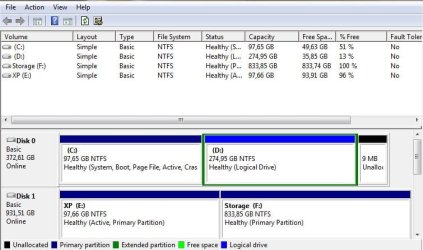
Please post back a screenshot of your full Disk Mgmt drive map, using Snipping Tool in Start Menu.

When you have separate HD's the best way to set up the dual boot is to boot via BIOS, so that the HD's remain independent and can come and go as you please.

You should still have boot files on XP, so try booting it now using the BIOS one-time Boot Menu key to select the XP HD to boot:
Asus - F8
HP/Compaq - Esc
Sony - F2
Acer - F2
Gateway - F10
eMachnes - F10
Toshiba - F12
Dell - F12
IBM/Lenovo - the blue Thinkvantage button

If not, post back the screenshot and we will give you the steps to set up the Dual Boot.
 
Hi!

Thanks for your advice. Unfortunately it doesn't work. Tried F8 and the boot menu opens, but XP wouldn't start, it says the installation needs repair.

Then I tried to switch the drive letters in EasyBCD so the letters were correct and it also didn't help.

I'm attaching the disk management screen. If it's possible I prefer booting via BIOS as you suggested. But I'd be happy just if it worked :)

BTW, would it do any good if I repair XP installation now and then reinstall 7 over existing installation?
 

Attachments

  • disks.JPG
    disks.JPG
    56.7 KB · Views: 23

My Computer My Computer

At a glance

Windows 7 Ultimate x64
OS
Windows 7 Ultimate x64
First in EasyBCD 2.0 try removing the XP listing on Edit Boot menu tab. Now try adding it back on Add OS tab, see if it offers boot files, accept them, let it autocomplete, Save, Restart to Dual Boot menu if lucky.

If not, power down to unplug Win7 HD, set XP as first HD to boot in BIOS setup then run a Repair Install on XP: Repair Windows XP - How To Perform a Repair Installation of Windows XP - Part 1 of 2

After XP starts up, power down to plug back in Win7 HD, set preferred HD as first to boot in BIOS setup, then boot the other OS HD using one-time BIOS Boot menu key.

If you prefer a Windows-managed Dual boot (which interlocks the HD's and makes them harder to extricate) then try removing XP in EasyBCD 2.0, add it again as given above.
 
Great! I removed and added back the XP listing in EasyBCD 2.0 as you said and now it works! I'm very very happy, thank you very much! ;)
 

My Computer My Computer

At a glance

Windows 7 Ultimate x64
OS
Windows 7 Ultimate x64
Good to see you have it sorted and thanks for the update.
 

My Computer My Computer

At a glance

W 7 64-bit UltimateIntel Q9550 Yorkfield8GB Dominator 8500C5DATI : XFX 5870
Computer Manufacturer/Model Number
* BFK Customs *
OS
W 7 64-bit Ultimate
CPU
Intel Q9550 Yorkfield
Motherboard
ASUS P5Q Pro
Memory
8GB Dominator 8500C5D
Graphics Card(s)
ATI : XFX 5870
Sound Card
Realtek HD Audio 7-1
Monitor(s) Displays
1x 47" LCD HDMI & 3x 26" LCD HDMI
Screen Resolution
1920x1080P & 1920x1200
Hard Drives
1x 80GB Intel X25-M G2 SSD : 1x 500GB & 1x 640GB WD Caviar Black(s)
PSU
Corsair 620HX
Case
Cooler Master RC-690
Cooling
Tuniq Tower 120, 2x 140mm and 3x 120mm case fans
Keyboard
Microsoft 500
Mouse
Razer Diamondback 3G
Internet Speed
14 Mb/s
Other Info
1x Koutech 3Gb/s SATA HDD Hot Swap Rack
I have a similar "missing hal.dll" problem in a multi-boot setup, and EasyBCD is not a viable solution in my particular setup. It could definitely solve the problem I am mentioning here, but it would also alter ntldr and thereby render boot.ini inaccessible via Grub4Dos on the USB stick I use for booting all Windows and Linux installations on my machine. So, here is my situation:

My first hard drive is a PATA that begins with some FAT32 partitions and boots Win98, Win2K (locally) and WinXP (on my third drive).

My second drive is also a PATA, but it is all NTFS and boots Win7 on a partition next to XP on my third drive, a SATA.

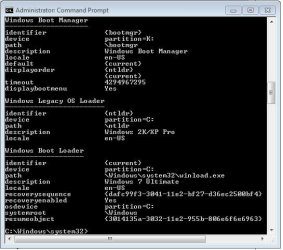
I can boot XP just fine via ntldr from either of my first two drives, but I get the misleading "missing or corrupt hal.dll" error when I try to boot XP via the bootmgr and BCD on my second drive that can boot Win7 just fine.

Here is a screen shot of what I have at the moment, and placing ntldr and boot.ini even in all partitions on all drives does not solve the problem:
 

Attachments

  • bcdedit01.jpg
    bcdedit01.jpg
    38.9 KB · Views: 3

My Computer My Computer

At a glance

Win7 Ultimate x64
OS
Win7 Ultimate x64
Back
Top