Dual installation of Windows 7

LifeIsSimple

New member
Local time
8:18 PM
Messages
2
Hi All,

I initially has an installation of Windows 7 in my computer. Later I upgraded my computer hardware and reinstalled windows 7 (I did not change my hard drive, for which it was already holding the previous installation of win 7). As I freshly installed Windows 7, it got installed into a separate drive (which was previously D drive of my computer and after this installation obviously became my new C drive though the volume label remain unchanged as 'Songs'). The previous installation of Win7 was pushed into D drive. As of now, my boot screen shows me options to select OS from, both of which is Win7.

I now want to remove the previous installation of Windows 7, which is wasting up my valuable disk space. Can anyone please guide me on this?

If someone wonders why on earth I made such a big prelude to my post to pose such a simple question, I can tell you that was for some reason. I do not want to make the post initially a huge one. So, I would elaborate upon that if straight forward solution for my query does not yield results.
 

My Computer My Computer

At a glance

Windows 7 UltimateIntel Core i3 - 3210 3.2GHz
Computer type
PC/Desktop
Computer Manufacturer/Model Number
custom build
OS
Windows 7 Ultimate
CPU
Intel Core i3 - 3210 3.2GHz
Browser
IE9

My Computer My Computer

At a glance

Microsoft Windows 7 Home Premium 64-bits 7601...Intel(R) Core(TM) i3 CPU M 370 @ 2.40GHz4,00 GBATI Mobility Radeon HD 5400 Series
Computer type
Laptop
Computer Manufacturer/Model Number
ACER ASPIRE 5742G
OS
Microsoft Windows 7 Home Premium 64-bits 7601 Multiprocessor Free Service Pack 1
CPU
Intel(R) Core(TM) i3 CPU M 370 @ 2.40GHz
Motherboard
Acer Aspire 5742G
Memory
4,00 GB
Graphics Card(s)
ATI Mobility Radeon HD 5400 Series
Sound Card
(1) AMD High Definition Audio Device (2) Realtek High Defi
Screen Resolution
1366 x 768 x 32 bits (4294967296 colors) @ 60 Hz
Hard Drives
WDC WD5000BEVT-22ZAT0
Here is a little tutorial I made that may help.

http://www.sevenforums.com/tutorials/210983-dual-boot-delete-os.html

There is still the problem of the bootmgr though. Your screenshot of disk management will tell us how to proceed with that.

Once all that has been clarified and dealt with, you can delete the old partition and use it for something else.
 

My Computer My Computer

At a glance

Vista, Windows7, Mint Mate, Zorin, Windows 8from 1.6GHz Duo to i7
Computer Manufacturer/Model Number
HP, Dell, Gateway, Toshiba - 4 laptops and 2 desktops
OS
Vista, Windows7, Mint Mate, Zorin, Windows 8
CPU
from 1.6GHz Duo to i7
Monitor(s) Displays
2x HP w2207
Hard Drives
5x HDD, 7x SSD, 12x Externals
Keyboard
with trackball - no mices
Mouse
Trackball mice
Internet Speed
DSL 6000
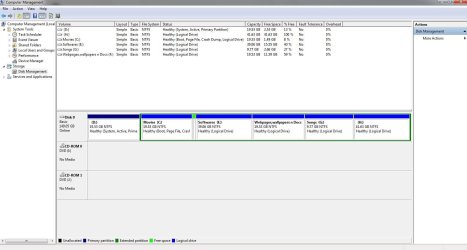
PFA the screenshot. Please let me know if anything else is needed for analysis.
 

Attachments

  • screenshot.JPG
    screenshot.JPG
    106 KB · Views: 6

My Computer My Computer

At a glance

Windows 7 UltimateIntel Core i3 - 3210 3.2GHz
Computer type
PC/Desktop
Computer Manufacturer/Model Number
custom build
OS
Windows 7 Ultimate
CPU
Intel Core i3 - 3210 3.2GHz
Browser
IE9

My Computer My Computer

At a glance

Vista, Windows7, Mint Mate, Zorin, Windows 8from 1.6GHz Duo to i7
Computer Manufacturer/Model Number
HP, Dell, Gateway, Toshiba - 4 laptops and 2 desktops
OS
Vista, Windows7, Mint Mate, Zorin, Windows 8
CPU
from 1.6GHz Duo to i7
Monitor(s) Displays
2x HP w2207
Hard Drives
5x HDD, 7x SSD, 12x Externals
Keyboard
with trackball - no mices
Mouse
Trackball mice
Internet Speed
DSL 6000
You want to delete "Movies" volume or "Songs" volume?
 

My Computer My Computer

At a glance

Microsoft Windows 7 Home Premium 64-bits 7601...Intel(R) Core(TM) i3 CPU M 370 @ 2.40GHz4,00 GBATI Mobility Radeon HD 5400 Series
Computer type
Laptop
Computer Manufacturer/Model Number
ACER ASPIRE 5742G
OS
Microsoft Windows 7 Home Premium 64-bits 7601 Multiprocessor Free Service Pack 1
CPU
Intel(R) Core(TM) i3 CPU M 370 @ 2.40GHz
Motherboard
Acer Aspire 5742G
Memory
4,00 GB
Graphics Card(s)
ATI Mobility Radeon HD 5400 Series
Sound Card
(1) AMD High Definition Audio Device (2) Realtek High Defi
Screen Resolution
1366 x 768 x 32 bits (4294967296 colors) @ 60 Hz
Hard Drives
WDC WD5000BEVT-22ZAT0
You'll not be able to move the System boot files to C until it is made into a Primary partition. You can do that using Partition Wiizard: rightclick on C to Modify>Set to Primary, Apply.

Then http://www.sevenforums.com/tutorials/71432-partition-mark-active.html on C which will also remove Active flag from D, run http://www.sevenforums.com/tutorials/105541-startup-repair-run-3-separate-times.html until Win7 boots and the System Active flags are on C.

Now you can delete D and recover the space on D into C using Partition Wizard Move/Resize Partition Video Help. Have your Win7 disk or http://www.sevenforums.com/performance-maintenance/51100-repair-cd-system-repair-disk.html standing by as sometimes resizing on the boot sector can cause it not to boot until repaired again.
 
Last edited:
Back
Top