Solved Dual Monitor Graphics Card

mjm6783

IT Wombat
Member
Local time
4:33 AM
Messages
66
Location
Portland, OR
Hey all,
I've got a bunch of HP Compaq dc5800 and dc6000 small form factors in the office I do IT support for. A couple of the employees have requested the use of multiple monitors, but I quickly discovered that the standard video card in these models does no support this function. I have looked on-line for an appropriate card replacement, but haven't found one that will fit into the compact design of the small form factor PCs.

Does anyone know of a specific make/model of graphics card that will fit? It doesn't need to be super powerful, just capable of running two monitors, (typically they have both a VGA and DVI port).

Thanks for your help.
 

My Computer My Computer

At a glance

XP Professional, 7 Professional
OS
XP Professional, 7 Professional

My Computer My Computer

At a glance

Win 7 Ultimate x64FX-8350 @ 4.6 GHz so farADATA XPG V1 Series Black 8GB DDR3 1600Sapphire R9 270x Dual-X
Computer type
PC/Desktop
Computer Manufacturer/Model Number
Me
OS
Win 7 Ultimate x64
CPU
FX-8350 @ 4.6 GHz so far
Motherboard
Asus M5A97 EVO
Memory
ADATA XPG V1 Series Black 8GB DDR3 1600
Graphics Card(s)
Sapphire R9 270x Dual-X
Sound Card
Xonar DGX w/ Corsair Vengence 1300
Monitor(s) Displays
Acer S232HL Abid
Screen Resolution
1920x1080
Hard Drives
120 GB OCZ Vertex 3
500 GB Seagate 7200.12
PSU
Antec Earthwatts 650W Green
Case
Antec Three Hundred
Cooling
Cooler Master 212 EVO
Keyboard
Logitech G510
Mouse
Logitech G500s
Internet Speed
35000/3000
Multi-monitor is easy with anything from the Radeon 5000 series. Most cards can do two monitors from their DVI output with a dual link splitter.
 

My Computer My Computer

At a glance

Windows 7 Ultimate x64Intel i7-860Corsair Dominator 1600Mhz, 8-8-8-24 1.65v 2x2GBATI Radeon 5770 HD
Computer Manufacturer/Model Number
Zen Productions
OS
Windows 7 Ultimate x64
CPU
Intel i7-860
Motherboard
Gigabyte GA-P55A-UD4P
Memory
Corsair Dominator 1600Mhz, 8-8-8-24 1.65v 2x2GB
Graphics Card(s)
ATI Radeon 5770 HD
Sound Card
Intel High Definition Sound
Monitor(s) Displays
Samsung P2570HD
Screen Resolution
1920x1080
Hard Drives
Western Digital Caviar Black 500gb
PSU
Corsair CMPSU-750HX 750W
Case
Antec p183
Cooling
Corsair H50 Water Cooler
Keyboard
Logitech G110
Mouse
Logitech MX Revolution
Internet Speed
768 mb/s
Yes, I agree, Multi-Monitor is simple with the Radeon 5000 Series and some others!
 

My Computer My Computer

At a glance

Windows 7 Ultimate/xDark Deluxe (x64bit)AMD-Phenom II X6 1100T Black EditionNvidia geforce gtx 460
Computer Manufacturer/Model Number
Emachines
OS
Windows 7 Ultimate/xDark Deluxe (x64bit)
CPU
AMD-Phenom II X6 1100T Black Edition
Motherboard
ASUS M4A88TD-V EVO
Graphics Card(s)
Nvidia geforce gtx 460
Sound Card
Sound Blaster 16 PCI
Monitor(s) Displays
Zenview DuoFlex 17T
Screen Resolution
1920x1200
Hard Drives
120GB Maxtor DiamondMax D540X
Seagate Expansion 1 TB USB 2.0 Desktop External Hard Drive ST310005EXA101-RK
PSU
Nvidia Turbo-Cool 1200
Keyboard
Logitech Wireless Illuminated Keyboard K800
Other Info
Gaming Expert
No DVI currently, video card does not support DualMon

Actually, my model of PC has no DVI port, thus the need for a new card. Also, as far as I'm aware the current card is a NVIDIA Quadro NVS 290 Graphics Card, which I was told doesn't support multiple monitors.

I could be mistaken on any of this, but that's the information I was given.

@Stormy - thanks for the tip, I'll look into the one you suggested, I'm still not exactly clear on how that's going to fit, but it's a good start.
 

My Computer My Computer

At a glance

XP Professional, 7 Professional
OS
XP Professional, 7 Professional

My Computer My Computer

At a glance

Win 7 Ultimate x64FX-8350 @ 4.6 GHz so farADATA XPG V1 Series Black 8GB DDR3 1600Sapphire R9 270x Dual-X
Computer type
PC/Desktop
Computer Manufacturer/Model Number
Me
OS
Win 7 Ultimate x64
CPU
FX-8350 @ 4.6 GHz so far
Motherboard
Asus M5A97 EVO
Memory
ADATA XPG V1 Series Black 8GB DDR3 1600
Graphics Card(s)
Sapphire R9 270x Dual-X
Sound Card
Xonar DGX w/ Corsair Vengence 1300
Monitor(s) Displays
Acer S232HL Abid
Screen Resolution
1920x1080
Hard Drives
120 GB OCZ Vertex 3
500 GB Seagate 7200.12
PSU
Antec Earthwatts 650W Green
Case
Antec Three Hundred
Cooling
Cooler Master 212 EVO
Keyboard
Logitech G510
Mouse
Logitech G500s
Internet Speed
35000/3000
For business the Nvidia Quadro's are pretty good.

And as said abovel the Radeon 5000's should have 2+ DVI outs. I know the HD 5770 has 3 (I think?). If not, it has two, and is cheap (about $160 now... or way less) and damn powerful for the price.
 

My Computer My Computer

At a glance

Windows 7 Home Premium 64bitIntel Core i7 M 620 @ 2.7 - 3.33GHz4GB DDR3 1066HzNvidia GT 330m
Computer Manufacturer/Model Number
Toshiba
OS
Windows 7 Home Premium 64bit
CPU
Intel Core i7 M 620 @ 2.7 - 3.33GHz
Memory
4GB DDR3 1066Hz
Graphics Card(s)
Nvidia GT 330m
Sound Card
Realtek HD
Monitor(s) Displays
Intergrated
Hard Drives
500GB 5400rpm HDD
Mouse
MS Bluetooth Mouse
Internet Speed
ADSL2
Actually that card does support dual monitors (best I can find as Nvidia doesn't list on their site anymore),

Lenovo Support - 256MB NVIDIA Quadro NVS 290 Dual-VGA or Dual-DVI Graphics Card - Overview

It just takes one of these,

Newegg.com - DMS-59

a DMS-59 to dual DVI or dual VGA, and there are even a couple with DVI and VGA. With one of those adapters you can run dual monitors with your current card.

He did mention that there isn't a DVI port, so it may not be the same card you linked to, so that splitter wouldn't work.

An easy way to add a second screen is using a USB to DVI adapter,
something like this,
Amazon.com: Plugable UGA-125 USB 2.0 to VGA/DVI/HDMI Adapter for Multiple Monitors up to 1280x1024 / 1440x900 Each (DisplayLink DL-125 Chipset): Electronics

I am not recommending the specific product linked above, just showing you the device. Lenovo and other companies make similar products so if you go this route, do some research and buy the one that has good support and fits the budget.
 

My Computer My Computer

At a glance

Windows 7 Ultimate 64bitIntel i7 3770K16GB DDR3 1333 Corsair XMS3XFX HD6950 2GB EyeFinity
Computer Manufacturer/Model Number
HAL-9000
OS
Windows 7 Ultimate 64bit
CPU
Intel i7 3770K
Motherboard
Asus Sabertooth Z77
Memory
16GB DDR3 1333 Corsair XMS3
Graphics Card(s)
XFX HD6950 2GB EyeFinity
Sound Card
Logitech G35 & Sennheiser PC135 & VIA HD
Monitor(s) Displays
23" HP 2310e, 23" Samsung B2230, 21.5" Viewsonic
Screen Resolution
5760x1080
Hard Drives
16TB of Storage
128GB & 256GB Crucial M4 SSD's, 2X 1TB WD Black, 3x 2TB WD, 3x 2TB Samsung F4, 1.5TB Seagate, WD 500GB,
PSU
Antec True Power New 650watt
Case
Cooler Master HAF-932
Cooling
Corsair H60 Hydro Cooler, 3x 230mm Fans, 2x120mm Fan
Keyboard
Logitech G15 and G13
Mouse
Logitech G700 Gaming Mouse
Internet Speed
50/10 Mbit
Other Info
Speakers : Alesis M1 Active Mk2 Studio Monitors , APC RS 1200 UPS, HP 4500DN Color Laser, HP P1006 mono Laser, Kodak 8500 Dye-Sub, Epson 1280 inkjet, Epson Worforce 610 MFC
Ya, I think it was my bad on the graphics card. I listed one that I found in some online specifications for these computers, but that can't be right, because I have no DMS-59 port (I call it the DVI female port.)

So am I correct in assuming that I'm currently using an on-board card? That's what it looks like to me when I crack the case, but I'm clearly no expert.
 

My Computer My Computer

At a glance

XP Professional, 7 Professional
OS
XP Professional, 7 Professional
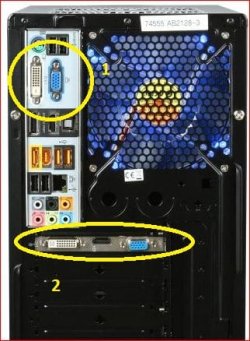
Quick and easy way to tell if your not sure what you're looking at without having to open the case.

H55.JPG

#1 is onboard and #2 is a video card.
 

My Computer My Computer

At a glance

Win 7 Ultimate x64FX-8350 @ 4.6 GHz so farADATA XPG V1 Series Black 8GB DDR3 1600Sapphire R9 270x Dual-X
Computer type
PC/Desktop
Computer Manufacturer/Model Number
Me
OS
Win 7 Ultimate x64
CPU
FX-8350 @ 4.6 GHz so far
Motherboard
Asus M5A97 EVO
Memory
ADATA XPG V1 Series Black 8GB DDR3 1600
Graphics Card(s)
Sapphire R9 270x Dual-X
Sound Card
Xonar DGX w/ Corsair Vengence 1300
Monitor(s) Displays
Acer S232HL Abid
Screen Resolution
1920x1080
Hard Drives
120 GB OCZ Vertex 3
500 GB Seagate 7200.12
PSU
Antec Earthwatts 650W Green
Case
Antec Three Hundred
Cooling
Cooler Master 212 EVO
Keyboard
Logitech G510
Mouse
Logitech G500s
Internet Speed
35000/3000
Definitely on-board. So that being the case, will I need a card that has dual monitor capacity, independent of the on board card? (I heard that adding an additional card over rides the built in.)

I suppose I could use a splitter and card system as way posted, or maybe look into a USB adapter, but I think it might be better overall to just upgrade to a dual monitor card.
 

My Computer My Computer

At a glance

XP Professional, 7 Professional
OS
XP Professional, 7 Professional
Back
Top