Solved Dual monitor vertical alignment problem.

blu28

New member
Local time
5:08 PM
Messages
2
My PC has a Nvidia Quadro FX 3500 graphics card with dual DVI ports. I have those ports connected to identical Samsung 244T monitors. However, port 1 is connected to monitor 1 through a IOGear DVI KVM, and port 2 is connected to the analog (VGA) port of the second monitor using a DVI to VGA converter. Using the "Screen resolution" menu item on the desktop, I can see that both monitors are detected and set to the same resolution, 1920x1200. Everything seems to be working fine. If I drag a window from one monitor to the other it looks like it is the same size. I have the same desktop background set on the two monitors and they both look identical. I have the two monitors physically set up side by side with their edges touching and their tops and bottoms aligned.

The problem is that the vertical position of the desktop is not the same. If I move the pointer along the bottom edge of the left monitor, as it transitions to the right monitor is not at the bottom edge, it is about one sixth the way up the desktop. If I move the pointer along the top edge of the left monitor, it does not appear on the right monitor at all, being off the top edge. I have to move it down to make it reappear. The same thing happens in reverse if I move the pointer from the right to the left. That is, Windows seems to know the correct top and bottom of both monitors if I stay on one or the other. It only seems to jump up or down by a sixth of the display as it transitions between them.
 

My Computer My Computer

At a glance

NH
Computer type
PC/Desktop
OS
NH
Hi Blu, welcome to the Seven Forums.

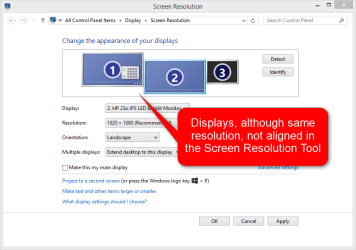
The physical size or placement of your displays is irrelevant here, the alignment is done in Screen Resolution Tool. It sounds as if your display alignment at the moment is something like this:

2014-10-01_01h46_07.png

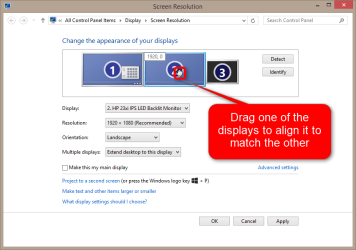
Drag & drop the display symbols in Screen Resolution Tool so that the top and bottom edges are aligned:

2014-10-01_01h48_44.png

Kari
 

My Computer My Computer

At a glance

Windows 10 Pro x64 EN-GB1.6 GHz Intel Core i7-720QM Processor6 GBATI Mobility Radeon HD 5850 Graphics
Computer type
Laptop
Computer Manufacturer/Model Number
HP ENVY 17-1150eg
OS
Windows 10 Pro x64 EN-GB
CPU
1.6 GHz Intel Core i7-720QM Processor
Memory
6 GB
Graphics Card(s)
ATI Mobility Radeon HD 5850 Graphics
Sound Card
Beats sound system with integrated subwoofer
Monitor(s) Displays
17" laptop display, 22" LED and 32" Full HD TV through HDMI
Screen Resolution
1600*900 (1), 1920*1080 (2&3)
Hard Drives
Internal: 2 x 500 GB SATA Hard Disk Drive 7200 rpm
External: 2TB for backups, 3TB USB3 network drive for media
Cooling
As Envy runs a bit warm, I have it on a Cooler Master pad
Keyboard
Logitech diNovo Media Desktop Laser (bluetooth)
Mouse
Logitech Performance Mouse MX
Internet Speed
50/10 Mbps VDSL
Antivirus
Windows Defender 4.3.9431.0
Browser
Maxthon 3.5.2., IE11
That was it. Seems obvious in retrospect, but I had no idea that the displacement could be adjusted through that tool, so it never occurred to me. Thanks.
 

My Computer My Computer

At a glance

NH
Computer type
PC/Desktop
OS
NH
You are welcome.

It's a tool often overlooked. When you decide to "re-design" your desk space and move the display located now at right to left, just drag the display icons in Screen Resolution Tool accordingly :).
 

My Computer My Computer

At a glance

Windows 10 Pro x64 EN-GB1.6 GHz Intel Core i7-720QM Processor6 GBATI Mobility Radeon HD 5850 Graphics
Computer type
Laptop
Computer Manufacturer/Model Number
HP ENVY 17-1150eg
OS
Windows 10 Pro x64 EN-GB
CPU
1.6 GHz Intel Core i7-720QM Processor
Memory
6 GB
Graphics Card(s)
ATI Mobility Radeon HD 5850 Graphics
Sound Card
Beats sound system with integrated subwoofer
Monitor(s) Displays
17" laptop display, 22" LED and 32" Full HD TV through HDMI
Screen Resolution
1600*900 (1), 1920*1080 (2&3)
Hard Drives
Internal: 2 x 500 GB SATA Hard Disk Drive 7200 rpm
External: 2TB for backups, 3TB USB3 network drive for media
Cooling
As Envy runs a bit warm, I have it on a Cooler Master pad
Keyboard
Logitech diNovo Media Desktop Laser (bluetooth)
Mouse
Logitech Performance Mouse MX
Internet Speed
50/10 Mbps VDSL
Antivirus
Windows Defender 4.3.9431.0
Browser
Maxthon 3.5.2., IE11
THANK YOU!
This helped me on Windows 10 too...
Cheers

Hi Blu, welcome to the Seven Forums.

The physical size or placement of your displays is irrelevant here, the alignment is done in Screen Resolution Tool. It sounds as if your display alignment at the moment is something like this:


Drag & drop the display symbols in Screen Resolution Tool so that the top and bottom edges are aligned:


Kari
 

My Computer My Computer

At a glance

win 7Athlon 64 3700+ 2.21ghz2gbNvidia GForce 6500
Computer Manufacturer/Model Number
beige box,
OS
win 7
CPU
Athlon 64 3700+ 2.21ghz
Motherboard
Asus
Memory
2gb
Graphics Card(s)
Nvidia GForce 6500
Hard Drives
3x SATA

My Computer My Computer

At a glance

Windows 10 Pro x64 EN-GB1.6 GHz Intel Core i7-720QM Processor6 GBATI Mobility Radeon HD 5850 Graphics
Computer type
Laptop
Computer Manufacturer/Model Number
HP ENVY 17-1150eg
OS
Windows 10 Pro x64 EN-GB
CPU
1.6 GHz Intel Core i7-720QM Processor
Memory
6 GB
Graphics Card(s)
ATI Mobility Radeon HD 5850 Graphics
Sound Card
Beats sound system with integrated subwoofer
Monitor(s) Displays
17" laptop display, 22" LED and 32" Full HD TV through HDMI
Screen Resolution
1600*900 (1), 1920*1080 (2&3)
Hard Drives
Internal: 2 x 500 GB SATA Hard Disk Drive 7200 rpm
External: 2TB for backups, 3TB USB3 network drive for media
Cooling
As Envy runs a bit warm, I have it on a Cooler Master pad
Keyboard
Logitech diNovo Media Desktop Laser (bluetooth)
Mouse
Logitech Performance Mouse MX
Internet Speed
50/10 Mbps VDSL
Antivirus
Windows Defender 4.3.9431.0
Browser
Maxthon 3.5.2., IE11
Wow...such an easy solution. It is such an obscure feature, one would never think of needing it. I see its practical use but I have no use for it other than trying to re-align what was aligned before. Lol.

Thanks!
 

My Computer My Computer

At a glance

California
Computer type
PC/Desktop
OS
California
Back
Top