Dual Monitor issue GTX 260

reasoner

New member
Local time
4:56 PM
Messages
59
my PC desktop is extended across two flat screen monitors (dell st2010 and dell e193fp) however my cursor cannot move between screens - the cursor remains limited to the primary monitor, the 2010

when I pull up the nvidia control panel it appears on the secondary monitor which my cursor can't access

things were fine yesterday - I could move the cursor between screens no problem - now this - strange

Word opens on the frozen secondary monitor: the insertion point winks, but I can't type anything = no mouse action or typing on secondary monitor

when i move the USB mouse from port to port the cursor jumps from primary to secondary screen but still can't move back and forth between screens

computer is a brand new dell xps studio
8G RAM
dual core

drivers updated

any advice will be greatly appreciated
 

My Computer My Computer

At a glance

Win7 64Dell 2.8 Intel Dual CoreDell 8GNVideo 260
Computer Manufacturer/Model Number
Dell
OS
Win7 64
CPU
Dell 2.8 Intel Dual Core
Memory
Dell 8G
Graphics Card(s)
NVideo 260
Sound Card
Delta 2496
Monitor(s) Displays
3 flat panels
Hard Drives
many
Have you tried moving the mouse off the side that isn't between the two monitors? It sounds like it may have somehow switched the monitor positions (right/left, left/right).
 

My Computer My Computer

At a glance

Win 7 Ultimate x64FX-8350 @ 4.6 GHz so farADATA XPG V1 Series Black 8GB DDR3 1600Sapphire R9 270x Dual-X
Computer type
PC/Desktop
Computer Manufacturer/Model Number
Me
OS
Win 7 Ultimate x64
CPU
FX-8350 @ 4.6 GHz so far
Motherboard
Asus M5A97 EVO
Memory
ADATA XPG V1 Series Black 8GB DDR3 1600
Graphics Card(s)
Sapphire R9 270x Dual-X
Sound Card
Xonar DGX w/ Corsair Vengence 1300
Monitor(s) Displays
Acer S232HL Abid
Screen Resolution
1920x1080
Hard Drives
120 GB OCZ Vertex 3
500 GB Seagate 7200.12
PSU
Antec Earthwatts 650W Green
Case
Antec Three Hundred
Cooling
Cooler Master 212 EVO
Keyboard
Logitech G510
Mouse
Logitech G500s
Internet Speed
35000/3000
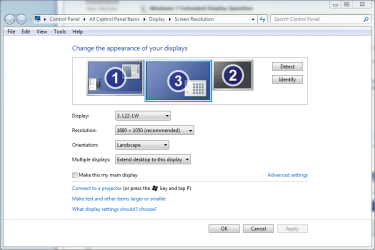
Right click desktop, choose Screen Resolution. Drag and drop the displays as you want. For example, if your secondary display is physically located to the right from your primary display but it's shown here to the left, you have to move the pointer over the left edge to get to second display.

In these examples I've disabled my display 2, using displays 1 and 3.

If you drag and drop you displays as this image shows, mouse pointer moves from display 1 to display 3 if moved over the right edge of the display 1, and back to display 1 if moved over the left edge of display 3:
display_1.PNG

If positioned as in this image, mouse pointer moves to display 3 when moved over the top edge of display 1, and back to display 1 when moved over the bottom edge of display 3:
display_2.PNG

Here you have to move the mouse pointer over the lower left corner in display 1 to get pointer to display 3, and over the top right corner in display 3 to get pointer to display 1:
display_3.PNG

Making any sense?

Kari
 

My Computer My Computer

At a glance

Windows 10 Pro x64 EN-GB1.6 GHz Intel Core i7-720QM Processor6 GBATI Mobility Radeon HD 5850 Graphics
Computer type
Laptop
Computer Manufacturer/Model Number
HP ENVY 17-1150eg
OS
Windows 10 Pro x64 EN-GB
CPU
1.6 GHz Intel Core i7-720QM Processor
Memory
6 GB
Graphics Card(s)
ATI Mobility Radeon HD 5850 Graphics
Sound Card
Beats sound system with integrated subwoofer
Monitor(s) Displays
17" laptop display, 22" LED and 32" Full HD TV through HDMI
Screen Resolution
1600*900 (1), 1920*1080 (2&3)
Hard Drives
Internal: 2 x 500 GB SATA Hard Disk Drive 7200 rpm
External: 2TB for backups, 3TB USB3 network drive for media
Cooling
As Envy runs a bit warm, I have it on a Cooler Master pad
Keyboard
Logitech diNovo Media Desktop Laser (bluetooth)
Mouse
Logitech Performance Mouse MX
Internet Speed
50/10 Mbps VDSL
Antivirus
Windows Defender 4.3.9431.0
Browser
Maxthon 3.5.2., IE11
Thanks for all the great advice - I'll give it a go

later

I didn't realize you had to select resolution - I was trying to resolve it via the nvidia control panel - thanks for the great advice

bitraker
 

My Computer My Computer

At a glance

Win7 64Dell 2.8 Intel Dual CoreDell 8GNVideo 260
Computer Manufacturer/Model Number
Dell
OS
Win7 64
CPU
Dell 2.8 Intel Dual Core
Memory
Dell 8G
Graphics Card(s)
NVideo 260
Sound Card
Delta 2496
Monitor(s) Displays
3 flat panels
Hard Drives
many
Back
Top