Dual monitor not working

Resonate

New member
Local time
9:49 AM
Messages
3
Hey everyone,

My house-mate just gave me his old TV he used to use as a dual monitor, I plugged it into my computer using a HDMI cable however I can't seem to get it to work, i've googled and asked various sources and can't find what i'm doing wrong, however this is my first time attempting dual monitors. My first monitor is connected via VGA and the second HDMI, so I changed it to both VGA but that doesn't seem to work either. Any help would be greatly appreciated.

P.S. Sorry if this thread isn't in the correct place or I missed out any information needed etc, its my first time on these forums, have a nice day :)
 

My Computer My Computer

At a glance

Windows 7 Home Premium 64bit.2.50GHz4GB RAMAMD Radeon HD 2270
Computer type
PC/Desktop
Computer Manufacturer/Model Number
Packard Bell
OS
Windows 7 Home Premium 64bit.
CPU
2.50GHz
Motherboard
ixtreme M3720
Memory
4GB RAM
Graphics Card(s)
AMD Radeon HD 2270
Hard Drives
?
Antivirus
AVG Free
Browser
Chrome
Hi Resonate, welcome to the Seven Forums.

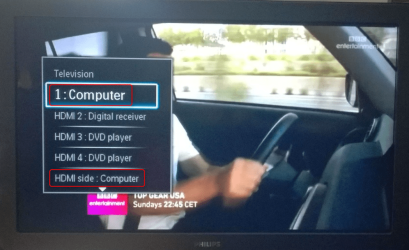
Did you select correct HDMI input from your TV's settings? For instance in my Philips TV I have connected two computers to it with HDMI as this photo shows:

2014-05-31_13h32_26.png

If I want to use the TV as display for my Home Theater PC, I need to select HDMI 1, and for the server HDMI Side. As the settings and remote controls are so different, I cannot tell you which button to press to get the input signal selection menu on your TV.

Kari
 

My Computer My Computer

At a glance

Windows 10 Pro x64 EN-GB1.6 GHz Intel Core i7-720QM Processor6 GBATI Mobility Radeon HD 5850 Graphics
Computer type
Laptop
Computer Manufacturer/Model Number
HP ENVY 17-1150eg
OS
Windows 10 Pro x64 EN-GB
CPU
1.6 GHz Intel Core i7-720QM Processor
Memory
6 GB
Graphics Card(s)
ATI Mobility Radeon HD 5850 Graphics
Sound Card
Beats sound system with integrated subwoofer
Monitor(s) Displays
17" laptop display, 22" LED and 32" Full HD TV through HDMI
Screen Resolution
1600*900 (1), 1920*1080 (2&3)
Hard Drives
Internal: 2 x 500 GB SATA Hard Disk Drive 7200 rpm
External: 2TB for backups, 3TB USB3 network drive for media
Cooling
As Envy runs a bit warm, I have it on a Cooler Master pad
Keyboard
Logitech diNovo Media Desktop Laser (bluetooth)
Mouse
Logitech Performance Mouse MX
Internet Speed
50/10 Mbps VDSL
Antivirus
Windows Defender 4.3.9431.0
Browser
Maxthon 3.5.2., IE11
Thanks for the help Kari, but I think i've just found the problem, the TV works when I change it to the VGA/PC setting and plug it into where my monitor was plugged in on my pc, so it looks like I can only have one monitor at a time. It seems my HDMI and extra VGA port in the back on my pc are not working for some reason, possibly because they aren't connected to anything inside as I found similarly with my Ethernet port. Is there anything I can do from home to resolve this issue or will I have to buy lots of external components in order to dual screen.
 

My Computer My Computer

At a glance

Windows 7 Home Premium 64bit.2.50GHz4GB RAMAMD Radeon HD 2270
Computer type
PC/Desktop
Computer Manufacturer/Model Number
Packard Bell
OS
Windows 7 Home Premium 64bit.
CPU
2.50GHz
Motherboard
ixtreme M3720
Memory
4GB RAM
Graphics Card(s)
AMD Radeon HD 2270
Hard Drives
?
Antivirus
AVG Free
Browser
Chrome
I have some difficulties to understand what you mean with "It seems my HDMI and extra VGA port in the back on my pc are not working for some reason, possibly because they aren't connected to anything inside". are these two ports just empty slots?
 

My Computer My Computer

At a glance

Windows 10 Pro x64 EN-GB1.6 GHz Intel Core i7-720QM Processor6 GBATI Mobility Radeon HD 5850 Graphics
Computer type
Laptop
Computer Manufacturer/Model Number
HP ENVY 17-1150eg
OS
Windows 10 Pro x64 EN-GB
CPU
1.6 GHz Intel Core i7-720QM Processor
Memory
6 GB
Graphics Card(s)
ATI Mobility Radeon HD 5850 Graphics
Sound Card
Beats sound system with integrated subwoofer
Monitor(s) Displays
17" laptop display, 22" LED and 32" Full HD TV through HDMI
Screen Resolution
1600*900 (1), 1920*1080 (2&3)
Hard Drives
Internal: 2 x 500 GB SATA Hard Disk Drive 7200 rpm
External: 2TB for backups, 3TB USB3 network drive for media
Cooling
As Envy runs a bit warm, I have it on a Cooler Master pad
Keyboard
Logitech diNovo Media Desktop Laser (bluetooth)
Mouse
Logitech Performance Mouse MX
Internet Speed
50/10 Mbps VDSL
Antivirus
Windows Defender 4.3.9431.0
Browser
Maxthon 3.5.2., IE11
Yeah, there isn't anything attached to the inside of the ports, just opened it up, looks like a few things inside aren't actually connected by anything. Pretty annoying. Had a similar problem a year or two ago, my ethernet port wasn't connected inside so had to get a friend to add one. Would it be possible to add a HDMI port that was actually connected and therefore worked
 

My Computer My Computer

At a glance

Windows 7 Home Premium 64bit.2.50GHz4GB RAMAMD Radeon HD 2270
Computer type
PC/Desktop
Computer Manufacturer/Model Number
Packard Bell
OS
Windows 7 Home Premium 64bit.
CPU
2.50GHz
Motherboard
ixtreme M3720
Memory
4GB RAM
Graphics Card(s)
AMD Radeon HD 2270
Hard Drives
?
Antivirus
AVG Free
Browser
Chrome
Back
Top