

So for a long time now I've been running a 22" Dell E2209W and a 42" Westinghouse monitor. The only problem I had was that Windows never recognized the Dell monitor as anything other than a "Generic Non-PnP Monitor".
I also have another 22" Dell E2209W that I had hooked up to my media server. I recently made some changes and bought a bigger desk and a new video card since I was running both monitors off the motherboard before.
My new video card just arrived (EVGA GeForce 9400 GT w/ dual DVI out) so I setup both of the 22" monitors on the video card and kept my 42" running off the HDMI output from the motherboard.
The problem I'm still having is that Windows still detects the same Dell monitor as just a Generic monitor and will not let me set it to it's native screen resolution of 1680x1050, but rather the recommended resolution of 1600x1024. Funny thing is that it recognizes the other Dell monitor just fine and sets the screen resolution on that one with no problems.
I have downloaded the proper drivers from the Dell Support site, and when I tell Windows to update the driver it tells me that it already has the proper driver installed.
Can someone help me figure this out so I can have both of the 22" monitors match with the same resolution?
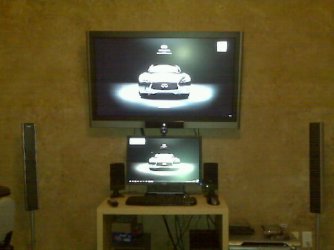
Here's a before and after picture of my setup so you can get an idea as to what it is I'm talking about:
I also have another 22" Dell E2209W that I had hooked up to my media server. I recently made some changes and bought a bigger desk and a new video card since I was running both monitors off the motherboard before.
My new video card just arrived (EVGA GeForce 9400 GT w/ dual DVI out) so I setup both of the 22" monitors on the video card and kept my 42" running off the HDMI output from the motherboard.
The problem I'm still having is that Windows still detects the same Dell monitor as just a Generic monitor and will not let me set it to it's native screen resolution of 1680x1050, but rather the recommended resolution of 1600x1024. Funny thing is that it recognizes the other Dell monitor just fine and sets the screen resolution on that one with no problems.
I have downloaded the proper drivers from the Dell Support site, and when I tell Windows to update the driver it tells me that it already has the proper driver installed.
Can someone help me figure this out so I can have both of the 22" monitors match with the same resolution?
Here's a before and after picture of my setup so you can get an idea as to what it is I'm talking about:
Attachments

My Computer
At a glance
Windows 7 RC 64bitAMD Athlon 7750 Dual-Core Processor 2.70Ghz4GBOn-board Graphics ATI Radeon HD 3200
- Computer Manufacturer/Model Number
- Custom
- OS
- Windows 7 RC 64bit
- CPU
- AMD Athlon 7750 Dual-Core Processor 2.70Ghz
- Motherboard
- Gigabyte GA-MA78GPM-UD2H
- Memory
- 4GB
- Graphics Card(s)
- On-board Graphics ATI Radeon HD 3200
- Sound Card
- On-board Sound Realtek ALC889A
- Monitor(s) Displays
- 42" Westinghouse 1080P Monitor (LVM-42w2)
- Screen Resolution
- 1920x1080

